Hardware Reserved taking too much RAM!

joelstitch

New member
Member
Local time
6:13 AM
Messages
30
So I got a HP G62-224HE with 3GB of RAM. It runs really slow and I couldn't figure out why. I went to Control Panel > System and it says :

Installed memory (RAM): 3.00 GB (763 MB usable)

And if i go to Resource Monitor it shows:

Hardware Reserved: 2310 MB
In Use: 602 MB
Modified: 1 MB
Standby: 161 MB
Free: 0 MB


How can I take RAM out of the Hardware Reserved?

My computer specs:

Product Name G62-224HE Product Number WQ848UA#ABA Microprocessor 2.1GHz VISION Technology from AMD with AMD Athlon II Dual-Core Processor for Notebook PCs P320 Microprocessor Cache 1MB L2 Cache Memory 3GB DDR3 System Memory (2 DIMM) Memory Max 8GB Video Graphics ATI Mobility Radeon HD 4250 Graphics Video Memory Up to 1405MB Hard Drive 320GB (7200RPM) Multimedia Drive LightScribe SuperMulti 8X DVD±R/RW with Double Layer Support Display 15.6" diagonal High-Definition HP BrightView LED Display (1366 x 768) Network Card Integrated 10/100 Ethernet LAN Wireless Connectivity
  • 802.11b/g/n WLAN
Sound
  • Altec Lansing speakers
Keyboard 101-key compatible keyboard with One touch launch keys Pointing Device Touch Pad with integrated On/Off button and 2-way scroll pad support External Ports
  • 5-in-1 integrated Digital Media Reader for Secure Digital cards, MultiMedia cards, Memory Stick, Memory Stick Pro, or xD Picture cards
  • 3 Universal Serial Bus (USB) 2.0
  • 1 HDMI
  • 1 VGA (15-pin)
  • 1 RJ -45 (LAN)
  • 1 Headphone-out
  • 1 Microphone-in
Other Devices
  • HP Webcam with integrated microphone
Dimensions 14.72"(W)x 9.70"(D)x 1.25"(min H)/1.44"(max H) Weight 5.50 lbs Security
  • Kensington MicroSaver lock slot
  • Power-on password
  • Accepts 3rd party security lock devices
Power
  • 65W AC Adapter
  • 6-Cell 47WHr Lithium-Ion Battery

Operating System: Windows 7 Ultimate
 

My Computer

Computer Manufacturer/Model Number
HP Pavilion DV629US
OS
Windows 7 32bit
Memory
3GB
Hard Drives
120GB
Usually when there's a lot of RAM being hardware reserved it could mean that there are some misbehaving device drivers on your system that are gobbling up that RAM on boot-up..

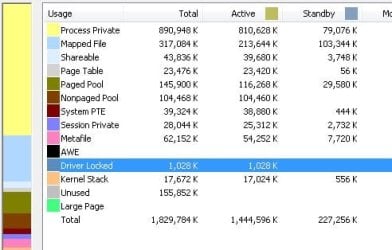
To confirm this phenomenon could you download RAMMAP (RAMMap), run it and check the section of use counts, specifically Driver Locked? Try to take note of the sections that have high totals.. It'd be even better if you could take a screenshot of the application on the usecounts page to give a clearer view of where your RAM is going to in detail from the application..

Hope that helps!
 

My Computer

Computer Manufacturer/Model Number
DELL SXPS 1640
OS
Windows 7 x64 Professional SP1
CPU
Intel C2D T9550 2.66 GHz @ 2.793 GHz (Thanks ThrottleStop!!)
Motherboard
Intel PM45
Memory
8 GB DDR3
Graphics Card(s)
ATI MOBILITY RADEON 4670
Sound Card
CREATIVE XFI AUDIO NOTEBOOK
Monitor(s) Displays
16.1 WLED
Screen Resolution
1920x1080
Hard Drives
Seagate ST9500420AS 500GB (465GiBi) 7200 RPM Drive

External Drives:-
2 TB WD Essentials x 3
1 TB WD Mybook Gen 1
1 TB WD Mybook Gen 2
1 TB Seagate
1 TB Seagate
320 GB WD Scorpio Black (enclosed)
PSU
90W Dell Power Brick
Case
Dell Chassis
Cooling
Coolermaster Cooling Pad
Keyboard
Built-in backlighted Keyboard
Mouse
Logitech Wireless Mini Mouse
Internet Speed
4/0.5
Usually when there's a lot of RAM being hardware reserved it could mean that there are some misbehaving device drivers on your system that are gobbling up that RAM on boot-up..

To confirm this phenomenon could you download RAMMAP (RAMMap), run it and check the section of use counts, specifically Driver Locked? Try to take note of the sections that have high totals.. It'd be even better if you could take a screenshot of the application on the usecounts page to give a clearer view of where your RAM is going to in detail from the application..

Hope that helps!

Driver Locked says: 1,028 K

I removed the RAM cards and switch them around and now on Control Panel > System It says :

Installed memory (RAM): 3.00 GB (1.74 GB usable)
 

Attachments

  • ram.jpg
    ram.jpg
    26 KB · Views: 98

My Computer

Computer Manufacturer/Model Number
HP Pavilion DV629US
OS
Windows 7 32bit
Memory
3GB
Hard Drives
120GB
Hmmm... looking at your your use counts i notice that The totals on the page(over 1.75 GB,which indicate the total RAM employed on the system) don't quite match up to the RAM windows reports as available to your system (which is 763MB)

Can i get a snapshot of performance tab of your task manager to confirm something further?
 

My Computer

Computer Manufacturer/Model Number
DELL SXPS 1640
OS
Windows 7 x64 Professional SP1
CPU
Intel C2D T9550 2.66 GHz @ 2.793 GHz (Thanks ThrottleStop!!)
Motherboard
Intel PM45
Memory
8 GB DDR3
Graphics Card(s)
ATI MOBILITY RADEON 4670
Sound Card
CREATIVE XFI AUDIO NOTEBOOK
Monitor(s) Displays
16.1 WLED
Screen Resolution
1920x1080
Hard Drives
Seagate ST9500420AS 500GB (465GiBi) 7200 RPM Drive

External Drives:-
2 TB WD Essentials x 3
1 TB WD Mybook Gen 1
1 TB WD Mybook Gen 2
1 TB Seagate
1 TB Seagate
320 GB WD Scorpio Black (enclosed)
PSU
90W Dell Power Brick
Case
Dell Chassis
Cooling
Coolermaster Cooling Pad
Keyboard
Built-in backlighted Keyboard
Mouse
Logitech Wireless Mini Mouse
Internet Speed
4/0.5
Hmmm... looking at your your use counts i notice that The totals on the page(over 1.75 GB,which indicate the total RAM employed on the system) don't quite match up to the RAM windows reports as available to your system (which is 763MB)

Can i get a snapshot of performance tab of your task manager to confirm something further?
I removed the RAM cards and switch them around and now on Control Panel > System It says :

Installed memory (RAM): 3.00 GB (1.74 GB usable)
 

My Computer

Computer Manufacturer/Model Number
HP Pavilion DV629US
OS
Windows 7 32bit
Memory
3GB
Hard Drives
120GB
Oh sorry, i didn't notice that statement....

I read up on your specs again, and i noticed you have an integrated graphics card on your system... it could be the culprit for gulping down that RAM.. do you have an option in your BIOS to set the amount of RAM allocated to your Graphics Card?
 

My Computer

Computer Manufacturer/Model Number
DELL SXPS 1640
OS
Windows 7 x64 Professional SP1
CPU
Intel C2D T9550 2.66 GHz @ 2.793 GHz (Thanks ThrottleStop!!)
Motherboard
Intel PM45
Memory
8 GB DDR3
Graphics Card(s)
ATI MOBILITY RADEON 4670
Sound Card
CREATIVE XFI AUDIO NOTEBOOK
Monitor(s) Displays
16.1 WLED
Screen Resolution
1920x1080
Hard Drives
Seagate ST9500420AS 500GB (465GiBi) 7200 RPM Drive

External Drives:-
2 TB WD Essentials x 3
1 TB WD Mybook Gen 1
1 TB WD Mybook Gen 2
1 TB Seagate
1 TB Seagate
320 GB WD Scorpio Black (enclosed)
PSU
90W Dell Power Brick
Case
Dell Chassis
Cooling
Coolermaster Cooling Pad
Keyboard
Built-in backlighted Keyboard
Mouse
Logitech Wireless Mini Mouse
Internet Speed
4/0.5
i didnt see any.
 

My Computer

Computer Manufacturer/Model Number
HP Pavilion DV629US
OS
Windows 7 32bit
Memory
3GB
Hard Drives
120GB
Hmm as a last resort, can you try just putting in one stick of RAM and leaving one out?

You've mentioned you've tried reseating the RAM and gained a GB from that....

E.g. putting in the 2GB stick and leaving out the 1GB stick....

Sorry if it seems like we're on a goose chase here, but i'm just trying to exclude all possibilities...
 

My Computer

Computer Manufacturer/Model Number
DELL SXPS 1640
OS
Windows 7 x64 Professional SP1
CPU
Intel C2D T9550 2.66 GHz @ 2.793 GHz (Thanks ThrottleStop!!)
Motherboard
Intel PM45
Memory
8 GB DDR3
Graphics Card(s)
ATI MOBILITY RADEON 4670
Sound Card
CREATIVE XFI AUDIO NOTEBOOK
Monitor(s) Displays
16.1 WLED
Screen Resolution
1920x1080
Hard Drives
Seagate ST9500420AS 500GB (465GiBi) 7200 RPM Drive

External Drives:-
2 TB WD Essentials x 3
1 TB WD Mybook Gen 1
1 TB WD Mybook Gen 2
1 TB Seagate
1 TB Seagate
320 GB WD Scorpio Black (enclosed)
PSU
90W Dell Power Brick
Case
Dell Chassis
Cooling
Coolermaster Cooling Pad
Keyboard
Built-in backlighted Keyboard
Mouse
Logitech Wireless Mini Mouse
Internet Speed
4/0.5
When i leave the 2gb card in it says the usable RAM is 1.74 GB:

2.00 GB (1.74 GB usable)
 

My Computer

Computer Manufacturer/Model Number
HP Pavilion DV629US
OS
Windows 7 32bit
Memory
3GB
Hard Drives
120GB
Bingo... we've solved your problem.. it seems like the other stick of RAM is faulty... and only 1.74 GB is usable because your integrated graphics card takes up the ~250 odd MB from your available RAM....

You should probably get a replacement stick for your 1 GB stick... preferably get another 2 GB stick of the same specs so that you can run your system in dual channel mode for added (4-5%) performance...

If you want to be sure that it's the ram's fault you can use MemTest x86+ (www.memtest86.com) and leave it running to allow it to check the ram for errors but it'll take ages...

EDIT: You are using Windows 7 64 bit right? If you have the money get 8 GBs ( 4 x 2 sticks) to cap out your RAM, since your laptop supports it according to this website (http://www.crucial.com/upgrade/HP+-+Compaq-memory/HP+G6xx+Series/HP+G62-224HE-upgrades.html)
 

My Computer

Computer Manufacturer/Model Number
DELL SXPS 1640
OS
Windows 7 x64 Professional SP1
CPU
Intel C2D T9550 2.66 GHz @ 2.793 GHz (Thanks ThrottleStop!!)
Motherboard
Intel PM45
Memory
8 GB DDR3
Graphics Card(s)
ATI MOBILITY RADEON 4670
Sound Card
CREATIVE XFI AUDIO NOTEBOOK
Monitor(s) Displays
16.1 WLED
Screen Resolution
1920x1080
Hard Drives
Seagate ST9500420AS 500GB (465GiBi) 7200 RPM Drive

External Drives:-
2 TB WD Essentials x 3
1 TB WD Mybook Gen 1
1 TB WD Mybook Gen 2
1 TB Seagate
1 TB Seagate
320 GB WD Scorpio Black (enclosed)
PSU
90W Dell Power Brick
Case
Dell Chassis
Cooling
Coolermaster Cooling Pad
Keyboard
Built-in backlighted Keyboard
Mouse
Logitech Wireless Mini Mouse
Internet Speed
4/0.5
:( thats sad to hear but thanks for the help. I will look on ebay for cards.
 

My Computer

Computer Manufacturer/Model Number
HP Pavilion DV629US
OS
Windows 7 32bit
Memory
3GB
Hard Drives
120GB
Glad to have been of service!
 

My Computer

Computer Manufacturer/Model Number
DELL SXPS 1640
OS
Windows 7 x64 Professional SP1
CPU
Intel C2D T9550 2.66 GHz @ 2.793 GHz (Thanks ThrottleStop!!)
Motherboard
Intel PM45
Memory
8 GB DDR3
Graphics Card(s)
ATI MOBILITY RADEON 4670
Sound Card
CREATIVE XFI AUDIO NOTEBOOK
Monitor(s) Displays
16.1 WLED
Screen Resolution
1920x1080
Hard Drives
Seagate ST9500420AS 500GB (465GiBi) 7200 RPM Drive

External Drives:-
2 TB WD Essentials x 3
1 TB WD Mybook Gen 1
1 TB WD Mybook Gen 2
1 TB Seagate
1 TB Seagate
320 GB WD Scorpio Black (enclosed)
PSU
90W Dell Power Brick
Case
Dell Chassis
Cooling
Coolermaster Cooling Pad
Keyboard
Built-in backlighted Keyboard
Mouse
Logitech Wireless Mini Mouse
Internet Speed
4/0.5
Bingo... we've solved your problem.. it seems like the other stick of RAM is faulty... and only 1.74 GB is usable because your integrated graphics card takes up the ~250 odd MB from your available RAM....

You should probably get a replacement stick for your 1 GB stick... preferably get another 2 GB stick of the same specs so that you can run your system in dual channel mode for added (4-5%) performance...

If you want to be sure that it's the ram's fault you can use MemTest x86+ (www.memtest86.com) and leave it running to allow it to check the ram for errors but it'll take ages...

EDIT: You are using Windows 7 64 bit right? If you have the money get 8 GBs ( 4 x 2 sticks) to cap out your RAM, since your laptop supports it according to this website (Computer memory upgrades for HP - Compaq HP G62-224HE Laptop/Notebook from Crucial.com)

I might save the money for that. Thanks for the help!
 

My Computer

Computer Manufacturer/Model Number
HP Pavilion DV629US
OS
Windows 7 32bit
Memory
3GB
Hard Drives
120GB
Test your RAM with memtest for 5-6 passes or overnight following the steps in this tutorial to test both RAM sticks and slots: RAM - Test with Memtest86+

Check for debris in slots which also must be tested.
 
Easy way to know where you ram is going:
WIN | type RESMON | ENTER | Memory tab
WIN = key with Microsoft logo on top.
 

My Computer

Computer Manufacturer/Model Number
Toshiba Satellite S875D-S7239 laptop
OS
MS Windows 7 Ultimate SP1 64-bit
CPU
AMD A10-4600M
Motherboard
AMD Pumori (Socket FT1)
Memory
6.00 GB Dual-Channel DDR3 @ 798MHz (11-11-12-28)
Graphics Card(s)
AMD Radeon HD 7660G
Sound Card
High Definition Audio Device
Monitor(s) Displays
Generic PnP Monitor (1600x900@60Hz)
Screen Resolution
1600x900@60Hz
Hard Drives
SSD 119GB Corsair CSSD-V128GB2 ATA Device
Keyboard
Standard PS/2 Keyboard
Mouse
HP Wireless Optical Mobile Mouse Model FHA-3410
Internet Speed
What the local pub, local coffee shop offers.
Other Info
Optical Drive:MATSHITA BD-CMB UJ160B ATA Device


Also have an Asus ha1002xp netbook with Win 7 Ultimate installed.
Back
Top