Solved HD Replacement makes W7 not genuine - MS cannot fix

tesnus4449

New member
Local time
7:35 PM
Messages
21
I am new in forums....and have looked over a number of threads on this subject. None seem to get me there, so I hope I have not overlooked a solution or walked on anyone’s existing thread.:)

Following a hard disk failure and new hard disk installation, I restored my operating system from a recent Windows Image Backup (8/01/16). The system seemed to be fully restored and otherwise functions well except that I have been getting a popup indicating: “This computer is not running genuine Windows”. Additionally the Windows Update feature does not work. The automated link “Resolve online now” eventually fails. As to "genuine", the operating system is indeed genuine. My computer is directly a purchased HP Pavillion Elite with pre-installed (w/o disks) Windows 7 Home Premium. There have been literally no changes to the computer (until the HD failure) and no changes to the OS since activation (11/09) other than regular updates by Microsoft.

From what I have seen online and from this and various other forums, a whole lot of things can trip the ‘non-genuine’ response. The following link from cnet suggests that mine is a common problem with many, many causes [https://www.cnet.com/forums/discussions/this-copy-of-windows-not-genuine-how-do-i-fix-this-619798/] and that not many Microsoft technicians can really fix it.

After scouring the web for solutions, I eventually sought help from Microsoft Support by phone. With my Product Key verified, etc, the tech did indeed recognize the installed W7 as genuine, but could still not get Windows Backup to execute. After a bit over an hour on the phone with remote control of my computer, the effort was abruptly terminated by the tech with the verbal message: “You will receive a call back to finish …”. This never happened.

A second request from Microsoft Support was scheduled and received 4 days later and went on for most of the day (phone plus remote; 6 hrs +). This tech too acknowledged that the installation is genuine and that the Product Key had been registered and is valid. He tried a number of things first, then system repair, and finally to upgrade to the latest, Windows 7 Ult SP1 64Bit. However, all efforts failed. He said the OS was ‘corrupted’ and he would need to do a fresh installation. This would only restore the OS, and none of the settings, programs, and files. I declined and he abruptly terminated the effort. I still have a case number I think.

So where am I now? The problem is unresolved: I get the popup 2 to 5 times a day, I cannot get updates, and Microsoft is of no help. If the Microsoft techs could not solve this issue, then I surely could not. I would write a letter to Microsoft (or send an e-mail) if I really knew where to send it. Maybe HP could help if I knew where and how to make the appropriate request. Fundamentally, their vendor has provided a product that is not functioning properly and cannot (or will not) make it do so. Windows Image Backup is supposed to work; if not, what is it there for?

Desperate, I am not. Frustrated and irritated, yes. Jealous of my wife’s Apple experience, yes. In need of advice.

Tesnus4449
 

My Computer My Computer

Computer type
PC/Desktop
Computer Manufacturer/Model Number
HP Pavillion Elite e0280t
OS
Windows 7 Home Premium 64 bit
CPU
Intel i7 920 @ 2.67 GHz
Motherboard
??? Unspecified by OEM
Memory
9 Gb DDR3-1066 MHz SDRAM
Graphics Card(s)
1 Gb ATI Radion HD 4650
Hard Drives
WD 1 Tb 6G/s SATA
Antivirus
Norton
Browser
Chrome and AOL

My Computer My Computer

Computer type
PC/Desktop
Computer Manufacturer/Model Number
Self built using existing case
OS
Windows 7 Home Premium 64 bit sp1
CPU
Intel i5 3570 3.4Ghz Ivy Bridge SKT 1155 quad core
Motherboard
Gigabyte Z77-HD3 SKT 1155 2xSata 3, 4x USB 3.0
Memory
G-Skill Rip Jaws 16Gb (8x2) DDR3 -1600 PC3 12800 CL 10 red
Graphics Card(s)
Gigabyte NVIDIA GT610 1Gb DDR3 810/1200 PCI-E 2.0 Silent
Sound Card
NVIDIA High Definition & Realtech High Definition Audio
Monitor(s) Displays
2 x Philips 226V4L 16:9 aspect ratio
Screen Resolution
1920 x 1080 HD
Hard Drives
Samsung 840 Pro 256gb SSD, SATA 3.
Hitachi Touro Portable 1tb, USB 3.0 HDD used for image b/ups.
PSU
Corsair VS450
Case
Codeng
Cooling
PSU fan & CPU fan
Keyboard
Logitech
Mouse
Logitech Wireless trackball M570
Internet Speed
Wireless 3G. 3mg down & 550kb up.
Antivirus
Bitdefender Internet Security 2020
Browser
Opera (Current Version) & Firefox
Other Info
MS Office 2013 Pro. Davis weather station software. MGE Nova 600 avr UPS.
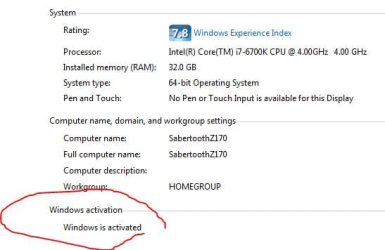
Is windows activated ?

What does it show on your computer properties page ?
 

Attachments

  • Capture.JPG
    Capture.JPG
    27.2 KB · Views: 64
Last edited:

My Computer My Computer

Computer type
PC/Desktop
Computer Manufacturer/Model Number
Skylake Special #666
OS
Windows 10 Pro x64
CPU
Intel Core i7 6700K
Motherboard
Asus Sabertooth Z170 Mark 1
Memory
GSkill TridentZ RGB 16GB 3600 16-16-16-36
Graphics Card(s)
EVGA GTX 980 Ti SC x2
Sound Card
Realtek High Definition
Monitor(s) Displays
AOC G2460PG
Screen Resolution
1920 x 1080 144Hz
Hard Drives
Samsung 860 Pro 256GB, Seagate Barracuda 4TB x2
PSU
EVGA 1000 P2, EVGA White Custom Braided Cables
Case
Corsair Vengeance C70 Gunmetal Black
Cooling
Corsair H100i v2, Corsair ML120 x2, Thermal Grizzly Kryonaut
Keyboard
Logitech G910 Orion Spectrum
Mouse
Logitech G700s
Internet Speed
Verizon Fios Quantum Gateway 75/75
Antivirus
Windows Defender, Malwarebytes Free 3.8.3
Browser
Chrome
Other Info
Corsair SP120 x4, LG Blu-ray Drive, Durabrand HT-395 100 Watt Dolby Digital Amp, Corsair H2100 Wireless 7.1 Headset
Code:
Diagnostic Report (1.9.0027.0):
-----------------------------------------
Windows Validation Data-->

Validation Code: 0x8004FE21
Cached Online Validation Code: 0x0
Windows Product Key: *****-*****-RHDJT-HXWT9-FX7QG
Windows Product Key Hash: mHLCw02NZkc/BKKxlCIS4y48f4I=
Windows Product ID: 00359-OEM-9800774-15948
Windows Product ID Type: 8
Windows License Type: COA SLP
Windows OS version: 6.1.7601.2.00010300.1.0.003
ID: {C0BA63AE-C2EF-4608-AACD-90C8A20F988A}(1)
Is Admin: Yes
TestCab: 0x0
LegitcheckControl ActiveX: Registered, 1.9.9.1
Signed By: Microsoft
Product Name: Windows 7 Home Premium
Architecture: 0x00000009
Build lab: 7601.win7sp1_ldr.160408-2045
TTS Error: 
Validation Diagnostic: 
Resolution Status: N/A

Vista WgaER Data-->
ThreatID(s): N/A, hr = 0x80070002
Version: N/A, hr = 0x80070002

Windows XP Notifications Data-->
Cached Result: N/A, hr = 0x80070002
File Exists: No
Version: N/A, hr = 0x80070002
WgaTray.exe Signed By: N/A, hr = 0x80070002
WgaLogon.dll Signed By: N/A, hr = 0x80070002

OGA Notifications Data-->
Cached Result: N/A, hr = 0x80070002
Version: N/A, hr = 0x80070002
OGAExec.exe Signed By: N/A, hr = 0x80070002
OGAAddin.dll Signed By: N/A, hr = 0x80070002

OGA Data-->
Office Status: 100 Genuine
Microsoft Office Standard 2007 - 100 Genuine
OGA Version: N/A, 0x80070002
Signed By: N/A, hr = 0x80070002
Office Diagnostics: 025D1FF3-364-80041010_025D1FF3-229-80041010_025D1FF3-230-1_025D1FF3-517-80040154_025D1FF3-237-80040154_025D1FF3-238-2_025D1FF3-244-80070002_025D1FF3-258-3_E2AD56EA-765-d003_E2AD56EA-766-0_E2AD56EA-134-80004005_E2AD56EA-765-b01a_E2AD56EA-766-0_E2AD56EA-148-80004005_16E0B333-89-80004005_B4D0AA8B-1029-80004005

Browser Data-->
Proxy settings: N/A
User Agent: Mozilla/4.0 (compatible; MSIE 8.0; Win32)
Default Browser: C:\Program Files (x86)\Google\Chrome\Application\chrome.exe
Download signed ActiveX controls: Prompt
Download unsigned ActiveX controls: Disabled
Run ActiveX controls and plug-ins: Allowed
Initialize and script ActiveX controls not marked as safe: Disabled
Allow scripting of Internet Explorer Webbrowser control: Disabled
Active scripting: Allowed
Script ActiveX controls marked as safe for scripting: Allowed

File Scan Data-->
File Mismatch: C:\Windows\system32\wat\watadminsvc.exe[7.1.7600.16395], Hr = 0x80092003
File Mismatch: C:\Windows\system32\wat\watux.exe[7.1.7600.16395], Hr = 0x80092003
File Mismatch: C:\Windows\system32\sppobjs.dll[6.1.7601.17514], Hr = 0x80092003
File Mismatch: C:\Windows\system32\sppc.dll[6.1.7601.17514], Hr = 0x800b0100
File Mismatch: C:\Windows\system32\sppcext.dll[6.1.7600.16385], Hr = 0x800b0100
File Mismatch: C:\Windows\system32\sppwinob.dll[6.1.7601.17514], Hr = 0x80092003
File Mismatch: C:\Windows\system32\slc.dll[6.1.7600.16385], Hr = 0x800b0100
File Mismatch: C:\Windows\system32\slcext.dll[6.1.7600.16385], Hr = 0x800b0100
File Mismatch: C:\Windows\system32\sppuinotify.dll[6.1.7600.16385], Hr = 0x80092003
File Mismatch: C:\Windows\system32\slui.exe[6.1.7601.17514], Hr = 0x80092003
File Mismatch: C:\Windows\system32\sppcomapi.dll[6.1.7601.17514], Hr = 0x800b0100
File Mismatch: C:\Windows\system32\sppcommdlg.dll[6.1.7600.16385], Hr = 0x800b0100
File Mismatch: C:\Windows\system32\sppsvc.exe[6.1.7601.17514], Hr = 0x80092003
File Mismatch: C:\Windows\system32\drivers\spsys.sys[6.1.7127.0], Hr = 0x80092003
File Mismatch: C:\Windows\system32\drivers\spldr.sys[6.1.7127.0], Hr = 0x80092003
File Mismatch: C:\Windows\system32\systemcpl.dll[6.1.7601.17514], Hr = 0x800b0100
File Mismatch: C:\Windows\system32\user32.dll[6.1.7601.19061], Hr = 0x800b0100

Other data-->
Office Details: <GenuineResults><MachineData><UGUID>{C0BA63AE-C2EF-4608-AACD-90C8A20F988A}</UGUID><Version>1.9.0027.0</Version><OS>6.1.7601.2.00010300.1.0.003</OS><Architecture>x64</Architecture><PKey>*****-*****-*****-*****-FX7QG</PKey><PID>00359-OEM-9800774-15948</PID><PIDType>8</PIDType><SID>S-1-5-21-1360168898-2425467685-3190231548</SID><SYSTEM><Manufacturer>HP-Pavilion</Manufacturer><Model>AW020AV-ABA e9280t</Model></SYSTEM><BIOS><Manufacturer>American Megatrends Inc.</Manufacturer><Version>5.28   </Version><SMBIOSVersion major="2" minor="5"/><Date>20100409000000.000000+000</Date></BIOS><HWID>C73C3107018400FE</HWID><UserLCID>0409</UserLCID><SystemLCID>0409</SystemLCID><TimeZone>Pacific Standard Time(GMT-08:00)</TimeZone><iJoin>0</iJoin><SBID><stat>3</stat><msppid></msppid><name></name><model></model></SBID><OEM><OEMID>HPQOEM</OEMID><OEMTableID>SLIC-CPC</OEMTableID></OEM><GANotification/></MachineData><Software><Office><Result>100</Result><Products><Product GUID="{91120000-0012-0000-0000-0000000FF1CE}"><LegitResult>100</LegitResult><Name>Microsoft Office Standard 2007</Name><Ver>12</Ver><Val>61E796EC737BF12</Val><Hash>6XNJa77hfeMOC3tWQLKfi3DUe+k=</Hash><Pid>81607-905-9130701-64228</Pid><PidType>1</PidType></Product></Products><Applications><App Id="16" Version="12" Result="100"/><App Id="18" Version="12" Result="100"/><App Id="1A" Version="12" Result="100"/><App Id="1B" Version="12" Result="100"/></Applications></Office></Software></GenuineResults>  

Spsys.log Content: 0x80070002

Licensing Data-->
Software licensing service version: 6.1.7601.17514

Name: Windows(R) 7, HomePremium edition
Description: Windows Operating System - Windows(R) 7, OEM_COA_SLP channel
Activation ID: 5e017a8a-f3f9-4167-b1bd-ba3e236a4d8f
Application ID: 55c92734-d682-4d71-983e-d6ec3f16059f
Extended PID: 00359-00196-007-715948-02-1033-7601.0000-2682016
Installation ID: 003302923356293280244616329141033702056516263656309443
Processor Certificate URL: http://go.microsoft.com/fwlink/?LinkID=88338
Machine Certificate URL: http://go.microsoft.com/fwlink/?LinkID=88339
Use License URL: http://go.microsoft.com/fwlink/?LinkID=88341
Product Key Certificate URL: http://go.microsoft.com/fwlink/?LinkID=88340
Partial Product Key: FX7QG
License Status: Licensed
Remaining Windows rearm count: 4
Trusted time: 10/2/2016 10:03:03 AM

Windows Activation Technologies-->
HrOffline: 0x8004FE21
HrOnline: N/A
HealthStatus: 0x000000000001EFF0
Event Time Stamp: 10:1:2016 09:09
ActiveX: Registered, Version: 7.1.7600.16395
Admin Service: Registered, Version: 7.1.7600.16395
HealthStatus Bitmask Output:
Tampered File: %systemroot%\system32\sppobjs.dll
Tampered File: %systemroot%\system32\sppc.dll|sppc.dll.mui
Tampered File: %systemroot%\system32\sppcext.dll|sppcext.dll.mui
Tampered File: %systemroot%\system32\sppwinob.dll
Tampered File: %systemroot%\system32\slc.dll|slc.dll.mui
Tampered File: %systemroot%\system32\slcext.dll|slcext.dll.mui
Tampered File: %systemroot%\system32\sppuinotify.dll|sppuinotify.dll.mui
Tampered File: %systemroot%\system32\slui.exe|slui.exe.mui|COM Registration
Tampered File: %systemroot%\system32\sppcomapi.dll|sppcomapi.dll.mui
Tampered File: %systemroot%\system32\sppcommdlg.dll|sppcommdlg.dll.mui
Tampered File: %systemroot%\system32\sppsvc.exe|sppsvc.exe.mui
Tampered File: %systemroot%\system32\drivers\spsys.sys


HWID Data-->
HWID Hash Current: NAAAAAEAAAABAAEAAgACAAAABAABAAEAvOm41LTeSlx+Ji4y1oeaiOjQKq7YeUwBqC3qgg==

OEM Activation 1.0 Data-->
N/A

OEM Activation 2.0 Data-->
BIOS valid for OA 2.0: yes
Windows marker version: 0x20001
OEMID and OEMTableID Consistent: yes
BIOS Information: 
  ACPI Table Name	OEMID Value	OEMTableID Value
  APIC			HPQOEM		SLIC-CPC
  FACP			HPQOEM		SLIC-CPC
  HPET			HPQOEM		SLIC-CPC
  MCFG			HPQOEM		SLIC-CPC
  OEMB			HPQOEM		SLIC-CPC
  SLIC			HPQOEM		SLIC-CPC
  SSDT			HPQOEM		SLIC-CPC
 

My Computer My Computer

Computer type
PC/Desktop
Computer Manufacturer/Model Number
HP Pavillion Elite e0280t
OS
Windows 7 Home Premium 64 bit
CPU
Intel i7 920 @ 2.67 GHz
Motherboard
??? Unspecified by OEM
Memory
9 Gb DDR3-1066 MHz SDRAM
Graphics Card(s)
1 Gb ATI Radion HD 4650
Hard Drives
WD 1 Tb 6G/s SATA
Antivirus
Norton
Browser
Chrome and AOL
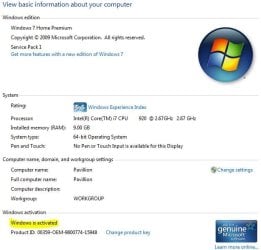
Answer to AddRAM

Yes, it is activated. Also, both MS support techs (on phone) acknowledged that the W7 installation is valid and activated.
 

Attachments

  • Pavillion Properties Oct 02 2016.JPG
    Pavillion Properties Oct 02 2016.JPG
    44.8 KB · Views: 59

My Computer My Computer

Computer type
PC/Desktop
Computer Manufacturer/Model Number
HP Pavillion Elite e0280t
OS
Windows 7 Home Premium 64 bit
CPU
Intel i7 920 @ 2.67 GHz
Motherboard
??? Unspecified by OEM
Memory
9 Gb DDR3-1066 MHz SDRAM
Graphics Card(s)
1 Gb ATI Radion HD 4650
Hard Drives
WD 1 Tb 6G/s SATA
Antivirus
Norton
Browser
Chrome and AOL
Reply to Ranger 4

I ran MGADiag.exe and post it.

Although I do not really know how to read it, looking it over, it seems to recognize that my W7 is genuine and activated. However, I could be missing something I do not know how to see. Nevertheless, I got the popup again this am as expected.

So, any advice from this point?

tesnus4449
 

My Computer My Computer

Computer type
PC/Desktop
Computer Manufacturer/Model Number
HP Pavillion Elite e0280t
OS
Windows 7 Home Premium 64 bit
CPU
Intel i7 920 @ 2.67 GHz
Motherboard
??? Unspecified by OEM
Memory
9 Gb DDR3-1066 MHz SDRAM
Graphics Card(s)
1 Gb ATI Radion HD 4650
Hard Drives
WD 1 Tb 6G/s SATA
Antivirus
Norton
Browser
Chrome and AOL
If you still have space on the drive and the system image, there is something you could try.

Create another partion. Boot into your favorite pe and restore the image to the new partition using the wbadmin command.

Still from booted pe, fix the drive letter of the newly restored image. If you applied the image to partition D ( as seen from pe ), then select D in the Fix OS Letter section dropdown then click FIX.

Then add a boot menu entry. EG if it restored to D as seen from pe, select D as the Windows partition in Auto boot repair section. Then click Apply.

nt6repair.jpg

You might need to borrow my boot disc as it includes the NT6repair program.
 
Last edited:

My Computers My Computers

System One System Two

  • Computer type
    PC/Desktop
    OS
    7 X64
    CPU
    i5 8400
    Motherboard
    gigabyte b365m ds3h
    Memory
    2x8gb 3200mhz
    Hard Drives
    various
    PSU
    pure power 11 400w cm
    Case
    Coolermaster
    Cooling
    cryorig m9i
  • Computer type
    PC/Desktop
    OS
    7x64
    CPU
    g5400
    Motherboard
    ga b365m ds3h
    Memory
    8gb ddr4 2400
    PSU
    xfx pro 450w

My Computer My Computer

Computer type
PC/Desktop
Computer Manufacturer/Model Number
medionl/Aspire 6930G/acer x55a
OS
W7 home premium 32bit/W7HP 64bit/w10 tp insider ring
CPU
E5300 dual core
Motherboard
medion MS7366
Memory
3gb
Graphics Card(s)
Nvidia Geforce 7100 Nforce 630i
Monitor(s) Displays
avixc
Internet Speed
n (isp resticted to 72)
Antivirus
mse/pands
Browser
palemoon
Other Info
Belkin Fd7050 n USB using Railink RT2870 drivers, more upto date
Thanks for the advice. I am afraid it is a bit over my head. For starters, I am not even sure what ‘pe’ refers to. Likewise, I am reluctant to ‘try’ something I really don’t understand. If that doesn’t work, I am really screwed, digging the hole deeper.

I can actually live with the way it is now; I just get tired of MS throwing unjust spitballs (the popup) at me.
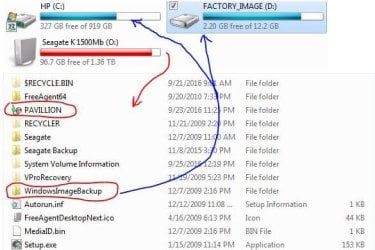
As for the backup, it is a Windows System Image (made 8/01/16) on a quite full external HD (see attached image). After installation of the replacement HD, booting from the Repair Disk, the system image was recognized and restoration actually worked fine (as advertised), all except the popup. The amazing thing is that the Microsoft supports tech’s cannot (or don’t want to) fix their own creation (W7).

I do in deed appreciate your attention.

tesnus4449
 

Attachments

  • Restore Process.JPG
    Restore Process.JPG
    45 KB · Views: 51

My Computer My Computer

Computer type
PC/Desktop
Computer Manufacturer/Model Number
HP Pavillion Elite e0280t
OS
Windows 7 Home Premium 64 bit
CPU
Intel i7 920 @ 2.67 GHz
Motherboard
??? Unspecified by OEM
Memory
9 Gb DDR3-1066 MHz SDRAM
Graphics Card(s)
1 Gb ATI Radion HD 4650
Hard Drives
WD 1 Tb 6G/s SATA
Antivirus
Norton
Browser
Chrome and AOL
forget that
DO AS I SAID

Roy
 

My Computer My Computer

Computer type
PC/Desktop
Computer Manufacturer/Model Number
medionl/Aspire 6930G/acer x55a
OS
W7 home premium 32bit/W7HP 64bit/w10 tp insider ring
CPU
E5300 dual core
Motherboard
medion MS7366
Memory
3gb
Graphics Card(s)
Nvidia Geforce 7100 Nforce 630i
Monitor(s) Displays
avixc
Internet Speed
n (isp resticted to 72)
Antivirus
mse/pands
Browser
palemoon
Other Info
Belkin Fd7050 n USB using Railink RT2870 drivers, more upto date

My Computer My Computer

Computer type
PC/Desktop
Computer Manufacturer/Model Number
medionl/Aspire 6930G/acer x55a
OS
W7 home premium 32bit/W7HP 64bit/w10 tp insider ring
CPU
E5300 dual core
Motherboard
medion MS7366
Memory
3gb
Graphics Card(s)
Nvidia Geforce 7100 Nforce 630i
Monitor(s) Displays
avixc
Internet Speed
n (isp resticted to 72)
Antivirus
mse/pands
Browser
palemoon
Other Info
Belkin Fd7050 n USB using Railink RT2870 drivers, more upto date
Yes, could be a problem with the intel drivers.Those won't install on my machine, but it is worth a try.

FYI, pe is a small version of windows that runs in ram. There is basic version on windows install discs in the sources folder, called boot.wim. There is another in a hidden folder on you hard drive called winre.wim which is booted by pressing the F8 key at startup. It contains the repair options. Enthusiasts make fancier versions with windows explorer, wireless networking, antivirus, and various imaging and partitioning programs.

The "repair disc" you referred to is pe. It contains winre.wim, the same as you get by pressing F8.

An enthusiasts "repair disc" will contain everything in winre, plus a lot more.
 

My Computers My Computers

System One System Two

  • Computer type
    PC/Desktop
    OS
    7 X64
    CPU
    i5 8400
    Motherboard
    gigabyte b365m ds3h
    Memory
    2x8gb 3200mhz
    Hard Drives
    various
    PSU
    pure power 11 400w cm
    Case
    Coolermaster
    Cooling
    cryorig m9i
  • Computer type
    PC/Desktop
    OS
    7x64
    CPU
    g5400
    Motherboard
    ga b365m ds3h
    Memory
    8gb ddr4 2400
    PSU
    xfx pro 450w
Re: Reply from torchwood.

Thanks, Roy. I am in the process of following your advice and have 3 question before I proceed.

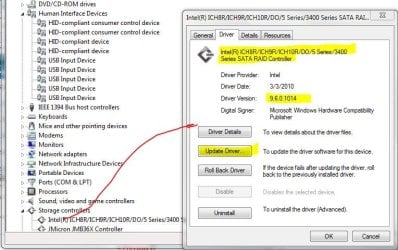
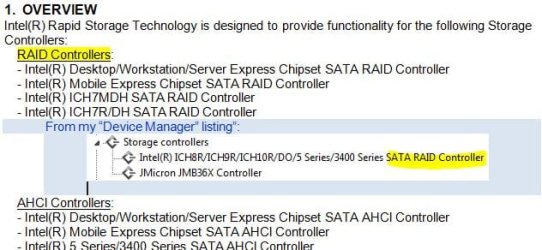
I have downloaded the zip-file from Intel [10.8.0.1003_f6flpy-x64.zip] and expanded it and have read the readme up to Section 7. It seems clear enough so far, but my specific controller ["Intel(R) ICH8R/ICH9R/DO/5 Series/3400 Series SATA RAID Controller"] is not specifically listed in the Readme (see 1st screen shot attached). Nevertheless, I do interpret it as a RAID system (right?).

The second question is minor (see screen shot 2). I do have corresponding folder, bit in '(x86)', but not in 'Program Files'. I am assuming this is the intended destination.

The third question is, the Properties window [see screen shot #3] for this controller has an update button. Shouldn't this do automatically what we are trying to do here?

As far as Section 8 in the README, I checked the driver version and this is "9.6.0.1014". Probably what you spotted as 'bad drivers'.

Thank you very much for the advice. It seems to make a lot of sense.

tesnus
 

My Computer My Computer

Computer type
PC/Desktop
Computer Manufacturer/Model Number
HP Pavillion Elite e0280t
OS
Windows 7 Home Premium 64 bit
CPU
Intel i7 920 @ 2.67 GHz
Motherboard
??? Unspecified by OEM
Memory
9 Gb DDR3-1066 MHz SDRAM
Graphics Card(s)
1 Gb ATI Radion HD 4650
Hard Drives
WD 1 Tb 6G/s SATA
Antivirus
Norton
Browser
Chrome and AOL
Sorry

I was not keeping up with the subsequent posts while I was reading the README, etc.

Thanks SIW2, re 'pe' etc; I get the idea now.

Torchwood: I forgot to attach; they should be here. On your later post, I will disregard your earlier link and go on to: https://downloadcenter.intel.com/Det...&DwnldID=22194. I need to leave for a couple of hours, and will check back later and proceed again. Thanks much.

tesnus
 

Attachments

  • Screen shot #3 Properties.JPG
    Screen shot #3 Properties.JPG
    69.3 KB · Views: 0
  • README screen shot [Intel].JPG
    README screen shot [Intel].JPG
    50 KB · Views: 45
  • Device Manager Screen shot 10-03-16.JPG
    Device Manager Screen shot 10-03-16.JPG
    45.8 KB · Views: 45

My Computer My Computer

Computer type
PC/Desktop
Computer Manufacturer/Model Number
HP Pavillion Elite e0280t
OS
Windows 7 Home Premium 64 bit
CPU
Intel i7 920 @ 2.67 GHz
Motherboard
??? Unspecified by OEM
Memory
9 Gb DDR3-1066 MHz SDRAM
Graphics Card(s)
1 Gb ATI Radion HD 4650
Hard Drives
WD 1 Tb 6G/s SATA
Antivirus
Norton
Browser
Chrome and AOL
Hi

When buying new PC, there is a note that it is better to make one set. Recovery discs.

If you did make a set of Recovery disk (DVD disc) then your Windows will not get this W7 not genuine.
The reason is that the HDD is being wiped out &or failed.

With new HDD, using Recovery discs to install, in this way there may not have this W7 not genuine.
Once it is activated, then using Windows Image Backup (8/01/16) there should not be a problem.

Windows Image Backup (8/01/16) is mainly for backup purpose.
That is to say if there is an virus, then format and do Restore this Windows Image Backup (8/01/16) will not be an issue.
HDD failed could be rare as HDD can able to last a few years.

Using Windows Image Backup (8/01/16) to do re-install to new HDD may result in error.
For example, some users using another HDD with Windows OS to use for another PC, as this would not work.

The interesting part is the 2 MS staff did said it is genuine as they could see the system and match their product id.
But they did not replied as there is something that both staff not willingly to confess how MS do the activation.

For Recovery disc, the PC always prompt for the user to do this first.
As in my case, i did only can create ONE set of Recovery disc.
In this way, the Windows OS will be indicated as activated, as most OEM do not required to manual activate.
Once activation is confirm, then Windows Image Backup (8/01/16) will be next step to complete.

This is my own opinion, and AFAIK.
Thanks for reading.

Eric.
 

My Computer My Computer

Computer type
Laptop
Computer Manufacturer/Model Number
Toshiba L630 and L735
OS
Windows 7 x64
Hard Drives
240 GB SSD
Re: Corrected link from Torchwood and comments by Eric3742

Following your revision, went to the intel link and was redirected to
Download Intel(R) Rapid Storage Technology (Intel(R) RST) RAID Driver
for the 'latest drivers and down loaded the following zip: f6flpy-x64.zip. Reading the associates README it look like there is a controller match
README: - Intel(R) 8 Series/C220 Series Chipset Family SATA AHCI/RAID Controller
My controller: Intel(R) ICH8R/ICH9R/ICH10R/DO/5 Series/3400 Series SATA RAID Controller

As mentioned previously, I am wondering if the option [Update Driver Software ...] in the right click of the Device Manager would do this automatically? I will follow up in the morning (here on the US West Coast) and execute the newer download.

Eric3742 (Thanks, Eric) has some interesting comments: "Using Windows Image Backup (8/01/16) to do re-install to new HDD may result in error.". This is what was done. The HD was installed buy a commercial technician for me, it was indeed new. He could not do the restoration from the Windows Image Backup. I was not able to locate my repair disk at the time I turned it over to the technician, so I am not at all sure exactly what he did, except it 'worked'. I ultimately located my repair disk and completed the restoration with it. I am still amazed that the MS Support techs could not succeed. Perhaps these were 3rd party contractors that were not given the "secret".

Thanks all.

Edit 2 hrs after above reviewing again:
Re-reading torchwoods revised instructions, it actually said to download and the item at the bottom of the intel webpage iata_enu.exe. [Sorry I missed that distinction] I have iata_enu.exe too now (inaddition to the file noted above). Inasmuch as iata_enu.exe does not have a README, I am not quite sure what it does, etc. Nevertheless, tomorrow I will proceed with that recommendation unless I hear otherwise before then. I will follow with getting the report from MGADiag.exe, post it, and see what that shows.

Thanks again.


tesnus
 
Last edited:

My Computer My Computer

Computer type
PC/Desktop
Computer Manufacturer/Model Number
HP Pavillion Elite e0280t
OS
Windows 7 Home Premium 64 bit
CPU
Intel i7 920 @ 2.67 GHz
Motherboard
??? Unspecified by OEM
Memory
9 Gb DDR3-1066 MHz SDRAM
Graphics Card(s)
1 Gb ATI Radion HD 4650
Hard Drives
WD 1 Tb 6G/s SATA
Antivirus
Norton
Browser
Chrome and AOL
Reply to torchwood re: applying iata_enu.exe and the posting of the subsequent MGADiag report.

Superficially, it all seemed to work and no popups yet. I have yet to check for updates (will advise on outcome). I will first compare the before/after reports to see what is different (not that I really know what I am looking at). I took a good look last night and also closely examined the results posted 2 years ago by "EricWindows". It looks like his case is very similar to mine, although he got there somewhat differently.

Thanks again,

tesnus

I noticed another issue that might be related. Besides my DVD drive (working fine), I have also a CD drive (both original with the computer). I had not noticed at all before, but the computer no longer 'sees' the CD drive. Might this be a controller driver issue? I suspect most likely it is the tech that replace the HD is the cause.


Diagnostic Report (1.9.0027.0):
-----------------------------------------
Windows Validation Data-->

Validation Code: 0
Cached Online Validation Code: 0x0
Windows Product Key: *****-*****-RHDJT-HXWT9-FX7QG
Windows Product Key Hash: mHLCw02NZkc/BKKxlCIS4y48f4I=
Windows Product ID: 00359-OEM-9800774-15948
Windows Product ID Type: 8
Windows License Type: COA SLP
Windows OS version: 6.1.7601.2.00010300.1.0.003
ID: {C0BA63AE-C2EF-4608-AACD-90C8A20F988A}(3)
Is Admin: Yes
TestCab: 0x0
LegitcheckControl ActiveX: Registered, 1.9.9.1
Signed By: Microsoft
Product Name: Windows 7 Home Premium
Architecture: 0x00000009
Build lab: 7601.win7sp1_ldr.160408-2045
TTS Error:
Validation Diagnostic:
Resolution Status: N/A

Vista WgaER Data-->
ThreatID(s): N/A, hr = 0x80070002
Version: N/A, hr = 0x80070002

Windows XP Notifications Data-->
Cached Result: N/A, hr = 0x80070002
File Exists: No
Version: N/A, hr = 0x80070002
WgaTray.exe Signed By: N/A, hr = 0x80070002
WgaLogon.dll Signed By: N/A, hr = 0x80070002

OGA Notifications Data-->
Cached Result: N/A, hr = 0x80070002
Version: N/A, hr = 0x80070002
OGAExec.exe Signed By: N/A, hr = 0x80070002
OGAAddin.dll Signed By: N/A, hr = 0x80070002

OGA Data-->
Office Status: 100 Genuine
Microsoft Office Standard 2007 - 100 Genuine
OGA Version: N/A, 0x80070002
Signed By: N/A, hr = 0x80070002
Office Diagnostics: 025D1FF3-364-80041010_025D1FF3-229-80041010_025D1FF3-230-1_025D1FF3-517-80040154_025D1FF3-237-80040154_025D1FF3-238-2_025D1FF3-244-80070002_025D1FF3-258-3_E2AD56EA-765-d003_E2AD56EA-766-0_E2AD56EA-134-80004005_E2AD56EA-765-b01a_E2AD56EA-766-0_E2AD56EA-148-80004005_16E0B333-89-80004005_B4D0AA8B-1029-80004005

Browser Data-->
Proxy settings: N/A
User Agent: Mozilla/4.0 (compatible; MSIE 8.0; Win32)
Default Browser: C:\Program Files (x86)\Google\Chrome\Application\chrome.exe
Download signed ActiveX controls: Prompt
Download unsigned ActiveX controls: Disabled
Run ActiveX controls and plug-ins: Allowed
Initialize and script ActiveX controls not marked as safe: Disabled
Allow scripting of Internet Explorer Webbrowser control: Disabled
Active scripting: Allowed
Script ActiveX controls marked as safe for scripting: Allowed

File Scan Data-->

Other data-->
Office Details: <GenuineResults><MachineData><UGUID>{C0BA63AE-C2EF-4608-AACD-90C8A20F988A}</UGUID><Version>1.9.0027.0</Version><OS>6.1.7601.2.00010300.1.0.003</OS><Architecture>x64</Architecture><PKey>*****-*****-*****-*****-FX7QG</PKey><PID>00359-OEM-9800774-15948</PID><PIDType>8</PIDType><SID>S-1-5-21-1360168898-2425467685-3190231548</SID><SYSTEM><Manufacturer>HP-Pavilion</Manufacturer><Model>AW020AV-ABA e9280t</Model></SYSTEM><BIOS><Manufacturer>American Megatrends Inc.</Manufacturer><Version>5.28 </Version><SMBIOSVersion major="2" minor="5"/><Date>20100409000000.000000+000</Date></BIOS><HWID>C7A43A07018400FE</HWID><UserLCID>0409</UserLCID><SystemLCID>0409</SystemLCID><TimeZone>Pacific Standard Time(GMT-08:00)</TimeZone><iJoin>0</iJoin><SBID><stat>3</stat><msppid></msppid><name></name><model></model></SBID><OEM><OEMID>HPQOEM</OEMID><OEMTableID>SLIC-CPC</OEMTableID></OEM><GANotification/></MachineData><Software><Office><Result>100</Result><Products><Product GUID="{91120000-0012-0000-0000-0000000FF1CE}"><LegitResult>100</LegitResult><Name>Microsoft Office Standard 2007</Name><Ver>12</Ver><Val>61E796EC737BF12</Val><Hash>6XNJa77hfeMOC3tWQLKfi3DUe+k=</Hash><Pid>81607-905-9130701-64228</Pid><PidType>1</PidType></Product></Products><Applications><App Id="16" Version="12" Result="100"/><App Id="18" Version="12" Result="100"/><App Id="1A" Version="12" Result="100"/><App Id="1B" Version="12" Result="100"/></Applications></Office></Software></GenuineResults>

Spsys.log Content: 0x80070002

Licensing Data-->
Software licensing service version: 6.1.7601.17514

Name: Windows(R) 7, HomePremium edition
Description: Windows Operating System - Windows(R) 7, OEM_COA_SLP channel
Activation ID: 5e017a8a-f3f9-4167-b1bd-ba3e236a4d8f
Application ID: 55c92734-d682-4d71-983e-d6ec3f16059f
Extended PID: 00359-00196-007-715948-02-1033-7601.0000-2682016
Installation ID: 011463369773465562456914748505341811171002953125367676
Processor Certificate URL: SpcService Web Service
Machine Certificate URL: RacService Web Service
Use License URL: UseLicenseService Web Service
Product Key Certificate URL: PkcService Web Service
Partial Product Key: FX7QG
License Status: Licensed
Remaining Windows rearm count: 4
Trusted time: 10/4/2016 10:45:00 AM

Windows Activation Technologies-->
HrOffline: 0x00000000
HrOnline: 0x00000000
HealthStatus: 0x0000000000000000
Event Time Stamp: 10:1:2016 09:09
ActiveX: Registered, Version: 7.1.7600.16395
Admin Service: Registered, Version: 7.1.7600.16395
HealthStatus Bitmask Output:


HWID Data-->
HWID Hash Current: NAAAAAEAAAABAAEAAgACAAAABAABAAEAvOm41BDz0tN+Ji4y1oeaiOjQKq7YeUwBqC3qgg==

OEM Activation 1.0 Data-->
N/A

OEM Activation 2.0 Data-->
BIOS valid for OA 2.0: yes
Windows marker version: 0x20001
OEMID and OEMTableID Consistent: yes
BIOS Information:
ACPI Table Name OEMID Value OEMTableID Value
APIC HPQOEM SLIC-CPC
FACP HPQOEM SLIC-CPC
HPET HPQOEM SLIC-CPC
MCFG HPQOEM SLIC-CPC
OEMB HPQOEM SLIC-CPC
SLIC HPQOEM SLIC-CPC
SSDT HPQOEM SLIC-CPC
 

My Computer My Computer

Computer type
PC/Desktop
Computer Manufacturer/Model Number
HP Pavillion Elite e0280t
OS
Windows 7 Home Premium 64 bit
CPU
Intel i7 920 @ 2.67 GHz
Motherboard
??? Unspecified by OEM
Memory
9 Gb DDR3-1066 MHz SDRAM
Graphics Card(s)
1 Gb ATI Radion HD 4650
Hard Drives
WD 1 Tb 6G/s SATA
Antivirus
Norton
Browser
Chrome and AOL
Hi Tesnus,
That looks much better, should update properly now.

Re your CD.
Open Device manager,
are there any problem/other devices showing a small down arrow or ! mark, if so
Right click >> properties >> details >> Hardware Ids (dropdown) post the
PCI/VEN details.


Roy
 

My Computer My Computer

Computer type
PC/Desktop
Computer Manufacturer/Model Number
medionl/Aspire 6930G/acer x55a
OS
W7 home premium 32bit/W7HP 64bit/w10 tp insider ring
CPU
E5300 dual core
Motherboard
medion MS7366
Memory
3gb
Graphics Card(s)
Nvidia Geforce 7100 Nforce 630i
Monitor(s) Displays
avixc
Internet Speed
n (isp resticted to 72)
Antivirus
mse/pands
Browser
palemoon
Other Info
Belkin Fd7050 n USB using Railink RT2870 drivers, more upto date
Followup to Torchwood

For nearly 24 hours now, I have not seen the popup (keeping fingers crossed):). However, I still cannot get Windows Updates to respond:(. Windows engages in an interminable search (as follows):
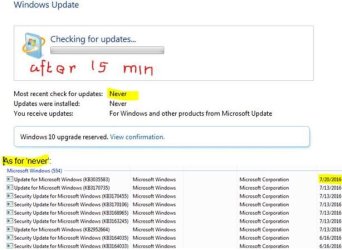
UindowsUpdate after 15 Min.JPG
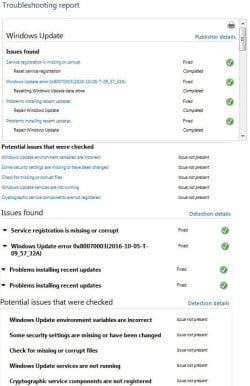
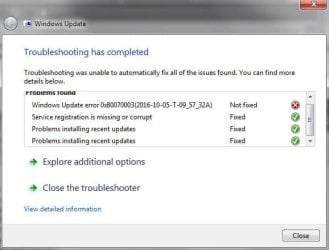
I ran a MS diagnostic application, WindowsUpdateDiagnostic.diagcab. It went into ‘resolving problems mode’ and and produced a ‘Troubleshooting Report' (could not copy as text) and claimed to fix a number of things. However. Windows Update still fails.
Windows Update Error - 1.JPG
TroubleShootingReport - A.JPG
TroubleShootingReport - B.JPG

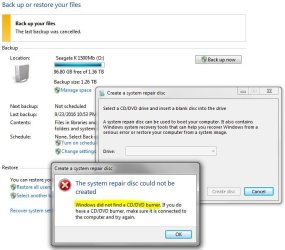
Another thing is that I cannot make a System Repair Disk; the following is the response:
CannotCreate SysRepairDisk.JPG

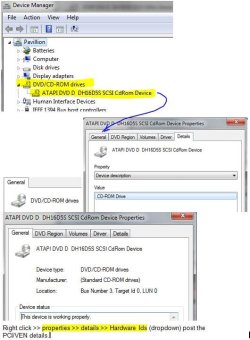
As for the CD-drive issue I brought up, nothing even suggests it exist except that I can physically open the drive and put in a CD; the system just does not see it. Nothing in the Device Manager list shows a small down arrow or ! mark. As highlighted in the screen shot, only the DVD drive shows up; no second (CD) drive. ‘Properties’ on the heading simply repeats the heading. Properties on the DVD [General, Details] show the following.
Missing CD Drive.JPG

But there is nothing to show on the CD-drive. This looks more like a hardware matter that I need to talk to the HD installer about. I think you have provided me a way to conclude it is not an OS problem. Thanks.

Roy, I must apologize for not being to adept at 'posting'. Thank you for your help and patience.

tesnus
 

My Computer My Computer

Computer type
PC/Desktop
Computer Manufacturer/Model Number
HP Pavillion Elite e0280t
OS
Windows 7 Home Premium 64 bit
CPU
Intel i7 920 @ 2.67 GHz
Motherboard
??? Unspecified by OEM
Memory
9 Gb DDR3-1066 MHz SDRAM
Graphics Card(s)
1 Gb ATI Radion HD 4650
Hard Drives
WD 1 Tb 6G/s SATA
Antivirus
Norton
Browser
Chrome and AOL
Tesnus, do as Torchwood says.

I too was sceptical. But he was oh so right. Read my latest posts and you'll see I had a similar problem as you and he recognized and fixed it.
 

My Computer My Computer

Computer type
Laptop
Computer Manufacturer/Model Number
Lenovo Thinkpad R500
OS
Windows 7 familale premium 64-bit SP1 (French)
CPU
Intel Core Duo T6570
Memory
4 Go
Hard Drives
WD Blue 500 Go
Antivirus
MS Security Essentials or Avast
Browser
IE11
Back
Top