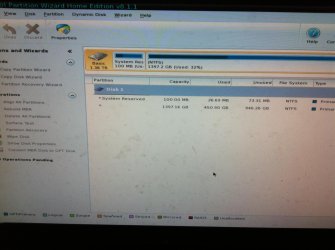
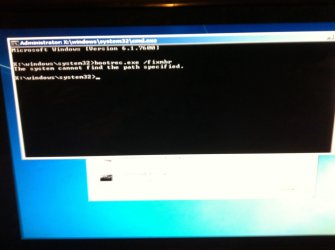
Hdd gone-ish, trying to repair partitions.

Yes, I would also like the snapshots to be uploaded to SevenForums server so that all can see. ( Since I was able to see - though with much less clarity - I did not bother about it.)

Also upload the snapshot of how your drive looks on PW main screen. As greg pointed out it may be necessary to make the System Reserved partition active if it is not already. You can check and do it with Partition Wizard.

Try the command bootrec.exe /fixmbr (including the .exe after bootrec)and check whether it fixes your problem. ( If you type only bootrec /fixmbr, the file cannot be found.)

Since Greg may have already gone to sleep and a direct guidance may not be available till he comes alive, in the meantime you can also create the AVG Rescue CD as in How To Restore The Master Boot Record | AVG Forums and try to restore the MBR if it looks easier for you. I think that would also eliminate any virus and will also give you other tools, should a data recovery exercise becomes necessary.
 
Last edited:

My Computer My Computer

At a glance

Windows 7 Home Premium 32 bit
OS
Windows 7 Home Premium 32 bit
Thanks guys. Will try the steps shown with malware bytes/avg etc and report back. It may take me a little while to find someone who I can get to burn an ISO. Stay tuned.
 

My Computer My Computer

At a glance

Windows 7 64
Computer type
PC/Desktop
OS
Windows 7 64
You already have Partition Wizard. What prevents you from running it again, take a snapshot of Partition Wizard Main screen that shows your drive and upload it? That would atleast confirm that the partition table is intact and you have to deal with MBR fix only.

Again I do not understand. You already tried bootrec /fixmbr. Again what prevents you trying the command bootrec.exe /fixmbr instead?
 

My Computer My Computer

At a glance

Windows 7 Home Premium 32 bit
OS
Windows 7 Home Premium 32 bit
Ok. Here is the main partition wizard screen:
image.jpg

Startup repair / command prompt / bootrec.exe /fixmbr gives
"The system cannot find the path specified".
 

My Computer My Computer

At a glance

Windows 7 64
Computer type
PC/Desktop
OS
Windows 7 64
(My phone seems to be having trouble attaching a second photo per post, it's overwriting the first)

image.jpg
 

My Computer My Computer

At a glance

Windows 7 64
Computer type
PC/Desktop
OS
Windows 7 64
There is a discrepancy between the Recovery Wizard output which is only 25% completed in the screenshot showing Unallocated Space and PW drive map showing the partitions intact. Did you actually complete Partition Recovery.

If the Partitions are intact then everything that can possibly be done is here for Troubleshooting Windows 7 Failure to Start. I would skip nothing since the boot-time AV scans will assure the infection is cleaned up and it may not repair until cleaned up.

The steps include the full set of bootrec commands and lead up to if necessary rescuiing your data to do the superior Clean Reinstall - Factory OEM Windows 7 which is the same for retail.

If you have data that isn't backed up then you can attempt to rescue it first using Copy & Paste - in Windows Recovery Console with your existing Win7 disk, the AVG Rescue disk Jumanji suggested which can also do the bootable AV scan, or Paragon Rescue Kit Free Edition 11.0 Free.

Then do the bootable AV scan, check System Files, confirm the Partition Marked Active
to run Startup Repair - Run 3 Separate Times. If this didn't start it I would wipe with Diskpart Clean Command to do the reinstall. You may wish to complete all the repair steps.
 
Ok I'll follow the steps. Thanks for your time.
 

My Computer My Computer

At a glance

Windows 7 64
Computer type
PC/Desktop
OS
Windows 7 64
There is also no way to see if System Reserved is marked System Active since the labels in the PW drive map screenshot are cut off. System flag means boot files are intact, Active flag points to the partition intended to boot the OS which will not boot without either.

If not then that may be your problem so confirm that SysReserved is Partition Marked Active using PW to rightclick Modify>Set to Active, OK., then highlight the disk, from Disk menu Rebuild MBR, OK, Apply both steps. Finally if Win7 wont start run Startup Repair - Run 3 Separate Times.

If these fail proceed with the other steps in Troubleshooting Windows 7 Failure to Start
 
Check whether the System Reserved partition is active --- That is a very good point,Greg, which I missed when I asked him to go ahead With Rebuild MBR. Even after that Rebuild MBR, his system did not boot, may be because we did not check it.

When Rebuiild MBR is carried out after checking and making sure of the System Flag and active Flag, I am hoping he should be able to boot.( provided any virus that is preventing the MBR being written has been eliminated.) Let us see.

As far as running the partition recovery is concerned, he had completed both a Deep scan and the Quick Scan, selected the two existing partitions, checked that the Preview Map showed his full disk before Finishing. ( The preview map will remain unallocated until the right partitions are chosen to fill it) In both cases there was no pending operation because of which the partition table could not be rewritten. It was at this stage it dawned on me that if the Partititon Table is not corrupted, and the main Window of the PW shows the drive with all partitons (as against RAW or unallocated in case of Partition Table/MBR corruption) then there is no need to run Partition Recovery Wizard and even if one runs it PW will not rewrite the partition table since it already exists. It was then I ran that little experiment which confirmed it when first sector was examined with Sector Edit Tool of bootice..(my post #15)

With that I shall loop back to the first and second para of this post.
 

My Computer My Computer

At a glance

Windows 7 Home Premium 32 bit
OS
Windows 7 Home Premium 32 bit
The System Reserved partition is marked as active.
 

My Computer My Computer

At a glance

Windows 7 64
Computer type
PC/Desktop
OS
Windows 7 64
Finally got hold of windows defender offline, but it won't even start up because it can't find a system drive.

I went back into partition wizard and noticed two things I didnt see before: 1) although the system partition was set as active, neither of the 2 was flagged as the boot partition, 2) when i try to flag either one as boot, it tells me "failed to find windows directory" (but when you browse the second one it's there).

Anyone know why it can't see it?
 
Last edited:

My Computer My Computer

At a glance

Windows 7 64
Computer type
PC/Desktop
OS
Windows 7 64
The System Reserved partition should be System, Active and the larger Windows partition (C drive) should be Boot, Pagefile,Crash Dump.( In Windows Disk Management)

In all the snapshots of Partition Wizard you posted the rightmost part showing the Status was truncated and that is what Greg pointed out in post #28.

Please post a complete snapshot without any truncation.

(You are going off tangentially somewhere running Windows Defender etc., instead of trying to do what Greg suggested or I suggested.)

In any case your bootfiles in the C partition seems to have corrupted and that may be the reason why you are unable to boot.

Eversince I saw you mention in your post#17 "BSOD is giving PROCESS1_INITIALIZATION_FAILED (even in safe mode with command prompt)." I have been working on it albeit slowly within my available time.

The available indications are that bootcat.cache file in C> Windows > System 32 > CodeIntegrity may be corrupt. The solution suggested is to delete that file or better still rename that file as bootcat.cacheold and boot. In most cases this has worked and made the system bootable. When booting, a new bootcat.cache will be automatically written.

You may do it by getting into the command prompt in the repair/Recovery Console of the Windows Installation disk with SP1 or booting from a live Linux pen drive.Running sfc /scannow from Windows Disk may also work. Some people replaced the bootcat.cache and ntdll.dll with copies from another computer running the same Windows edition and bit version. (ntdll.dll should get into System32 folder)

You may google search on the topic and do it the way you may feel comfortable for you.I have only given you the clues I have gathered..
 
Last edited:

My Computer My Computer

At a glance

Windows 7 Home Premium 32 bit
OS
Windows 7 Home Premium 32 bit
In PW unfortunately they reverse the meaning of the System and Boot flags from Disk Mgmt. So SysReserved should appear in PW as Boot and Active, while C will be System.

As C will not be booted, it may not have the System flag which in PW signifies the partition currently booted.

Nevertheless, confirm the Active flag is on System Reserved or else right click it to Modify>Set to Active, OK. Then highlight the Win7 hard drive, from Disk tab select Rebuild MBR, OK, Apply both steps.

Now boot into the Win7 disk to run Startup Repair - Run 3 Separate Times .
 
I was also hoping that after he does what you suggested the system will boot but after reading what causes the "BSOD is giving PROCESS1_INITIALIZATION_FAILED (even in safe mode with command prompt) I have lost that hope.

In any case the OP should do it as you suggested since it's not any difficult and check. We will know where we are.

Greg, you may have a look at these time-permitting.

"Stop error code 0x0000006B PROCESS1_INITIALIZATION_FAILED" error message during startup on a computer that is running Windows 7 or Windows Server 2008 R2

Fix : Stop Error 0x0000006B Process1_initialization_failed BSOD in Windows 7 | TroubleShoot Windows

(Note: If OP runs Command prompt from Windows Installation disc he may have to look for bootcat.cache in D: perhaps. C: may be his System Reserved Partition.)

These are just two out of the many. But all of them point to a corrupted bootcat.cache file and deleting it.

So after trying what you have suggested in the previous post, he should go ahead with renaming it bootcat.cacheold and try to boot.That will be the simplest thing to do rather than running Windows repair. I have a feeling that windows repair three times as you suggested may not run at all for nowhere it is mentioned for this problem -- as far as I have researched. :)
 

My Computer My Computer

At a glance

Windows 7 Home Premium 32 bit
OS
Windows 7 Home Premium 32 bit
The "tangent" I was going off on was following the steps that gregrocker asked me to do, which included Windows Defender offline. And sorry about my poor photography skills, I was trying to get it close enough to be readable.

I've just used AVG rescue disk's tools to get into the file system. I renamed Bootcat.cache but it made no difference :(
Still, now I can at least copy files off it.
Just running a memtest now(one guy on this forum clarified this issue to be RAM with it), then I'll try the mbr rebuild as described above.

I'm not sure if I have sp1 or not (DVD just says win7 pro). Can I burn it from somewhere?
 

My Computer My Computer

At a glance

Windows 7 64
Computer type
PC/Desktop
OS
Windows 7 64
Glad that you could copy your files. Retrieving your files was never in doubt since Partition Wizard showed your partitions and file system in tact.Our efforts are focussed on getting your drive accessible without a need for data recovery.All that we are doing is to get the first sector right with PW.

What Tool did you use to get the files? TestDisk on the AVG Rescue disk?

After renaming bootdat.cache as bootdat.cacheold and rebooting, are you still getting that BSOD with the same Process1 initialisation failed?

Check whether a new bootcat.cache file has been created.

It is said that if ntdll.dll (which is in System32 folder) is also corrupted, a new bootcat.cache file will not be created.In such a case some users had copied both ntdll.dll and bootcat.cache file from a working system and copied it to System32 folder and CodeIntegrity folder respectively. If you have a Win 7 Home Premium SP1 64 bit , you should copy those files from another Win 7 Home Premium SP1 64bit, that is the files should come from a like system.

It is also mentioned that running sfc scan now from the Windows SP1 Disk can replace the corrupted files. There is some official download site where you can download your version with SP1. Someone else will be able to tell you about it. It has recently changed and I did not bother to remember it.:D

Let us see what Greg has to say on the whole issue. A repair install can certainly get your system intact, if other hardware is not creating this problem.
 
Last edited:

My Computer My Computer

At a glance

Windows 7 Home Premium 32 bit
OS
Windows 7 Home Premium 32 bit
In PW unfortunately they reverse the meaning of the System and Boot flags from Disk Mgmt. So SysReserved should appear in PW as Boot and Active, while C will be System.

As C will not be booted, it may not have the System flag which in PW signifies the partition currently booted.

Nevertheless, confirm the Active flag is on System Reserved or else right click it to Modify>Set to Active, OK. Then highlight the Win7 hard drive, from Disk tab select Rebuild MBR, OK, Apply both steps.

Now boot into the Win7 disk to run Startup Repair - Run 3 Separate Times .

Ok, I performed the PW steps then ran startup repair 3 times with a restart between each. Every time it gives me "Startup Repair cannot repair this computer automatically", with a problem event name of StartupRepairOffline (screenshot follows).

Symptoms are still PROCESS1_initialization_FAILED after windows logo.
The Bootcat.cache was NOT recreated.

I thought I could copy files off with Midnight Commander, but there seems to be no way to access another drive (eg my USB).
 

My Computer My Computer

At a glance

Windows 7 64
Computer type
PC/Desktop
OS
Windows 7 64
image.jpg
 

My Computer My Computer

At a glance

Windows 7 64
Computer type
PC/Desktop
OS
Windows 7 64
Did you apply the fix in Post #35?

If you reinstall be sure to use the latest official Win7 ISO with SP1 from Clean Reinstall - Factory OEM Windows 7.

Checking for infection, confirming the Partition Marked Active to run Startup Repair - Run 3 Separate Times is standard procedure for when Win7 won't start, since it will not repair if infected and all important repairs are automated in Startup Repair. It has worked for tens of thousands of cases we've helped with here so should always be included.

In your case be sure that nothing whatsoever is plugged into the PC, no other hard drives are present, run the bootrec commands in Troubleshooting Windows 7 Failure to Start which can jumpstart an OS to be detected since the results say it isn't detecting one - does an OS show up in the Repair window when you open it, and is it the correct size?

I'll be flying cross-country today but hopefully Jumanji will stop by.
 
Back
Top