
Solved HDD not working

dwarfer66

New member
Power User
Local time
3:53 AM
Messages
233
Location
Kwinana, Western Australia
I had a problem with an external HDD (put in as an external for 3 years all fine) showing as active, and preventing Windows from booting, I have removed it from the PC and put it in external enclosure, it shows up in My Computer (with the drive number but no size details) but I cannot access it.

I tried to load disk management and paragon HD manager but both programs hang until the drive is removed, even trying to format it all I get is a spinning cricle (mouse), as soon as I removed it the right click options show up, cannot even diskpart as it also hangs, is there a way I can access it to format (I know dammit that I will loose all data on it), as I want the drive back again.
 

My Computer

Computer type
PC/Desktop
Computer Manufacturer/Model Number
Home Build
OS
Windows 8.1 Pro
CPU
i5 3550 Ivy Bridge
Motherboard
Gigabyte Z77MX-D3H
Memory
8gb 1600 GSkill 9-9-9-24 xmp
Graphics Card(s)
Gigabyte GTX 760 OC
Sound Card
VIA VT2021 onboard
Monitor(s) Displays
BenQ GL2760H 27inch hdmi; LG Flatron E2351 23inch dvi
Screen Resolution
1920x1080
Hard Drives
1x Samsung 850 Evo 120GB
1x 4TB WD Green HDD
1x 3TB WD Green HDD
2x 2TB Seagate HDD
1x 1TB Seagate External HDD
PSU
Cooler Master V750
Case
Coolermaster HAF 912 Advanced
Cooling
Standard
Keyboard
Logitech K120 USB
Mouse
Razor Abyssus USB
Internet Speed
Broadband
Antivirus
MSE + Malwarebytes
Browser
Palemoon
Other Info
It's been the worst day since yesterday (thanks Flogging Molly) so apt!
Hello if you want to retrieve data before formatting see this ditty of mine
BOOTABLE UBUNTU
Make a bootable Ubuntu disk Get Ubuntu | Download | Ubuntu
Set the BIOS to boot from the optical when the machine boots it will show you a screen with TRY or INSTALL > select TRY not INSTALL
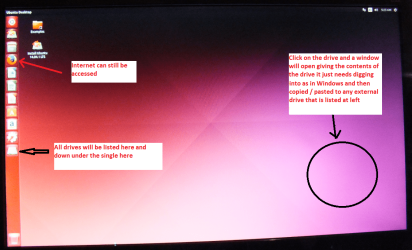
When it is finished - it takes very little time you will get a screen like in the pic .
Open the drive you want > User and dig down until you get to the data / settings you may be able to copy / paste the material you want to an external source or other installed drive doing this.
I am not sure if it will but I have recovered tons of data etc using this method both on "dead" or just plain drives that you cannot get data from using Windows.

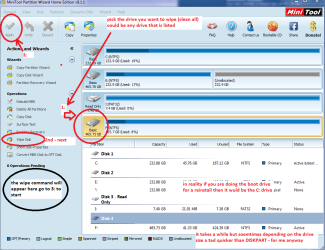
Then to format it try this from Partition Wizard (see pic) Free Partition Manager for Window PC | MiniTool Partition Wizard Free Edition
 

Attachments

  • UBUNTU SCREEN X2.PNG
    UBUNTU SCREEN X2.PNG
    272.7 KB · Views: 0
  • MINI TOOL WIPE.PNG
    MINI TOOL WIPE.PNG
    52.4 KB · Views: 0

My Computer

Computer type
PC/Desktop
Computer Manufacturer/Model Number
Own build (new) Desk1 / Asus ROG Win 7 / Desk2 1st build
OS
Desk1 7 Home Prem / Desk2 10 Pro / Main lap Asus ROG 10 Pro 2 laptop Toshiba 7 Pro Asus P2520 7 & 10
CPU
Desk1 i5 3750K / Laptop i7 GTX 860M / Desk2 i5 2500
Motherboard
Desk1 Asus P877-V / Desk2 Gigabyte H67 UD3H / Laptop ?
Memory
Desk1 8GB (1866) / Desk2 16GB (1333) / Laptop 8Gb DDR3
Graphics Card(s)
Desk 1& 2NVidia GTX 650 & Laptops on board Intel
Sound Card
Desk 1 & 2 -XONAR DG Realtek High Def audio Laptop
Monitor(s) Displays
Desk 1 Benq HD 2450 / Desk2 Philips 24" / Laptop 17.5"
Screen Resolution
1920x1080 D1 & D2 & Laptop 1
Hard Drives
Desk1 Samsung 120GB 830 SSD
Asus ROG 256GB 850 Pro SSD
Desk2 Samsung 840 256 SSD
Toshiba 120GB EVO
PSU
Desk 1 Corsair HX 1050/ Laptop ? / Desk 2 Corsair HX 650
Case
Desk 1 Cooler HAF XM ? Toshiba laptop / Desk2 Coolermaster
Cooling
Fans on all Desk1 -2 Desk2 - all Coolermasters 5 Laptop ?
Keyboard
Desk 1 MS Sidewinder X6 Desk 2 MS Sidewinder X 4
Mouse
Desk 1&2 - Gigabyte MS 900 gamer - laptop - Logitec wireless
Internet Speed
ADSL2+
Other Info
One other Desktop (tester) and spare Toshba laptop both with SSD's
Running Kaspersky 2016 ISS on all machines config'd identically
Logitec audio stereo systems on each machine (x3)
Canon MG5250MFC
Router/modem TP-Link running WPA2SK
Cheers mate will try when ubuntu downloads.
 

My Computer

Computer type
PC/Desktop
Computer Manufacturer/Model Number
Home Build
OS
Windows 8.1 Pro
CPU
i5 3550 Ivy Bridge
Motherboard
Gigabyte Z77MX-D3H
Memory
8gb 1600 GSkill 9-9-9-24 xmp
Graphics Card(s)
Gigabyte GTX 760 OC
Sound Card
VIA VT2021 onboard
Monitor(s) Displays
BenQ GL2760H 27inch hdmi; LG Flatron E2351 23inch dvi
Screen Resolution
1920x1080
Hard Drives
1x Samsung 850 Evo 120GB
1x 4TB WD Green HDD
1x 3TB WD Green HDD
2x 2TB Seagate HDD
1x 1TB Seagate External HDD
PSU
Cooler Master V750
Case
Coolermaster HAF 912 Advanced
Cooling
Standard
Keyboard
Logitech K120 USB
Mouse
Razor Abyssus USB
Internet Speed
Broadband
Antivirus
MSE + Malwarebytes
Browser
Palemoon
Other Info
It's been the worst day since yesterday (thanks Flogging Molly) so apt!
Keep us updated and just as a by the by some files may not be able to be opened but not that many and usually easy to copy / paste to another drive in or out.
 

My Computer

Computer type
PC/Desktop
Computer Manufacturer/Model Number
Own build (new) Desk1 / Asus ROG Win 7 / Desk2 1st build
OS
Desk1 7 Home Prem / Desk2 10 Pro / Main lap Asus ROG 10 Pro 2 laptop Toshiba 7 Pro Asus P2520 7 & 10
CPU
Desk1 i5 3750K / Laptop i7 GTX 860M / Desk2 i5 2500
Motherboard
Desk1 Asus P877-V / Desk2 Gigabyte H67 UD3H / Laptop ?
Memory
Desk1 8GB (1866) / Desk2 16GB (1333) / Laptop 8Gb DDR3
Graphics Card(s)
Desk 1& 2NVidia GTX 650 & Laptops on board Intel
Sound Card
Desk 1 & 2 -XONAR DG Realtek High Def audio Laptop
Monitor(s) Displays
Desk 1 Benq HD 2450 / Desk2 Philips 24" / Laptop 17.5"
Screen Resolution
1920x1080 D1 & D2 & Laptop 1
Hard Drives
Desk1 Samsung 120GB 830 SSD
Asus ROG 256GB 850 Pro SSD
Desk2 Samsung 840 256 SSD
Toshiba 120GB EVO
PSU
Desk 1 Corsair HX 1050/ Laptop ? / Desk 2 Corsair HX 650
Case
Desk 1 Cooler HAF XM ? Toshiba laptop / Desk2 Coolermaster
Cooling
Fans on all Desk1 -2 Desk2 - all Coolermasters 5 Laptop ?
Keyboard
Desk 1 MS Sidewinder X6 Desk 2 MS Sidewinder X 4
Mouse
Desk 1&2 - Gigabyte MS 900 gamer - laptop - Logitec wireless
Internet Speed
ADSL2+
Other Info
One other Desktop (tester) and spare Toshba laptop both with SSD's
Running Kaspersky 2016 ISS on all machines config'd identically
Logitec audio stereo systems on each machine (x3)
Canon MG5250MFC
Router/modem TP-Link running WPA2SK
So far MiniTools picks up the drive fine, and am doing a chkdsk on it, and it is SLOW but also finding "file record segments unreadable". but I will let it finish anyway.
 

My Computer

Computer type
PC/Desktop
Computer Manufacturer/Model Number
Home Build
OS
Windows 8.1 Pro
CPU
i5 3550 Ivy Bridge
Motherboard
Gigabyte Z77MX-D3H
Memory
8gb 1600 GSkill 9-9-9-24 xmp
Graphics Card(s)
Gigabyte GTX 760 OC
Sound Card
VIA VT2021 onboard
Monitor(s) Displays
BenQ GL2760H 27inch hdmi; LG Flatron E2351 23inch dvi
Screen Resolution
1920x1080
Hard Drives
1x Samsung 850 Evo 120GB
1x 4TB WD Green HDD
1x 3TB WD Green HDD
2x 2TB Seagate HDD
1x 1TB Seagate External HDD
PSU
Cooler Master V750
Case
Coolermaster HAF 912 Advanced
Cooling
Standard
Keyboard
Logitech K120 USB
Mouse
Razor Abyssus USB
Internet Speed
Broadband
Antivirus
MSE + Malwarebytes
Browser
Palemoon
Other Info
It's been the worst day since yesterday (thanks Flogging Molly) so apt!
Even ubuntu could not pick up the HDD so it looks like I may have to format the drive and lose 2TB of my movie backups.
 

My Computer

Computer type
PC/Desktop
Computer Manufacturer/Model Number
Home Build
OS
Windows 8.1 Pro
CPU
i5 3550 Ivy Bridge
Motherboard
Gigabyte Z77MX-D3H
Memory
8gb 1600 GSkill 9-9-9-24 xmp
Graphics Card(s)
Gigabyte GTX 760 OC
Sound Card
VIA VT2021 onboard
Monitor(s) Displays
BenQ GL2760H 27inch hdmi; LG Flatron E2351 23inch dvi
Screen Resolution
1920x1080
Hard Drives
1x Samsung 850 Evo 120GB
1x 4TB WD Green HDD
1x 3TB WD Green HDD
2x 2TB Seagate HDD
1x 1TB Seagate External HDD
PSU
Cooler Master V750
Case
Coolermaster HAF 912 Advanced
Cooling
Standard
Keyboard
Logitech K120 USB
Mouse
Razor Abyssus USB
Internet Speed
Broadband
Antivirus
MSE + Malwarebytes
Browser
Palemoon
Other Info
It's been the worst day since yesterday (thanks Flogging Molly) so apt!

My Computer

Computer type
PC/Desktop
Computer Manufacturer/Model Number
Own build (new) Desk1 / Asus ROG Win 7 / Desk2 1st build
OS
Desk1 7 Home Prem / Desk2 10 Pro / Main lap Asus ROG 10 Pro 2 laptop Toshiba 7 Pro Asus P2520 7 & 10
CPU
Desk1 i5 3750K / Laptop i7 GTX 860M / Desk2 i5 2500
Motherboard
Desk1 Asus P877-V / Desk2 Gigabyte H67 UD3H / Laptop ?
Memory
Desk1 8GB (1866) / Desk2 16GB (1333) / Laptop 8Gb DDR3
Graphics Card(s)
Desk 1& 2NVidia GTX 650 & Laptops on board Intel
Sound Card
Desk 1 & 2 -XONAR DG Realtek High Def audio Laptop
Monitor(s) Displays
Desk 1 Benq HD 2450 / Desk2 Philips 24" / Laptop 17.5"
Screen Resolution
1920x1080 D1 & D2 & Laptop 1
Hard Drives
Desk1 Samsung 120GB 830 SSD
Asus ROG 256GB 850 Pro SSD
Desk2 Samsung 840 256 SSD
Toshiba 120GB EVO
PSU
Desk 1 Corsair HX 1050/ Laptop ? / Desk 2 Corsair HX 650
Case
Desk 1 Cooler HAF XM ? Toshiba laptop / Desk2 Coolermaster
Cooling
Fans on all Desk1 -2 Desk2 - all Coolermasters 5 Laptop ?
Keyboard
Desk 1 MS Sidewinder X6 Desk 2 MS Sidewinder X 4
Mouse
Desk 1&2 - Gigabyte MS 900 gamer - laptop - Logitec wireless
Internet Speed
ADSL2+
Other Info
One other Desktop (tester) and spare Toshba laptop both with SSD's
Running Kaspersky 2016 ISS on all machines config'd identically
Logitec audio stereo systems on each machine (x3)
Canon MG5250MFC
Router/modem TP-Link running WPA2SK
Hi dwarfer66,

Do not give up so easily.

You said Partition Wizard can pick up your drive. Post a screenshot.

Also tell us the model/make/ manufacturer of your drive. You may run the manufacturer's diagnostics/ Repair utility and check the status of the drive. That utility will also repair your drive, if possible.
 

My Computer

OS
Windows 7 Home Premium 32 bit
The repair utility also hung when the drive was connected, the only part that worked, was wipe and then format which I have now done. It was a seagate 2TB drive. I have formatted it now, but at least my housemate also had about 300GB of my files on his drive so not all was lost. Thanks for help anyway mate.
 

My Computer

Computer type
PC/Desktop
Computer Manufacturer/Model Number
Home Build
OS
Windows 8.1 Pro
CPU
i5 3550 Ivy Bridge
Motherboard
Gigabyte Z77MX-D3H
Memory
8gb 1600 GSkill 9-9-9-24 xmp
Graphics Card(s)
Gigabyte GTX 760 OC
Sound Card
VIA VT2021 onboard
Monitor(s) Displays
BenQ GL2760H 27inch hdmi; LG Flatron E2351 23inch dvi
Screen Resolution
1920x1080
Hard Drives
1x Samsung 850 Evo 120GB
1x 4TB WD Green HDD
1x 3TB WD Green HDD
2x 2TB Seagate HDD
1x 1TB Seagate External HDD
PSU
Cooler Master V750
Case
Coolermaster HAF 912 Advanced
Cooling
Standard
Keyboard
Logitech K120 USB
Mouse
Razor Abyssus USB
Internet Speed
Broadband
Antivirus
MSE + Malwarebytes
Browser
Palemoon
Other Info
It's been the worst day since yesterday (thanks Flogging Molly) so apt!
Oh!

In all cases where Windows/programs running on Windows have difficulty in reading/accessing the drive, that should be run from outside Windows.

For example, you should have run SeaTools for DOS running it on DOS.

Anyway, since you seem to have most of the data elsewhere and not keen to recover but keen to format, you were the best judge to do what you have done. :)

Now that it has been formatted, you can go ahead checking it with SeaTools for Windows.

Since you have experienced some difficulties with that drive, it is also worth to keep an eye on it and do a periodical check with that say once in a fortnight and then once in a month.

Entrust any critical data you may not want to lose only if that periodical tests do not show anything detrimental for a period of six months.
 

My Computer

OS
Windows 7 Home Premium 32 bit
Back
Top