HDMI output not working.

RockStar21

New member
Local time
4:47 PM
Messages
39
My laptop crashed when removing the HDMI cable... totally dead... had to pull the battery to get it restarted. Now unfortunately the HDMI output is no longer recognizing the TV unless there is a second VGA monitor connected. Does this sound like a hardware issue?
 

My Computer

Computer Manufacturer/Model Number
Asus UX50V
OS
Windows 7 Home Premium 64-bit
CPU
Intel® Core™2 Duo Processor SU9600 1.6 GHz
Motherboard
Asus 60-NVLMB1200-C14
Memory
4GB SDRAM
Graphics Card(s)
NVIDIA® GeForce® G 105M
Sound Card
Realtek High Definition Audio
Monitor(s) Displays
15.6" HD LED backlight, Color-Shine
Screen Resolution
1366x768
Hard Drives
2.5" 9.5mm SATA 500GB
Sure sounds like it.

But first, go to Control Panel > Display > Change Display Settings > and click the Detect button with the HDMI connected to the TV.

I have been operating under the assumption that you should never "hot plug" HDMI connections. Turn off the laptop and TV, connect the cable, then turn them on.
 

My Computer

Computer type
PC/Desktop
Computer Manufacturer/Model Number
Home Built - Jan 2013
OS
Windows 7 64 Bit Home Premium SP1
CPU
i7-3820
Motherboard
Asus P9X79-PRO - Bios 4608
Memory
GSkill F3-14900CL9Q - 16GB
Graphics Card(s)
EVGA GeForce GTX660 - Driver 352.86
Sound Card
On board Realtek ALC898
Monitor(s) Displays
Acer S271HL
Screen Resolution
1920 x 1080
Hard Drives
#1- Samsung 840 Pro Series
#2- Western Digital WD1002FAEX Sata3 Black
#3- Western Digital WD1002FAEX Sata3 Black
PSU
Corsair CMPSU-850TX-V2 - 850 watt (by Seasonic)
Case
Corsair Obsidian 550D
Cooling
Standard 3 120mm case fans, Cooler Master Hyper 212 EVO
Keyboard
MS KC-0405
Mouse
Intellimouse 5-button
Internet Speed
56 Mbits/Sec (on a good day)
Antivirus
Avast & Malwarebytes
Browser
Firefox
Other Info
Asus DVD - DRW-24B1ST 24X
Ok did that... I get "Available display output on: NVIDIA GeForce G105M" but does not detect the TV.
 

My Computer

Computer Manufacturer/Model Number
Asus UX50V
OS
Windows 7 Home Premium 64-bit
CPU
Intel® Core™2 Duo Processor SU9600 1.6 GHz
Motherboard
Asus 60-NVLMB1200-C14
Memory
4GB SDRAM
Graphics Card(s)
NVIDIA® GeForce® G 105M
Sound Card
Realtek High Definition Audio
Monitor(s) Displays
15.6" HD LED backlight, Color-Shine
Screen Resolution
1366x768
Hard Drives
2.5" 9.5mm SATA 500GB
Mmmm. Running out of ideas. I'm not ready to say it is a hardware issue because the port does work with VGA also attached so it could still be OS, or video driver issue.

First, with TV & PC connected and on, try looking through the nVidia Control Panel settings to see if there is a display setting you can play with.

If no luck there, then I would try: with TV & PC connected and on, and sure that the TV is set to the correct input, restart the PC.
Or turn the TV off and then back on.

The purpose of this is to try and get the input and/or display signal to get recognized again.
 

My Computer

Computer type
PC/Desktop
Computer Manufacturer/Model Number
Home Built - Jan 2013
OS
Windows 7 64 Bit Home Premium SP1
CPU
i7-3820
Motherboard
Asus P9X79-PRO - Bios 4608
Memory
GSkill F3-14900CL9Q - 16GB
Graphics Card(s)
EVGA GeForce GTX660 - Driver 352.86
Sound Card
On board Realtek ALC898
Monitor(s) Displays
Acer S271HL
Screen Resolution
1920 x 1080
Hard Drives
#1- Samsung 840 Pro Series
#2- Western Digital WD1002FAEX Sata3 Black
#3- Western Digital WD1002FAEX Sata3 Black
PSU
Corsair CMPSU-850TX-V2 - 850 watt (by Seasonic)
Case
Corsair Obsidian 550D
Cooling
Standard 3 120mm case fans, Cooler Master Hyper 212 EVO
Keyboard
MS KC-0405
Mouse
Intellimouse 5-button
Internet Speed
56 Mbits/Sec (on a good day)
Antivirus
Avast & Malwarebytes
Browser
Firefox
Other Info
Asus DVD - DRW-24B1ST 24X
Tried tinkering with different settings in nvidia control panel and all other suggestions... even tried restoring system from a backup when everything was working fine. But, still only working with VGA attached. When I remove VGA... HDMI loses its signal. Very Puzzling.
 

My Computer

Computer Manufacturer/Model Number
Asus UX50V
OS
Windows 7 Home Premium 64-bit
CPU
Intel® Core™2 Duo Processor SU9600 1.6 GHz
Motherboard
Asus 60-NVLMB1200-C14
Memory
4GB SDRAM
Graphics Card(s)
NVIDIA® GeForce® G 105M
Sound Card
Realtek High Definition Audio
Monitor(s) Displays
15.6" HD LED backlight, Color-Shine
Screen Resolution
1366x768
Hard Drives
2.5" 9.5mm SATA 500GB
Could you post a snip of your NVIDIA settings? Specifically the info under
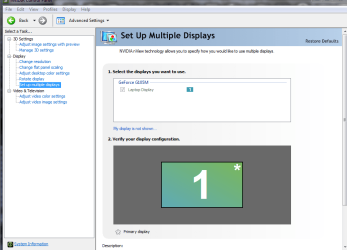
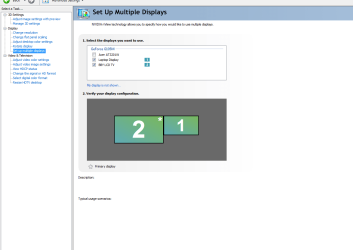
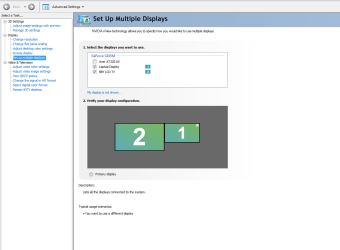
"Set up multiple displays" and
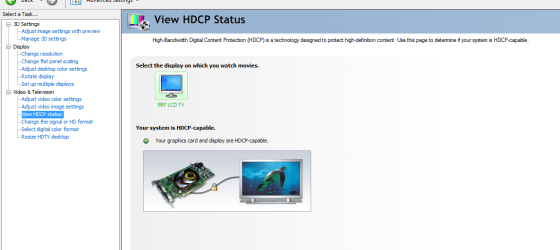
"View HDCP status" ?

Sounds like your LT got messed up as to what it's primary/main display should be...

And please update your system specs, specially mobo, BIOS version and Graphics card etc...
 

My Computer

Computer Manufacturer/Model Number
custom build
OS
Windows 7 64b Ultimate
CPU
I7-2600 3.40GHz - testing various OC levels..
Motherboard
ASUS Sabretooth
Memory
2x 4Gb DDR3/1333
Graphics Card(s)
GTX570 - testing OC levels
Sound Card
motherboard 7.1 DIG.
Monitor(s) Displays
2x Ilyama 24" E2409HDS-B1 2ms/DVI
Screen Resolution
1920 x 1080
Hard Drives
120 GB Intel Elmcrest SSD
1 TB SATAII 7200RPM/32MB
External 2TB USB3
PSU
Corsair Pro HX850W
Cooling
Coolermaster Hyper V8
Keyboard
Logitech G110
Mouse
Logitech G700
Internet Speed
25Mb
Other Info
CPU: 7,7 RAM: 7,7 GTX: 7,9 GTX 3D : 7,9 SSD 7,6
Overall 7,6 ...... now to speed up the SSD... ;)

Also use a Dell XPS M1710 on Vista 32b
Asus LT on Vista 32
3 older machines still doing fine on Linux/ubuntu but not used much anymore...
Ok... updated system specs. Do you want the NVIDIA snip with VGA and HDMI connected or just HDMI?
 

My Computer

Computer Manufacturer/Model Number
Asus UX50V
OS
Windows 7 Home Premium 64-bit
CPU
Intel® Core™2 Duo Processor SU9600 1.6 GHz
Motherboard
Asus 60-NVLMB1200-C14
Memory
4GB SDRAM
Graphics Card(s)
NVIDIA® GeForce® G 105M
Sound Card
Realtek High Definition Audio
Monitor(s) Displays
15.6" HD LED backlight, Color-Shine
Screen Resolution
1366x768
Hard Drives
2.5" 9.5mm SATA 500GB
Ok... updated system specs. Do you want the NVIDIA snip with VGA and HDMI connected or just HDMI?

With both connected please, actually better: in both cases....
 
Last edited:

My Computer

Computer Manufacturer/Model Number
custom build
OS
Windows 7 64b Ultimate
CPU
I7-2600 3.40GHz - testing various OC levels..
Motherboard
ASUS Sabretooth
Memory
2x 4Gb DDR3/1333
Graphics Card(s)
GTX570 - testing OC levels
Sound Card
motherboard 7.1 DIG.
Monitor(s) Displays
2x Ilyama 24" E2409HDS-B1 2ms/DVI
Screen Resolution
1920 x 1080
Hard Drives
120 GB Intel Elmcrest SSD
1 TB SATAII 7200RPM/32MB
External 2TB USB3
PSU
Corsair Pro HX850W
Cooling
Coolermaster Hyper V8
Keyboard
Logitech G110
Mouse
Logitech G700
Internet Speed
25Mb
Other Info
CPU: 7,7 RAM: 7,7 GTX: 7,9 GTX 3D : 7,9 SSD 7,6
Overall 7,6 ...... now to speed up the SSD... ;)

Also use a Dell XPS M1710 on Vista 32b
Asus LT on Vista 32
3 older machines still doing fine on Linux/ubuntu but not used much anymore...
I noticed that the only way to have LCD and HDMI working at same time is to clone or extend desktop... when cloned, that means the HDMI is not actually running in HD right? Before the incident I could run both displays with different resolutions without extending desktop.

See png name for state of each snip.
 

Attachments

  • hdcp_vga.PNG
    hdcp_vga.PNG
    64.9 KB · Views: 593
  • sumd_no_vga.PNG
    sumd_no_vga.PNG
    31.1 KB · Views: 479
  • sumd_vga_1.PNG
    sumd_vga_1.PNG
    26.7 KB · Views: 435
  • sumd_vga_2.PNG
    sumd_vga_2.PNG
    28.2 KB · Views: 306
Last edited:

My Computer

Computer Manufacturer/Model Number
Asus UX50V
OS
Windows 7 Home Premium 64-bit
CPU
Intel® Core™2 Duo Processor SU9600 1.6 GHz
Motherboard
Asus 60-NVLMB1200-C14
Memory
4GB SDRAM
Graphics Card(s)
NVIDIA® GeForce® G 105M
Sound Card
Realtek High Definition Audio
Monitor(s) Displays
15.6" HD LED backlight, Color-Shine
Screen Resolution
1366x768
Hard Drives
2.5" 9.5mm SATA 500GB
Tried tinkering with different settings in nvidia control panel and all other suggestions... even tried restoring system from a backup when everything was working fine. But, still only working with VGA attached. When I remove VGA... HDMI loses its signal. Very Puzzling.

Normally this happens when you cloned the two. In this case, don't. What I dont get yet.. What is the third screen in your snips?
Make you lt screen primary and do not clone. We'll go from there....
 

My Computer

Computer Manufacturer/Model Number
custom build
OS
Windows 7 64b Ultimate
CPU
I7-2600 3.40GHz - testing various OC levels..
Motherboard
ASUS Sabretooth
Memory
2x 4Gb DDR3/1333
Graphics Card(s)
GTX570 - testing OC levels
Sound Card
motherboard 7.1 DIG.
Monitor(s) Displays
2x Ilyama 24" E2409HDS-B1 2ms/DVI
Screen Resolution
1920 x 1080
Hard Drives
120 GB Intel Elmcrest SSD
1 TB SATAII 7200RPM/32MB
External 2TB USB3
PSU
Corsair Pro HX850W
Cooling
Coolermaster Hyper V8
Keyboard
Logitech G110
Mouse
Logitech G700
Internet Speed
25Mb
Other Info
CPU: 7,7 RAM: 7,7 GTX: 7,9 GTX 3D : 7,9 SSD 7,6
Overall 7,6 ...... now to speed up the SSD... ;)

Also use a Dell XPS M1710 on Vista 32b
Asus LT on Vista 32
3 older machines still doing fine on Linux/ubuntu but not used much anymore...
Tried tinkering with different settings in nvidia control panel and all other suggestions... even tried restoring system from a backup when everything was working fine. But, still only working with VGA attached. When I remove VGA... HDMI loses its signal. Very Puzzling.

Normally this happens when you cloned the two. In this case, don't. What I dont get yet.. What is the third screen in your snips?
Make you lt screen primary and do not clone. We'll go from there....

Snip 4... lt is primary and not cloned. The third screen would be the VGA connected to a TV... has to be connected to see the HDMI screen.
 

My Computer

Computer Manufacturer/Model Number
Asus UX50V
OS
Windows 7 Home Premium 64-bit
CPU
Intel® Core™2 Duo Processor SU9600 1.6 GHz
Motherboard
Asus 60-NVLMB1200-C14
Memory
4GB SDRAM
Graphics Card(s)
NVIDIA® GeForce® G 105M
Sound Card
Realtek High Definition Audio
Monitor(s) Displays
15.6" HD LED backlight, Color-Shine
Screen Resolution
1366x768
Hard Drives
2.5" 9.5mm SATA 500GB
You mean your VGA laptop output has to be connected to a third screen? Which vga output is that ? Graphics card or does you mobo have one? Or is the vga ALSO connected to the same tv as the hdmi?
 

My Computer

Computer Manufacturer/Model Number
custom build
OS
Windows 7 64b Ultimate
CPU
I7-2600 3.40GHz - testing various OC levels..
Motherboard
ASUS Sabretooth
Memory
2x 4Gb DDR3/1333
Graphics Card(s)
GTX570 - testing OC levels
Sound Card
motherboard 7.1 DIG.
Monitor(s) Displays
2x Ilyama 24" E2409HDS-B1 2ms/DVI
Screen Resolution
1920 x 1080
Hard Drives
120 GB Intel Elmcrest SSD
1 TB SATAII 7200RPM/32MB
External 2TB USB3
PSU
Corsair Pro HX850W
Cooling
Coolermaster Hyper V8
Keyboard
Logitech G110
Mouse
Logitech G700
Internet Speed
25Mb
Other Info
CPU: 7,7 RAM: 7,7 GTX: 7,9 GTX 3D : 7,9 SSD 7,6
Overall 7,6 ...... now to speed up the SSD... ;)

Also use a Dell XPS M1710 on Vista 32b
Asus LT on Vista 32
3 older machines still doing fine on Linux/ubuntu but not used much anymore...
You mean your VGA laptop output has to be connected to a third screen? Which vga output is that ? Graphics card or does you mobo have one? Or is the vga ALSO connected to the same tv as the hdmi?

Yes VGA has to be connected to a 3rd screen(second TV in this case) I'm pretty sure the VGA is on the mobo.
 

My Computer

Computer Manufacturer/Model Number
Asus UX50V
OS
Windows 7 Home Premium 64-bit
CPU
Intel® Core™2 Duo Processor SU9600 1.6 GHz
Motherboard
Asus 60-NVLMB1200-C14
Memory
4GB SDRAM
Graphics Card(s)
NVIDIA® GeForce® G 105M
Sound Card
Realtek High Definition Audio
Monitor(s) Displays
15.6" HD LED backlight, Color-Shine
Screen Resolution
1366x768
Hard Drives
2.5" 9.5mm SATA 500GB
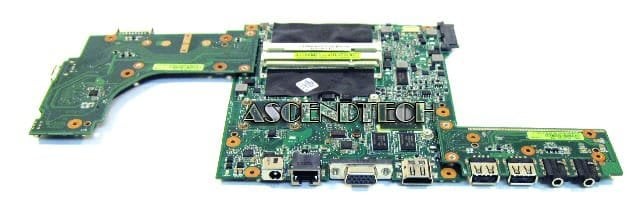
Here is a pic of the mobo if that helps at all.
 

Attachments

  • 60NVLMB1200C14001.jpg
    60NVLMB1200C14001.jpg
    39.3 KB · Views: 42

My Computer

Computer Manufacturer/Model Number
Asus UX50V
OS
Windows 7 Home Premium 64-bit
CPU
Intel® Core™2 Duo Processor SU9600 1.6 GHz
Motherboard
Asus 60-NVLMB1200-C14
Memory
4GB SDRAM
Graphics Card(s)
NVIDIA® GeForce® G 105M
Sound Card
Realtek High Definition Audio
Monitor(s) Displays
15.6" HD LED backlight, Color-Shine
Screen Resolution
1366x768
Hard Drives
2.5" 9.5mm SATA 500GB
OK, a last check question: if you right click on your screen and go into W7 screen properties (not nvidia) in the case you have the 3 screens connected... what do you get?
In that screen, please make LT screen the primary and do not clone or extend anything...
 

My Computer

Computer Manufacturer/Model Number
custom build
OS
Windows 7 64b Ultimate
CPU
I7-2600 3.40GHz - testing various OC levels..
Motherboard
ASUS Sabretooth
Memory
2x 4Gb DDR3/1333
Graphics Card(s)
GTX570 - testing OC levels
Sound Card
motherboard 7.1 DIG.
Monitor(s) Displays
2x Ilyama 24" E2409HDS-B1 2ms/DVI
Screen Resolution
1920 x 1080
Hard Drives
120 GB Intel Elmcrest SSD
1 TB SATAII 7200RPM/32MB
External 2TB USB3
PSU
Corsair Pro HX850W
Cooling
Coolermaster Hyper V8
Keyboard
Logitech G110
Mouse
Logitech G700
Internet Speed
25Mb
Other Info
CPU: 7,7 RAM: 7,7 GTX: 7,9 GTX 3D : 7,9 SSD 7,6
Overall 7,6 ...... now to speed up the SSD... ;)

Also use a Dell XPS M1710 on Vista 32b
Asus LT on Vista 32
3 older machines still doing fine on Linux/ubuntu but not used much anymore...
OK, a last check question: if you right click on your screen and go into W7 screen properties (not nvidia) in the case you have the 3 screens connected... what do you get?
In that screen, please make LT screen the primary and do not clone or extend anything...

Ok, by default in this case VGA is primary and HDMI is extended. If I make lt primary; no signal on HDMI or VGA but they are listed as 2 and 3. Only way to get signal on either is to clone or extend.
 

My Computer

Computer Manufacturer/Model Number
Asus UX50V
OS
Windows 7 Home Premium 64-bit
CPU
Intel® Core™2 Duo Processor SU9600 1.6 GHz
Motherboard
Asus 60-NVLMB1200-C14
Memory
4GB SDRAM
Graphics Card(s)
NVIDIA® GeForce® G 105M
Sound Card
Realtek High Definition Audio
Monitor(s) Displays
15.6" HD LED backlight, Color-Shine
Screen Resolution
1366x768
Hard Drives
2.5" 9.5mm SATA 500GB
And you are sure it used to work without cloning?
 

My Computer

Computer Manufacturer/Model Number
custom build
OS
Windows 7 64b Ultimate
CPU
I7-2600 3.40GHz - testing various OC levels..
Motherboard
ASUS Sabretooth
Memory
2x 4Gb DDR3/1333
Graphics Card(s)
GTX570 - testing OC levels
Sound Card
motherboard 7.1 DIG.
Monitor(s) Displays
2x Ilyama 24" E2409HDS-B1 2ms/DVI
Screen Resolution
1920 x 1080
Hard Drives
120 GB Intel Elmcrest SSD
1 TB SATAII 7200RPM/32MB
External 2TB USB3
PSU
Corsair Pro HX850W
Cooling
Coolermaster Hyper V8
Keyboard
Logitech G110
Mouse
Logitech G700
Internet Speed
25Mb
Other Info
CPU: 7,7 RAM: 7,7 GTX: 7,9 GTX 3D : 7,9 SSD 7,6
Overall 7,6 ...... now to speed up the SSD... ;)

Also use a Dell XPS M1710 on Vista 32b
Asus LT on Vista 32
3 older machines still doing fine on Linux/ubuntu but not used much anymore...
And you are sure it used to work without cloning?

Yeah, pretty sure... different resolutions... so that wouldn't be cloning right?
 

My Computer

Computer Manufacturer/Model Number
Asus UX50V
OS
Windows 7 Home Premium 64-bit
CPU
Intel® Core™2 Duo Processor SU9600 1.6 GHz
Motherboard
Asus 60-NVLMB1200-C14
Memory
4GB SDRAM
Graphics Card(s)
NVIDIA® GeForce® G 105M
Sound Card
Realtek High Definition Audio
Monitor(s) Displays
15.6" HD LED backlight, Color-Shine
Screen Resolution
1366x768
Hard Drives
2.5" 9.5mm SATA 500GB
No, you'd expect it to go for the lowest, maximum res of the two screens and present that on both. So if you are sure there were different resolutions then it was not cloned.

Please test something strange: Try making TV hdmi your primary screen and when it is.. take out the vga connection. If you need to put things right after because you end up with no screen at all, boot in Safe mode and reset.
 

My Computer

Computer Manufacturer/Model Number
custom build
OS
Windows 7 64b Ultimate
CPU
I7-2600 3.40GHz - testing various OC levels..
Motherboard
ASUS Sabretooth
Memory
2x 4Gb DDR3/1333
Graphics Card(s)
GTX570 - testing OC levels
Sound Card
motherboard 7.1 DIG.
Monitor(s) Displays
2x Ilyama 24" E2409HDS-B1 2ms/DVI
Screen Resolution
1920 x 1080
Hard Drives
120 GB Intel Elmcrest SSD
1 TB SATAII 7200RPM/32MB
External 2TB USB3
PSU
Corsair Pro HX850W
Cooling
Coolermaster Hyper V8
Keyboard
Logitech G110
Mouse
Logitech G700
Internet Speed
25Mb
Other Info
CPU: 7,7 RAM: 7,7 GTX: 7,9 GTX 3D : 7,9 SSD 7,6
Overall 7,6 ...... now to speed up the SSD... ;)

Also use a Dell XPS M1710 on Vista 32b
Asus LT on Vista 32
3 older machines still doing fine on Linux/ubuntu but not used much anymore...
No, you'd expect it to go for the lowest, maximum res of the two screens and present that on both. So if you are sure there were different resolutions then it was not cloned.

Please test something strange: Try making TV hdmi your primary screen and when it is.. take out the vga connection. If you need to put things right after because you end up with no screen at all, boot in Safe mode and reset.

When HDMI is primary and VGA is removed... it switches back to lt and HDMI TV is no longer listed in displays.
 

My Computer

Computer Manufacturer/Model Number
Asus UX50V
OS
Windows 7 Home Premium 64-bit
CPU
Intel® Core™2 Duo Processor SU9600 1.6 GHz
Motherboard
Asus 60-NVLMB1200-C14
Memory
4GB SDRAM
Graphics Card(s)
NVIDIA® GeForce® G 105M
Sound Card
Realtek High Definition Audio
Monitor(s) Displays
15.6" HD LED backlight, Color-Shine
Screen Resolution
1366x768
Hard Drives
2.5" 9.5mm SATA 500GB
Back
Top