hdtv as second display

jojo6

New member
Local time
12:34 PM
Messages
13
Hello there!Guys could you please help.I'm not very good at computers.I have a laptop SONY VAIO ,CPU Intel Core 2 Duo Processor T8100 ENHANCED INTEL SPEEDSTEP 2.10 GHz,memory 4GB/Go DDR2 SDRAM,grafics NVIDIA GeFORCE 8400M GT GPU,BLURAY COMBO DRIVE,1080p.When i bought the laptop i had vista home premium and now i bought the windows 7 home premium wich came with 2 cd(32bit) or (64bit).Before when i had the vista i could connect my hdtv wich is a sony 40inch thru the HDMI and it would recognise it but now when i install windows 7 it doesn't.Oh by the way i did update the driver and i install the 32 bit version.I'm not even sure if i can install the 64 bit.Is not even working with tv out ( svideo ).THANKS
 

My Computer

OS
windows 7 home premium
1) Did you install x86 or x64 version of 7?

2) What outputs does your laptop have?

3) What inputs does your tv have?

The best option would be hdmi.
 

My Computer

Computer Manufacturer/Model Number
Sony Vaio Z46GDU
OS
Windows 7 Ultimate x86-64
CPU
[email protected] 1066MHz FSB
Motherboard
Sony branded
Memory
6GB DDR3 1066MHz
Graphics Card(s)
9300M GS 256MB Dedicated (Speed) + Intel4500MHD (Stamina)
Sound Card
Realtek HD Audio
Monitor(s) Displays
13.1' WXGA
Screen Resolution
1600x900
Hard Drives
320GB 7200RPM w/ 16MB cache
Internet Speed
1MB/s
My laptop got the hdmi and s-video and tv the same
i install the 32 bit version
 

My Computer

OS
windows 7 home premium
Then connect an HDMI cable from your laptop to your TV, and adjust any settings.
 

My Computer

Computer Manufacturer/Model Number
Sony Vaio Z46GDU
OS
Windows 7 Ultimate x86-64
CPU
[email protected] 1066MHz FSB
Motherboard
Sony branded
Memory
6GB DDR3 1066MHz
Graphics Card(s)
9300M GS 256MB Dedicated (Speed) + Intel4500MHD (Stamina)
Sound Card
Realtek HD Audio
Monitor(s) Displays
13.1' WXGA
Screen Resolution
1600x900
Hard Drives
320GB 7200RPM w/ 16MB cache
Internet Speed
1MB/s
I did and i adjust the settings several times but it doesn't recognise the tv.it's just show the main display.i pres detect and nothing.as i said when i had the vista it was working but now i dont know what to do.
 

My Computer

OS
windows 7 home premium
What is the resolution of the tv and your laptop? Go into the gpu control panel and look at a setting for tv's.
 

My Computer

Computer Manufacturer/Model Number
Sony Vaio Z46GDU
OS
Windows 7 Ultimate x86-64
CPU
[email protected] 1066MHz FSB
Motherboard
Sony branded
Memory
6GB DDR3 1066MHz
Graphics Card(s)
9300M GS 256MB Dedicated (Speed) + Intel4500MHD (Stamina)
Sound Card
Realtek HD Audio
Monitor(s) Displays
13.1' WXGA
Screen Resolution
1600x900
Hard Drives
320GB 7200RPM w/ 16MB cache
Internet Speed
1MB/s
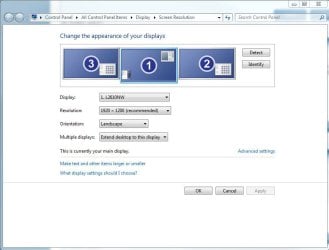
What is gpu.how do i get there.what i did was go to control panel- adjust screen resolution and then i changed the resolution to several options still not see second display.just display 1.i tried detect but nothing
 

My Computer

OS
windows 7 home premium
RESOLUTION ON THE DISPLAY IS 1280 BY 800 TRUE COLOR 32BIT DEFAULT REFRESH AND ON THE HDTV IS 1080p FULL HD.
 

My Computer

OS
windows 7 home premium
In control panel look for nvidia control panel, plug in the cable and look at the display options. GPU is your graphics card. You might have to lower the resolution of the TV. Check the control panel.
 

My Computer

Computer Manufacturer/Model Number
Sony Vaio Z46GDU
OS
Windows 7 Ultimate x86-64
CPU
[email protected] 1066MHz FSB
Motherboard
Sony branded
Memory
6GB DDR3 1066MHz
Graphics Card(s)
9300M GS 256MB Dedicated (Speed) + Intel4500MHD (Stamina)
Sound Card
Realtek HD Audio
Monitor(s) Displays
13.1' WXGA
Screen Resolution
1600x900
Hard Drives
320GB 7200RPM w/ 16MB cache
Internet Speed
1MB/s
I did look in control panel for nvidia control panel and i couldn't find it.
 

My Computer

OS
windows 7 home premium
Look in the TV's menu settings to ensure that nothing needs a reset, or whether the TV needs to scan for fresh input sources. If you can't detect the HDMI signal then try and test the output on another HDMI display.

At least if you can deduce where the problem lies you can better tackle it.
 

My Computer

Computer Manufacturer/Model Number
Custom built machine
OS
W7 x64
CPU
Intel Q9300 2.5Ghz Quad LGA775 (Would like Q9650)
Motherboard
Gigabyte GA-EP45T-UD3R (F6 Bios)
Memory
4Gb OCZ Gold 1,333Mhz
Graphics Card(s)
Palit HD4850 O/C Sonic 512Mb DDR3, Dual DViD's
Sound Card
Azalia to twin Samson 50w Studio Monitors
Monitor(s) Displays
Twin Dell (E-IPS) U2311H 23.6" Screens
Screen Resolution
1920 x 1080 @ 60Hz
Hard Drives
Crucial M4 SSD, archives on twin Western Digital Caviar Black WD2002FAEX, 2TB, 7200rpm HDD's, Samsung Ritemaster CD/DVD Burner...
PSU
OCZ 600w
Case
Lian-Li PC8 acoustifoamed' aluminium tower
Cooling
Scythe 140mm Zipang
Keyboard
Cherry PS/2 custom model
Mouse
Lenovo USB laser "Thinkpad" Mouse
Internet Speed
ADSL2+ @14Mbps downstream & Cat6 Gigabit Ethernet
Antivirus
NOD32
Browser
Opera
Other Info
Silicon Dust HD Homerun Dual FTA (Ethernet) TV Tuners, Dray Tek Vigor 2850Vn router and 8x HP Gigabit Switch. Lian-Li CR26 Card Reader, Canon MF4430 iSensys laser printer/scanner.

My Computer

Computer Manufacturer/Model Number
* BFK Customs *
OS
W 7 64-bit Ultimate
CPU
Intel Q9550 Yorkfield
Motherboard
ASUS P5Q Pro
Memory
8GB Dominator 8500C5D
Graphics Card(s)
ATI : XFX 5870
Sound Card
Realtek HD Audio 7-1
Monitor(s) Displays
1x 47" LCD HDMI & 3x 26" LCD HDMI
Screen Resolution
1920x1080P & 1920x1200
Hard Drives
1x 80GB Intel X25-M G2 SSD : 1x 500GB & 1x 640GB WD Caviar Black(s)
PSU
Corsair 620HX
Case
Cooler Master RC-690
Cooling
Tuniq Tower 120, 2x 140mm and 3x 120mm case fans
Keyboard
Microsoft 500
Mouse
Razer Diamondback 3G
Internet Speed
14 Mb/s
Other Info
1x Koutech 3Gb/s SATA HDD Hot Swap Rack
NVIDIA should have a tv display setting.
 

My Computer

Computer Manufacturer/Model Number
Sony Vaio Z46GDU
OS
Windows 7 Ultimate x86-64
CPU
[email protected] 1066MHz FSB
Motherboard
Sony branded
Memory
6GB DDR3 1066MHz
Graphics Card(s)
9300M GS 256MB Dedicated (Speed) + Intel4500MHD (Stamina)
Sound Card
Realtek HD Audio
Monitor(s) Displays
13.1' WXGA
Screen Resolution
1600x900
Hard Drives
320GB 7200RPM w/ 16MB cache
Internet Speed
1MB/s
I have an option on the tv under set up hdmi connections that sais device list update.i did what you said and the tv could not detect any other devices
 

My Computer

OS
windows 7 home premium
I could not get to the nvidia control panel or maybe i don't know how.
 

My Computer

OS
windows 7 home premium
Search for nvidia in control panel.
 

My Computer

Computer Manufacturer/Model Number
Sony Vaio Z46GDU
OS
Windows 7 Ultimate x86-64
CPU
[email protected] 1066MHz FSB
Motherboard
Sony branded
Memory
6GB DDR3 1066MHz
Graphics Card(s)
9300M GS 256MB Dedicated (Speed) + Intel4500MHD (Stamina)
Sound Card
Realtek HD Audio
Monitor(s) Displays
13.1' WXGA
Screen Resolution
1600x900
Hard Drives
320GB 7200RPM w/ 16MB cache
Internet Speed
1MB/s
Ok i got to device manager-display adaptors-standard vga graphics adaptors but nothing about nvidia.
 

My Computer

OS
windows 7 home premium
shot in the dark
1: right click anywhere on the desktop (just not on an icon or gadget)
2:from the menu that appeared select "screen resolution"
3:in the window that appears, next to multiple display click on the pull down tab try selecting "extend these displays" or " duplicate these displays" see if any of that works for ya
 

My Computer

Computer Manufacturer/Model Number
HP Compaq dc5750 Microtower
OS
Win 7 Ultimate 64 bit
CPU
AMD Athlon(tm) 64 X2 Dual Core Processor 6000+
Memory
8.00 GB
Graphics Card(s)
ATI Radeon HD 4670
Sound Card
Realtek High Definition Audio \ ATI High Definition Aud
Monitor(s) Displays
1) VA2226W 2) 32PFL3403D
Screen Resolution
1) 1680 X 1050 32bit @60 Hz 2) 1920 X 1080 32bit @ 60 hz
Hard Drives
Model SAMSUNG HD103UJ ATA Device
Model ST3160815AS ATA Device
Model WDC WD1600AAJS-60WAA0 ATA Device
Keyboard
logitech lx310
Mouse
logitech lx310
I Have the same issue but also have a resolution to this, restart your computer while the HDMI cable is plugged in. this worked for me, but as a previous Vista user this is very annoying as it is no longer as simple as plug and play. This may be a video driver thing with nvidia and not just windows seven.
 

My Computer

Computer Manufacturer/Model Number
Desktop, built by me. Laptop, built by ASUS
OS
Vista HP, Vista Ultimate, XP Pro, Seven Ultimate x2
CPU
Desktop, AMD Athlon X2 6400+. Laptop, Intel C2D T9400
Motherboard
Desktop, K9N Diamond. Laptop, Asus G50VT
Memory
Desktop, 4 GB PC2 6400. Laptop, 4 GB PC2 6400
Graphics Card(s)
Desktop, Nvidia 8800 Ultra OC. Laptop, Nvidia 9800M GS
Sound Card
Desktop, intergrated. Laptop, intergrated
Monitor(s) Displays
Sharp Aquos, In built Laptop, Dell ultra sharp
Screen Resolution
46 inch 1920x1080, 15.4 inch 1680x1050, 24 inch, 1920x1200
Hard Drives
Desktop, Veloci Raptor, Raptor X, WD 500GB. Laptop, 250 GB seagate and 320 GB Western Digital both at 7200 RPM. Plus one 320 GB external passport.
PSU
Desktop, Ultra X3 600 watt modular PSU, Laptop, a brick PSU
Case
Desktop, Ultra eXo Aluminum Chassis. Laptop, It's a laptop
Cooling
Desktop, 2 120mm ball bearing fans, ChillTec Thermo Electric
Keyboard
Desktop. Microsoft Natural Ergonomic Keyboard 4000
Mouse
Desktop, Logitech track ball wired.
Internet Speed
10 Mb I think
Other Info
There is no truth to any of our reality but what we want to believe.

LPR
Here is some much better news (I hope this will work for you too). The previous drivers I was using is provided through windows updates, the version number is 186.31 for 9800m GS. I went to Nvidia web site and used their version which is 186.81. Now plug and play works perfect with an HDTV. You will have to re-run the WEI to to turn transparency back on.
 

My Computer

Computer Manufacturer/Model Number
Desktop, built by me. Laptop, built by ASUS
OS
Vista HP, Vista Ultimate, XP Pro, Seven Ultimate x2
CPU
Desktop, AMD Athlon X2 6400+. Laptop, Intel C2D T9400
Motherboard
Desktop, K9N Diamond. Laptop, Asus G50VT
Memory
Desktop, 4 GB PC2 6400. Laptop, 4 GB PC2 6400
Graphics Card(s)
Desktop, Nvidia 8800 Ultra OC. Laptop, Nvidia 9800M GS
Sound Card
Desktop, intergrated. Laptop, intergrated
Monitor(s) Displays
Sharp Aquos, In built Laptop, Dell ultra sharp
Screen Resolution
46 inch 1920x1080, 15.4 inch 1680x1050, 24 inch, 1920x1200
Hard Drives
Desktop, Veloci Raptor, Raptor X, WD 500GB. Laptop, 250 GB seagate and 320 GB Western Digital both at 7200 RPM. Plus one 320 GB external passport.
PSU
Desktop, Ultra X3 600 watt modular PSU, Laptop, a brick PSU
Case
Desktop, Ultra eXo Aluminum Chassis. Laptop, It's a laptop
Cooling
Desktop, 2 120mm ball bearing fans, ChillTec Thermo Electric
Keyboard
Desktop. Microsoft Natural Ergonomic Keyboard 4000
Mouse
Desktop, Logitech track ball wired.
Internet Speed
10 Mb I think
Other Info
There is no truth to any of our reality but what we want to believe.

LPR
Back
Top