Headphones/earphones don't work

Chris25

New member
Local time
11:05 PM
Messages
6
Hi there
wave.gif


I'm new here, and being a girl (J/K), I don't quite get along with my computer
1-shy.gif


Here's my problem:

My HP Compaq Presario CQ60 - 215EP had the Windows Vista as the operating system: everything was working just fine.

A while ago, I decided do change it to Windows 7 (32 bits) and, all of the sudden, my headphones (earphones also) simply stoped working.

I don't think it's a hardware problem, because everything was fine and dandy before I made that change.

I don't know the name of my of my sound board because that's not specified on the My Computers properties, but I'm currently using the Conexant High Definition SmartAudio 221 and the High Definition Audio Devide drivers (I guess
1-shy.gif
)
(and it sais that they're updated)

Can you give a hand please?
Thanks
i_smile.gif
 

My Computer My Computer

At a glance

Windows 7 Home Premium - 32 bitIntel(R) Pentium(R) Dual CPU T3400 @ 2.16GHz ...4,00GB
Computer Manufacturer/Model Number
HP Compaq Presario CQ60 - 215EP
OS
Windows 7 Home Premium - 32 bit
CPU
Intel(R) Pentium(R) Dual CPU T3400 @ 2.16GHz 2.17 GHz
Memory
4,00GB
You got sound on the speakers? If don't,go to Device Manager,right click on the Sound,video,game controlers and select Update Driver Software. Maybe you got wrong drivers.
You can intall Speccy to find your sound card name.
 

My Computer My Computer

At a glance

Windows 10 Pro x64Intel Core i5 4440 @Stock4 x 4GB HyperX Fury DDR3Gigabyte GTX 1050Ti O4G
Computer type
PC/Desktop
Computer Manufacturer/Model Number
Custom Build
OS
Windows 10 Pro x64
CPU
Intel Core i5 4440 @Stock
Motherboard
Gigabyte Z97 D3H
Memory
4 x 4GB HyperX Fury DDR3
Graphics Card(s)
Gigabyte GTX 1050Ti O4G
Sound Card
Integrated
Monitor(s) Displays
Dell P2417H
Screen Resolution
1920 x 1080
Hard Drives
Samsung EVO 850 120GB / Toshiba DT01ACA050 1TB 7200prm 32MB
PSU
Riotoro Onyx 750W
Case
NZXT H500 Black-Red
Cooling
Stock CPU + NZXT 120mm + 2x120mm red fans
Keyboard
Modecom Volcano Lanparty
Mouse
Asus ROG Gladius / DeepCool E-Pad Plus
Internet Speed
DOCSIS 50/3 Mbit
Browser
Google Chrome
Other Info
Asus K55VJ(i5 3210M, GT635M / 2GB, 8GB DDR3, 500GB HDD)
Yeah, my speakers are just fine...
Only the earphones / headphones don't work
 

My Computer My Computer

At a glance

Windows 7 Home Premium - 32 bitIntel(R) Pentium(R) Dual CPU T3400 @ 2.16GHz ...4,00GB
Computer Manufacturer/Model Number
HP Compaq Presario CQ60 - 215EP
OS
Windows 7 Home Premium - 32 bit
CPU
Intel(R) Pentium(R) Dual CPU T3400 @ 2.16GHz 2.17 GHz
Memory
4,00GB
Did you try with other headphones?
 

My Computer My Computer

At a glance

Windows 10 Pro x64Intel Core i5 4440 @Stock4 x 4GB HyperX Fury DDR3Gigabyte GTX 1050Ti O4G
Computer type
PC/Desktop
Computer Manufacturer/Model Number
Custom Build
OS
Windows 10 Pro x64
CPU
Intel Core i5 4440 @Stock
Motherboard
Gigabyte Z97 D3H
Memory
4 x 4GB HyperX Fury DDR3
Graphics Card(s)
Gigabyte GTX 1050Ti O4G
Sound Card
Integrated
Monitor(s) Displays
Dell P2417H
Screen Resolution
1920 x 1080
Hard Drives
Samsung EVO 850 120GB / Toshiba DT01ACA050 1TB 7200prm 32MB
PSU
Riotoro Onyx 750W
Case
NZXT H500 Black-Red
Cooling
Stock CPU + NZXT 120mm + 2x120mm red fans
Keyboard
Modecom Volcano Lanparty
Mouse
Asus ROG Gladius / DeepCool E-Pad Plus
Internet Speed
DOCSIS 50/3 Mbit
Browser
Google Chrome
Other Info
Asus K55VJ(i5 3210M, GT635M / 2GB, 8GB DDR3, 500GB HDD)
Yeah.

Sony, Halfmman Viper, you name it...
None of them work :cry:
 

My Computer My Computer

At a glance

Windows 7 Home Premium - 32 bitIntel(R) Pentium(R) Dual CPU T3400 @ 2.16GHz ...4,00GB
Computer Manufacturer/Model Number
HP Compaq Presario CQ60 - 215EP
OS
Windows 7 Home Premium - 32 bit
CPU
Intel(R) Pentium(R) Dual CPU T3400 @ 2.16GHz 2.17 GHz
Memory
4,00GB
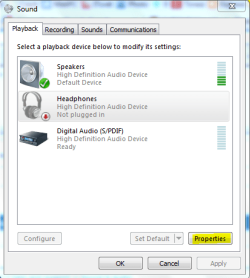
Go to Control Panel->Sound. On Playback tab select Headphone,and then Properties.
1.PNG
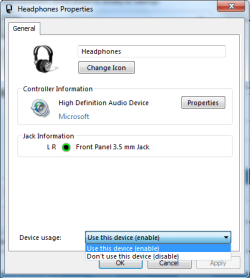
In Device Usage,check if its selected Don't use this device (disabled),change to Use this device.
2.png
 

My Computer My Computer

At a glance

Windows 10 Pro x64Intel Core i5 4440 @Stock4 x 4GB HyperX Fury DDR3Gigabyte GTX 1050Ti O4G
Computer type
PC/Desktop
Computer Manufacturer/Model Number
Custom Build
OS
Windows 10 Pro x64
CPU
Intel Core i5 4440 @Stock
Motherboard
Gigabyte Z97 D3H
Memory
4 x 4GB HyperX Fury DDR3
Graphics Card(s)
Gigabyte GTX 1050Ti O4G
Sound Card
Integrated
Monitor(s) Displays
Dell P2417H
Screen Resolution
1920 x 1080
Hard Drives
Samsung EVO 850 120GB / Toshiba DT01ACA050 1TB 7200prm 32MB
PSU
Riotoro Onyx 750W
Case
NZXT H500 Black-Red
Cooling
Stock CPU + NZXT 120mm + 2x120mm red fans
Keyboard
Modecom Volcano Lanparty
Mouse
Asus ROG Gladius / DeepCool E-Pad Plus
Internet Speed
DOCSIS 50/3 Mbit
Browser
Google Chrome
Other Info
Asus K55VJ(i5 3210M, GT635M / 2GB, 8GB DDR3, 500GB HDD)
The headphones don't even show in that list
 

My Computer My Computer

At a glance

Windows 7 Home Premium - 32 bitIntel(R) Pentium(R) Dual CPU T3400 @ 2.16GHz ...4,00GB
Computer Manufacturer/Model Number
HP Compaq Presario CQ60 - 215EP
OS
Windows 7 Home Premium - 32 bit
CPU
Intel(R) Pentium(R) Dual CPU T3400 @ 2.16GHz 2.17 GHz
Memory
4,00GB
You have the Vista driver,

Conexant High-Definition SmartAudio 221 Driver Compaq Presario CQ60-215EP Notebook PC - HP Customer Care (United States - English)

or the Windows 7 driver,

Conexant High-Definition SmartAudio 221 Driver Compaq Presario CQ60-215EP Notebook PC - HP Customer Care (United States - English)

installed? Also it is mentioned in the description, is there a Conexant control panel of any kind showing in either the Start menu, Control Panel or in the notification area? If so it may need to be configured there to work.

P.S. Stalker if those are current screen shots from your computer, you don't have the sound driver installed and are running off of the default Windows driver.
 

My Computer My Computer

At a glance

Win 7 Ultimate x64FX-8350 @ 4.6 GHz so farADATA XPG V1 Series Black 8GB DDR3 1600Sapphire R9 270x Dual-X
Computer type
PC/Desktop
Computer Manufacturer/Model Number
Me
OS
Win 7 Ultimate x64
CPU
FX-8350 @ 4.6 GHz so far
Motherboard
Asus M5A97 EVO
Memory
ADATA XPG V1 Series Black 8GB DDR3 1600
Graphics Card(s)
Sapphire R9 270x Dual-X
Sound Card
Xonar DGX w/ Corsair Vengence 1300
Monitor(s) Displays
Acer S232HL Abid
Screen Resolution
1920x1080
Hard Drives
120 GB OCZ Vertex 3
500 GB Seagate 7200.12
PSU
Antec Earthwatts 650W Green
Case
Antec Three Hundred
Cooling
Cooler Master 212 EVO
Keyboard
Logitech G510
Mouse
Logitech G500s
Internet Speed
35000/3000
I've done it once already, but, to be safe, I've installed the one (of the windows 7) of the link you gave me...

Still nothing :cry:

I don't quite understand what you were talking about when you mentioned the Conexatn Control Panel... but there's nothing on my notification area and on my Start menu...

On the Sound option of the Control Panel, it shows the driver, of course.

Here:
14pv0p.png
 

My Computer My Computer

At a glance

Windows 7 Home Premium - 32 bitIntel(R) Pentium(R) Dual CPU T3400 @ 2.16GHz ...4,00GB
Computer Manufacturer/Model Number
HP Compaq Presario CQ60 - 215EP
OS
Windows 7 Home Premium - 32 bit
CPU
Intel(R) Pentium(R) Dual CPU T3400 @ 2.16GHz 2.17 GHz
Memory
4,00GB
Same problem

I have the exact same problem and I use windows 7. The headphones don't show up on my list neither. Did you by any chance figure it out?
 

My Computer My Computer

At a glance

Windows 7
OS
Windows 7
I have the same problem - anyone figure this out yet??
 

My Computer My Computer

At a glance

Windows 7 64 bitintel i3 quad core
Computer type
Laptop
Computer Manufacturer/Model Number
Samsung
OS
Windows 7 64 bit
CPU
intel i3 quad core
Browser
Firefox
I just solved this problem by going to HP (my laptop maker) and downloading updated sound drivers from them -- NOT microsoft. Now everything works fine. Tried Realtek but I don't think I have the right chipset since nothing happened after I installed it.

Works great ... finally! Took 3 days to figure this out!
 

My Computer My Computer

At a glance

Windows 7 64bit Proi58G
Computer type
Laptop
Computer Manufacturer/Model Number
HP 8440p
OS
Windows 7 64bit Pro
CPU
i5
Memory
8G
Back
Top