Help diagnose startup time ....

Golden

000
VIP
SF Team
Local time
4:38 AM
Messages
19,301
Location
South Australia
Hi Everyone,

For some time now, I've been wondering why on my system my startup time is in the order of 107sec.

When I first installed Windows 7 Ultimate x64 to my SSD (see system specs), I was achieving phenomenal startup times, but its slowly seems to have degraded.

Typically, when I turn my boot my PC, and I login, the "Welcome" message is displayed for a long time. As soon as it finishes Windows, and all my startup programs load virtually instantaneously. So, I'm trying to find out what is loading/enabling during the "Welcome" part of the bootup.

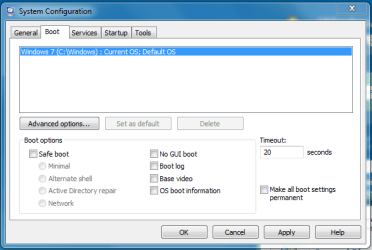
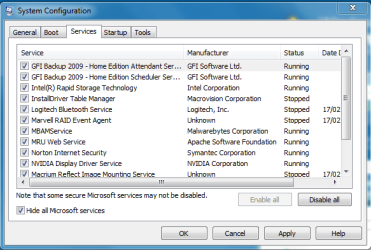
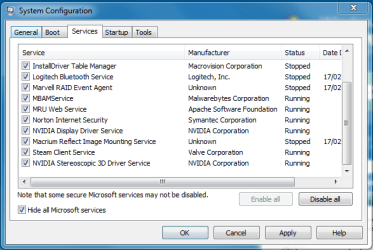
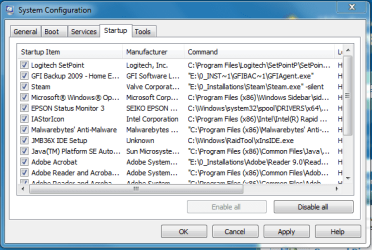
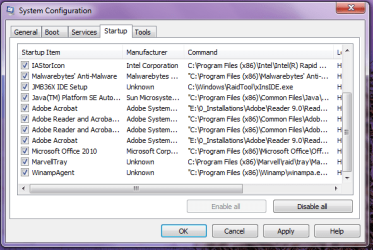
I've attached some images of my msconfig. Can anyone help me find out out why the "Welcome" message displays for so long, and what is causing my long boot-up? I'm expecting that with my OCZ Vertex 2 that from login to fully loaded desktop should be a matter of 10 or 20 secs. Does that seem reasonable?

Also, is there a way to copy and paste all my startup services from within the msconfig panels into a text file?

Thanks for any help you can give me,
Golden
 

Attachments
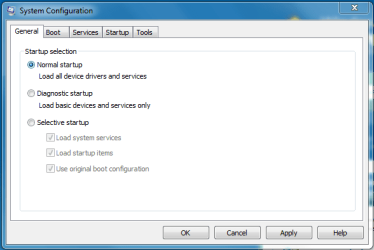
  • 1.PNG
    1.PNG
    11.9 KB · Views: 15
  • 2.PNG
    2.PNG
    14.7 KB · Views: 19
  • 3.PNG
    3.PNG
    19 KB · Views: 31
  • 4.PNG
    4.PNG
    18.3 KB · Views: 26
  • 5.PNG
    5.PNG
    19.4 KB · Views: 25
  • 6.PNG
    6.PNG
    21.7 KB · Views: 21

My Computer

Computer type
PC/Desktop
Computer Manufacturer/Model Number
Golden Mk. I.4
OS
Windows 10 Pro x64 ; Xubuntu x64
CPU
Intel i7 860 @ 2.80 GHz O/C'ed to 4.0GHz
Motherboard
Gigabyte P55A-UD3R Rev.1. Award BIOS F13
Memory
16GB Corsair Vengance DDR3 @ 661 MHz Dual Channel (9-9-9-24)
Graphics Card(s)
EVGA NVidia GTX 560 1024MB
Sound Card
Realtek Integrated
Monitor(s) Displays
Dual Samsung SyncMaster 2494HS
Screen Resolution
1920*1080 and 1920*1080
Hard Drives
1*Samsung 840 EVO 120GB SSD;
1*OCZ Vertex 2 60GB SSD;
2*Samsung F3 SpinPoint 1TB in RAID0;
1*Samsung F1 SpinPoint 1TB;
2*Western Digital 1TB External USB 3.0
1*Western Digital 500GB External USB 3.0
1*Seagate 500GB External USB 2.0
PSU
Thermaltake ToughPower QFan 750W
Case
Thermaltake Element S VK60001W2Z
Cooling
Corsair H60 Water Cooling, 2*230mm and 2*80mm case fans
Keyboard
Logitech G110
Mouse
Logitech MX518
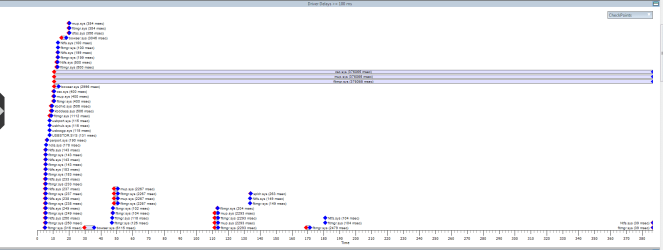
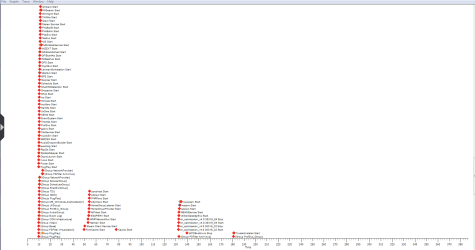
EDIT : OK. I've just run Windows Performance Analyser to do a boot trace, problem is I don't really understand it. I've loaded up some images if that can help anyone help me.

Thanks,
Golden

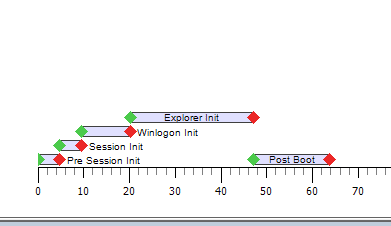
EDIT : one more attachement - my boot phases : time on bottom axis is seconds. Green = start, red = finish.
 

Attachments

  • trace1.PNG
    trace1.PNG
    16.5 KB · Views: 79
  • trace2.PNG
    trace2.PNG
    39.5 KB · Views: 83
  • trace3.PNG
    trace3.PNG
    24.5 KB · Views: 25
  • bootphases.PNG
    bootphases.PNG
    1.7 KB · Views: 24

My Computer

Computer type
PC/Desktop
Computer Manufacturer/Model Number
Golden Mk. I.4
OS
Windows 10 Pro x64 ; Xubuntu x64
CPU
Intel i7 860 @ 2.80 GHz O/C'ed to 4.0GHz
Motherboard
Gigabyte P55A-UD3R Rev.1. Award BIOS F13
Memory
16GB Corsair Vengance DDR3 @ 661 MHz Dual Channel (9-9-9-24)
Graphics Card(s)
EVGA NVidia GTX 560 1024MB
Sound Card
Realtek Integrated
Monitor(s) Displays
Dual Samsung SyncMaster 2494HS
Screen Resolution
1920*1080 and 1920*1080
Hard Drives
1*Samsung 840 EVO 120GB SSD;
1*OCZ Vertex 2 60GB SSD;
2*Samsung F3 SpinPoint 1TB in RAID0;
1*Samsung F1 SpinPoint 1TB;
2*Western Digital 1TB External USB 3.0
1*Western Digital 500GB External USB 3.0
1*Seagate 500GB External USB 2.0
PSU
Thermaltake ToughPower QFan 750W
Case
Thermaltake Element S VK60001W2Z
Cooling
Corsair H60 Water Cooling, 2*230mm and 2*80mm case fans
Keyboard
Logitech G110
Mouse
Logitech MX518
i'm not surprised your boot is so slow, with all them startup entries - do you really need them all?

a lot of them can be safely disabled, without any loss of functionality. for example - do you need steam running all the time? or only when you're playing games...i always check msconfig after installing a new prog, and see if it's snuck any entries in - i only keep the ones i really need.

you're going to have to spend an hour or two disabling a few at a time, reboot, see if everything still works, disable a few more >> repeat. it's better to use services.msc to tweak services - it's best to set them to 'manual' rather than disable...then test!

as an example, i've only got two non-microsoft services and four progs in the startup tab - and yes a twenty second boot is certainly achievable with a vertex.
 

My Computer

Computer Manufacturer/Model Number
mickey megabyte 1234
OS
ultimate 64 sp1
CPU
i5 2500K [email protected]
Motherboard
MSI P67A-GD53
Memory
8 gigs GSkill Ripjaws 1600
Graphics Card(s)
amd hd6950
Sound Card
creative x-fi gamer
Monitor(s) Displays
samsung 24"
Screen Resolution
1920x1080
Hard Drives
ocz vertex 2e 60 gig, samsung f3 1tb, buffalo 2tb ext
PSU
antec 550
Case
antec three hundred
Cooling
i'm a cooling fan
Keyboard
saitek eclipse ii
Mouse
logitech g3
Internet Speed
about 4 Mbps
Other Info
i love win7
That is an unusually long Startup and Services list, one which I'd expect to cause a long Startup and hamper performance.

I'd uncheck all of the Startup items in msconfig except AV and gadgets/stikynotes if you use them.

Then with MS services hidden, turn off all the msconfig>Services that you didn't open yourself.

After reboot go back to see which ones turned themselves back on and find the way to turn them off in their program preferences.

This should greatly improve the Startup time. If not run another Boot Trace and ask it's expert Cluberti to analyze it.

Another cool new program that creates an animated self-explanatory boot map is Soluto, which will also let you delay startup items you don't want to turn off.
 
Last edited:
Thanks guys - I'll check it out and let you know hpow it goes.
 

My Computer

Computer type
PC/Desktop
Computer Manufacturer/Model Number
Golden Mk. I.4
OS
Windows 10 Pro x64 ; Xubuntu x64
CPU
Intel i7 860 @ 2.80 GHz O/C'ed to 4.0GHz
Motherboard
Gigabyte P55A-UD3R Rev.1. Award BIOS F13
Memory
16GB Corsair Vengance DDR3 @ 661 MHz Dual Channel (9-9-9-24)
Graphics Card(s)
EVGA NVidia GTX 560 1024MB
Sound Card
Realtek Integrated
Monitor(s) Displays
Dual Samsung SyncMaster 2494HS
Screen Resolution
1920*1080 and 1920*1080
Hard Drives
1*Samsung 840 EVO 120GB SSD;
1*OCZ Vertex 2 60GB SSD;
2*Samsung F3 SpinPoint 1TB in RAID0;
1*Samsung F1 SpinPoint 1TB;
2*Western Digital 1TB External USB 3.0
1*Western Digital 500GB External USB 3.0
1*Seagate 500GB External USB 2.0
PSU
Thermaltake ToughPower QFan 750W
Case
Thermaltake Element S VK60001W2Z
Cooling
Corsair H60 Water Cooling, 2*230mm and 2*80mm case fans
Keyboard
Logitech G110
Mouse
Logitech MX518
I'll suggest you to change services that you don't use on Manual.(Not automatic)
 

My Computer

Computer type
PC/Desktop
Computer Manufacturer/Model Number
Custom Build
OS
Windows 10 Pro x64
CPU
Intel Core i5 4440 @Stock
Motherboard
Gigabyte Z97 D3H
Memory
4 x 4GB HyperX Fury DDR3
Graphics Card(s)
Gigabyte GTX 1050Ti O4G
Sound Card
Integrated
Monitor(s) Displays
Dell P2417H
Screen Resolution
1920 x 1080
Hard Drives
Samsung EVO 850 120GB / Toshiba DT01ACA050 1TB 7200prm 32MB
PSU
Riotoro Onyx 750W
Case
NZXT H500 Black-Red
Cooling
Stock CPU + NZXT 120mm + 2x120mm red fans
Keyboard
Modecom Volcano Lanparty
Mouse
Asus ROG Gladius / DeepCool E-Pad Plus
Internet Speed
DOCSIS 50/3 Mbit
Browser
Google Chrome
Other Info
Asus K55VJ(i5 3210M, GT635M / 2GB, 8GB DDR3, 500GB HDD)
Java, Norton, MBam, Adobe.. any one of those could be looking for updates.

SuperAntiSpyware was causing an extremely slow startup on my XP machine, until I set it to manual startup.
 

My Computer

Computer type
PC/Desktop
Computer Manufacturer/Model Number
Bruce ... somewhere in his 40's
OS
Windows 7 Ultimate 32bit SP1
CPU
Intel(R) Core(TM)2 Quad CPU @ 2.40GHz, 2400 MHz
Motherboard
INTEL/D975XBX2
Memory
4 GB
Graphics Card(s)
ATI Radeon HD 2600 Pro
Monitor(s) Displays
Samsung SyncMaster 914v
Screen Resolution
1280 x 1024
Hard Drives
2/500GB each ... ST3500630AS ATA Device.
One is not connected
PSU
Rocketfish 700 W
Case
G.Skill Gigabyte Chassis
Keyboard
Standard PS/2 Keyboard
Mouse
Microsoft PS/2 Mouse
Internet Speed
DSL
Antivirus
Avira Internet Security
Browser
IE 11
Other Info
ATI HDMI Audio
Thanks Jacee and Stalker - I'll look at all of that too. I've also pm'ed Cluberti to see if he can look at my etl file as a start.
 

My Computer

Computer type
PC/Desktop
Computer Manufacturer/Model Number
Golden Mk. I.4
OS
Windows 10 Pro x64 ; Xubuntu x64
CPU
Intel i7 860 @ 2.80 GHz O/C'ed to 4.0GHz
Motherboard
Gigabyte P55A-UD3R Rev.1. Award BIOS F13
Memory
16GB Corsair Vengance DDR3 @ 661 MHz Dual Channel (9-9-9-24)
Graphics Card(s)
EVGA NVidia GTX 560 1024MB
Sound Card
Realtek Integrated
Monitor(s) Displays
Dual Samsung SyncMaster 2494HS
Screen Resolution
1920*1080 and 1920*1080
Hard Drives
1*Samsung 840 EVO 120GB SSD;
1*OCZ Vertex 2 60GB SSD;
2*Samsung F3 SpinPoint 1TB in RAID0;
1*Samsung F1 SpinPoint 1TB;
2*Western Digital 1TB External USB 3.0
1*Western Digital 500GB External USB 3.0
1*Seagate 500GB External USB 2.0
PSU
Thermaltake ToughPower QFan 750W
Case
Thermaltake Element S VK60001W2Z
Cooling
Corsair H60 Water Cooling, 2*230mm and 2*80mm case fans
Keyboard
Logitech G110
Mouse
Logitech MX518
After looking at the trace, it appears that it's the Symantec Framework service (ccsvchst.exe):


Winlogon appears to stop processing things (disk and cpu activity go way down when this loads) when ccsvchst.exe loads:
01.png


Also, I notice bowser.sys loaded three times, at different intervals, which would indicate network connectivity attempts off of the box - these also correspond to the "stop" in activity, and also the restart near the 31 second mark:
02.png


When going deeper into the pattern of CPU activity during the "stop" in winlogon processing, these two seemed to go together - wmiprvse.exe and ccsvchst.exe. This pattern is too much of a pattern to be a coincidence - winlogon should be hammering the disk and CPU throughout the process, not stopping for 25 - 30 seconds at a time. This was too suspicious to be anything other than the culprit:
03.png


After removal of the Symantec application, bootup time was approximately 70 seconds (rather than 380-ish), as verified by Golden.
 

My Computer

Computer type
PC/Desktop
Computer Manufacturer/Model Number
Custom
OS
Windows 10 Pro x64
CPU
Intel Core i7 4790K @ 4.5GHz
Motherboard
Asus Maximus Hero VII
Memory
32GB DDR3
Graphics Card(s)
Nvidia GeForce GTX970
Sound Card
Realtek HD Audio
Screen Resolution
1920x1200
Hard Drives
1x Samsung 250GB SSD
4x WD RE 2TB (RAIDZ)
PSU
Corsair AX760i
Case
Fractal Design Define R4
Cooling
Noctua NH-D15
Thanks a bunch Cluberti - you do know your stuff. 1 x juciy REP in the post Sir :cool:

EDIT : The quicker boot time was achieved by uninstalling NIS and replacing it with MSE.
 
Last edited:

My Computer

Computer type
PC/Desktop
Computer Manufacturer/Model Number
Golden Mk. I.4
OS
Windows 10 Pro x64 ; Xubuntu x64
CPU
Intel i7 860 @ 2.80 GHz O/C'ed to 4.0GHz
Motherboard
Gigabyte P55A-UD3R Rev.1. Award BIOS F13
Memory
16GB Corsair Vengance DDR3 @ 661 MHz Dual Channel (9-9-9-24)
Graphics Card(s)
EVGA NVidia GTX 560 1024MB
Sound Card
Realtek Integrated
Monitor(s) Displays
Dual Samsung SyncMaster 2494HS
Screen Resolution
1920*1080 and 1920*1080
Hard Drives
1*Samsung 840 EVO 120GB SSD;
1*OCZ Vertex 2 60GB SSD;
2*Samsung F3 SpinPoint 1TB in RAID0;
1*Samsung F1 SpinPoint 1TB;
2*Western Digital 1TB External USB 3.0
1*Western Digital 500GB External USB 3.0
1*Seagate 500GB External USB 2.0
PSU
Thermaltake ToughPower QFan 750W
Case
Thermaltake Element S VK60001W2Z
Cooling
Corsair H60 Water Cooling, 2*230mm and 2*80mm case fans
Keyboard
Logitech G110
Mouse
Logitech MX518
Back
Top