HELP! Everything APPCRASH

douglasf13

New member
Local time
4:44 PM
Messages
13
I am pulling my hair out here. I can't seem to download anything correctly in Windows 7. I was using it without error for a couple of months, but now I get an APPCRASH on every downloaded program that I try to install. I did a complete reinstall of Windows 7 to fix the problem, but it is still there. I've re-downloaded firefox, itunes, and safari to my desktop, and all three will not let me install them, and they give me this error:

Problem Event Name: APPCRASH
Application Name: iTunesSetup.exe
Application Version: 8.2.1.6
Application Timestamp: 4a5ba5ae
Fault Module Name: iTunesSetup.exe
Fault Module Version: 8.2.1.6
Fault Module Timestamp: 4a5ba5ae
Exception Code: c0000005
Exception Offset: 00009d24
OS Version: 6.1.7100.2.0.0.256.1
Locale ID: 1033
Additional Information 1: 0a9e
Additional Information 2: 0a9e372d3b4ad19135b953a78882e789
Additional Information 3: 0a9e
Additional Information 4: 0a9e372d3b4ad19135b953a78882e789


any ideas????? thanks.


My Computer

OS
Windows 7 RC 7100
CPU
INtel E8400
Memory
4 GB
Graphics Card(s)
8800 GT
I am pulling my hair out here. I can't seem to download anything correctly in Windows 7. I was using it without error for a couple of months, but now I get an APPCRASH on every downloaded program that I try to install. I did a complete reinstall of Windows 7 to fix the problem, but it is still there. I've re-downloaded firefox, itunes, and safari to my desktop, and all three will not let me install them, and they give me this error:

Problem Event Name: APPCRASH
Application Name: iTunesSetup.exe
Application Version: 8.2.1.6
Application Timestamp: 4a5ba5ae
Fault Module Name: iTunesSetup.exe
Fault Module Version: 8.2.1.6
Fault Module Timestamp: 4a5ba5ae
Exception Code: c0000005
Exception Offset: 00009d24
OS Version: 6.1.7100.2.0.0.256.1
Locale ID: 1033
Additional Information 1: 0a9e
Additional Information 2: 0a9e372d3b4ad19135b953a78882e789
Additional Information 3: 0a9e
Additional Information 4: 0a9e372d3b4ad19135b953a78882e789


any ideas????? thanks.


Doug

Welcome to sevenforums

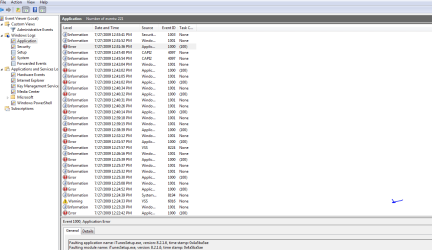
First thing we need is your system specs. If you know how to go into event viewer (type event viewer in search) see if there are many, many errors relating to applications. If there are we are going to need to see a couple. You can take a snip of it by using the snipping tool (snipping tool in search) and then upload them to here.

Ken
 

My Computer

Computer Manufacturer/Model Number
HP Pavillion dv-7 1005 Tx
OS
Win 8 Release candidate 8400
CPU
[email protected]
Memory
4 gigs
Graphics Card(s)
Nvidia 9600M
Sound Card
HD built-in
Monitor(s) Displays
17" Wxga
Screen Resolution
1440x900
Cooling
none
Internet Speed
45Mb down 5Mb up
I'm not exactly sure which screen in the event viewer that you'd like me to snip. Thanks.
 

My Computer

OS
Windows 7 RC 7100
CPU
INtel E8400
Memory
4 GB
Graphics Card(s)
8800 GT
I'm not exactly sure which screen in the event viewer that you'd like me to snip. Thanks.

Since its appcrash you should start there.

Ken
 
Last edited:

My Computer

Computer Manufacturer/Model Number
HP Pavillion dv-7 1005 Tx
OS
Win 8 Release candidate 8400
CPU
[email protected]
Memory
4 gigs
Graphics Card(s)
Nvidia 9600M
Sound Card
HD built-in
Monitor(s) Displays
17" Wxga
Screen Resolution
1440x900
Cooling
none
Internet Speed
45Mb down 5Mb up
does this help?
 

Attachments

  • snip1.PNG
    snip1.PNG
    33.4 KB · Views: 12,673

My Computer

OS
Windows 7 RC 7100
CPU
INtel E8400
Memory
4 GB
Graphics Card(s)
8800 GT
here is the bottom portion
 

Attachments

  • snip2.PNG
    snip2.PNG
    16.6 KB · Views: 5,164

My Computer

OS
Windows 7 RC 7100
CPU
INtel E8400
Memory
4 GB
Graphics Card(s)
8800 GT
here is the bottom portion


douglas

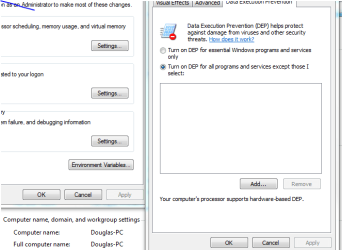
I know exactly what this is. could you go to control panel>system>advanced settings>advanced>a nd look for DEP. I bet it off.

Ken
 
Last edited:

My Computer

Computer Manufacturer/Model Number
HP Pavillion dv-7 1005 Tx
OS
Win 8 Release candidate 8400
CPU
[email protected]
Memory
4 gigs
Graphics Card(s)
Nvidia 9600M
Sound Card
HD built-in
Monitor(s) Displays
17" Wxga
Screen Resolution
1440x900
Cooling
none
Internet Speed
45Mb down 5Mb up
hmm...well, i switched it to this, and then restarted, but no luck still.
 

Attachments

  • snip3.PNG
    snip3.PNG
    14.8 KB · Views: 8,885

My Computer

OS
Windows 7 RC 7100
CPU
INtel E8400
Memory
4 GB
Graphics Card(s)
8800 GT
Any other ideas?
 

My Computer

OS
Windows 7 RC 7100
CPU
INtel E8400
Memory
4 GB
Graphics Card(s)
8800 GT
Any other ideas?

Maybe a system restore to a previous time when you did not have the problem, or maybe a repair install would help you... Worth a shot if you cant figure out what the problem is...
 

My Computer

Computer Manufacturer/Model Number
HP Pavillion zd8000
OS
Windows XP MCE (Soon to be 7)
CPU
Duo Core 3.4 GHz
That is what is driving me bonkers. I did a clean install, and then literally the first thing that I did was download firefox and itunes, and the problems began right away.
 

My Computer

OS
Windows 7 RC 7100
CPU
INtel E8400
Memory
4 GB
Graphics Card(s)
8800 GT
Try rebuilding your indexing
 

My Computer

Computer Manufacturer/Model Number
Custom Assembled
OS
Windows 7 Build 7600.16385 (Clean Install)
CPU
AMD Black Edition AMD Phenom X3 8750 / 2.4 GHz processor
Motherboard
Gigabyte GA-MA78GM-S2H 780G Socket AM2+ onboard VGA 8 channe
Memory
Kingston 4GB (4x1GB) DDR2 1066MHz/PC2-8500 Hyperx Memory
Graphics Card(s)
Intergrated ATI HD3200
Sound Card
Realtek High Definition Audio
Monitor(s) Displays
Acer 19"
Screen Resolution
1280 x 1024
Hard Drives
2 x Maxtor STM3250310AS 250GB SATAII 7200rpm 8MB Cache

3 x 500gb Seagate External HDD
PSU
CM eXtreme Power 460W PSU
Case
Coolermaster Elite 330 Black Case
Keyboard
Zippy Multimedia
Mouse
Logitech MX™518 Gaming-Grade Optical Mouse
Internet Speed
8Mbps down / 1Mbps up
Other Info
I haz floppyz
Index rebuilt, restart, still no luck?? I downloaded another program that I use, Raw Therapee, to see if it would work, and I get the same thing. Every program that I download does an APPCRASH when I try to run it, and that's after a fresh install. WTF?
 

My Computer

OS
Windows 7 RC 7100
CPU
INtel E8400
Memory
4 GB
Graphics Card(s)
8800 GT
Uninstall iTunes if it installed, I know there were issues with it in RC build.
 

My Computer

Computer Manufacturer/Model Number
Custom Assembled
OS
Windows 7 Build 7600.16385 (Clean Install)
CPU
AMD Black Edition AMD Phenom X3 8750 / 2.4 GHz processor
Motherboard
Gigabyte GA-MA78GM-S2H 780G Socket AM2+ onboard VGA 8 channe
Memory
Kingston 4GB (4x1GB) DDR2 1066MHz/PC2-8500 Hyperx Memory
Graphics Card(s)
Intergrated ATI HD3200
Sound Card
Realtek High Definition Audio
Monitor(s) Displays
Acer 19"
Screen Resolution
1280 x 1024
Hard Drives
2 x Maxtor STM3250310AS 250GB SATAII 7200rpm 8MB Cache

3 x 500gb Seagate External HDD
PSU
CM eXtreme Power 460W PSU
Case
Coolermaster Elite 330 Black Case
Keyboard
Zippy Multimedia
Mouse
Logitech MX™518 Gaming-Grade Optical Mouse
Internet Speed
8Mbps down / 1Mbps up
Other Info
I haz floppyz
I've just reinstalled Windows 7 RC on my computer, again. All that I've done is loaded my Belkin driver for my usb wireless stick. Once that worked, I tried downloading Adobe Reader. It appears to have downloaded (like my programs did earlier,) but still it won't run. :cry:
 

My Computer

OS
Windows 7 RC 7100
CPU
INtel E8400
Memory
4 GB
Graphics Card(s)
8800 GT
Index rebuilt, restart, still no luck?? I downloaded another program that I use, Raw Therapee, to see if it would work, and I get the same thing. Every program that I download does an APPCRASH when I try to run it, and that's after a fresh install. WTF?

What version of windows are you doing all this in? Is it the RC as that is what it says in your profile on this forum...? If you are still running the RC, I would recommend a clean install of the 7600.16385... Either that, or get rid of iTunes, as that may be part of the problem, as hedrush mentioned, as it seems to have issues with the RC... Maybe uninstall iTunes then do a repair install...? If I were you, I would backup all the stuff that I wanted to keep, then do a clean install of 16385... Issues are to be expected in the RC version, as it is incomplete...
 

My Computer

Computer Manufacturer/Model Number
HP Pavillion zd8000
OS
Windows XP MCE (Soon to be 7)
CPU
Duo Core 3.4 GHz
HotCarl, I'm still running RC candidate 7100, and I can't even get a newer build, because my computer won't allow me. I've reinstalled the RC twice, and still no go. I haven't installed itunes, because it won't let me.
 

My Computer

OS
Windows 7 RC 7100
CPU
INtel E8400
Memory
4 GB
Graphics Card(s)
8800 GT
HotCarl, I'm still running RC candidate 7100, and I can't even get a newer build, because my computer won't allow me.

Why not? You are posting in this thread, so why can you not download newer version? Not even in safe mode? That is the best advice I can give you, download the most current, finalized, build...the RC is just that, a Release Candidate...and it expected to have problems in it, and they will never be resolved because MS will not support it like they do with the final build...it is trial preview software...it is not meant to be used as a primary OS...for test/preview purposes...
 

My Computer

Computer Manufacturer/Model Number
HP Pavillion zd8000
OS
Windows XP MCE (Soon to be 7)
CPU
Duo Core 3.4 GHz
What's interesting is, if I try to install programs that I have on a separate drive from prior to updgrading, they look fine. It's only a problem with programs that I am currently downloading and trying to install.
 

My Computer

OS
Windows 7 RC 7100
CPU
INtel E8400
Memory
4 GB
Graphics Card(s)
8800 GT
I think what is happening is that everthing that I download is corrupt. I tried downloading another build earlier, and right before it got to 100%, windows said it was corrupt and stopped. I was using RC 7100 fine for months, until I tried installing itunes 8.3 Since then, I've reinstalled windows twice, and nothing will fix it.
 

My Computer

OS
Windows 7 RC 7100
CPU
INtel E8400
Memory
4 GB
Graphics Card(s)
8800 GT
Back
Top