Help me not hate my computer

JAWZ

New member
Local time
9:51 AM
Messages
30
I'm not exactly an advanced user, just to get that out in the open. I've been going through this site trying to find someone having the same problem as I am-with no luck.
So first the background.
I got my new laptop a little over a month ago and my problem has been exactly the same since I got it. Windows 7 works fine as it is, where I am having problems is with the networking of it. I can connect and surf around relativly fine. I have problems whenever i want to watch a video, download, or do something where I'm logged into the site.

I'm assuming that they are all related to the same thing that is wrong but I'll describe all of the issues separatly to hopefully help diagnose the situation

If I go to youtube and watch a video, it will load about a quarter of the video and NEVER load any more....unless, I click beyond where it has loaded on the scroll bar. Doesn't matter what site it is and it's all video types.

Number 2, this one is a little more hit and miss because it sometimes (rarely) will work properly. When I'm on a site with a log in, my hotmail for instance. It will open the e-mails fine, if I want to delete an e-mail though, it will put this loading in the bottom left corner...indefinitly. But, if I click on delete again. Poof it's instantly deleted, just like every other computer I've ever used hotmail on. I've never had a problem until this computer. The same thing happens if I want to move an e-mail to a folder or whatever. Hotmail is pretty much always like that... the part where it's hit or miss is on a forum site where I'll click on a link it doesn't load, I hit back, and then hit that same link and instantly it will load---or not, and I just hit back again and hit the link and then maybe it will load this time.

Number 3. This one has been everytime I've tried, ever since I have gotten this computer. So far to date, the only things I've been able to download on this wonderful computer is updates. If I want to download a program I've had to download it on either of my other computers, save it to a flash drive and put it onto my computer and install it.

I hope that I've given enough information for you to help me. Like I said, these problems have been since day 1 and I'm tired of it.


I don't know what other info to give you but this
Lenovo Y550
4 Gig DDR3
nVidia GT 240M 1Gig
Core 2 Duo
Home Premium 64
 

My Computer

Computer Manufacturer/Model Number
Lenovo Y550
OS
windows 7 64bit
CPU
Core 2 Duo
Memory
4 Gig
Graphics Card(s)
nVidia GeForce
I would copy your data off of the computer and do a re-install (or recovery) of windows. If you have the actual "windows 7" disc, then i would do a clean install from it. You will have to re-install your apps, but its better in the long run.
 

My Computer

Computer Manufacturer/Model Number
Black_Box (homebuilt)
OS
windows 7 RTM x64
CPU
Phenom II 965 Quad Core 3.4Ghz
Motherboard
Asus M4A79T Deluxe
Memory
Mushkin Blackline 8GB (4x2gb)
Graphics Card(s)
XFX Radeon 5970 Black Edition
Sound Card
onboard
Monitor(s) Displays
Dell 2408WPF-main Dell E248WFP-secondary
Screen Resolution
1920x1200-main 1920x1200-secondary
Hard Drives
OCZ Vertex Limited Edition 100GB (OS)
x1 WD Black Edition 500GB drive (Storage)
PSU
XFX 850w Black Edition (Modular)
Case
Mountian Mods H2go
Cooling
CoolITSystems ECO A.L.C.
Keyboard
Logitech MX 5500 wireless keyboard
Mouse
Razor Copperhead
Internet Speed
16Mb down/2Mb up Wowway Cable Internet
Try running sfc / scannow as administrator

Do you have a anti-virus program installed?
Run Malware bytes Malwarebytes.org
 

My Computer

Computer Manufacturer/Model Number
Chosen by me - Built by someone else ;)
OS
Windows 7 x 32 bit
CPU
AMD Phenom II 810 Quad Core
Motherboard
Gigabyte GA-MA770T
Memory
Corsair 4GB (2x2GB)
Graphics Card(s)
ASUS GTS250 1GB DDR3
Sound Card
Realtek Audio
Monitor(s) Displays
BenQ
Screen Resolution
1220 x 900
Hard Drives
Western Digital 1TB, Caviar Green
PSU
650w
Case
Antec Sonata Elite Black/Silver
Keyboard
Logitech New Touch
Mouse
Belkin
I'm not exactly an advanced user, just to get that out in the open. I've been going through this site trying to find someone having the same problem as I am-with no luck.
So first the background.
I got my new laptop a little over a month ago and my problem has been exactly the same since I got it. Windows 7 works fine as it is, where I am having problems is with the networking of it. I can connect and surf around relativly fine. I have problems whenever i want to watch a video, download, or do something where I'm logged into the site.

I'm assuming that they are all related to the same thing that is wrong but I'll describe all of the issues separatly to hopefully help diagnose the situation

If I go to youtube and watch a video, it will load about a quarter of the video and NEVER load any more....unless, I click beyond where it has loaded on the scroll bar. Doesn't matter what site it is and it's all video types.

Number 2, this one is a little more hit and miss because it sometimes (rarely) will work properly. When I'm on a site with a log in, my hotmail for instance. It will open the e-mails fine, if I want to delete an e-mail though, it will put this loading in the bottom left corner...indefinitly. But, if I click on delete again. Poof it's instantly deleted, just like every other computer I've ever used hotmail on. I've never had a problem until this computer. The same thing happens if I want to move an e-mail to a folder or whatever. Hotmail is pretty much always like that... the part where it's hit or miss is on a forum site where I'll click on a link it doesn't load, I hit back, and then hit that same link and instantly it will load---or not, and I just hit back again and hit the link and then maybe it will load this time.

Number 3. This one has been everytime I've tried, ever since I have gotten this computer. So far to date, the only things I've been able to download on this wonderful computer is updates. If I want to download a program I've had to download it on either of my other computers, save it to a flash drive and put it onto my computer and install it.

I hope that I've given enough information for you to help me. Like I said, these problems have been since day 1 and I'm tired of it.


I don't know what other info to give you but this
Lenovo Y550
4 Gig DDR3
nVidia GT 240M 1Gig
Core 2 Duo
Home Premium 64

You have a nice computer with plenty of speed and RAM.
I would first try what Ninja suggested before trying to reinstall Win7.
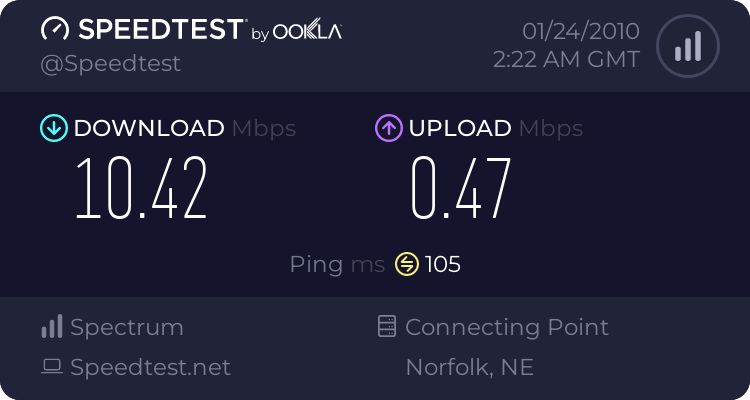
What is your connection speed? Use thsi link and select something close to the gold star.
http://speedtest.net/
 

My Computer

Computer type
PC/Desktop
Computer Manufacturer/Model Number
Self Built
OS
Windows 10 Pro
CPU
Intel i5
Motherboard
I have a fatherboard
Memory
I'm old and lost a few chips
Graphics Card(s)
Yup
Sound Card
Yup
Monitor(s) Displays
Samsung 32" UHD
Screen Resolution
3840 x 2160
Hard Drives
Samsung 860 EVO drives
PSU
450 Watt and some fans that blow
Case
Small tower
Cooling
Yes I am cool. lol
Keyboard
Who needs a keyboard?
Mouse
Logitech Laser G7 wireless
Internet Speed
Zippy fast UP and DOWN
Antivirus
I got a shot
Browser
The new Improved EDGE 2020
I would definilty recommend what the other guy said. Copy all of your data....

and do a full restore on the computer....

This is the thing that I would like for you to do to make sure that everything is top notch...


1) Go ahead and copy your files and restore your computer.
2) Run the windows update until everything is finished.
3) Go to Programs & Features and post a picture of your whole list on here and we
will let you know what you have to keep and what to delete. Alot of that software is not needed.
4) Once we get everything. I will let you know what to delete and then I will help you fix your settings as well.
5) Then i will supply you where to go to update the java, adobe products, k lite mega codecs
6) The reason why i want to list is becuase the computer will supply you with someoe of the java and flash but i rather you delete the old versions and we can install the new ones with no confusions nor replicas in the programs list
7)Please inform us if you have any networking you woul like to do and i can tell you what to put in the computer to have everything set up. Are you networking to another windows 7, windows visita, or windows xp

just come onto this forume and post everything needed and we will help you out to the T


Another thing you may want to do after windows update is done is update all of your drivers from the manufacture's website:
http://consumersupport.lenovo.com/en/DriversDownloads/drivers_list.aspx?CategoryID=207087
 

My Computer

Computer Manufacturer/Model Number
HP Pavilion Elite HPE-410f
OS
Windows 7 Ultimate x64
CPU
AMD Phenom x6 1045t
Motherboard
N/A
Memory
8 GB
Graphics Card(s)
ATI Radeon HD 5570
Sound Card
Realtek Highdefinition Audio / 5.1 Dolby Setup
Monitor(s) Displays
HP w2207h Widescreen
Screen Resolution
1680*1050
Hard Drives
1 TB (fixed), 320 Portable maxtor, Server Hard drives
PSU
350 Watt
Case
HP CASE
Cooling
Bass
Keyboard
Logitech MX 5500
Mouse
Logitech MX 5500
Internet Speed
ROAD RUNNER 16MB D/512 U
Thankyou for the responses,
This is what i did for NinaJay---Ok, I tried the sfc / scan now. It pops up so fast and goes away and I can't read what it says. How do I make it stay open? Yes I have antivirus. It came with McAfee and last night I ditched it for Norton hoping that it might make it better and it didn't.

I did scans before and only found tracking cookies...never anything else

I just did a scan with the above and it found
KEY_LOCAL_MACHINE\SOFTWARE\Microsoft\Windows\CurrentVersion\Policies\Explorer\NoActiveDesktopChanges (Hijack.DisplayProperties) -> Bad: (1) Good: (0) -> Quarantined and deleted successfully.
 

My Computer

Computer Manufacturer/Model Number
Lenovo Y550
OS
windows 7 64bit
CPU
Core 2 Duo
Memory
4 Gig
Graphics Card(s)
nVidia GeForce
Thankyou for the responses,
This is what i did for NinaJay---Ok, I tried the sfc / scan now. It pops up so fast and goes away and I can't read what it says. How do I make it stay open? Yes I have antivirus. It came with McAfee and last night I ditched it for Norton hoping that it might make it better and it didn't.

I did scans before and only found tracking cookies...never anything else

I just did a scan with the above and it found
KEY_LOCAL_MACHINE\SOFTWARE\Microsoft\Windows\CurrentVersion\Policies\Explorer\NoActiveDesktopChanges (Hijack.DisplayProperties) -> Bad: (1) Good: (0) -> Quarantined and deleted successfully.

ditch norton and use Microsoft security essentials and to run sfc /scannow do it by opening a command prompt run as administrator :)

P.S. to find command prompt type cmd into search at start orb ;)
 

My Computer

Computer Manufacturer/Model Number
built my own
OS
win7 ultimate / virtual box
CPU
Intel Core i7 3770K,1155, Ivy Bridge
Motherboard
MSI Z77A-G43
Memory
GSkill Ripjaws Z Series 1600 CL 9.0 16GB
Graphics Card(s)
KFA2 GeForce GTX 670 EX OC 2048MB GDDR5 PCI-E gfx card
Sound Card
onboard Nvidia HDMI audio
Monitor(s) Displays
ASUS VK222H 22" widescreen LCD monitor
Screen Resolution
1680x1050
Hard Drives
Kingston 128gb SSD
OCZ Vertex 90gb SSD
500GB WDCaviar 16mb 5000KS
320GB WDCaviar 16mb 3200AAKS sata 2
1TB Samsung 16mb HD103SJ sata 2
PSU
Corsair HX 750W ATX2.2 Modular
Cooling
Antec 25 Kuhler H2O 620
Keyboard
logitech
Mouse
logitech MX518
Internet Speed
7mb adsl
If you would run this sfc / scan now, it would not work. You have one blank too many in front of the word scan and scannow is one word. The blank in front of the slash, however, is needed. So it should look like this sfc /scannow
 

My Computer

Computer Manufacturer/Model Number
HP, Dell, Gateway, Toshiba - 4 laptops and 2 desktops
OS
Vista, Windows7, Mint Mate, Zorin, Windows 8
CPU
from 1.6GHz Duo to i7
Monitor(s) Displays
2x HP w2207
Hard Drives
5x HDD, 7x SSD, 12x Externals
Keyboard
with trackball - no mices
Mouse
Trackball mice
Internet Speed
DSL 6000
ok, here's where my ignorance shows
how do i run as admin, shouldn't i be admin since i'm the only person on this computer?
 

My Computer

Computer Manufacturer/Model Number
Lenovo Y550
OS
windows 7 64bit
CPU
Core 2 Duo
Memory
4 Gig
Graphics Card(s)
nVidia GeForce
Yes you are admin but still you have to make an admin setting. Let's make that setting for good.
1. go to start > All Programs > Acessories
2. right click on Command prompt and go to Properties
3. hopefully you are on the Shortcut tab - if yes, go to Advanced
4. tick the box "Run as Administrator"
5. OK > Apply > OK (the Apply is important - else you have done nothing)
6. Now Command Prompt (cmd) will always run as admin and you don't have to worry about that. You will need cmd often in the future, believe me.

PS: If the sfc (system file checker) came back saying that it could not fix all corrupted files, come back and I tell you how to deal with that. But write down the path to the CBS.log - you'll need that.
Btw: you can copy the info in the cmd window. Right click on the window (anywhere) and click "select all". Then click on the highlighted area. Now the info is on the clipboard and you can paste it into a Notepad, Wordpad or Word page.
 
Last edited:

My Computer

Computer Manufacturer/Model Number
HP, Dell, Gateway, Toshiba - 4 laptops and 2 desktops
OS
Vista, Windows7, Mint Mate, Zorin, Windows 8
CPU
from 1.6GHz Duo to i7
Monitor(s) Displays
2x HP w2207
Hard Drives
5x HDD, 7x SSD, 12x Externals
Keyboard
with trackball - no mices
Mouse
Trackball mice
Internet Speed
DSL 6000
The Y550 is a very good laptop if you erase the entire HDD and do a clean reinstall of windows. A lot of the problems with lenovos comes from the factory installed software. (90 processes with no applications running) I bought one for my daughter and it didn't work right until I got rid of all the factory bloatware.
 
I noticed that there seems to be a ton of crap running for just starting up. Ok, I really apprectiate all of your help. I was trying to remember my flickr password so that I could do a print screen of the sfc since it didn't let me control a and c. Anyways, it helps to fully read the directions. So. here is what that told me...nothing. here's what it said for you guys though.

Microsoft Windows [Version 6.1.7600]
Copyright (c) 2009 Microsoft Corporation. All rights reserved.
C:\windows\system32>sfc\scannow
The system cannot find the path specified.
C:\windows\system32>sfc
Microsoft (R) Windows (R) Resource Checker Version 6.0
Copyright (c) 2006 Microsoft Corporation. All rights reserved.
Scans the integrity of all protected system files and replaces incorrect version
s with
correct Microsoft versions.
SFC [/SCANNOW] [/VERIFYONLY] [/SCANFILE=<file>] [/VERIFYFILE=<file>]
[/OFFWINDIR=<offline windows directory> /OFFBOOTDIR=<offline boot directory>
]
/SCANNOW Scans integrity of all protected system files and repairs files
with
problems when possible.
/VERIFYONLY Scans integrity of all protected system files. No repair operati
on is
performed.
/SCANFILE Scans integrity of the referenced file, repairs file if problems
are
identified. Specify full path <file>
/VERIFYFILE Verifies the integrity of the file with full path <file>. No re
pair
operation is performed.
/OFFBOOTDIR For offline repair specify the location of the offline boot dire
ctory
/OFFWINDIR For offline repair specify the location of the offline windows d
irectory
e.g.
sfc /SCANNOW
sfc /VERIFYFILE=c:\windows\system32\kernel32.dll
sfc /SCANFILE=d:\windows\system32\kernel32.dll /OFFBOOTDIR=d:\ /OFFWINDI
R=d:\windows
sfc /VERIFYONLY
C:\windows\system32>scannow
'scannow' is not recognized as an internal or external command,
operable program or batch file.
C:\windows\system32>

Hope that's what you wanted.
 

My Computer

Computer Manufacturer/Model Number
Lenovo Y550
OS
windows 7 64bit
CPU
Core 2 Duo
Memory
4 Gig
Graphics Card(s)
nVidia GeForce
The Y550 is a very good laptop if you erase the entire HDD and do a clean reinstall of windows. A lot of the problems with lenovos comes from the factory installed software. (90 processes with no applications running) I bought one for my daughter and it didn't work right until I got rid of all the factory bloatware.

I am not against doing that, I'd have to order the disks though. I also don't want to have a bunch of buttons on my computer that don't work. though.
 

My Computer

Computer Manufacturer/Model Number
Lenovo Y550
OS
windows 7 64bit
CPU
Core 2 Duo
Memory
4 Gig
Graphics Card(s)
nVidia GeForce
 

My Computer

Computer Manufacturer/Model Number
Lenovo Y550
OS
windows 7 64bit
CPU
Core 2 Duo
Memory
4 Gig
Graphics Card(s)
nVidia GeForce
JAWZ, what you posted is the result of a wrong command. You only put in sfc - but you have to put in sfc /scannow. The first time you put it in, you did not have a blank in front of the slash, and cmd is not very forgiving with syntax errors. Try again, but only 1 blank (in front of the slash). Or paste my command into the cmd window.
Should it come back saying that there were corrupted files it could not fix, paste this command in:

findstr /c:"[SR]" %windir%\logs\cbs\cbs.log


It will come back with a bunch of stuff. For that you right click on the Command Prompt window (any place is good) and click Select All. Then you right click anywhere in the window. Now this whole text is stored on the clipboard and you can paste it into a document file (e.g. Notepad) where you can analyze it.
If there are things you don't understand, post them here (but not the whole sermon because that may be a lot of stuff).
 

My Computer

Computer Manufacturer/Model Number
HP, Dell, Gateway, Toshiba - 4 laptops and 2 desktops
OS
Vista, Windows7, Mint Mate, Zorin, Windows 8
CPU
from 1.6GHz Duo to i7
Monitor(s) Displays
2x HP w2207
Hard Drives
5x HDD, 7x SSD, 12x Externals
Keyboard
with trackball - no mices
Mouse
Trackball mice
Internet Speed
DSL 6000
thanks.....I hate it when I screw up basic "do this" commands and I still screw it up. Am I able to do other stuff while it does this? cause I am
 

My Computer

Computer Manufacturer/Model Number
Lenovo Y550
OS
windows 7 64bit
CPU
Core 2 Duo
Memory
4 Gig
Graphics Card(s)
nVidia GeForce
thanks.....I hate it when I screw up basic "do this" commands and I still screw it up. Am I able to do other stuff while it does this? cause I am

Don't worry. We'll get there. unfortunately it does not fix your problem. Back to the drawing board.
 

My Computer

Computer Manufacturer/Model Number
HP, Dell, Gateway, Toshiba - 4 laptops and 2 desktops
OS
Vista, Windows7, Mint Mate, Zorin, Windows 8
CPU
from 1.6GHz Duo to i7
Monitor(s) Displays
2x HP w2207
Hard Drives
5x HDD, 7x SSD, 12x Externals
Keyboard
with trackball - no mices
Mouse
Trackball mice
Internet Speed
DSL 6000
Windows resource protection did not find any integrity violations
 

My Computer

Computer Manufacturer/Model Number
Lenovo Y550
OS
windows 7 64bit
CPU
Core 2 Duo
Memory
4 Gig
Graphics Card(s)
nVidia GeForce
Windows resource protection did not find any integrity violations

Well, that is good news, unfortunately it does not fix your problem. Back to the drawing board.
 

My Computer

Computer Manufacturer/Model Number
HP, Dell, Gateway, Toshiba - 4 laptops and 2 desktops
OS
Vista, Windows7, Mint Mate, Zorin, Windows 8
CPU
from 1.6GHz Duo to i7
Monitor(s) Displays
2x HP w2207
Hard Drives
5x HDD, 7x SSD, 12x Externals
Keyboard
with trackball - no mices
Mouse
Trackball mice
Internet Speed
DSL 6000
Alright, well, looking back at other's ideas, I've backed up my photos and software that I need. I havn't done a whole lot with my computer because it's pretty uncooperative.
Acurasd asked my for my goals with networking. I've got this laptop running windows 7 64bit. I've got a laptop running windows vista, possibly another one if I decide to replace the motherboard. I've got an older desktop running windows xp. I've also got a ps3 and wii. What I'd like to have happen is all of my computers print to either of printers and also for all of the computers to be able to save and back up to a terabite hd. Oh, and everything to be able to go online. That should cover it
 

My Computer

Computer Manufacturer/Model Number
Lenovo Y550
OS
windows 7 64bit
CPU
Core 2 Duo
Memory
4 Gig
Graphics Card(s)
nVidia GeForce
Back
Top