
You are using an out of date browser. It may not display this or other websites correctly.
You should upgrade or use an alternative browser.
You should upgrade or use an alternative browser.
Help me with startup
- Thread starter d12bn
- Start date

?
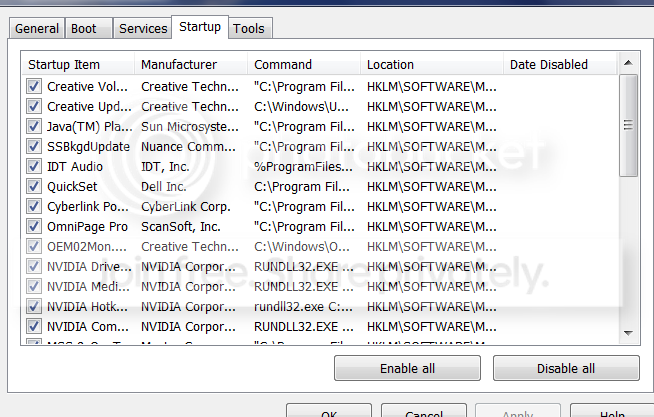
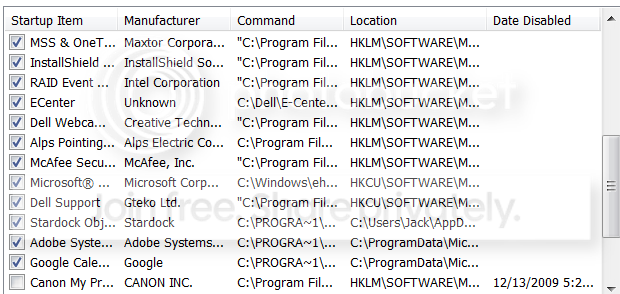
I ran RegCure and it found lots of problems but won't fix with free version. I would consider buying the program but it did not tell me which programs to turn off in startup.
Any suggestions is appreciated
I ran RegCure and it found lots of problems but won't fix with free version. I would consider buying the program but it did not tell me which programs to turn off in startup.
Any suggestions is appreciated
My Computer
- Computer Manufacturer/Model Number
- Dell
- OS
- Windows 7

Frostmourne
New member
- Local time
- 9:00 AM
- Messages
- 2,685
Is this crap from a pre-built pc? Untick everything except your AV - and kill McCrappee and go for Microsoft Security Essentials - the Creative and NVIDIA stuff. In the second screenshot keep what you need.
My Computer
- Computer Manufacturer/Model Number
- Sony Vaio Z46GDU
- OS
- Windows 7 Ultimate x86-64
- CPU
- [email protected] 1066MHz FSB
- Motherboard
- Sony branded
- Memory
- 6GB DDR3 1066MHz
- Graphics Card(s)
- 9300M GS 256MB Dedicated (Speed) + Intel4500MHD (Stamina)
- Sound Card
- Realtek HD Audio
- Monitor(s) Displays
- 13.1' WXGA
- Screen Resolution
- 1600x900
- Hard Drives
- 320GB 7200RPM w/ 16MB cache
- Internet Speed
- 1MB/s

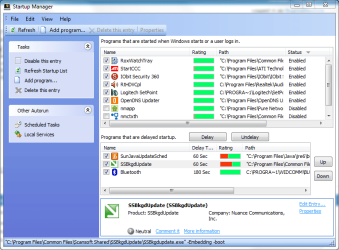
I have a Dell too. If I were you I would keep the Alps Pointing software running if you use custom settings for your touchpad (like scrolling). You can use a free tool such as Glary Utilities that allows you to delete certain start-up options, delay certain resource hogging programs, as well as see what each item does. See below:
Attachments
My Computer
- Computer type
- PC/Desktop
- Computer Manufacturer/Model Number
- Custom Desktop PC
- OS
- Windows 7 / Windows 8.1
- CPU
- Devils Canyon i7-4790K @ 4.8 GHz ~ 1.33v
- Motherboard
- Asus Z97 Deluxe
- Memory
- Corsair Vengeance Pro PC3-19200 DDR3 2400MHz
- Graphics Card(s)
- EVGA GeForce GTX 980 SuperClocked ACX 2.0
- Sound Card
- Realtek ALC1150 8 channels
- Monitor(s) Displays
- BenQ XL2720Z 27"
- Screen Resolution
- 1920 x 1080 @ 144Hz
- Hard Drives
- SSD1: 512GB Samsung 850 Pro
SSD2: 1TB Samsung 850 EVO
SSD3: 1TB Samsung 850 EVO
HDD: 4TB Western Digital Black
Backup: Western Digital My Book Duo 8TB
- PSU
- Corsair HX1000i / CyberPower CP1500PFCLCD PFC Sinewave UPS 1
- Case
- Corsair Graphite 780T
- Cooling
- Custom single loop liquid; CPU delidded; Aerocool DS Fans
- Keyboard
- Logitech G710 Cherry MX Blue
- Mouse
- LogitechG502 Proteus Core
- Internet Speed
- Download: 119MBs /Upload 39.12MBs via Optimum 101 Ultra
- Antivirus
- MYOB
- Browser
- Firefox
- Other Info
- Cooling: EK-Supremecy MX Waterblock, XSPC AX360 Radiator, Swiftech MCP655 Series 12VDC D5 Pump, EK-RES x3 250 Reservoir, Primochill Ice Intensified Coolant, 11x AerocoolDS fans, Primochill Primoflex Avanced LRT Tubing

sabrina
New member
- Local time
- 12:00 AM
- Messages
- 13
This passage Manage auto-startup programs to speed up your PC booting may be also helpful to you. It recommends Startup manager of Glary Utilities. The delay function is amazing and really speed up PC boot.
My Computer
- OS
- win xp

- Local time
- 4:00 PM
- Messages
- 50,634
Wow, just about everything.
Use regedit to delete everything except antivirus and Stardock. If you have more than one av, uninstall the others.
Use msconfig, not regedit. I'm guessin that's what he meant.
I would uncheck all of them except your AV, as they aren't needed to ride along on the startup but can start when WIndows starts them or you click on them.
I always mouse over the MS ones to see what they are, usually StikyNotes or Gadgets which I want. I wouldn't turn off anything MS unless I knew for sure.
Anything that turns itself back on needs to be turned of in it's Preferences, mostly likely. Adobe Reader has a box on it's General Prefs, for example. That and Java will ask about Updates when you use their apps.
Slow
I turned almost everything off in startup and still not happy with boot time of 74 seconds.
I think its time to call Microsoft for some advice.
Is 74 seconds acceptable? My Dad upgraded his Sony laptop as well to W7 and gets 35 second boot.
I turned almost everything off in startup and still not happy with boot time of 74 seconds.
I think its time to call Microsoft for some advice.
Is 74 seconds acceptable? My Dad upgraded his Sony laptop as well to W7 and gets 35 second boot.
My Computer
- Computer Manufacturer/Model Number
- Dell
- OS
- Windows 7


Lol most people would love for there machines to boot in 1min 14sec
Yours is 39 sec slower than your Dads. Remember if it ain't broke don't fix it ... its not a race... Microsoft might not be able to give you the answers you're looking for... but good luck

Last edited:
My Computer
- Computer type
- PC/Desktop
- Computer Manufacturer/Model Number
- Self Built
- OS
- Windows 7 Ultimate 64bit
- CPU
- AMD Phenom Quad core 9950 black edition
- Motherboard
- Gigabyte
- Memory
- 16Gb
- Graphics Card(s)
- 2x XFX Radeon 5850
- Sound Card
- PCI Express X-Fi Titanium / Logitech G35
- Monitor(s) Displays
- 2x HP 2410i
- Screen Resolution
- 1920x1080
- Hard Drives
- 2x 500Gb Seagate
1x 300Gb Seagate
1x 1Tb Seagate
2x 1Tb Hitatchi
- PSU
- Jean Tech Storm 700W
- Case
- Cooler Master COSMOS S
- Cooling
- Akasa Evo Blue Pro
- Keyboard
- Logitech G15
- Mouse
- Mad Catz M.M.O. 7
- Internet Speed
- 12mb

- Local time
- 12:00 AM
- Messages
- 16,784
GlaryUtilities is the best all in one utility, imo.
Another app. useful for oem preinstalls is :
Download | The PC Decrapifier
Another app. useful for oem preinstalls is :
Download | The PC Decrapifier
My Computers
System One System Two
-
- Computer type
- PC/Desktop
- OS
- 7 X64
- CPU
- i5 8400
- Motherboard
- gigabyte b365m ds3h
- Memory
- 2x8gb 3200mhz
- Hard Drives
- various
- PSU
- pure power 11 400w cm
- Case
- Coolermaster
- Cooling
- cryorig m9i
-
- Computer type
- PC/Desktop
- OS
- 7x64
- CPU
- g5400
- Motherboard
- ga b365m ds3h
- Memory
- 8gb ddr4 2400
- PSU
- xfx pro 450w
- Local time
- 4:00 PM
- Messages
- 50,634
Study the Diagnostics erformance log for boot delaying culprits.
Boot into F8 and enable boot logging. Study the boot log over time to determine what is slowing it down.
Clean reinstall is a possible fix.
erformance log for boot delaying culprits. Boot into F8 and enable boot logging. Study the boot log over time to determine what is slowing it down.
Clean reinstall is a possible fix.
Similar threads
- Replies
- 6
- Views
- 3K

- Replies
- 8
- Views
- 2K

