Hi all
I am running Windows 7 Ultimate. I have two hard drives in my desktop. I accidentally renamed the "System Reserved" partition on my main C drive. As soon as I realised, I quickly renamed it back - so I am hoping that I haven't lost any files.
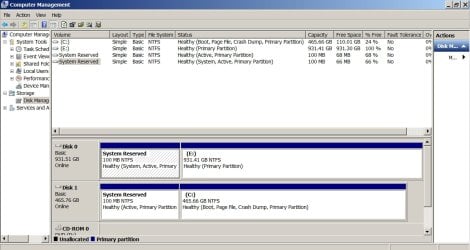
However, when I looked at status of the "System Reserved" partition in Computer Management, it shows "Healthy (Active, Primary Partition)" instead of "Healthy (System, Active, Primary Partition)" - the word "System" is missing. Can anyone tell my why this might be, and how this could be rectified (if indeed it needs to be rectified)?
I have several "restore points" that I can use, but wasn't sure if that would solve the issue (need advice first).
I am a bit scared to turn my computer off, so any help would be appreciated.
Many thanks
I am running Windows 7 Ultimate. I have two hard drives in my desktop. I accidentally renamed the "System Reserved" partition on my main C drive. As soon as I realised, I quickly renamed it back - so I am hoping that I haven't lost any files.
However, when I looked at status of the "System Reserved" partition in Computer Management, it shows "Healthy (Active, Primary Partition)" instead of "Healthy (System, Active, Primary Partition)" - the word "System" is missing. Can anyone tell my why this might be, and how this could be rectified (if indeed it needs to be rectified)?
I have several "restore points" that I can use, but wasn't sure if that would solve the issue (need advice first).
I am a bit scared to turn my computer off, so any help would be appreciated.
Many thanks
Last edited:
My Computer
At a glance
window 7 ultimate
- Computer type
- PC/Desktop
- OS
- window 7 ultimate

 , and right clicked on the wrong partition - which was the System Reserved partition of the C: drive (instead of the E: drive). I assigned a letter to this partition (H