
Solved Help needed - "System Reserved" issue

Tom 77

New member
Local time
3:05 AM
Messages
27
Hi all

I am running Windows 7 Ultimate. I have two hard drives in my desktop. I accidentally renamed the "System Reserved" partition on my main C drive. As soon as I realised, I quickly renamed it back - so I am hoping that I haven't lost any files.

However, when I looked at status of the "System Reserved" partition in Computer Management, it shows "Healthy (Active, Primary Partition)" instead of "Healthy (System, Active, Primary Partition)" - the word "System" is missing. Can anyone tell my why this might be, and how this could be rectified (if indeed it needs to be rectified)?

I have several "restore points" that I can use, but wasn't sure if that would solve the issue (need advice first).

I am a bit scared to turn my computer off, so any help would be appreciated.

Many thanks
 
Last edited:

My Computer

Computer type
PC/Desktop
OS
window 7 ultimate
Welcome to the Forum.

Is C: partition set as System?
 

My Computers

System One System Two

  • Computer type
    PC/Desktop
    Computer Manufacturer/Model Number
    custom build
    OS
    Windows 7 HP 64
    CPU
    i5 6600K - 800MHz to 4200MHz
    Motherboard
    GA-Z170-HD3P
    Memory
    4+4G GSkill DDR4 3000
    Graphics Card(s)
    IG - Intel 530
    Monitor(s) Displays
    Samsung 226BW
    Screen Resolution
    1680x1050
    Hard Drives
    (1) -1 SM951 – 128GB M.2 AHCI PCIe SSD drive for Windows 7 and Lubuntu
    (2) -1 WD SATA 3 - 1T for Data
    (3) -1 WD SATA 3 - 1T for backup
    PSU
    Thermaltake 450W TR2 gold
    Keyboard
    Old and good Chicony mechanical keyboard
    Mouse
    Logitech mX performance - 9 buttons (had to disable some)
    Internet Speed
    500Mb/s
    Browser
    Firefox 64
    Other Info
    TinyWall firewall
  • Computer type
    Laptop
    System Manufacturer/Model Number
    Asus Q550LF
    OS
    Windows 7 Pro
    CPU
    i7-4500U 800MHz to 3.0GHz
    Motherboard
    Asus Q550LF
    Memory
    (4+4)G DDR3 1600
    Graphics Card(s)
    IG intel 4400 + NVIDIA GeForce GT 745M
    Sound Card
    Realtek
    Monitor(s) Displays
    LG Display LP156WF4-SPH1
    Screen Resolution
    1920 x 1080
    Hard Drives
    BX500 120G SSD for Windows and programs +
    1T HDD for data
    Internet Speed
    500 Mb/s
    Browser
    Firefox
    Other Info
    TinyWall firewall
Hi

C: drive is running Windows 7 at the moment. How can I check if C: partition set as System? Thanks
 

My Computer

Computer type
PC/Desktop
OS
window 7 ultimate
Use Disk manager (C:\Windows\System32\diskmgmt.msc).

How did you renamed the System partition and saw Healthy (Active, Primary Partition) ?
 

My Computers

System One System Two

  • Computer type
    PC/Desktop
    Computer Manufacturer/Model Number
    custom build
    OS
    Windows 7 HP 64
    CPU
    i5 6600K - 800MHz to 4200MHz
    Motherboard
    GA-Z170-HD3P
    Memory
    4+4G GSkill DDR4 3000
    Graphics Card(s)
    IG - Intel 530
    Monitor(s) Displays
    Samsung 226BW
    Screen Resolution
    1680x1050
    Hard Drives
    (1) -1 SM951 – 128GB M.2 AHCI PCIe SSD drive for Windows 7 and Lubuntu
    (2) -1 WD SATA 3 - 1T for Data
    (3) -1 WD SATA 3 - 1T for backup
    PSU
    Thermaltake 450W TR2 gold
    Keyboard
    Old and good Chicony mechanical keyboard
    Mouse
    Logitech mX performance - 9 buttons (had to disable some)
    Internet Speed
    500Mb/s
    Browser
    Firefox 64
    Other Info
    TinyWall firewall
  • Computer type
    Laptop
    System Manufacturer/Model Number
    Asus Q550LF
    OS
    Windows 7 Pro
    CPU
    i7-4500U 800MHz to 3.0GHz
    Motherboard
    Asus Q550LF
    Memory
    (4+4)G DDR3 1600
    Graphics Card(s)
    IG intel 4400 + NVIDIA GeForce GT 745M
    Sound Card
    Realtek
    Monitor(s) Displays
    LG Display LP156WF4-SPH1
    Screen Resolution
    1920 x 1080
    Hard Drives
    BX500 120G SSD for Windows and programs +
    1T HDD for data
    Internet Speed
    500 Mb/s
    Browser
    Firefox
    Other Info
    TinyWall firewall
I went into "Computer Management". I saw the two internal drives that have (C: & E:), and right clicked on the wrong partition - which was the System Reserved partition of the C: drive (instead of the E: drive). I assigned a letter to this partition (H:), then opened the the folder to explore this drive. From there I right clicked on the H: drive and renamed it. I didn't make any changed to this partition other than to rename it. I quickly named it back to "System Reserved" when I realised my mistake.
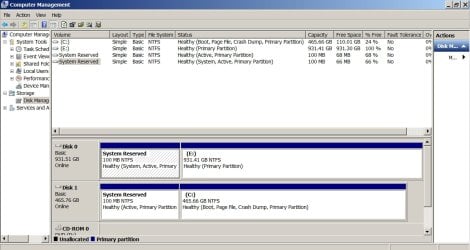
I saw Healthy (Active, Primary Partition) in "Computer Management" after I had renamed back to System Reserved
 

My Computer

Computer type
PC/Desktop
OS
window 7 ultimate
Did you remove the drive letter name, also?
 

My Computer

Computer type
PC/Desktop
OS
Windows 7 x64, Vista x64, 8.1 smartphone
CPU
Intel E8400 65W 64-bit
Motherboard
Gigabyte EP45-UD3LR
Memory
DDR2 2 x 2GB, 1GB x 2
Graphics Card(s)
XFX Radeon HD5750
Sound Card
AMD High Definition Audio; Realtek High Definition Audio
Monitor(s) Displays
iiyama prolite X2377HDS
Screen Resolution
1920 x 1080
Hard Drives
500GB 7200 rpm Seagate ST3500413AS 16MB, 500GB 5400 rpm Toshiba MQ02ABF050H 32MB, 200GB 7200 rpm Seagate ST3200820AS 8MB, 2TB 7200 rpm Western Digital WD20EZRX 64MB
PSU
Enermax Liberty Modular
Case
Antec P193 Midi Tower
Keyboard
Mionix ZIBAL 60
Mouse
Razer USB 2.0 Diamondback Mouse or Huion Graphics Tablet
Browser
Internet Explorer, Lunascape, Firefox, Opera, Avast Safezone
Yes. I removed the letter 'H' that I had assigned.
 

My Computer

Computer type
PC/Desktop
OS
window 7 ultimate
Would a "system restore" sort out any issues I may have created by renaming the partition?
 

My Computer

Computer type
PC/Desktop
OS
window 7 ultimate
System restore only affects registry objects. Does not affect Disk formatting.

Is the disk GPT or MBR? I would assume it is GPT if it has separate System Reserved partition.
 

My Computer

Computer type
PC/Desktop
OS
Windows 7 x64, Vista x64, 8.1 smartphone
CPU
Intel E8400 65W 64-bit
Motherboard
Gigabyte EP45-UD3LR
Memory
DDR2 2 x 2GB, 1GB x 2
Graphics Card(s)
XFX Radeon HD5750
Sound Card
AMD High Definition Audio; Realtek High Definition Audio
Monitor(s) Displays
iiyama prolite X2377HDS
Screen Resolution
1920 x 1080
Hard Drives
500GB 7200 rpm Seagate ST3500413AS 16MB, 500GB 5400 rpm Toshiba MQ02ABF050H 32MB, 200GB 7200 rpm Seagate ST3200820AS 8MB, 2TB 7200 rpm Western Digital WD20EZRX 64MB
PSU
Enermax Liberty Modular
Case
Antec P193 Midi Tower
Keyboard
Mionix ZIBAL 60
Mouse
Razer USB 2.0 Diamondback Mouse or Huion Graphics Tablet
Browser
Internet Explorer, Lunascape, Firefox, Opera, Avast Safezone
A Active partition is only possible on a MBR drive.

I don't think that you damaged anything.
Did you already do a reboot?
 

My Computers

System One System Two

  • Computer type
    PC/Desktop
    Computer Manufacturer/Model Number
    custom build
    OS
    Windows 7 HP 64
    CPU
    i5 6600K - 800MHz to 4200MHz
    Motherboard
    GA-Z170-HD3P
    Memory
    4+4G GSkill DDR4 3000
    Graphics Card(s)
    IG - Intel 530
    Monitor(s) Displays
    Samsung 226BW
    Screen Resolution
    1680x1050
    Hard Drives
    (1) -1 SM951 – 128GB M.2 AHCI PCIe SSD drive for Windows 7 and Lubuntu
    (2) -1 WD SATA 3 - 1T for Data
    (3) -1 WD SATA 3 - 1T for backup
    PSU
    Thermaltake 450W TR2 gold
    Keyboard
    Old and good Chicony mechanical keyboard
    Mouse
    Logitech mX performance - 9 buttons (had to disable some)
    Internet Speed
    500Mb/s
    Browser
    Firefox 64
    Other Info
    TinyWall firewall
  • Computer type
    Laptop
    System Manufacturer/Model Number
    Asus Q550LF
    OS
    Windows 7 Pro
    CPU
    i7-4500U 800MHz to 3.0GHz
    Motherboard
    Asus Q550LF
    Memory
    (4+4)G DDR3 1600
    Graphics Card(s)
    IG intel 4400 + NVIDIA GeForce GT 745M
    Sound Card
    Realtek
    Monitor(s) Displays
    LG Display LP156WF4-SPH1
    Screen Resolution
    1920 x 1080
    Hard Drives
    BX500 120G SSD for Windows and programs +
    1T HDD for data
    Internet Speed
    500 Mb/s
    Browser
    Firefox
    Other Info
    TinyWall firewall
No I have not rebooted - I didn't know if I would ever get back in with the "system" missing in Healthy (Active, Primary Partition).

Not sure what MBR or GPT is... I will look into it and post back
 

My Computer

Computer type
PC/Desktop
OS
window 7 ultimate
The drive is MBR.
 

My Computer

Computer type
PC/Desktop
OS
window 7 ultimate
Make sure you have a System Repair Disk before you switch off/re-boot the PC.

You may need to use the Repair Disk to re-create the Boot Files, by Startup Repair - Run 3 Separate Times .
 

My Computer

Computer type
PC/Desktop
OS
Windows 7 x64, Vista x64, 8.1 smartphone
CPU
Intel E8400 65W 64-bit
Motherboard
Gigabyte EP45-UD3LR
Memory
DDR2 2 x 2GB, 1GB x 2
Graphics Card(s)
XFX Radeon HD5750
Sound Card
AMD High Definition Audio; Realtek High Definition Audio
Monitor(s) Displays
iiyama prolite X2377HDS
Screen Resolution
1920 x 1080
Hard Drives
500GB 7200 rpm Seagate ST3500413AS 16MB, 500GB 5400 rpm Toshiba MQ02ABF050H 32MB, 200GB 7200 rpm Seagate ST3200820AS 8MB, 2TB 7200 rpm Western Digital WD20EZRX 64MB
PSU
Enermax Liberty Modular
Case
Antec P193 Midi Tower
Keyboard
Mionix ZIBAL 60
Mouse
Razer USB 2.0 Diamondback Mouse or Huion Graphics Tablet
Browser
Internet Explorer, Lunascape, Firefox, Opera, Avast Safezone
Hi iko22

Reading through the information on the link you sent, I wonder if my problem lies in the fact the my E: drive is showing Healthy (System, Active, Primary Partition)? The "System" part of this is appearing on the E: drive and not the C: drive. Is it possible the "Systems" has been writing to the wrong drive? Please see attached screenshot.

My Windows 7 Ultimate computer was obtained with just one drive installed (C:). I installed the E: drive and put Windows 10 on it. However, Windows 10 crashed and is unrepairable, so I am back using Windows 7.

For the time being, I am just intending to use the E: drive for storage and was attempting to reformat it when my issue came about.
 

Attachments

  • Screenshot 1.jpg
    Screenshot 1.jpg
    374.3 KB · Views: 1

My Computer

Computer type
PC/Desktop
OS
window 7 ultimate
Is your computer a OEM (Dell, HP etc)?
 

My Computers

System One System Two

  • Computer type
    PC/Desktop
    Computer Manufacturer/Model Number
    custom build
    OS
    Windows 7 HP 64
    CPU
    i5 6600K - 800MHz to 4200MHz
    Motherboard
    GA-Z170-HD3P
    Memory
    4+4G GSkill DDR4 3000
    Graphics Card(s)
    IG - Intel 530
    Monitor(s) Displays
    Samsung 226BW
    Screen Resolution
    1680x1050
    Hard Drives
    (1) -1 SM951 – 128GB M.2 AHCI PCIe SSD drive for Windows 7 and Lubuntu
    (2) -1 WD SATA 3 - 1T for Data
    (3) -1 WD SATA 3 - 1T for backup
    PSU
    Thermaltake 450W TR2 gold
    Keyboard
    Old and good Chicony mechanical keyboard
    Mouse
    Logitech mX performance - 9 buttons (had to disable some)
    Internet Speed
    500Mb/s
    Browser
    Firefox 64
    Other Info
    TinyWall firewall
  • Computer type
    Laptop
    System Manufacturer/Model Number
    Asus Q550LF
    OS
    Windows 7 Pro
    CPU
    i7-4500U 800MHz to 3.0GHz
    Motherboard
    Asus Q550LF
    Memory
    (4+4)G DDR3 1600
    Graphics Card(s)
    IG intel 4400 + NVIDIA GeForce GT 745M
    Sound Card
    Realtek
    Monitor(s) Displays
    LG Display LP156WF4-SPH1
    Screen Resolution
    1920 x 1080
    Hard Drives
    BX500 120G SSD for Windows and programs +
    1T HDD for data
    Internet Speed
    500 Mb/s
    Browser
    Firefox
    Other Info
    TinyWall firewall
I wonder if my problem lies in the fact the my E: drive is showing Healthy (System, Active, Primary Partition)?
[...]
My Windows 7 Ultimate computer was obtained with just one drive installed (C:). I installed the E: drive and put Windows 10 on it. However, Windows 10 crashed and is unrepairable, so I am back using Windows 7.

Well, it's probably not so much a "problem" as merely an unintended configuration.

It looks like you installed a blank, new disk for Win10 and let the Win10 installer reconfigure your system, which it did by abandoning the original "System Reserved" partition and creating a second SRP on the new disk. That would imply the original SRP (on the 500GB disk) is still functional, and you just need to tell the BIOS to start booting from it again.

Since you originally started with just the 500GB disk, you should be able to disconnect the 1TB disk, plug the 500GB disk back into the first port, and Win7 should boot up like it originally did. Its SRP should be annotated "System, Active", just as you want.

If that works, you can plug the 1TB disk into the second port and it should not interfere with the 500GB SRP still being "System, Active". You should then be able to remove both 1TB partitions, recreate a single large partition, and use it for your data.

There are shortcuts that leave both drives connected the whole time, but you may find it clearer to follow what's happening if you temporarily disconnect the 1TB disk while you sort out the 500GB bootup.
 

My Computer

Computer type
PC/Desktop
Computer Manufacturer/Model Number
Dell Optiplex 7050
OS
Windows 7/8.1/10 multiboot
CPU
Intel Core i7-7700
Motherboard
Dell, Intel Q270 chipset
Memory
48GB (2x16GB Crucial DDR4-3200 + 2x8GB Hynix DDR4-2400)
Graphics Card(s)
Intel HD630 + AMD Radeon R7 450 PCIe
Monitor(s) Displays
Asus VC279 (27")
Screen Resolution
1920x1080
Hard Drives
Toshiba M.2 NVMe (256GB),
Samsung 960 Evo (500GB),
WD Red Plus 80EFBX (8TB)
No it is not a branded computer, it was put together by an IT expert. With a legitimate copy of Windows 7 Ultimate loaded. (I still have the disk)
 

My Computer

Computer type
PC/Desktop
OS
window 7 ultimate
Hi dg1261

Thank you for your reply. What you are saying makes sense, but when you state "Since you originally started with just the 500GB disk, you should be able to disconnect the 1TB disk, plug the 500GB disk back into the first port, and Win7 should boot up like it originally did" could you please explain what you mean by "first port"? Are you referring to the SATA connections on the motherboard?

I honestly can't remember what I did when I installed the additional 1TB drive, but it's quite possible that I had to use SATA extension (male to female adapters) and move SATA cables on the mother board (I can't remember what to where though).
 

My Computer

Computer type
PC/Desktop
OS
window 7 ultimate
If things weren't frustrating enough - I have now come across the additional problem when trying to create a system repair disk. I'm getting the message "system repair disk could not be created - the parameter is incorrect (0x80070056)"
 

My Computer

Computer type
PC/Desktop
OS
window 7 ultimate
when you state "Since you originally started with just the 500GB disk, you should be able to disconnect the 1TB disk, plug the 500GB disk back into the first port, and Win7 should boot up like it originally did" could you please explain what you mean by "first port"? Are you referring to the SATA connections on the motherboard?

Yes, I'm talking about the SATA jacks on the motherboard. (I've deliberately avoided using the terms SATA0, SATA1, etc., because it can be misconstrued depending on context, and different devices/utilities may start counting from either 0 or 1, adding to the confusion.)

Let's call them jack-x and jack-y on the motherboard, where jack-x is currently connected to your 1TB disk and jack-y to the 500GB disk. Your BIOS is evidently set to boot first from jack-x, which is why it's using the SRP on the 1TB instead of the SRP on the 500.

Shut down, disconnect both SATA data cables at the motherboard end, plug the 500's cable into jack-x, and leave the 1TB cable dangling. Power on, and see if the 500 boots by itself like it used to do. If my guess is right, the Win10 install didn't mess with the 500's SRP, so it should still work. (And if it works, your problems creating the system repair disk will be moot.) You can leave the power cables (the larger of the two connectors to each hard drive) connected, just disconnect/switch the data cables.

If the 500 works by itself, shut down again, plug the 1TB cable into jack-y, and boot back up. Check in Disk Mgmt to make sure the 500's SRP is still "System". You should be able to take it from there.

If it doesn't work with only the 500 connected, you'll need to repair the 500's SRP. There are lots of ways to do that, so let us know and you'll probably get several different suggestions, one of which may be easier for you to execute than others.
 

My Computer

Computer type
PC/Desktop
Computer Manufacturer/Model Number
Dell Optiplex 7050
OS
Windows 7/8.1/10 multiboot
CPU
Intel Core i7-7700
Motherboard
Dell, Intel Q270 chipset
Memory
48GB (2x16GB Crucial DDR4-3200 + 2x8GB Hynix DDR4-2400)
Graphics Card(s)
Intel HD630 + AMD Radeon R7 450 PCIe
Monitor(s) Displays
Asus VC279 (27")
Screen Resolution
1920x1080
Hard Drives
Toshiba M.2 NVMe (256GB),
Samsung 960 Evo (500GB),
WD Red Plus 80EFBX (8TB)
Back
Top