Solved [HELP] WD Elements 1023 chkdsk issue

synth

New member
Member
VIP
Local time
9:31 AM
Messages
100
Hi, I have a 500 GB WD Elements 1023. And whenever I try plugging it in, the scan and fix option pops up, after googling a bit, people recommended to use chkdsk instead of running the scan and fix option.

So I did, here's what I got with the chkdsk command:
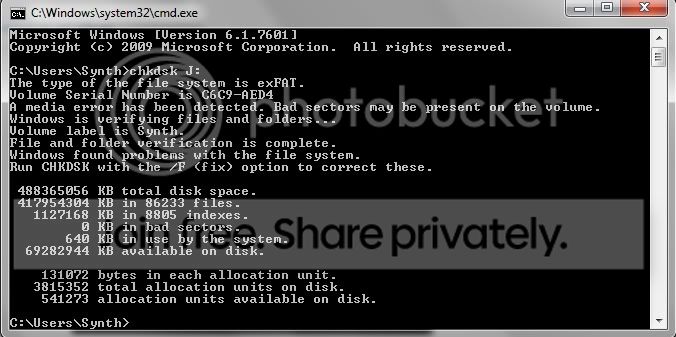
chkdsk1.jpg


After it showed some problems, I ran it again with the /f or fix attrib. and here's what I got:
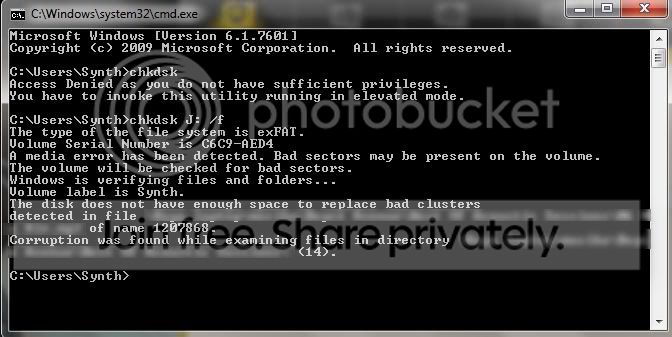
chkdsk.jpg


And btw, these scans took me a little while (around 1-3 mins) before it was done. Maybe it has something to do with the available space on my drive, I have 66GB free out of 500GB. Now I can't copy, paste, or even delete any file on my external hard drive.

There are some very important files on my external hard drive, and I cant afford to lose all my work. :confused: I really need help on this one guys. Can you give me any suggestions what options do I have to save this drive? Any help would be much appreciated. Thank you very much kind sirs and madams.
 

My Computer

OS
Windows 7 Ultimate x64
I don't see bad sectors in the first check. But you can try tool called WD diagnostics. For really check if harddrive has bad sectors and how bad.
Keep us noticed after the WD diagnosis.
 

My Computer

Computer Manufacturer/Model Number
WINDOWS 7 ULTIMATE 64Bit
OS
windows 7 ultimate 64 bit
CPU
intel quad 9550
Motherboard
asus striker II
Memory
2x Corsair 4Gb blue edition
Graphics Card(s)
nvidia GTX260 asus
Sound Card
motherboard
Monitor(s) Displays
Benq
Screen Resolution
1280 x 1024
Hard Drives
2 x500Gb WD BLACK EDITION
PSU
thermaltake 800watt
Case
thermaltake Armor MX
Cooling
zalman
Keyboard
Logitech
Mouse
Microsoft 1000
Internet Speed
20Mb cables
I don't see bad sectors in the first check. But you can try tool called WD diagnostics. For really check if harddrive has bad sectors and how bad.
Keep us noticed after the WD diagnosis.

How about the second check? It says that there isnt enough space to replace bad clusters. What does that mean? and what can I do to fix that?


EDIT:

How can I free up some space on my drive if I cant delete anything? :confused:

These are the files available for download for my drive: WD Support / Downloads / WD Elements / WD Elements SE Portable
 

My Computer

OS
Windows 7 Ultimate x64
Currently doing the WD Data LifeGuard Diagnostics - Extended Test. Though, the SMART Status says it passed. But still, i'm doing the test. Be posting the results soon.
 

My Computer

OS
Windows 7 Ultimate x64
First, "Scan & Fix" is CheckDisk.

Second, do you know why your external drive is formatted exFAT? Do you have some kind of security or encryption software on that drive?

Third, if it were me I would immediately work on recovering and backing up that data to another drive before doing any further repair work. There is always a risk in fixing file system errors in losing data. You could start with a program like RECUVA to see if it can read and copy from the drive.

If you can recover and backup your data then you can try many fixes without pressure. If all else fails you could just wipe the drive clean and format it NTFS, then copy all the data back.
 

My Computer

Computer type
PC/Desktop
Computer Manufacturer/Model Number
Home Built - Jan 2013
OS
Windows 7 64 Bit Home Premium SP1
CPU
i7-3820
Motherboard
Asus P9X79-PRO - Bios 4608
Memory
GSkill F3-14900CL9Q - 16GB
Graphics Card(s)
EVGA GeForce GTX660 - Driver 352.86
Sound Card
On board Realtek ALC898
Monitor(s) Displays
Acer S271HL
Screen Resolution
1920 x 1080
Hard Drives
#1- Samsung 840 Pro Series
#2- Western Digital WD1002FAEX Sata3 Black
#3- Western Digital WD1002FAEX Sata3 Black
PSU
Corsair CMPSU-850TX-V2 - 850 watt (by Seasonic)
Case
Corsair Obsidian 550D
Cooling
Standard 3 120mm case fans, Cooler Master Hyper 212 EVO
Keyboard
MS KC-0405
Mouse
Intellimouse 5-button
Internet Speed
56 Mbits/Sec (on a good day)
Antivirus
Avast & Malwarebytes
Browser
Firefox
Other Info
Asus DVD - DRW-24B1ST 24X
First, "Scan & Fix" is CheckDisk.

Yes, I am aware of this, but for some reason, when I tried doing the "Scan & Fix", it wasn't making any progress at all. Then I tried the manual method, it gave me those outputs.


Second, do you know why your external drive is formatted exFAT? Do you have some kind of security or encryption software on that drive?

No, not really. When I got the drive it was formatted this way. And I've been wanting to reformat it to NTFS, I just didn't have the time to back everything up.

Third, if it were me I would immediately work on recovering and backing up that data to another drive before doing any further repair work. There is always a risk in fixing file system errors in losing data. You could start with a program like RECUVA to see if it can read and copy from the drive.

When I first posted this I wasn't able to copy or read from the drive. But when I tried it a little earlier, and chose the "Continue without scanning" option on the pop-up, I was able to read and copy though I wasn't able to delete anything. And yes, I will be backing up the contents but I can't now since I don't have any spare drives yet. I may be able to back it up in a few days. Would there be a problem if I continue using this drive for pulling up files until I get a spare drive? Or should I just leave it alone 'till I'm able to back-up everything?

If you can recover and backup your data then you can try many fixes without pressure. If all else fails you could just wipe the drive clean and format it NTFS, then copy all the data back.

Yes, looks like this is gonna be my best option.


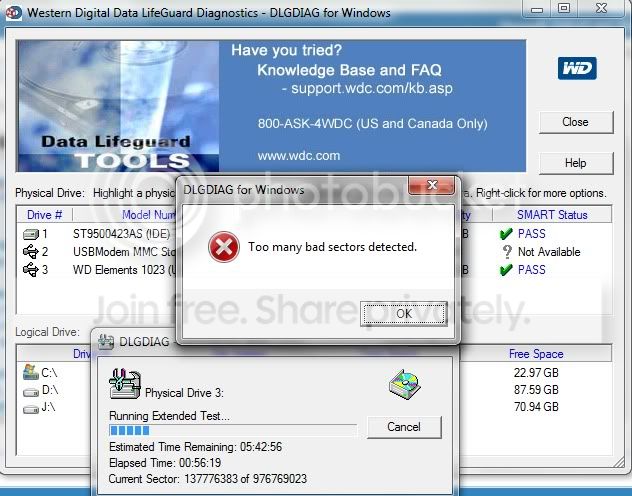
The WD Diagnostics stopped and gave me this error:

WDDIAG.jpg


Is this a bad thing? :confused:


Thank you so much for responding. Highly appreciate it.
 

My Computer

OS
Windows 7 Ultimate x64
Yes, that WD Diagnostic result is a bad thing.

If it were me I would not use the drive until I could start backing up the data. You just can't tell right now if this is a simple file system corruption or a failing hard drive. Further testing could determine this, but you run the risk of the scans and/or corrections causing the loss of data. If the drive is failing then using it runs the risk of moving closer to total failure.

This is simply a matter of how important the data really is to you.
If it is critically important then I would drop everything, run to the store, pay more money than necessary, and buy a new external drive to do the backups.
If the data is not that important then I might order an external drive online for less money, wait to get the drive, wait for the weekend, and then do the transfer.

It's your data. It's your decision.
 

My Computer

Computer type
PC/Desktop
Computer Manufacturer/Model Number
Home Built - Jan 2013
OS
Windows 7 64 Bit Home Premium SP1
CPU
i7-3820
Motherboard
Asus P9X79-PRO - Bios 4608
Memory
GSkill F3-14900CL9Q - 16GB
Graphics Card(s)
EVGA GeForce GTX660 - Driver 352.86
Sound Card
On board Realtek ALC898
Monitor(s) Displays
Acer S271HL
Screen Resolution
1920 x 1080
Hard Drives
#1- Samsung 840 Pro Series
#2- Western Digital WD1002FAEX Sata3 Black
#3- Western Digital WD1002FAEX Sata3 Black
PSU
Corsair CMPSU-850TX-V2 - 850 watt (by Seasonic)
Case
Corsair Obsidian 550D
Cooling
Standard 3 120mm case fans, Cooler Master Hyper 212 EVO
Keyboard
MS KC-0405
Mouse
Intellimouse 5-button
Internet Speed
56 Mbits/Sec (on a good day)
Antivirus
Avast & Malwarebytes
Browser
Firefox
Other Info
Asus DVD - DRW-24B1ST 24X
There is 1 more good tool that show the harddrive physics.
MHDD its bootable CD that's work from dos. If you see many sectors that the answer time is long or some red sectors. Try backup and get Rid from the harddrive asap.
 

My Computer

Computer Manufacturer/Model Number
WINDOWS 7 ULTIMATE 64Bit
OS
windows 7 ultimate 64 bit
CPU
intel quad 9550
Motherboard
asus striker II
Memory
2x Corsair 4Gb blue edition
Graphics Card(s)
nvidia GTX260 asus
Sound Card
motherboard
Monitor(s) Displays
Benq
Screen Resolution
1280 x 1024
Hard Drives
2 x500Gb WD BLACK EDITION
PSU
thermaltake 800watt
Case
thermaltake Armor MX
Cooling
zalman
Keyboard
Logitech
Mouse
Microsoft 1000
Internet Speed
20Mb cables
Yes, that WD Diagnostic result is a bad thing.

If it were me I would not use the drive until I could start backing up the data. You just can't tell right now if this is a simple file system corruption or a failing hard drive. Further testing could determine this, but you run the risk of the scans and/or corrections causing the loss of data. If the drive is failing then using it runs the risk of moving closer to total failure.

This is simply a matter of how important the data really is to you.
If it is critically important then I would drop everything, run to the store, pay more money than necessary, and buy a new external drive to do the backups.
If the data is not that important then I might order an external drive online for less money, wait to get the drive, wait for the weekend, and then do the transfer.

It's your data. It's your decision.

I see. Thank you so much for the help. sevenforums never fails. I'll be backing everything up today. Thanks again.
 

My Computer

OS
Windows 7 Ultimate x64
Gah, been a busy week for me. Anyway, I was able to backup and re-format my external HDD. It's now formatted in NTFS, and I already copied some of my old files to it, but another problem rises. It now takes a while before my laptop can detect it and when it does, it slows down my laptop tremendously. I ran chkdsk again and it found no errors, but when I ran the WD Diagnostic Tool again, it gave me the same error as it did before. "Too many bad sectors detected" :confused: Any suggestions would be highly appreciated mates. Thanks again.
 

My Computer

OS
Windows 7 Ultimate x64
Gah, been a busy week for me. Anyway, I was able to backup and re-format my external HDD. It's now formatted in NTFS, and I already copied some of my old files to it, but another problem rises. It now takes a while before my laptop can detect it and when it does, it slows down my laptop tremendously. I ran chkdsk again and it found no errors, but when I ran the WD Diagnostic Tool again, it gave me the same error as it did before. "Too many bad sectors detected" :confused: Any suggestions would be highly appreciated mates. Thanks again.

From your prior post:

WDDIAG.jpg


Does the WD Diagnostic Tool still show PASS for that drive's SMART status? Click on it and post a screenshot of the window that pops up.

Did your last run of chkdsk show any bad sectors? Or did it report a 0 for bad sectors? Even if it reports no errors, give us a screenshot of the chkdsk output...
 

My Computer

OS
Windows 7 Ultimate x64
Gah, been a busy week for me. Anyway, I was able to backup and re-format my external HDD. It's now formatted in NTFS, and I already copied some of my old files to it, but another problem rises. It now takes a while before my laptop can detect it and when it does, it slows down my laptop tremendously. I ran chkdsk again and it found no errors, but when I ran the WD Diagnostic Tool again, it gave me the same error as it did before. "Too many bad sectors detected" :confused: Any suggestions would be highly appreciated mates. Thanks again.

From your prior post:

WDDIAG.jpg


Does the WD Diagnostic Tool still show PASS for that drive's SMART status? Click on it and post a screenshot of the window that pops up.

Did your last run of chkdsk show any bad sectors? Or did it report a 0 for bad sectors? Even if it reports no errors, give us a screenshot of the chkdsk output...

I've tried reformatting the thing using Disk Management, but its been more than 5 hours and its only at 55%! Is this normal? Cos the first time I formatted this drive I only did a "Quick Format"..Could that have cause the problem? I can't take a screenshot now since its still formatting :(

And yes, the SMART Status still shows a PASS. And iirc, the chkdsk did report no errors.
 

My Computer

OS
Windows 7 Ultimate x64
No that is not normal. That drive has problems.

Does the Data Lifeguard utility have an option to repair the disk? You might give that a try.

And when you run checkdisk, you are using the /r switch?
chkdsk /r
 

My Computer

Computer type
PC/Desktop
Computer Manufacturer/Model Number
Home Built - Jan 2013
OS
Windows 7 64 Bit Home Premium SP1
CPU
i7-3820
Motherboard
Asus P9X79-PRO - Bios 4608
Memory
GSkill F3-14900CL9Q - 16GB
Graphics Card(s)
EVGA GeForce GTX660 - Driver 352.86
Sound Card
On board Realtek ALC898
Monitor(s) Displays
Acer S271HL
Screen Resolution
1920 x 1080
Hard Drives
#1- Samsung 840 Pro Series
#2- Western Digital WD1002FAEX Sata3 Black
#3- Western Digital WD1002FAEX Sata3 Black
PSU
Corsair CMPSU-850TX-V2 - 850 watt (by Seasonic)
Case
Corsair Obsidian 550D
Cooling
Standard 3 120mm case fans, Cooler Master Hyper 212 EVO
Keyboard
MS KC-0405
Mouse
Intellimouse 5-button
Internet Speed
56 Mbits/Sec (on a good day)
Antivirus
Avast & Malwarebytes
Browser
Firefox
Other Info
Asus DVD - DRW-24B1ST 24X
No that is not normal. That drive has problems.

Does the Data Lifeguard utility have an option to repair the disk? You might give that a try.

And when you run checkdisk, you are using the /r switch?
chkdsk /r

Haven't checked if there is. No I didnt use /r. So, should I just cancel this then? its only at 59% right now..
 

My Computer

OS
Windows 7 Ultimate x64
I would. Afterward just do a quick format.

And then run chkdsk /r , that will repair or flag any bad sectors and might make the drive usable. Running chkdsk without the r switch just does a quick surface scan.
 

My Computer

Computer type
PC/Desktop
Computer Manufacturer/Model Number
Home Built - Jan 2013
OS
Windows 7 64 Bit Home Premium SP1
CPU
i7-3820
Motherboard
Asus P9X79-PRO - Bios 4608
Memory
GSkill F3-14900CL9Q - 16GB
Graphics Card(s)
EVGA GeForce GTX660 - Driver 352.86
Sound Card
On board Realtek ALC898
Monitor(s) Displays
Acer S271HL
Screen Resolution
1920 x 1080
Hard Drives
#1- Samsung 840 Pro Series
#2- Western Digital WD1002FAEX Sata3 Black
#3- Western Digital WD1002FAEX Sata3 Black
PSU
Corsair CMPSU-850TX-V2 - 850 watt (by Seasonic)
Case
Corsair Obsidian 550D
Cooling
Standard 3 120mm case fans, Cooler Master Hyper 212 EVO
Keyboard
MS KC-0405
Mouse
Intellimouse 5-button
Internet Speed
56 Mbits/Sec (on a good day)
Antivirus
Avast & Malwarebytes
Browser
Firefox
Other Info
Asus DVD - DRW-24B1ST 24X
I would. Afterward just do a quick format.

And then run chkdsk /r , that will repair or flag any bad sectors and might make the drive usable. Running chkdsk without the r switch just does a quick surface scan.

Orayt. Scanning. And, Data LifeGuard doesn't have a repair option. :confused:
 

My Computer

OS
Windows 7 Ultimate x64
Couldn't remember. Didn't think so. (I'm away from home - away from all my stuff!)

Chkdsk is a good tool. Let's see what happens!
If you see any information of interest as it runs the 5 scans jot them down. IIRC there is little time at the end to do so before chkdsk shut down automatically.
 

My Computer

Computer type
PC/Desktop
Computer Manufacturer/Model Number
Home Built - Jan 2013
OS
Windows 7 64 Bit Home Premium SP1
CPU
i7-3820
Motherboard
Asus P9X79-PRO - Bios 4608
Memory
GSkill F3-14900CL9Q - 16GB
Graphics Card(s)
EVGA GeForce GTX660 - Driver 352.86
Sound Card
On board Realtek ALC898
Monitor(s) Displays
Acer S271HL
Screen Resolution
1920 x 1080
Hard Drives
#1- Samsung 840 Pro Series
#2- Western Digital WD1002FAEX Sata3 Black
#3- Western Digital WD1002FAEX Sata3 Black
PSU
Corsair CMPSU-850TX-V2 - 850 watt (by Seasonic)
Case
Corsair Obsidian 550D
Cooling
Standard 3 120mm case fans, Cooler Master Hyper 212 EVO
Keyboard
MS KC-0405
Mouse
Intellimouse 5-button
Internet Speed
56 Mbits/Sec (on a good day)
Antivirus
Avast & Malwarebytes
Browser
Firefox
Other Info
Asus DVD - DRW-24B1ST 24X
Couldn't remember. Didn't think so. (I'm away from home - away from all my stuff!)

Chkdsk is a good tool. Let's see what happens!
If you see any information of interest as it runs the 5 scans jot them down. IIRC there is little time at the end to do so before chkdsk shut down automatically.

OMG. It's still at 41% -_-. This is getting annoying and frustrating tbh,,

I dont think chkdsk would take this long -_-
 

My Computer

OS
Windows 7 Ultimate x64
It can if it has a lot of bad sectors to repair. Go for a walk!
 

My Computer

Computer type
PC/Desktop
Computer Manufacturer/Model Number
Home Built - Jan 2013
OS
Windows 7 64 Bit Home Premium SP1
CPU
i7-3820
Motherboard
Asus P9X79-PRO - Bios 4608
Memory
GSkill F3-14900CL9Q - 16GB
Graphics Card(s)
EVGA GeForce GTX660 - Driver 352.86
Sound Card
On board Realtek ALC898
Monitor(s) Displays
Acer S271HL
Screen Resolution
1920 x 1080
Hard Drives
#1- Samsung 840 Pro Series
#2- Western Digital WD1002FAEX Sata3 Black
#3- Western Digital WD1002FAEX Sata3 Black
PSU
Corsair CMPSU-850TX-V2 - 850 watt (by Seasonic)
Case
Corsair Obsidian 550D
Cooling
Standard 3 120mm case fans, Cooler Master Hyper 212 EVO
Keyboard
MS KC-0405
Mouse
Intellimouse 5-button
Internet Speed
56 Mbits/Sec (on a good day)
Antivirus
Avast & Malwarebytes
Browser
Firefox
Other Info
Asus DVD - DRW-24B1ST 24X
It can if it has a lot of bad sectors to repair. Go for a walk!

Well if it does have a lot of bad sectors, could it still be fixed by just the chkdsk? And would my HDD still last? And yes, I've already been out of the house twice since I started this lol.
 

My Computer

OS
Windows 7 Ultimate x64
Back
Top