Solved [HELP] WD Elements 1023 chkdsk issue

Well, first, it is an either/or situation. Checkdisk will either repair it so it can be used or it won't!

Regardless, a hard drive with any bad sectors is failing and on it's way out. It is only a matter of time. Weeks? Months? Who knows?

This is just your official notice to start shopping for a new drive, sorry to say. You are fortunate that you were able to backup your data easily. Many do not get that chance.
 

My Computer My Computer

Computer type
PC/Desktop
Computer Manufacturer/Model Number
Home Built - Jan 2013
OS
Windows 7 64 Bit Home Premium SP1
CPU
i7-3820
Motherboard
Asus P9X79-PRO - Bios 4608
Memory
GSkill F3-14900CL9Q - 16GB
Graphics Card(s)
EVGA GeForce GTX660 - Driver 352.86
Sound Card
On board Realtek ALC898
Monitor(s) Displays
Acer S271HL
Screen Resolution
1920 x 1080
Hard Drives
#1- Samsung 840 Pro Series
#2- Western Digital WD1002FAEX Sata3 Black
#3- Western Digital WD1002FAEX Sata3 Black
PSU
Corsair CMPSU-850TX-V2 - 850 watt (by Seasonic)
Case
Corsair Obsidian 550D
Cooling
Standard 3 120mm case fans, Cooler Master Hyper 212 EVO
Keyboard
MS KC-0405
Mouse
Intellimouse 5-button
Internet Speed
56 Mbits/Sec (on a good day)
Antivirus
Avast & Malwarebytes
Browser
Firefox
Other Info
Asus DVD - DRW-24B1ST 24X
Well, first, it is an either/or situation. Checkdisk will either repair it so it can be used or it won't!

Regardless, a hard drive with any bad sectors is failing and on it's way out. It is only a matter of time. Weeks? Months? Who knows?

This is just your official notice to start shopping for a new drive, sorry to say. You are fortunate that you were able to backup your data easily. Many do not get that chance.

I see. Oh well WD sucks -_- its only been 10 months since I got this thing. Do you think WD will still cover this with their warranty? Tho I bought it from a shop. Hmm..
 

My Computer My Computer

OS
Windows 7 Ultimate x64
Yes! Most WD products have at least a 1 year warranty.
Take screenshots for your records. Find the telephone #. You've got a shiny new hard drive coming!
 

My Computer My Computer

Computer type
PC/Desktop
Computer Manufacturer/Model Number
Home Built - Jan 2013
OS
Windows 7 64 Bit Home Premium SP1
CPU
i7-3820
Motherboard
Asus P9X79-PRO - Bios 4608
Memory
GSkill F3-14900CL9Q - 16GB
Graphics Card(s)
EVGA GeForce GTX660 - Driver 352.86
Sound Card
On board Realtek ALC898
Monitor(s) Displays
Acer S271HL
Screen Resolution
1920 x 1080
Hard Drives
#1- Samsung 840 Pro Series
#2- Western Digital WD1002FAEX Sata3 Black
#3- Western Digital WD1002FAEX Sata3 Black
PSU
Corsair CMPSU-850TX-V2 - 850 watt (by Seasonic)
Case
Corsair Obsidian 550D
Cooling
Standard 3 120mm case fans, Cooler Master Hyper 212 EVO
Keyboard
MS KC-0405
Mouse
Intellimouse 5-button
Internet Speed
56 Mbits/Sec (on a good day)
Antivirus
Avast & Malwarebytes
Browser
Firefox
Other Info
Asus DVD - DRW-24B1ST 24X
Yes! Most WD products have at least a 1 year warranty.
Take screenshots for your records. Find the telephone #. You've got a shiny new hard drive coming!

OH YES! :D I might just drop by the store later then :3 Tho I'm still gonna try and fix this. But I can really see it's failing, my laptop takes a few minutes before it can detect it. And before I started formatting it, it's starting to slow down my laptop.
 

My Computer My Computer

OS
Windows 7 Ultimate x64
Actually, you will probably need to contact WD service and get an RMA to send it in for replacement. The warranty comes from WD, not the store you bought it from. Some stores will replace an item within 30 days of purchase or so, but beyond that you are supposed to contact the manufacturer directly.
 

My Computer My Computer

Computer type
PC/Desktop
Computer Manufacturer/Model Number
Home Built - Jan 2013
OS
Windows 7 64 Bit Home Premium SP1
CPU
i7-3820
Motherboard
Asus P9X79-PRO - Bios 4608
Memory
GSkill F3-14900CL9Q - 16GB
Graphics Card(s)
EVGA GeForce GTX660 - Driver 352.86
Sound Card
On board Realtek ALC898
Monitor(s) Displays
Acer S271HL
Screen Resolution
1920 x 1080
Hard Drives
#1- Samsung 840 Pro Series
#2- Western Digital WD1002FAEX Sata3 Black
#3- Western Digital WD1002FAEX Sata3 Black
PSU
Corsair CMPSU-850TX-V2 - 850 watt (by Seasonic)
Case
Corsair Obsidian 550D
Cooling
Standard 3 120mm case fans, Cooler Master Hyper 212 EVO
Keyboard
MS KC-0405
Mouse
Intellimouse 5-button
Internet Speed
56 Mbits/Sec (on a good day)
Antivirus
Avast & Malwarebytes
Browser
Firefox
Other Info
Asus DVD - DRW-24B1ST 24X
Well, as long as they'll replace this one. I'm all good. Anyway, chkdsk finished like 30 mins ago, i think, here's what I got:
chkdsk-1.jpg

Seems like its working fine right now, but I unno how it'll act later on. Gotta keep an eye on this, or if there are any other recommendations you can give to make sure I can still use this or should I just contact WD for the warranty.

I'll prolly run the Data Lifeguard Diagnostic later today. I don't have much time to do it right now. I'll post my screenies from the Data Lifeguard Diagnostic later. Thanks again mates.
 

My Computer My Computer

OS
Windows 7 Ultimate x64
Make sure to get a screenshot of the popup window for SMART data (by clicking on Pass/Warn/Fail or whatever term it reports).

Do you only have one partition on that drive (I:)? If so, does it take up the whole disk?

You probably have bad sectors on that disk even though chkdsk reports zero. Even new, good drives can have a few bad sectors. But they design disks with spare space that the drive itself uses when it encounters bad spots, it'll mark them as bad (retires them) and swaps in spare space in their place. The OS (and chkdsk) never see this happening. That's what the drive diagnostics apps can do; report what's going on internally with the drive (the SMART data).

There is only so much spare space on any given drive to use for swapping sectors. One way you might see a drive start going out is when sectors start going "bad" at a higher than "normal" rate.

At the moment it does seem like you'll soon be making a call to WD. When you run the DLG extended test and get that "Too many bad sectors" error, does that abort the test or will it let it continue to run to completion? If it lets you continue you should allow it to do so (WD may want the final result as well).
 

My Computer My Computer

OS
Windows 7 Ultimate x64
Doing the quick test now, and then doing the extended after. I'll edit this post with the screenies of the results.

EDIT:

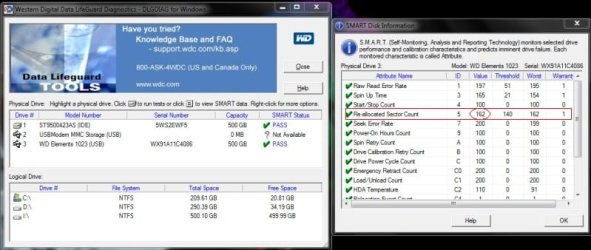
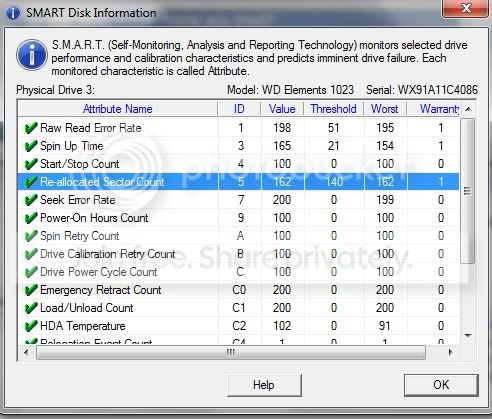
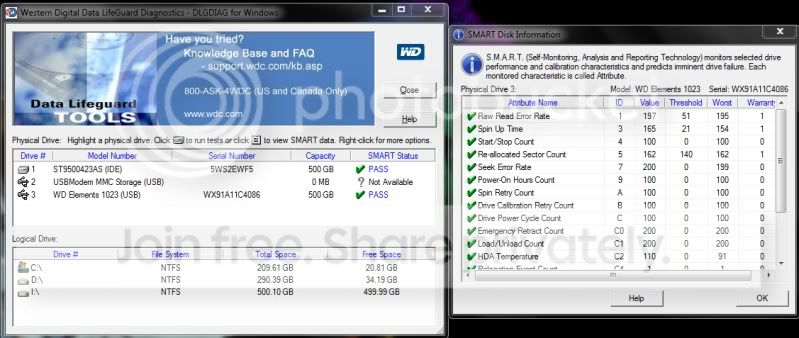
Here's the popup for the SMART data. (1st half of it)
datalifediag.jpg


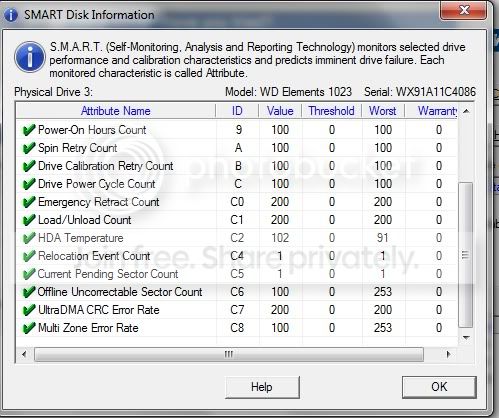
Here's the second half.
datalifediag2.jpg


Currently running the extended test. Twice I did this before, It did NOT let me continue after reporting it has a lot of bad sectors. Virtually the same outcome as my first screen shot.

Gonna post the screenshot here after its done.

EDIT:

By the looks of it, the extended test might not get interrupted this time. Still waiting for it to finish, ETR is 2:33:40. I'll post an update soon.
 
Last edited:

My Computer My Computer

OS
Windows 7 Ultimate x64
Even if this test run fails, see what you can get out of the "View Test Results" button before you close the app. Screenshot it as WD may want it as well.

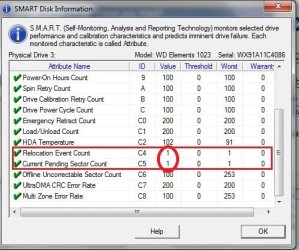
Also check the SMART screen again, making note of the following number (circled):

!temp.jpg
 

My Computer My Computer

OS
Windows 7 Ultimate x64
Will do. What numbers should I be looking for to say that its still a good drive? Or whatever comes up as a result, should I still give WD a call? 45 minutes left still.
 

My Computer My Computer

OS
Windows 7 Ultimate x64
Just that 162. You've lost more sectors if it drops. If it drops below that threshold of 140 it means it has hit the trip point for that attribute. SMART would no longer show PASS. It might then qualify for a warranty adjustment (if it changes to FAIL). If it changes to WARN (or whatever the term) I'm not sure if they would honor it just yet.

As far as I can tell, the other numbers look good. Even though SMART is an industry standard, manufacturers are free to implement it the way they want. The all track certain "critical" attributes (something like 5 or 6 different attributes) but they all track more than the certain standard attributes. But they measure them in different ways so it's sometimes hard to tell.

The "Threshold" number is the trip point for each attribute.
 

My Computer My Computer

OS
Windows 7 Ultimate x64
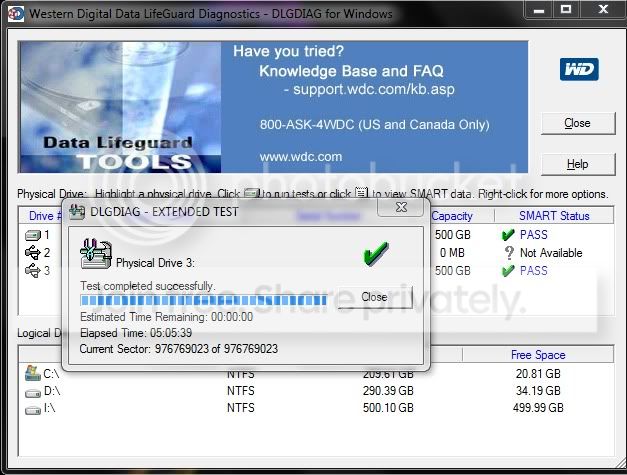
I see. I understand. So, here are my new results, and this time it passed and didnt detect any bad sectors like the previous tests.

datalifediagExtendedTestbmp.jpg


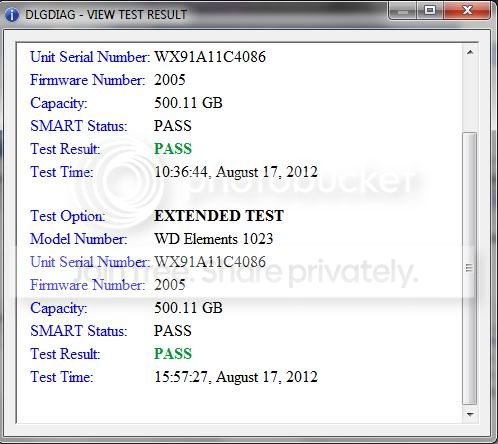
Here's the result:
datalifediagExtendedTestResultbmpbmp.jpg


Same results for the SMART test:
datalifediagAfterExtendedbmp.jpg


Here's the lower half of it:
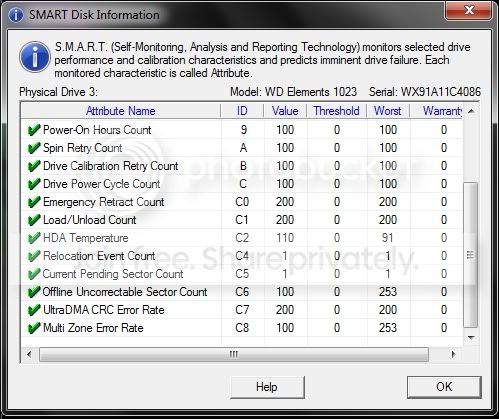
datalifediagAfterExtended2bmp.jpg


So, with everything done, results are in, what can you guys suggest I do with my drive? :confused:
 

My Computer My Computer

OS
Windows 7 Ultimate x64
I guess the previous runs must've done all the reallocation of bad sectors and allowed the test to run, and the 162 didn't drop. So that's good; the count should start at 200 and drop from there (I believe) so it's already experienced quite a bit of sector swapping. But it's holding steady even after the stress of the test.

There were two other attributes I was wondering about though (even though I didn't mention them). So while waiting for your results post I ran DLG on a couple of WD external drives I've got. Both in good shape. The numbers should be close to 200. But yours shows them at 1.

!temp.jpg

Even so, I'm not too sure on how to evaluate that drastic drop without researching some more. I "think" you may be okay (those aren't warranty attributes after all). But that's not saying much for using it to store critical data.

Still looking, but I want to get this posted so you see something.
 

My Computer My Computer

OS
Windows 7 Ultimate x64
I see, I may browse a bit about those two attributes and prolly post what I find in this thread. Well, I should prolly just monitor this drive for now and not store important files in it. And hopefully it holds up. Thanks guys.
 

My Computer My Computer

OS
Windows 7 Ultimate x64
I'm not sure if anyone's mentioned it yet but you should know that SMART, although it's pretty good, is not perfect. If it reports fail, then most often you can pretty much count on trashing the disk. But just because it passes doesn't mean the drive won't drop dead tomorrow.

How is the drive performing? Can you try disconnecting/reconnecting to check response? Move some files around. And do another chkdsk, it should not take long to do (don't add switches like /R or anything).

One problem is all the other tools I can think of to try require the drive to be connected directly to an ATA port rather than via USB.
 

My Computer My Computer

OS
Windows 7 Ultimate x64
I see, I may browse a bit about those two attributes and prolly post what I find in this thread. Well, I should prolly just monitor this drive for now and not store important files in it. And hopefully it holds up. Thanks guys.

You could also come back to see what TVeblen can offer.

And I'll keep an eye on this thread as well (and post for more help).
 

My Computer My Computer

OS
Windows 7 Ultimate x64
Yes, I'll try to put some files on it later today. I'm a bit swamped with some things right now so I can't check it. I'd still be updating this thread too. Thanks again :)
 

My Computer My Computer

OS
Windows 7 Ultimate x64
I agree with F5ing. The drive looks to be "functional". But unless you get a SMART failure or failure error code then your warranty claims will be questionable. I'd keep a eye on it.
 

My Computer My Computer

Computer type
PC/Desktop
Computer Manufacturer/Model Number
Home Built - Jan 2013
OS
Windows 7 64 Bit Home Premium SP1
CPU
i7-3820
Motherboard
Asus P9X79-PRO - Bios 4608
Memory
GSkill F3-14900CL9Q - 16GB
Graphics Card(s)
EVGA GeForce GTX660 - Driver 352.86
Sound Card
On board Realtek ALC898
Monitor(s) Displays
Acer S271HL
Screen Resolution
1920 x 1080
Hard Drives
#1- Samsung 840 Pro Series
#2- Western Digital WD1002FAEX Sata3 Black
#3- Western Digital WD1002FAEX Sata3 Black
PSU
Corsair CMPSU-850TX-V2 - 850 watt (by Seasonic)
Case
Corsair Obsidian 550D
Cooling
Standard 3 120mm case fans, Cooler Master Hyper 212 EVO
Keyboard
MS KC-0405
Mouse
Intellimouse 5-button
Internet Speed
56 Mbits/Sec (on a good day)
Antivirus
Avast & Malwarebytes
Browser
Firefox
Other Info
Asus DVD - DRW-24B1ST 24X
Yes, I will be keeping an eye on this drive. And do some tests over the weekend, and see if theres anything different.
 

My Computer My Computer

OS
Windows 7 Ultimate x64
See what this app has to say about the drive:

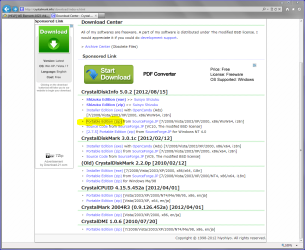
Download Center - Crystal Dew World

There's a bunch of links on that page; you want CrystalDiskInfo, portable edition (no-install version, and you don't get ads), see the link that's highlighted in yellow below:

Capture5.PNG

It has the ability to access some SMART info on at least some USB drives and yours, being a WD, may have their special controller card that allows SMART access anyway.

See if you get green (good) icons next to those two attributes I mentioned before.
 

My Computer My Computer

OS
Windows 7 Ultimate x64
Back
Top