Ofcourse got windows 7 bout last week with a new comp.
its an hp. forgot which kind but its the lower level one.
computer properties say
Intel Dual Core 2.6
3gb
an Ati video card.
bla bla bla.
So far i have liked windows 7 except for this problem.
I have windows 7 64 bit by the way.
I try installing my printer but i cant seem to.
it worked fine with my previos xp computer. it was an OLD gateway.
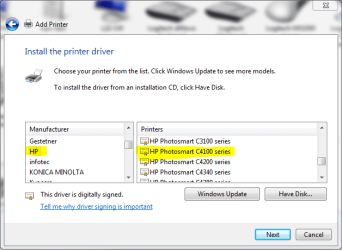
My printer is an HP PhotoSmart C4180
but Windows wont detect it.
I installed it manually before
Installed the drivers from the HP site.
And it wouldnt print.
Nor detect an MS DUO card when i inserted it in the Printer.
So i uninstalled the printer.
Now i try once again to install it manually.
And i go to the add a device screen.
And it doesnt detect it.
Powered on and everything. Just doesnt detect.
the add a device screen has now been searching forever without stopping.
Around an hour and doesnt find anything.
I tried switching usb cords but nothing happened.
Restarted the Printer Spooler Service. but nothing happened either.
Can somoeone please help me, and windows detect the printer.
And install it properly. Any help would be Appreciated it. Thank you.
its an hp. forgot which kind but its the lower level one.
computer properties say
Intel Dual Core 2.6
3gb
an Ati video card.
bla bla bla.
So far i have liked windows 7 except for this problem.
I have windows 7 64 bit by the way.
I try installing my printer but i cant seem to.
it worked fine with my previos xp computer. it was an OLD gateway.
My printer is an HP PhotoSmart C4180
but Windows wont detect it.
I installed it manually before
Installed the drivers from the HP site.
And it wouldnt print.
Nor detect an MS DUO card when i inserted it in the Printer.
So i uninstalled the printer.
Now i try once again to install it manually.
And i go to the add a device screen.
And it doesnt detect it.
Powered on and everything. Just doesnt detect.
the add a device screen has now been searching forever without stopping.
Around an hour and doesnt find anything.
I tried switching usb cords but nothing happened.
Restarted the Printer Spooler Service. but nothing happened either.
Can somoeone please help me, and windows detect the printer.
And install it properly. Any help would be Appreciated it. Thank you.
My Computer
- OS
- Windows 7