
Solved HELP! - With Free Space

Fuentes

New member
Member
Local time
10:07 AM
Messages
61
Hi all-
I seem to have a problem with Windows 7 not updating the Free Space of my HDD. I've been deleting and/or moving files and my Primary HDD doesn't recognize the fact that there has been a change. For illustrative purposes, I've included 2 screenshots, one of what I see when I open 'Computer:'
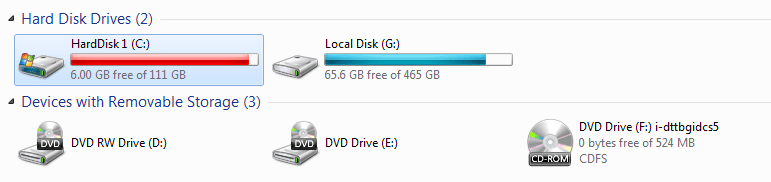
HardDisk1.png
...and one of WinDirStat (which is, AFAIK, a true representation of what is actually on my HDD...)
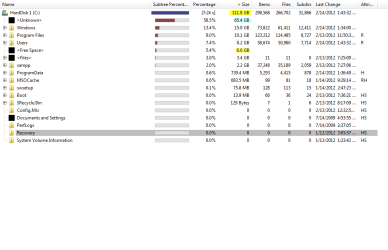
WinDirStat.png

I somehow managed to regain 3GB (up to 6GB), but I'm missing much more. Any help/insight is appreciated. I've run CHKDSK, and I've looked for everything I can think of, all with no joy. (The highlights in WinDirStat are mine.)

Thanks for looking.

-Fuentes
 

My Computer

Computer Manufacturer/Model Number
hp s5220f, hp f730us, hp s3300f
OS
7 HP & ULT
CPU
intel and amd
Memory
4GB desk/2GB lap/2GB theater
Graphics Card(s)
nvidia
Sound Card
realtek
Monitor(s) Displays
sceptre magnavox
Internet Speed
sux (with cable!)

My Computer

Computer type
PC/Desktop
Computer Manufacturer/Model Number
Self Assembled
OS
Microsoft Windows 10 Pro Insider Preview 64-bit
CPU
Intel(R) Core(TM) i3-4130 CPU @ 3.40GHz
Motherboard
Gigabyte Technology Co., Ltd. B85M-D3H
Memory
Corsair Vengence 4GB x2 (8.00GB Dual-Channel DDR3 @ 798MHz)
Graphics Card(s)
2047MB GeForce GTS 450 (ZOTAC International)
Sound Card
Onboard (Realtek High Definition Audio)
Monitor(s) Displays
LG Flatron E2040T
Screen Resolution
1600x900
Hard Drives
Western Digital 1 TB
Seagate 500 GB
PSU
Corsair VS550
Case
Cooler Master K380
Cooling
Cooler Master Seidon 120V Plus
Keyboard
Logitech MK260r
Mouse
Logitech MK260r
Internet Speed
PMPL Broadband
Antivirus
Windows Defender + MBAM
Browser
Firefox
Other Info
Dell Studio 15" Laptop
Open an elevated command prompt and enter this command:

vssadmin list shadowstorage

What is then shown for used, allotted, and maximum shadowcopy storage in GB?
 

My Computer

Computer type
PC/Desktop
Computer Manufacturer/Model Number
Ignatz Special; 4 speed manual gearbox; factory air conditioning; one of one
OS
Windows 7 Home Premium SP1, 64-bit
CPU
Intel Skylake i5-6600K, not overclocked
Motherboard
AsRock Z170M Extreme 4, micro ATX
Memory
8 GB HyperX DDR4-2666 (2 x 4 GB)
Graphics Card(s)
none; graphics are integrated on CPU
Sound Card
onboard: Realtek ALC1150; external: USB Behringer UF0-202
Monitor(s) Displays
Dell S2340M 23 inch IPS
Screen Resolution
1600 x 900
Hard Drives
System: Crucial MX100 series SSD, 128 GB;
Data: Samsung Spinpoint 103SJ, 1 TB;
Backup: WD Caviar Green WD30EZRX-00D8PB0, 3 TB
PSU
Rosewill SilentNight 500 watt fanless, semi-modular
Case
Antec Solo II
Cooling
Noctua NH-U12S; Noctua F12 intake, Noctua S12A exhaust
Keyboard
Microsoft 200 6JH-00001 USB
Mouse
Dell or Microsoft optical wired; USB
Antivirus
Microsoft Security Essentials and Malwarebytes Premium
Browser
Pale Moon
Other Info
All fans PWM; speeds at idle: CPU circa 500 rpm; intake circa 600 rpm; exhaust circa 600 rpm; CPU temps 27 idle and 47 C load in a warm room (27 C/81 F) when running Intel Extreme Tuning Utility stress test.
After running the 1st Option (which hung and I had to reboot) I did Option 2 and it returned a 'No Service Pack backup files were found' message or something much like that. And I lost some space from 6GB to 5.60GB free.

Open an elevated command prompt and enter this command:

vssadmin list shadowstorage

What is then shown for used, allotted, and maximum shadowcopy storage in GB?
I received this message after running: No items found that satisfy the query.

Sigh.

-Fuentes
 

My Computer

Computer Manufacturer/Model Number
hp s5220f, hp f730us, hp s3300f
OS
7 HP & ULT
CPU
intel and amd
Memory
4GB desk/2GB lap/2GB theater
Graphics Card(s)
nvidia
Sound Card
realtek
Monitor(s) Displays
sceptre magnavox
Internet Speed
sux (with cable!)
When you run WinDirStat, do you see an area on the right side that shows info about file types and extensions---.mp3, .doc, .wmv, etc??

If so, post that picture.

The pic you did post of WinDirStat shows 65 GB of "unknown" files. That's where the space is going, but what are those "unknown" files and where are they located?
 

My Computer

Computer type
PC/Desktop
Computer Manufacturer/Model Number
Ignatz Special; 4 speed manual gearbox; factory air conditioning; one of one
OS
Windows 7 Home Premium SP1, 64-bit
CPU
Intel Skylake i5-6600K, not overclocked
Motherboard
AsRock Z170M Extreme 4, micro ATX
Memory
8 GB HyperX DDR4-2666 (2 x 4 GB)
Graphics Card(s)
none; graphics are integrated on CPU
Sound Card
onboard: Realtek ALC1150; external: USB Behringer UF0-202
Monitor(s) Displays
Dell S2340M 23 inch IPS
Screen Resolution
1600 x 900
Hard Drives
System: Crucial MX100 series SSD, 128 GB;
Data: Samsung Spinpoint 103SJ, 1 TB;
Backup: WD Caviar Green WD30EZRX-00D8PB0, 3 TB
PSU
Rosewill SilentNight 500 watt fanless, semi-modular
Case
Antec Solo II
Cooling
Noctua NH-U12S; Noctua F12 intake, Noctua S12A exhaust
Keyboard
Microsoft 200 6JH-00001 USB
Mouse
Dell or Microsoft optical wired; USB
Antivirus
Microsoft Security Essentials and Malwarebytes Premium
Browser
Pale Moon
Other Info
All fans PWM; speeds at idle: CPU circa 500 rpm; intake circa 600 rpm; exhaust circa 600 rpm; CPU temps 27 idle and 47 C load in a warm room (27 C/81 F) when running Intel Extreme Tuning Utility stress test.
These unknown files types can often be simply temp files or possibly MFT you don't have any restore points so it's not that.
Defraggler is a good app for identifying those files, it's free and trusted.
 

My Computer

Computer Manufacturer/Model Number
DIY
OS
Windows 7 home premium x64
CPU
AMD FX-4100 AM3+ 3.6GHz 12MB Black Edition
Motherboard
Asus M5A97 Pro
Memory
Crsair vengeance 12Gb DDR3 1600MHz CL9
Graphics Card(s)
Asus GTX 560 1GB
Sound Card
Realtek onboard
Monitor(s) Displays
Hanns G 1680x1050 native
Hard Drives
OCZ 128Gb Petrol ssd
2x500 Gb Samsung
PSU
OCZ StealthXstream II 500W
Internet Speed
8Mb or better
You need a disk cleanup .... If there are not the backup files, some other junks are there , which is displayed as unknown there. BTW, the cleanup shouldn't consume more place, unless there is a auto backup/restore point creating mechanism with system shutdown.

Try CCleaner . Download and install it, and then run it. From the cleaner tab, run the cleaner .... it will remove all the possible junks from your system. After that, dont touch the registry tab ; and come to the tools tab, and select system restore under it. Remove the restore point (the last one is auto disabled, so you cannot delete it; for the system safety).

Now see if you have gained some free space or not .
 

My Computer

Computer type
PC/Desktop
Computer Manufacturer/Model Number
Self Assembled
OS
Microsoft Windows 10 Pro Insider Preview 64-bit
CPU
Intel(R) Core(TM) i3-4130 CPU @ 3.40GHz
Motherboard
Gigabyte Technology Co., Ltd. B85M-D3H
Memory
Corsair Vengence 4GB x2 (8.00GB Dual-Channel DDR3 @ 798MHz)
Graphics Card(s)
2047MB GeForce GTS 450 (ZOTAC International)
Sound Card
Onboard (Realtek High Definition Audio)
Monitor(s) Displays
LG Flatron E2040T
Screen Resolution
1600x900
Hard Drives
Western Digital 1 TB
Seagate 500 GB
PSU
Corsair VS550
Case
Cooler Master K380
Cooling
Cooler Master Seidon 120V Plus
Keyboard
Logitech MK260r
Mouse
Logitech MK260r
Internet Speed
PMPL Broadband
Antivirus
Windows Defender + MBAM
Browser
Firefox
Other Info
Dell Studio 15" Laptop
I just reinstalled windows...but I'd like to say 'Thank you' to those that tried to help me solve my problem.

-Fuentes
 

My Computer

Computer Manufacturer/Model Number
hp s5220f, hp f730us, hp s3300f
OS
7 HP & ULT
CPU
intel and amd
Memory
4GB desk/2GB lap/2GB theater
Graphics Card(s)
nvidia
Sound Card
realtek
Monitor(s) Displays
sceptre magnavox
Internet Speed
sux (with cable!)
Back
Top