
Solved Help with Windows Vista x64 processes

ftpcomrad

New member
Local time
11:58 PM
Messages
29
Location
Oregon
Hello,

I'm running a Gateway LX6810-01 with Intel Core 2 Quad Q8200 2.34ghz processor, MCP7AM01G1 mobo, xfx gf6800gt gpu, Antec vp450 psu, 6gb RAM pc6400, and running windows vista home premium x64.

I am having some minor performance issues and was wondering if there's a way I can streamline my processes running. Currently I am running 58 processes and have unchecked everything but 8 items under my start up tab in msconfig. The start up items left are: Realtek Voice Manager by Realtek Semiconductor Corp, HD Audio Control Panel by Realtek Semiconductor, Microsoft Intellipoint by Microsoft Corporation, Microsoft Intellitype Pro by Microsoft Corporarion, swg by Uknown (which says Google Toolbar Notifier in program filesx86 when I mouse over it,) Google Update by Unknown (which is in user>john>appdata>google>update>google update,) Avast Antivirus by Avast software, and Java Platform SE Auto Updater by Oracle Corporation.

I'm also going to ss my process from task manager and put it below.

Another thing I know that needs addressed is my gpu.. I think it's the driver. I say my gpu has an issue because every time windows Vista loads and I get to my desktop the screen flashes about 15 seconds later... for about a second the screen goes black and then the desktop reappears. I am going to start a thread in the graphics section of the forum to address that, though.

I've also cleaned my pc for security stuff with Jacee: http://www.sevenforums.com/system-security/363847-windows-vistax64-firewall-not-starting.html
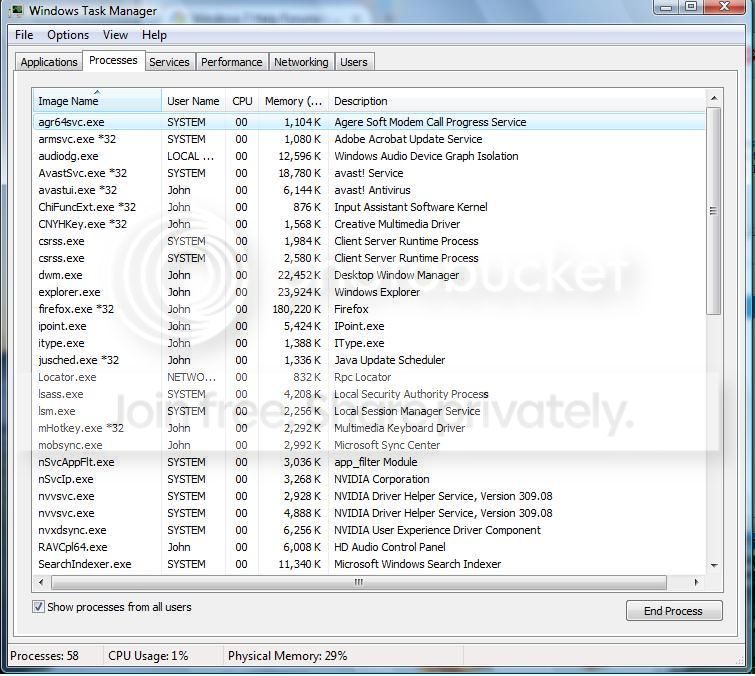
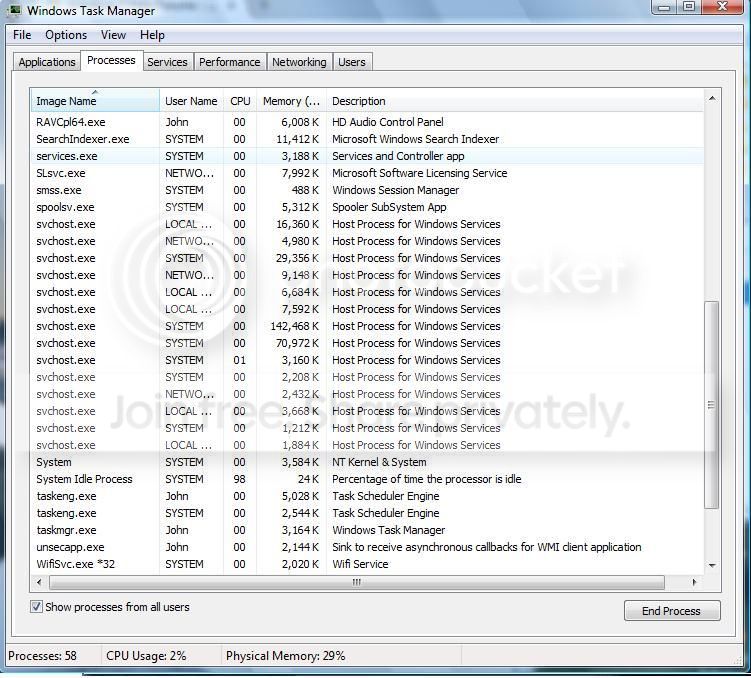
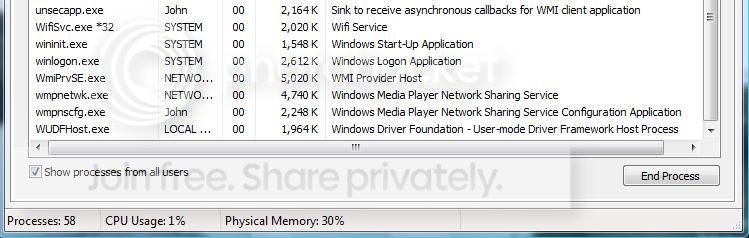


Last edited:

My Computer

Computer type
PC/Desktop
Computer Manufacturer/Model Number
Gateway
OS
windows vistax64
CPU
Intel core 2 quad q8200 2.34 ghz
Motherboard
MCP7AM01G1
Memory
DDR2 PC6400 6gb
Graphics Card(s)
XFX GF6800 GT
Sound Card
Integrated
Monitor(s) Displays
LG 32LD350
Screen Resolution
1024x768
Hard Drives
600gb sata, can't remember brand.
PSU
Antec VP450
Keyboard
Wireless MS keyboard
Mouse
Wireless MS1000
Internet Speed
Cable 60mbps
Antivirus
avast, super antispyware
Browser
Firefox
Maybe I should clarify a little here. All i'm really trying to figure out is if any of the processes running on my machine are not required and which ones are needed. Ultimately i'm just trying to run the bare minimum processes and shut down everything else.

Is 58 processes a lot for Vista?

How many are required to run the OS and provide internet access?

Do I need all those service hosts?

Any help and suggestions would be greatly appreciated.
 

My Computer

Computer type
PC/Desktop
Computer Manufacturer/Model Number
Gateway
OS
windows vistax64
CPU
Intel core 2 quad q8200 2.34 ghz
Motherboard
MCP7AM01G1
Memory
DDR2 PC6400 6gb
Graphics Card(s)
XFX GF6800 GT
Sound Card
Integrated
Monitor(s) Displays
LG 32LD350
Screen Resolution
1024x768
Hard Drives
600gb sata, can't remember brand.
PSU
Antec VP450
Keyboard
Wireless MS keyboard
Mouse
Wireless MS1000
Internet Speed
Cable 60mbps
Antivirus
avast, super antispyware
Browser
Firefox
58 processes is average and if they are not required, they are not running - they just sit there doing no harm.

Playing with the processes is dangerous and pretty useless. Your performance problem must have another cause. How does the "slow performance" manifest itself.
 

My Computer

Computer Manufacturer/Model Number
HP, Dell, Gateway, Toshiba - 4 laptops and 2 desktops
OS
Vista, Windows7, Mint Mate, Zorin, Windows 8
CPU
from 1.6GHz Duo to i7
Monitor(s) Displays
2x HP w2207
Hard Drives
5x HDD, 7x SSD, 12x Externals
Keyboard
with trackball - no mices
Mouse
Trackball mice
Internet Speed
DSL 6000
I notice it through my mousing every so often. I can swipe my mouse from left to right across the screen and it lags. Most of the time my pointer glides smoothly across the screen and reacts quickly to where i'm mousing to, but if I launch firefox (for example) it will always lag that response time of the mouse. There are other times when I notice this lag also... it usually seems like it does it when something starts up.

It's like I have 512mb of ram and a half core processor with .9ghz or something, but I don't, I have 6gb ram and a super low end quad processor. I checked my memory at boot up and it said all my memory was good. I also updated my wireless mouse and keyboard driver through Microsoft (my mouse is a wireless ms mouse 1000 and keyboard is wireless ms keyboard 800 that I bought in a package from Staples.) The problem reminds me of how laggy your system would get if you were to run a lot of stuff at once (like a windows update, virus scan, defrag, installing a program, and streaming a video all at the same time while trying to surf the net.)... laggy. It doesn't last long and will go back to normal within a second or two, but it will do it everytime I open a new tab or another program. Once things open it will go back to smooth scrolling within a second or two.

I really don't run much at the same time and that has me alarmed. Even if I am just running firefox with one tab and the stuff I showed above in the ss it will do this. Again, only doing it when a browser, tab, link, or program is first initiated.

hope that makes sense, i'm self taught on PCs and don't always know the right lingo. I got my first PC August 2005 and have been learning ever since. Btw, that pc still runs fairly well and my wife uses it now as her entertainment streaming machine. I clean the heat sink, fans, blow out the case every 4-6 mos. Every couple years i'll replace the thermal paste on it. I'm still so noob when it comes to PCs though, I wish I were as good as you, Jacee, and the other folks in here. Maybe one day.
 

My Computer

Computer type
PC/Desktop
Computer Manufacturer/Model Number
Gateway
OS
windows vistax64
CPU
Intel core 2 quad q8200 2.34 ghz
Motherboard
MCP7AM01G1
Memory
DDR2 PC6400 6gb
Graphics Card(s)
XFX GF6800 GT
Sound Card
Integrated
Monitor(s) Displays
LG 32LD350
Screen Resolution
1024x768
Hard Drives
600gb sata, can't remember brand.
PSU
Antec VP450
Keyboard
Wireless MS keyboard
Mouse
Wireless MS1000
Internet Speed
Cable 60mbps
Antivirus
avast, super antispyware
Browser
Firefox
I think you are OK. You are doing the right things. If the lag is only when you open a program, it should not be too frustrating.

There are a few things you can research - I suspect the lag is coming from a starving CPU. Quad core is nice but many times only 1 core is being used.

1. When you launch a program, watch the processes tab (Show processes for all users) of the task manager. There you can see which processes eat the CPY.

2. A similar facility is the Process Explorer - but there you can get more info about the processes.

3. The Folder Changes View program can also give you some clues about the activities in the system

Happy hunting.
 

My Computer

Computer Manufacturer/Model Number
HP, Dell, Gateway, Toshiba - 4 laptops and 2 desktops
OS
Vista, Windows7, Mint Mate, Zorin, Windows 8
CPU
from 1.6GHz Duo to i7
Monitor(s) Displays
2x HP w2207
Hard Drives
5x HDD, 7x SSD, 12x Externals
Keyboard
with trackball - no mices
Mouse
Trackball mice
Internet Speed
DSL 6000
Thank you very much, i'll research the stuff you suggested... that helps a ton! I am especially intested in the part you mentioned about the processor because I didn't know that could happen. I will be happily reading article after article about that in particular. It's nice to have direction.. i'll log in here on my pc so I can add to your rep. Thank you so much.

Regards,

FTPcomrad
 

My Computer

Computer type
PC/Desktop
Computer Manufacturer/Model Number
Gateway
OS
windows vistax64
CPU
Intel core 2 quad q8200 2.34 ghz
Motherboard
MCP7AM01G1
Memory
DDR2 PC6400 6gb
Graphics Card(s)
XFX GF6800 GT
Sound Card
Integrated
Monitor(s) Displays
LG 32LD350
Screen Resolution
1024x768
Hard Drives
600gb sata, can't remember brand.
PSU
Antec VP450
Keyboard
Wireless MS keyboard
Mouse
Wireless MS1000
Internet Speed
Cable 60mbps
Antivirus
avast, super antispyware
Browser
Firefox
OK, and don't worry about the reps. But thank you anyhow. It's the thought that counts.
 

My Computer

Computer Manufacturer/Model Number
HP, Dell, Gateway, Toshiba - 4 laptops and 2 desktops
OS
Vista, Windows7, Mint Mate, Zorin, Windows 8
CPU
from 1.6GHz Duo to i7
Monitor(s) Displays
2x HP w2207
Hard Drives
5x HDD, 7x SSD, 12x Externals
Keyboard
with trackball - no mices
Mouse
Trackball mice
Internet Speed
DSL 6000
WHS,

I thought I knew what RAM was until yesterday, as it turns out I don't. I read a lot of stuff regarding cached ram, free ram, super fetch, page file size, file swapping from cached ram to HDD, and now I'm a bit confused.

I tend to leave my PC on 24/7, should I stop doing that to help keep some free memory?

To turn on Superfetch or turn off Superfetch that is the question?

I have 4 channels on my mobo for RAM and I got it with 6gb of Ram: 2gb in ch1, 2gb in ch2, and 2gb in channel 3, 0gb in ch4... is that bad to have it installed that way with the channels unbalanced?

This PC uses DDR2 pc6400 RAM and in my spare parts I have (4) 1gb sticks of PC6400 RAM. Can I run 2gb,2gb,2gb, and then 1gb RAM in my 4 channels or should I reconfigure it to be 2gb, 1gb, 2gb, 1gb? One way I would get 7gb RAM and the other I would retain the 6gb RAM, but one way is balanced while the other is not... does it matter?

Yesterday I had 0 free space for my RAM and I thought that was wierd (I've read the unused RAM is wasted RAM) can you look at my performance and tell me if you see anything out of the ordinary? I don't fully understand what I'm looking at yet other than I can see all 4 cores of my processor are being utilized and that my RAM seems to have some of it hidden or leaked.


My Computer

Computer type
PC/Desktop
Computer Manufacturer/Model Number
Gateway
OS
windows vistax64
CPU
Intel core 2 quad q8200 2.34 ghz
Motherboard
MCP7AM01G1
Memory
DDR2 PC6400 6gb
Graphics Card(s)
XFX GF6800 GT
Sound Card
Integrated
Monitor(s) Displays
LG 32LD350
Screen Resolution
1024x768
Hard Drives
600gb sata, can't remember brand.
PSU
Antec VP450
Keyboard
Wireless MS keyboard
Mouse
Wireless MS1000
Internet Speed
Cable 60mbps
Antivirus
avast, super antispyware
Browser
Firefox
1. Superfetch should be on
2. Cached RAM is available RAM. It can be used any time. Superfetch caches.
3. Keeping the system on 24/7 is not a good idea. Turn it off when not used.
4. Your RAM usage looks normal - no leaks
5. The usage of the 4 cores depends on the programs/processes that are running. Some do, some don't use all cores.
 

My Computer

Computer Manufacturer/Model Number
HP, Dell, Gateway, Toshiba - 4 laptops and 2 desktops
OS
Vista, Windows7, Mint Mate, Zorin, Windows 8
CPU
from 1.6GHz Duo to i7
Monitor(s) Displays
2x HP w2207
Hard Drives
5x HDD, 7x SSD, 12x Externals
Keyboard
with trackball - no mices
Mouse
Trackball mice
Internet Speed
DSL 6000
How about installing the other 1gb of Ram? Do you think it would be alright if I ran (3) 2gb sticks of pc6400 DDR2 and (1) 1gb stick of pc6400 DDR2?
I will also make sure and start turning my PC off at night rather than let it run. Yesterday when I was reading stuff about how Vista utilizes its RAM I felt like it was telling me to not leave it running and now you confirmed it. Thanks again.
 

My Computer

Computer type
PC/Desktop
Computer Manufacturer/Model Number
Gateway
OS
windows vistax64
CPU
Intel core 2 quad q8200 2.34 ghz
Motherboard
MCP7AM01G1
Memory
DDR2 PC6400 6gb
Graphics Card(s)
XFX GF6800 GT
Sound Card
Integrated
Monitor(s) Displays
LG 32LD350
Screen Resolution
1024x768
Hard Drives
600gb sata, can't remember brand.
PSU
Antec VP450
Keyboard
Wireless MS keyboard
Mouse
Wireless MS1000
Internet Speed
Cable 60mbps
Antivirus
avast, super antispyware
Browser
Firefox
I don't think the extra Dimm would make a difference. But it may mess things up.
 

My Computer

Computer Manufacturer/Model Number
HP, Dell, Gateway, Toshiba - 4 laptops and 2 desktops
OS
Vista, Windows7, Mint Mate, Zorin, Windows 8
CPU
from 1.6GHz Duo to i7
Monitor(s) Displays
2x HP w2207
Hard Drives
5x HDD, 7x SSD, 12x Externals
Keyboard
with trackball - no mices
Mouse
Trackball mice
Internet Speed
DSL 6000
ok, I will leave as is until I can buy another 2gb stick. Thanks for all your help... i'm going to mark this as solved.
 

My Computer

Computer type
PC/Desktop
Computer Manufacturer/Model Number
Gateway
OS
windows vistax64
CPU
Intel core 2 quad q8200 2.34 ghz
Motherboard
MCP7AM01G1
Memory
DDR2 PC6400 6gb
Graphics Card(s)
XFX GF6800 GT
Sound Card
Integrated
Monitor(s) Displays
LG 32LD350
Screen Resolution
1024x768
Hard Drives
600gb sata, can't remember brand.
PSU
Antec VP450
Keyboard
Wireless MS keyboard
Mouse
Wireless MS1000
Internet Speed
Cable 60mbps
Antivirus
avast, super antispyware
Browser
Firefox
Update: turns out my wireless mouse and keyboard need to be replaced and thats why my mouse was delaying like that. My keyboard would also not always type the keys I would press and so off a hunch I swapped out the both of them with my wifes keyboard and mouse which are the same exact as mine ( I bought 2 of the same mouse/keyboard combo packs from Staples back when I got mine. ) I swapped out the usb reciever, mouse, and keyboard with hers and and it works perfectly now. No more missed key strokes and the mouse moves my pointer without a hitch.

Also, when I open firefox that delay in my mouse is gone.. it may take a half second to load the page, but while it loads my pointer smoothly reacts to my mouse as I move it about the screen. All in all my new hand me down pc is running like a champ now and I am a happy camper... well, minus the fact I am running Vista. Still a HUGE upgrade from what I was using before. yay WHS, yay Jacee!

I think it was from button mashing online MMOs and using the you know what out of my mouse.

Regards,

FTPcomrad
 

My Computer

Computer type
PC/Desktop
Computer Manufacturer/Model Number
Gateway
OS
windows vistax64
CPU
Intel core 2 quad q8200 2.34 ghz
Motherboard
MCP7AM01G1
Memory
DDR2 PC6400 6gb
Graphics Card(s)
XFX GF6800 GT
Sound Card
Integrated
Monitor(s) Displays
LG 32LD350
Screen Resolution
1024x768
Hard Drives
600gb sata, can't remember brand.
PSU
Antec VP450
Keyboard
Wireless MS keyboard
Mouse
Wireless MS1000
Internet Speed
Cable 60mbps
Antivirus
avast, super antispyware
Browser
Firefox
That's good to hear. I am glad you are happy now. Maybe now you want to try out Windows 10 in virtual. Here is one of my tutorials that shows you how to install and run it. It's the same in Vista.
 

My Computer

Computer Manufacturer/Model Number
HP, Dell, Gateway, Toshiba - 4 laptops and 2 desktops
OS
Vista, Windows7, Mint Mate, Zorin, Windows 8
CPU
from 1.6GHz Duo to i7
Monitor(s) Displays
2x HP w2207
Hard Drives
5x HDD, 7x SSD, 12x Externals
Keyboard
with trackball - no mices
Mouse
Trackball mice
Internet Speed
DSL 6000
Thank you, I will check it out when I get from vacation in just over a week. I can't follow the link on my tablet and I won't have any time to hop on my pc before I leave. You're the man, i'm sure you have a stellar tutorial and I can't wait to check it out.
You're MVP status is well deserving, great job..... it's people like you that get people to come to this forum. That and my pc super hero, Jacee.
 

My Computer

Computer type
PC/Desktop
Computer Manufacturer/Model Number
Gateway
OS
windows vistax64
CPU
Intel core 2 quad q8200 2.34 ghz
Motherboard
MCP7AM01G1
Memory
DDR2 PC6400 6gb
Graphics Card(s)
XFX GF6800 GT
Sound Card
Integrated
Monitor(s) Displays
LG 32LD350
Screen Resolution
1024x768
Hard Drives
600gb sata, can't remember brand.
PSU
Antec VP450
Keyboard
Wireless MS keyboard
Mouse
Wireless MS1000
Internet Speed
Cable 60mbps
Antivirus
avast, super antispyware
Browser
Firefox
LOL, Jacee is actually a heroine.
 

My Computer

Computer Manufacturer/Model Number
HP, Dell, Gateway, Toshiba - 4 laptops and 2 desktops
OS
Vista, Windows7, Mint Mate, Zorin, Windows 8
CPU
from 1.6GHz Duo to i7
Monitor(s) Displays
2x HP w2207
Hard Drives
5x HDD, 7x SSD, 12x Externals
Keyboard
with trackball - no mices
Mouse
Trackball mice
Internet Speed
DSL 6000
Back
Top