<hiberfil.sys> Location » Relocation?

thricipio

New member
Member
Local time
1:20 PM
Messages
65
<hiberfil.sys> Location » Relocation?

Is there a way to change the location of <hiberfil.sys>?

My {Disk 0} is partitioned into a C-drive (my boot partition), a D-drive and an E-drive. My C-drive is running tight on space; so, I've recently turned off hibernate capability [powercfg -h off] in order to save space. I'd like to turn it back on, but without impacting the available space in my boot partition.

Can <hiberfil.sys> be moved to either of the remaining partitions (D or E)?

Many thanks in advance for any answers, suggestions, etc.

All the best,
----------------------
--Thri
----------------------
____________________________________________
 

My Computer

Computer type
PC/Desktop
Computer Manufacturer/Model Number
Lenovo Thinkpad W520 (4270-CTO)
OS
Windows 7 Professional x64
CPU
Intel® Core™ i7-2860QM
Memory
20GB
Graphics Card(s)
NVIDIA Quadro 1000M
Screen Resolution
1920 × 1080
Browser
Mozilla Firefox

My Computer

Computer type
PC/Desktop
Computer Manufacturer/Model Number
Custom assembled by me :}
OS
Win-7-Pro64bit 7-H-Prem-64bit
CPU
i7-5930K 2nd i9-9940x both water blocked VRM's too
Motherboard
ASUS SABERTOOTH X99 2nd ASUS x299 Apex
Memory
Trident-z 3200C14 2nd Trident-z 3600C16
Graphics Card(s)
EVGA 1080ti ftw3 2nd Titan Xp both water blocked
Sound Card
Built-in Realtek
Monitor(s) Displays
1-AOC G2460PG 24"G-Sync 144Hz/ 2nd 1-ASUS VG248QE 24" 144Hz
Screen Resolution
1920 x 1080 144Hz
Hard Drives
2-Samsung M.2 Evo & Evo Plus
2-Samsung 850 EVO 500GB SSD's/ 3-2.5 W.D. Black 1tb-&3-1tb/3-3.5 WD Black 1tb hdd's
PSU
EVGA SuperNOVA 1000-P2 2nd 1200-P2
Case
2-Corsair Obsidian Series 450D Black ATX Mid Tower
Cooling
Custom water loops
Keyboard
Logitech G710+/ 2nd Logitech G910
Mouse
2-RedDragon M901 Perdition 16400 dpi Gaming mouse = wired
Internet Speed
Comcast Ping 19ms 89.31mbps download speed 6.12mbps upload
Antivirus
Malwarebytes Pro/ Superantispyware Pro
Browser
FireFox & Pale moon
Other Info
2nd ASUS X299 Apex/Intel i9-9940x with Custom water loop/7H-Prem-x64/Corsair 450D case/Ram Trident-z 3600C16 4x8gb / Samsung970Evo plus 500gb SSD/Dual ssd EZ swap evo/PSU EVGA SuperNova 1200w-P2 80+Platinum/GPU Titan Xp /8-ML-140 on push-pull on 2-280GTX rads
The hiberfil.sys file cannot be moved.

The hiberfil.sys file must be accessed very early in the boot process. At this time the file system is in a very primitive state and has no ability to access any but the Windows partition.
 

My Computer

Computer type
PC/Desktop
Computer Manufacturer/Model Number
HP
OS
Windows 7 Pro 64 bit
CPU
Xeon W3520
Memory
8 GB
Graphics Card(s)
Nvidia Geforce 210
Leave <hiberfil.sys> exactly where Windows 7 has it. Turn it on and off as you please.

Doing this as ThrashZone has recommended is a great idea.


Disk Management - Post a Screen Capture Image

C, D, E are partition not drives.
 

My Computer

Computer type
PC/Desktop
Computer Manufacturer/Model Number
Home made Desktop
OS
Windows 10 Pro. 64/ version 1709 Windows 7 Pro/64
CPU
Intel i7-6800K @ 4.3
Motherboard
ASUS X-99 Deluxe II
Memory
Corsair Platinum 16 gig @2400
Graphics Card(s)
EVGA GTX 1070 OC
Monitor(s) Displays
Asus 27" LED LCD/VE278Q
Screen Resolution
1920-1080 or 1280-720 HDMI
Hard Drives
INTEL SSD 730-240 Gb Sata 3.0/
PSU
EVGA Platium 1200W
Case
Phanteks Luxe Tempered Glass 8 fans/ one radiator
Cooling
XSPC/ Water Cooled CPU
Keyboard
Das 4 Professional
Mouse
Logitech M705/MX Anywhere 2-S
Internet Speed
100 mbits
Antivirus
Microsoft Security Essentials/ Malwarebytes Premium 3.0/ SAS
Browser
I.E. 11 default/Firefox/ ISP Time Warner Cable/Spectrum
Other Info
LG BluRay Burner/
Sound system-KLipsch-THX/
Icy Dock ssd Hot Swap bays.
Last edited:

My Computer

Computer type
PC/Desktop
Computer Manufacturer/Model Number
Lenovo Thinkpad W520 (4270-CTO)
OS
Windows 7 Professional x64
CPU
Intel® Core™ i7-2860QM
Memory
20GB
Graphics Card(s)
NVIDIA Quadro 1000M
Screen Resolution
1920 × 1080
Browser
Mozilla Firefox
The hiberfil.sys file cannot be moved.

The hiberfil.sys file must be accessed very early in the boot process. At this time the file system is in a very primitive state and has no ability to access any but the Windows partition.
A most excellent reply: informative, yet concise. Many thanks.

All the best,
--------------
—Thri
--------------
____________________________________________
 

My Computer

Computer type
PC/Desktop
Computer Manufacturer/Model Number
Lenovo Thinkpad W520 (4270-CTO)
OS
Windows 7 Professional x64
CPU
Intel® Core™ i7-2860QM
Memory
20GB
Graphics Card(s)
NVIDIA Quadro 1000M
Screen Resolution
1920 × 1080
Browser
Mozilla Firefox
C, D, E are partition[s;] not drives.
Right-O … instead of saying, C-drive, D-drive and E-drive … I should have said, "C-drive" , "D-drive" and "E-drive" ! ;)
 

My Computer

Computer type
PC/Desktop
Computer Manufacturer/Model Number
Lenovo Thinkpad W520 (4270-CTO)
OS
Windows 7 Professional x64
CPU
Intel® Core™ i7-2860QM
Memory
20GB
Graphics Card(s)
NVIDIA Quadro 1000M
Screen Resolution
1920 × 1080
Browser
Mozilla Firefox
Hi,
I doubt 4gb is really going to make a difference in space,
I also doubt it's a good idea to move the folder in question from the C drive,
But please post a disk management screen shot,
http://www.sevenforums.com/tutorials/274797-disk-management-post-screen-capture-image.html
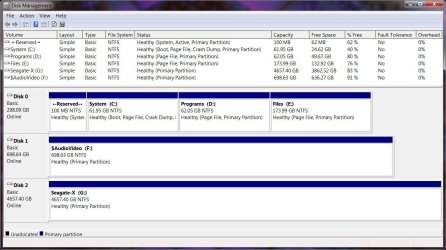
Okay… here it is (click to enlarge) . . .


Not sure how seeing this could be helpful . . . but I guess it can't hurt. ;)

Anyway, thanks . . .
—Thri

Hi,
You state your running out of space on C
You have plenty on D and E
Use Partition wizard free to move and take space from D.

Have you ever ran disk cleanup extended ?
http://www.sevenforums.com/tutorials/307546-windows-updates-remove-outdated-updates-windows-7-a.html
 

My Computer

Computer type
PC/Desktop
Computer Manufacturer/Model Number
Custom assembled by me :}
OS
Win-7-Pro64bit 7-H-Prem-64bit
CPU
i7-5930K 2nd i9-9940x both water blocked VRM's too
Motherboard
ASUS SABERTOOTH X99 2nd ASUS x299 Apex
Memory
Trident-z 3200C14 2nd Trident-z 3600C16
Graphics Card(s)
EVGA 1080ti ftw3 2nd Titan Xp both water blocked
Sound Card
Built-in Realtek
Monitor(s) Displays
1-AOC G2460PG 24"G-Sync 144Hz/ 2nd 1-ASUS VG248QE 24" 144Hz
Screen Resolution
1920 x 1080 144Hz
Hard Drives
2-Samsung M.2 Evo & Evo Plus
2-Samsung 850 EVO 500GB SSD's/ 3-2.5 W.D. Black 1tb-&3-1tb/3-3.5 WD Black 1tb hdd's
PSU
EVGA SuperNOVA 1000-P2 2nd 1200-P2
Case
2-Corsair Obsidian Series 450D Black ATX Mid Tower
Cooling
Custom water loops
Keyboard
Logitech G710+/ 2nd Logitech G910
Mouse
2-RedDragon M901 Perdition 16400 dpi Gaming mouse = wired
Internet Speed
Comcast Ping 19ms 89.31mbps download speed 6.12mbps upload
Antivirus
Malwarebytes Pro/ Superantispyware Pro
Browser
FireFox & Pale moon
Other Info
2nd ASUS X299 Apex/Intel i9-9940x with Custom water loop/7H-Prem-x64/Corsair 450D case/Ram Trident-z 3600C16 4x8gb / Samsung970Evo plus 500gb SSD/Dual ssd EZ swap evo/PSU EVGA SuperNova 1200w-P2 80+Platinum/GPU Titan Xp /8-ML-140 on push-pull on 2-280GTX rads
This illustrates one of the biggest problems with multiple partitions. No matter how careful you are in choosing the sizes very often one of them will prove too small while others have space to spare. Even experts have this problem. Organization is best done with folders, not partitions.

I like to have 2 partitions, one for the OS and applications and one for data. This allows reinstallation of the OS without touching your data. But I would find it difficult to justify more than 2 partitions unless dual booting with multiple operating systems.
 

My Computer

Computer type
PC/Desktop
Computer Manufacturer/Model Number
HP
OS
Windows 7 Pro 64 bit
CPU
Xeon W3520
Memory
8 GB
Graphics Card(s)
Nvidia Geforce 210
Yep
75gb for an os partition is way too small,
I'd say 100gb and a another 50gb as set to unallocated as a empty partition to the right of it then the rest of additional space partitions if that's what your forced to do because you don't have another internal drive to work with or a external hdd to use for other personal goodies.

In the later case a external enclosure/ hdd is your best option. with a 250gb hdd which are pretty dang cheap right now.
Hell so are ssd's even good ones are on sell for 99.00us
I just bought a Samsung 850 EVO 500gb ssd for 190.00us from Samsung.
 
Last edited:

My Computer

Computer type
PC/Desktop
Computer Manufacturer/Model Number
Custom assembled by me :}
OS
Win-7-Pro64bit 7-H-Prem-64bit
CPU
i7-5930K 2nd i9-9940x both water blocked VRM's too
Motherboard
ASUS SABERTOOTH X99 2nd ASUS x299 Apex
Memory
Trident-z 3200C14 2nd Trident-z 3600C16
Graphics Card(s)
EVGA 1080ti ftw3 2nd Titan Xp both water blocked
Sound Card
Built-in Realtek
Monitor(s) Displays
1-AOC G2460PG 24"G-Sync 144Hz/ 2nd 1-ASUS VG248QE 24" 144Hz
Screen Resolution
1920 x 1080 144Hz
Hard Drives
2-Samsung M.2 Evo & Evo Plus
2-Samsung 850 EVO 500GB SSD's/ 3-2.5 W.D. Black 1tb-&3-1tb/3-3.5 WD Black 1tb hdd's
PSU
EVGA SuperNOVA 1000-P2 2nd 1200-P2
Case
2-Corsair Obsidian Series 450D Black ATX Mid Tower
Cooling
Custom water loops
Keyboard
Logitech G710+/ 2nd Logitech G910
Mouse
2-RedDragon M901 Perdition 16400 dpi Gaming mouse = wired
Internet Speed
Comcast Ping 19ms 89.31mbps download speed 6.12mbps upload
Antivirus
Malwarebytes Pro/ Superantispyware Pro
Browser
FireFox & Pale moon
Other Info
2nd ASUS X299 Apex/Intel i9-9940x with Custom water loop/7H-Prem-x64/Corsair 450D case/Ram Trident-z 3600C16 4x8gb / Samsung970Evo plus 500gb SSD/Dual ssd EZ swap evo/PSU EVGA SuperNova 1200w-P2 80+Platinum/GPU Titan Xp /8-ML-140 on push-pull on 2-280GTX rads
Please understand that when I'm trying to help some one I don't do jokes.

Their is a difference between (drives) and (partitions).

When you complete the tutorial correctly that I and ThrashZone suggested it could be very helpful. We ask for things to be done for a reason that you will understand later.


Disk Management - Post a Screen Capture Image


It could be handy to know what partition is on what drive and where the active flags are.
 

My Computer

Computer type
PC/Desktop
Computer Manufacturer/Model Number
Home made Desktop
OS
Windows 10 Pro. 64/ version 1709 Windows 7 Pro/64
CPU
Intel i7-6800K @ 4.3
Motherboard
ASUS X-99 Deluxe II
Memory
Corsair Platinum 16 gig @2400
Graphics Card(s)
EVGA GTX 1070 OC
Monitor(s) Displays
Asus 27" LED LCD/VE278Q
Screen Resolution
1920-1080 or 1280-720 HDMI
Hard Drives
INTEL SSD 730-240 Gb Sata 3.0/
PSU
EVGA Platium 1200W
Case
Phanteks Luxe Tempered Glass 8 fans/ one radiator
Cooling
XSPC/ Water Cooled CPU
Keyboard
Das 4 Professional
Mouse
Logitech M705/MX Anywhere 2-S
Internet Speed
100 mbits
Antivirus
Microsoft Security Essentials/ Malwarebytes Premium 3.0/ SAS
Browser
I.E. 11 default/Firefox/ ISP Time Warner Cable/Spectrum
Other Info
LG BluRay Burner/
Sound system-KLipsch-THX/
Icy Dock ssd Hot Swap bays.
Hey, everybody–
Thanks for your follow-up comments. Will respond in detail later on… probably, this evening.
—Thri
 

My Computer

Computer type
PC/Desktop
Computer Manufacturer/Model Number
Lenovo Thinkpad W520 (4270-CTO)
OS
Windows 7 Professional x64
CPU
Intel® Core™ i7-2860QM
Memory
20GB
Graphics Card(s)
NVIDIA Quadro 1000M
Screen Resolution
1920 × 1080
Browser
Mozilla Firefox
Hi, You state your running out of space on C. You have plenty on D and E
Use Partition wizard free to move and take space from D.

Have you ever ran disk cleanup extended ?
http://www.sevenforums.com/tutorials/307546-windows-updates-remove-outdated-updates-windows-7-a.html
I'll definitely look into Partition Wizard Free. Thanks.

I have performed a recent Disk Cleanup operation. I'm not sure what you mean by "extended," but I did check a box that applied to removing outdated Windows Update files.
 

My Computer

Computer type
PC/Desktop
Computer Manufacturer/Model Number
Lenovo Thinkpad W520 (4270-CTO)
OS
Windows 7 Professional x64
CPU
Intel® Core™ i7-2860QM
Memory
20GB
Graphics Card(s)
NVIDIA Quadro 1000M
Screen Resolution
1920 × 1080
Browser
Mozilla Firefox
Hi,
Yea the extended part I was going to post to a different tutorial but it said nothing of windows update cleanup so I posted the other one that does :)

Did you notice how much space they took up ?
Not that it will be very beneficial but should of given some system overwriting space :/

The safest way I see is to copy and paste the files from D to E and verify all pasted well then delete them on D,
Then extend C into D
Plus I wouldn't do this very often leave or give C about 120gb. or all of D and look into a external enclosure for your personal file storage needs
Cheers.
 

My Computer

Computer type
PC/Desktop
Computer Manufacturer/Model Number
Custom assembled by me :}
OS
Win-7-Pro64bit 7-H-Prem-64bit
CPU
i7-5930K 2nd i9-9940x both water blocked VRM's too
Motherboard
ASUS SABERTOOTH X99 2nd ASUS x299 Apex
Memory
Trident-z 3200C14 2nd Trident-z 3600C16
Graphics Card(s)
EVGA 1080ti ftw3 2nd Titan Xp both water blocked
Sound Card
Built-in Realtek
Monitor(s) Displays
1-AOC G2460PG 24"G-Sync 144Hz/ 2nd 1-ASUS VG248QE 24" 144Hz
Screen Resolution
1920 x 1080 144Hz
Hard Drives
2-Samsung M.2 Evo & Evo Plus
2-Samsung 850 EVO 500GB SSD's/ 3-2.5 W.D. Black 1tb-&3-1tb/3-3.5 WD Black 1tb hdd's
PSU
EVGA SuperNOVA 1000-P2 2nd 1200-P2
Case
2-Corsair Obsidian Series 450D Black ATX Mid Tower
Cooling
Custom water loops
Keyboard
Logitech G710+/ 2nd Logitech G910
Mouse
2-RedDragon M901 Perdition 16400 dpi Gaming mouse = wired
Internet Speed
Comcast Ping 19ms 89.31mbps download speed 6.12mbps upload
Antivirus
Malwarebytes Pro/ Superantispyware Pro
Browser
FireFox & Pale moon
Other Info
2nd ASUS X299 Apex/Intel i9-9940x with Custom water loop/7H-Prem-x64/Corsair 450D case/Ram Trident-z 3600C16 4x8gb / Samsung970Evo plus 500gb SSD/Dual ssd EZ swap evo/PSU EVGA SuperNova 1200w-P2 80+Platinum/GPU Titan Xp /8-ML-140 on push-pull on 2-280GTX rads
This illustrates one of the biggest problems with multiple partitions. No matter how careful you are in choosing the sizes very often one of them will prove too small while others have space to spare. Even experts have this problem. Organization is best done with folders, not partitions.
Well, this is a good perspective to have . . . at least I know I'm not the only one who's struggled with this; i.e., this isn't the first time I've found myself in the this predicament. Of course, this time around, I thought I'd allocated more than enough space, but that's probably what everybody says… like, every time they find themselves in this circumstance. On the other hand, I'm not sure I'm in such bad shape: my latest Disk Management report shows that I have about 40% free space; albeit, with hibernate capability disabled. And this is after a little over three years with this configuration. I'm thinking I can make it until I upgrade to Windows 10, at which time I'll start over, but with a much larger boot partition — maybe 150GB.


I like to have 2 partitions, one for the OS and applications and one for data. This allows reinstallation of the OS without touching your data. But I would find it difficult to justify more than 2 partitions unless dual booting with multiple operating systems.
When it comes right down to it, I might find it difficult as well. However, I must confess to being pretty wedded to the approach I've been using — and I've been using it for quite a number of years now. I like having everything I need to run maintenance on (i.e., the system files, Registry, etc.) in its own partition. And i like having my data in its own partition for backup purposes. And as far as the allocation guessing game is concerned, I'm not sure there's a big difference in the challenge between two and three partitions.

In any case, I appreciate the feedback.

Thanks.

—Thri
 

My Computer

Computer type
PC/Desktop
Computer Manufacturer/Model Number
Lenovo Thinkpad W520 (4270-CTO)
OS
Windows 7 Professional x64
CPU
Intel® Core™ i7-2860QM
Memory
20GB
Graphics Card(s)
NVIDIA Quadro 1000M
Screen Resolution
1920 × 1080
Browser
Mozilla Firefox
Yep
75gb for an os partition is way too small,
I'd say 100gb and a another 50gb as set to unallocated as a empty partition to the right of it then the rest of additional space partitions if that's what your forced to do because you don't have another internal drive to work with or a external hdd to use for other personal goodies.
·
· [snip]
·
These seem like good numbers to me. But, what's the purpose of setting aside 50GB of unallocated space "to the right of it;" i.e., why not just make the boot partition 150GB to start with and skip the unallocated space? I'm asking in order to learn . . . not to be argumentative.

Regarding "another internal drive to work with or a external hdd to use," see my next post to Layback Bear containing a more current and a complete Disk Management report.

Thanks,
—Thri
 

My Computer

Computer type
PC/Desktop
Computer Manufacturer/Model Number
Lenovo Thinkpad W520 (4270-CTO)
OS
Windows 7 Professional x64
CPU
Intel® Core™ i7-2860QM
Memory
20GB
Graphics Card(s)
NVIDIA Quadro 1000M
Screen Resolution
1920 × 1080
Browser
Mozilla Firefox
Please understand that when I'm trying to help some one I don't do jokes.
First off, I do appreciate your (and everybody else's) help. Secondly, my previous response was my way of saying that I use the terms "C-Drive," etc., as vernacular and not intending technical precision, per sé.


Their is a difference between (drives) and (partitions).
Since my original post started off with "My {Disk 0} is partitioned into a C-drive (my boot partition)," I thought it was apparent that I was aware that "{Disk 0}" is the volume label for a physical entity (i.e., an actual harddrive) and that a partition is an organizational structure.


When you complete the tutorial correctly that I and ThrashZone suggested it could be very helpful.
The tutorial is good work, but somewhat irrelevant to my needs; I'm familiar with Disk Management, screenshots and posting image files (though, admittedly I'd forgotten about the paperclip attachment icon that makes posting a whole lot easier).


We ask for things to be done for a reason that you will understand later.
My original screenshot was cropped and therefore incomplete in terms of the amount of information it included. That was a mistake on my part. So, your immediately preceding statement is a point well made… and this time around, it's well taken. So, thanks.

All the best,
--------------
--Thri
--------------

Here's the complete Disk Management report . . .
 

Attachments

  • Disk-Mgmt-LG.jpg
    Disk-Mgmt-LG.jpg
    117 KB · Views: 3

My Computer

Computer type
PC/Desktop
Computer Manufacturer/Model Number
Lenovo Thinkpad W520 (4270-CTO)
OS
Windows 7 Professional x64
CPU
Intel® Core™ i7-2860QM
Memory
20GB
Graphics Card(s)
NVIDIA Quadro 1000M
Screen Resolution
1920 × 1080
Browser
Mozilla Firefox
Offhand, I can't think of why you want to leave some space unallocated. Maybe someone else has a reason.

With 2 partitions (C and D), you have only one decision that could go wrong: how much space do I devote to C. By default, all of the remainder would go to D.

With 3 partitions, there are 2 decisions that can be wrong--how much space to C and how much space to D. It's not a critical distinction as long as you are willing and able take the time to resize your partitions at some later date if 1 of the 2 decisions is bad. The best widely available tool is Partition Wizard.

You are the world's foremost authority on how much space you need for C. I've yet to need 40. My data is on an entirely separate drive regardless.

I'd think that having Windows on C and applications on D would complicate a backup strategy, but I'd guess you could work around that.
 

My Computer

Computer type
PC/Desktop
Computer Manufacturer/Model Number
Ignatz Special; 4 speed manual gearbox; factory air conditioning; one of one
OS
Windows 7 Home Premium SP1, 64-bit
CPU
Intel Skylake i5-6600K, not overclocked
Motherboard
AsRock Z170M Extreme 4, micro ATX
Memory
8 GB HyperX DDR4-2666 (2 x 4 GB)
Graphics Card(s)
none; graphics are integrated on CPU
Sound Card
onboard: Realtek ALC1150; external: USB Behringer UF0-202
Monitor(s) Displays
Dell S2340M 23 inch IPS
Screen Resolution
1600 x 900
Hard Drives
System: Crucial MX100 series SSD, 128 GB;
Data: Samsung Spinpoint 103SJ, 1 TB;
Backup: WD Caviar Green WD30EZRX-00D8PB0, 3 TB
PSU
Rosewill SilentNight 500 watt fanless, semi-modular
Case
Antec Solo II
Cooling
Noctua NH-U12S; Noctua F12 intake, Noctua S12A exhaust
Keyboard
Microsoft 200 6JH-00001 USB
Mouse
Dell or Microsoft optical wired; USB
Antivirus
Microsoft Security Essentials and Malwarebytes Premium
Browser
Pale Moon
Other Info
All fans PWM; speeds at idle: CPU circa 500 rpm; intake circa 600 rpm; exhaust circa 600 rpm; CPU temps 27 idle and 47 C load in a warm room (27 C/81 F) when running Intel Extreme Tuning Utility stress test.
Offhand, I can't think of why you want to leave some space unallocated. Maybe someone else has a reason.

I would only think of Over Provisioning on SSDs.
 

My Computer

Computer type
PC/Desktop
Computer Manufacturer/Model Number
Custom Build
OS
Windows 7 Ultimate x64 SP1
CPU
AMD Phenom 2 1090T
Motherboard
Gigabyte GA-890FXA-UD5
Memory
2x8GB Kingston HyperX Fury Black 1600Mhz Unganged
Graphics Card(s)
MSI GTX 970 Gaming 4G
Sound Card
Realtek On-Board HD 7.1 Audio / Logitech G35
Monitor(s) Displays
3xAcer GD245HQ
Screen Resolution
1920x1080
Hard Drives
Samsung 850 Pro 512GB SSD - OS /
WD Caviar Black SATA 3 - 1 TBx2 - Dynamic RAID 0 /
WD Caviar Green SATA 2 - 640GBx2 - Dynamic RAID 0 /
WD Caviar Green SATA 2 - 640GB - Internal Backup /
Seagate Barracude SATA 3 - 3TB - External Backup/ Sync
PSU
HighPower 1000W
Case
Cooler Master HAF 932
Cooling
Noctua NH-D14
Keyboard
Logitech G19
Mouse
Logitech G500
Internet Speed
100/4 Mbit Cable (100GB quota)
Antivirus
ZoneAlarm Extreme Security / MBAM Pro / MBAE Free / SAS Free
Browser
IE 11 - Firefox - Chrome
Other Info
Logitech F710/ G27/ G940/ Z5500 // TrackIR 5 // Nvidia 3D Surround Vision
Offhand, I can't think of why you want to leave some space unallocated. Maybe someone else has a reason.

I would only think of Over Provisioning on SSDs.

Gokay:

Can you confirm that the "over provisioning" area MUST not be in any partition? I've seen conflicting info on this and have never bothered with over provisioning. My partitions and drives are never crowded and I've never had any performance issues.
 

My Computer

Computer type
PC/Desktop
Computer Manufacturer/Model Number
Ignatz Special; 4 speed manual gearbox; factory air conditioning; one of one
OS
Windows 7 Home Premium SP1, 64-bit
CPU
Intel Skylake i5-6600K, not overclocked
Motherboard
AsRock Z170M Extreme 4, micro ATX
Memory
8 GB HyperX DDR4-2666 (2 x 4 GB)
Graphics Card(s)
none; graphics are integrated on CPU
Sound Card
onboard: Realtek ALC1150; external: USB Behringer UF0-202
Monitor(s) Displays
Dell S2340M 23 inch IPS
Screen Resolution
1600 x 900
Hard Drives
System: Crucial MX100 series SSD, 128 GB;
Data: Samsung Spinpoint 103SJ, 1 TB;
Backup: WD Caviar Green WD30EZRX-00D8PB0, 3 TB
PSU
Rosewill SilentNight 500 watt fanless, semi-modular
Case
Antec Solo II
Cooling
Noctua NH-U12S; Noctua F12 intake, Noctua S12A exhaust
Keyboard
Microsoft 200 6JH-00001 USB
Mouse
Dell or Microsoft optical wired; USB
Antivirus
Microsoft Security Essentials and Malwarebytes Premium
Browser
Pale Moon
Other Info
All fans PWM; speeds at idle: CPU circa 500 rpm; intake circa 600 rpm; exhaust circa 600 rpm; CPU temps 27 idle and 47 C load in a warm room (27 C/81 F) when running Intel Extreme Tuning Utility stress test.
Back
Top