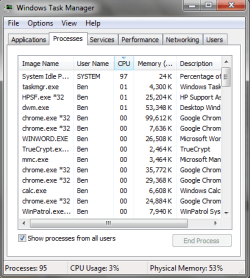
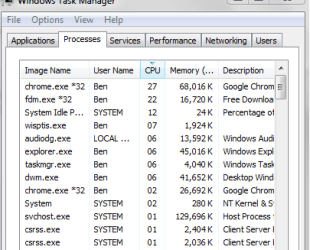
For awhile now , I have been having trouble with programs having random "spikes" all at the same time rendering the computer unusable since it is at 100% CPU. This happens on random programs like Skype, Free Download Manager, Chrome, etc. It isn't a virus because this happened on my last installation and I use Symantec, Malwarebytes, and Superantispyway anyways.. I need this fixed, I can't do anything for 1/3 of the time I use the computer. Keep in mind this happens at random. It is normally using about 5% CPU total. I have disabled all services except Microsoft's in msconfig, but it still occurs.
The specs are: HP g6 i3 2.53GHz, 4GB Ram, 500GB HDD.
The specs are: HP g6 i3 2.53GHz, 4GB Ram, 500GB HDD.
Attachments
Last edited:
My Computer
- Computer type
- PC/Desktop
- Computer Manufacturer/Model Number
- Custom (desktop), Custom (desktop), Lenovo U530 Touch
- OS
- Windows 7 Ultimate x64, Windows 7 Pro x64, Windows 10 Home x64
- CPU
- Intel i7-4790K , Intel i7-3770K, Intel i7-4510ULT
- Motherboard
- Asus Z87-PRO (main), Asus P8P67 Rev 3.1(secondary)
- Memory
- 12GB Corsair Vengeance
- Graphics Card(s)
- EVGA GeForce GTX 660 2GB, 2X GIGABYTE 6890, Nvidia GT730M
- Sound Card
- Realtek Integrated, IDT (both laptops)
- Monitor(s) Displays
- Samsung S22C300H 21.5"
- Screen Resolution
- 1920x1080 (Both machines)
- Hard Drives
- Main:
Muskin SSD 240GB
Seagate 320GB
Western Digital 1TB
Seagate 2TB
Seconday:
Toshiba 1TB
WD 1TB
Lenovo Laptop:
SAMSUNG SM843 SSD 480GB
- PSU
- Corsair GS700, COOLMAX CUL-850B (secondary)
- Case
- Thermaltake Chaser
- Cooling
- Corsair H60 Dual Fans, Stock Cooler
- Keyboard
- Logitech K360
- Mouse
- Logitech M310
- Internet Speed
- 16Mbps
- Antivirus
- Comodo Internet Security Premium, MWB
- Browser
- Chrome, Firefox
- Other Info
- I have three systems listed in the specs area. My main desktop and my secondary desktop that was my previous build. The last one (in all the sections) is my Lenovo laptop.
Thanks for your interest in my machines! :)