
Solved High CPU On Random Programs

ben946210

New member
Power User
Local time
6:32 PM
Messages
236
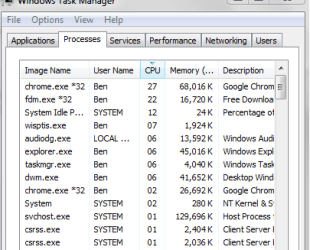
For awhile now , I have been having trouble with programs having random "spikes" all at the same time rendering the computer unusable since it is at 100% CPU. This happens on random programs like Skype, Free Download Manager, Chrome, etc. It isn't a virus because this happened on my last installation and I use Symantec, Malwarebytes, and Superantispyway anyways.. I need this fixed, I can't do anything for 1/3 of the time I use the computer. Keep in mind this happens at random. It is normally using about 5% CPU total. I have disabled all services except Microsoft's in msconfig, but it still occurs.


The specs are: HP g6 i3 2.53GHz, 4GB Ram, 500GB HDD.
 

Attachments
  • 123.png
    123.png
    11.5 KB · Views: 9
Last edited:

My Computer

Computer type
PC/Desktop
Computer Manufacturer/Model Number
Custom (desktop), Custom (desktop), Lenovo U530 Touch
OS
Windows 7 Ultimate x64, Windows 7 Pro x64, Windows 10 Home x64
CPU
Intel i7-4790K , Intel i7-3770K, Intel i7-4510ULT
Motherboard
Asus Z87-PRO (main), Asus P8P67 Rev 3.1(secondary)
Memory
12GB Corsair Vengeance
Graphics Card(s)
EVGA GeForce GTX 660 2GB, 2X GIGABYTE 6890, Nvidia GT730M
Sound Card
Realtek Integrated, IDT (both laptops)
Monitor(s) Displays
Samsung S22C300H 21.5"
Screen Resolution
1920x1080 (Both machines)
Hard Drives
Main:
Muskin SSD 240GB
Seagate 320GB
Western Digital 1TB
Seagate 2TB

Seconday:
Toshiba 1TB
WD 1TB

Lenovo Laptop:
SAMSUNG SM843 SSD 480GB
PSU
Corsair GS700, COOLMAX CUL-850B (secondary)
Case
Thermaltake Chaser
Cooling
Corsair H60 Dual Fans, Stock Cooler
Keyboard
Logitech K360
Mouse
Logitech M310
Internet Speed
16Mbps
Antivirus
Comodo Internet Security Premium, MWB
Browser
Chrome, Firefox
Other Info
I have three systems listed in the specs area. My main desktop and my secondary desktop that was my previous build. The last one (in all the sections) is my Lenovo laptop.

Thanks for your interest in my machines! :)
whats with them 32 asterisks on chrome.exe?how many of them are running?you do know they shouldnt be there in the first place...
 

My Computer

Computer type
PC/Desktop
Computer Manufacturer/Model Number
Homebuilt,Quadcore processor on Asus MB
OS
Microsoft Windows 7 Ultimate 64-bit Service Pack 1
CPU
Intel(R) Core(TM)2 Quad Q 9550 @ 2.83 GHz
Motherboard
ASUS P5B-Deluxe Wi-Fi Edition
Memory
4x1024 GB DDR2 Corsair PC2-6400 800 Mhz
Graphics Card(s)
MSI TwiFrozer II 1024MB GDDR5
Sound Card
Realtek ALC883 @ Intel 82801HB ICH8 - High Def
Monitor(s) Displays
Asus VW195 [19" LCD]
Screen Resolution
1440x860 pixels
Hard Drives
OCZ Vertex Plus Series SATA II 2.5" SSD 128GB-

Westarn Digital SATA II 250GB
PSU
Corsair CX600W
Case
Custom built,cut and painted
Cooling
Xigmatek Gaia 2x120mm fan
Keyboard
MS Generic
Mouse
MS Optical 6000
Internet Speed
never enough
Antivirus
ESET Smart Security 6.0.306.0
I believe "*32" stand for 32 bit process. It's running on a 64-Bit machine.
 

My Computer

Computer type
PC/Desktop
Computer Manufacturer/Model Number
Custom (desktop), Custom (desktop), Lenovo U530 Touch
OS
Windows 7 Ultimate x64, Windows 7 Pro x64, Windows 10 Home x64
CPU
Intel i7-4790K , Intel i7-3770K, Intel i7-4510ULT
Motherboard
Asus Z87-PRO (main), Asus P8P67 Rev 3.1(secondary)
Memory
12GB Corsair Vengeance
Graphics Card(s)
EVGA GeForce GTX 660 2GB, 2X GIGABYTE 6890, Nvidia GT730M
Sound Card
Realtek Integrated, IDT (both laptops)
Monitor(s) Displays
Samsung S22C300H 21.5"
Screen Resolution
1920x1080 (Both machines)
Hard Drives
Main:
Muskin SSD 240GB
Seagate 320GB
Western Digital 1TB
Seagate 2TB

Seconday:
Toshiba 1TB
WD 1TB

Lenovo Laptop:
SAMSUNG SM843 SSD 480GB
PSU
Corsair GS700, COOLMAX CUL-850B (secondary)
Case
Thermaltake Chaser
Cooling
Corsair H60 Dual Fans, Stock Cooler
Keyboard
Logitech K360
Mouse
Logitech M310
Internet Speed
16Mbps
Antivirus
Comodo Internet Security Premium, MWB
Browser
Chrome, Firefox
Other Info
I have three systems listed in the specs area. My main desktop and my secondary desktop that was my previous build. The last one (in all the sections) is my Lenovo laptop.

Thanks for your interest in my machines! :)
you r right,i m running on 32 and it doesnt show up.looking at your window bar i assume you have more than 65 or 70 services already running.if many belong to third party apps and are set to auto update,they could produce spikes.Is your AV loking for new signatures every hour?Do you have malwarebytes active all the time?Things like that i mean,your system specs shouldnt allow such a behaviour,i7 and 8gb!download process explorer and have a look whats running and how high.
 

My Computer

Computer type
PC/Desktop
Computer Manufacturer/Model Number
Homebuilt,Quadcore processor on Asus MB
OS
Microsoft Windows 7 Ultimate 64-bit Service Pack 1
CPU
Intel(R) Core(TM)2 Quad Q 9550 @ 2.83 GHz
Motherboard
ASUS P5B-Deluxe Wi-Fi Edition
Memory
4x1024 GB DDR2 Corsair PC2-6400 800 Mhz
Graphics Card(s)
MSI TwiFrozer II 1024MB GDDR5
Sound Card
Realtek ALC883 @ Intel 82801HB ICH8 - High Def
Monitor(s) Displays
Asus VW195 [19" LCD]
Screen Resolution
1440x860 pixels
Hard Drives
OCZ Vertex Plus Series SATA II 2.5" SSD 128GB-

Westarn Digital SATA II 250GB
PSU
Corsair CX600W
Case
Custom built,cut and painted
Cooling
Xigmatek Gaia 2x120mm fan
Keyboard
MS Generic
Mouse
MS Optical 6000
Internet Speed
never enough
Antivirus
ESET Smart Security 6.0.306.0
I'm sorry for the confusion.. this problem is occurring on my laptop. The Specs are i3 2.53GHz, 4gb Ram, 500gb HDD. I don't use Malwarebytes, but I do have Ad-Aware and Spybot. Ad-Aware is always running but doesn't take a lot of CPU. I have no idea what the problem could be. It happens at random time.. for instance, I was watching The Simpsons on my computer yesterday and randomly the video started to shake and the audio was slurred/choppy. I open task manager and sure enough, 20-40% CPU usage on random programs that would never use more than 5% at max.
 

My Computer

Computer type
PC/Desktop
Computer Manufacturer/Model Number
Custom (desktop), Custom (desktop), Lenovo U530 Touch
OS
Windows 7 Ultimate x64, Windows 7 Pro x64, Windows 10 Home x64
CPU
Intel i7-4790K , Intel i7-3770K, Intel i7-4510ULT
Motherboard
Asus Z87-PRO (main), Asus P8P67 Rev 3.1(secondary)
Memory
12GB Corsair Vengeance
Graphics Card(s)
EVGA GeForce GTX 660 2GB, 2X GIGABYTE 6890, Nvidia GT730M
Sound Card
Realtek Integrated, IDT (both laptops)
Monitor(s) Displays
Samsung S22C300H 21.5"
Screen Resolution
1920x1080 (Both machines)
Hard Drives
Main:
Muskin SSD 240GB
Seagate 320GB
Western Digital 1TB
Seagate 2TB

Seconday:
Toshiba 1TB
WD 1TB

Lenovo Laptop:
SAMSUNG SM843 SSD 480GB
PSU
Corsair GS700, COOLMAX CUL-850B (secondary)
Case
Thermaltake Chaser
Cooling
Corsair H60 Dual Fans, Stock Cooler
Keyboard
Logitech K360
Mouse
Logitech M310
Internet Speed
16Mbps
Antivirus
Comodo Internet Security Premium, MWB
Browser
Chrome, Firefox
Other Info
I have three systems listed in the specs area. My main desktop and my secondary desktop that was my previous build. The last one (in all the sections) is my Lenovo laptop.

Thanks for your interest in my machines! :)
I disabled all services not by Microsoft in msconfig and restarted and it does't appear to do it when they are disabled. Kind of odd..
 

My Computer

Computer type
PC/Desktop
Computer Manufacturer/Model Number
Custom (desktop), Custom (desktop), Lenovo U530 Touch
OS
Windows 7 Ultimate x64, Windows 7 Pro x64, Windows 10 Home x64
CPU
Intel i7-4790K , Intel i7-3770K, Intel i7-4510ULT
Motherboard
Asus Z87-PRO (main), Asus P8P67 Rev 3.1(secondary)
Memory
12GB Corsair Vengeance
Graphics Card(s)
EVGA GeForce GTX 660 2GB, 2X GIGABYTE 6890, Nvidia GT730M
Sound Card
Realtek Integrated, IDT (both laptops)
Monitor(s) Displays
Samsung S22C300H 21.5"
Screen Resolution
1920x1080 (Both machines)
Hard Drives
Main:
Muskin SSD 240GB
Seagate 320GB
Western Digital 1TB
Seagate 2TB

Seconday:
Toshiba 1TB
WD 1TB

Lenovo Laptop:
SAMSUNG SM843 SSD 480GB
PSU
Corsair GS700, COOLMAX CUL-850B (secondary)
Case
Thermaltake Chaser
Cooling
Corsair H60 Dual Fans, Stock Cooler
Keyboard
Logitech K360
Mouse
Logitech M310
Internet Speed
16Mbps
Antivirus
Comodo Internet Security Premium, MWB
Browser
Chrome, Firefox
Other Info
I have three systems listed in the specs area. My main desktop and my secondary desktop that was my previous build. The last one (in all the sections) is my Lenovo laptop.

Thanks for your interest in my machines! :)
High CPU At Random Times

edit
 
Last edited:

My Computer

Computer type
PC/Desktop
Computer Manufacturer/Model Number
Custom (desktop), Custom (desktop), Lenovo U530 Touch
OS
Windows 7 Ultimate x64, Windows 7 Pro x64, Windows 10 Home x64
CPU
Intel i7-4790K , Intel i7-3770K, Intel i7-4510ULT
Motherboard
Asus Z87-PRO (main), Asus P8P67 Rev 3.1(secondary)
Memory
12GB Corsair Vengeance
Graphics Card(s)
EVGA GeForce GTX 660 2GB, 2X GIGABYTE 6890, Nvidia GT730M
Sound Card
Realtek Integrated, IDT (both laptops)
Monitor(s) Displays
Samsung S22C300H 21.5"
Screen Resolution
1920x1080 (Both machines)
Hard Drives
Main:
Muskin SSD 240GB
Seagate 320GB
Western Digital 1TB
Seagate 2TB

Seconday:
Toshiba 1TB
WD 1TB

Lenovo Laptop:
SAMSUNG SM843 SSD 480GB
PSU
Corsair GS700, COOLMAX CUL-850B (secondary)
Case
Thermaltake Chaser
Cooling
Corsair H60 Dual Fans, Stock Cooler
Keyboard
Logitech K360
Mouse
Logitech M310
Internet Speed
16Mbps
Antivirus
Comodo Internet Security Premium, MWB
Browser
Chrome, Firefox
Other Info
I have three systems listed in the specs area. My main desktop and my secondary desktop that was my previous build. The last one (in all the sections) is my Lenovo laptop.

Thanks for your interest in my machines! :)

My Computer

Computer type
PC/Desktop
Computer Manufacturer/Model Number
Home Built Desktop By DataTech
OS
Windows 7 Ultimate X64 SP1
CPU
Intel i5-2550K, Differing ~4.4-4.8GHz No built in GPU
Motherboard
ASUS P8Z68-V PRO/GEN3
Memory
16GB G.Skill Sniper 1866MHz @ 2133MHz 2x8GB
Graphics Card(s)
ASUS GTX650TIB-DC2OC-2GD5, (650TI Boost)
Sound Card
Onboard Realtek 5-1
Monitor(s) Displays
Samsung P2570HD
Screen Resolution
1920x1080
Hard Drives
Samsung 840 Pro 256GB SSD for OS, 500GB Seagate Constellation (Enterprise drive) for Data
PSU
Corsair HX650W
Case
Inwin Dragon Rider
Cooling
Hyper 212 EVO w/two Noctua fans, push-pull, @1300 RPM
Keyboard
E-Z Eyes, bright yellow keys with large characters
Mouse
steelseries SENSEI Laser Pro Gaming
Internet Speed
48-51Mbs Mbs down, 11 Mbs up Xfinity Cable
Antivirus
Norton Internet Security 2013
Browser
IE 10, Opera, Pale Moon if needed
Other Info
4 case fans, LG BluRay-RE, ASUS DVD-RW, Mr. Fusion power supply, 1.21 gigawatts.
Ok, thanks for the recommendation. I'll do that as soon as the mem. tests are finished. Do you think there is any chance the CPU is bad? When doing these memory tests, the CPU area gets extremely hot(to where you cant touch it). As far as I know, the CPU isn't really used at all for the testing.
 

My Computer

Computer type
PC/Desktop
Computer Manufacturer/Model Number
Custom (desktop), Custom (desktop), Lenovo U530 Touch
OS
Windows 7 Ultimate x64, Windows 7 Pro x64, Windows 10 Home x64
CPU
Intel i7-4790K , Intel i7-3770K, Intel i7-4510ULT
Motherboard
Asus Z87-PRO (main), Asus P8P67 Rev 3.1(secondary)
Memory
12GB Corsair Vengeance
Graphics Card(s)
EVGA GeForce GTX 660 2GB, 2X GIGABYTE 6890, Nvidia GT730M
Sound Card
Realtek Integrated, IDT (both laptops)
Monitor(s) Displays
Samsung S22C300H 21.5"
Screen Resolution
1920x1080 (Both machines)
Hard Drives
Main:
Muskin SSD 240GB
Seagate 320GB
Western Digital 1TB
Seagate 2TB

Seconday:
Toshiba 1TB
WD 1TB

Lenovo Laptop:
SAMSUNG SM843 SSD 480GB
PSU
Corsair GS700, COOLMAX CUL-850B (secondary)
Case
Thermaltake Chaser
Cooling
Corsair H60 Dual Fans, Stock Cooler
Keyboard
Logitech K360
Mouse
Logitech M310
Internet Speed
16Mbps
Antivirus
Comodo Internet Security Premium, MWB
Browser
Chrome, Firefox
Other Info
I have three systems listed in the specs area. My main desktop and my secondary desktop that was my previous build. The last one (in all the sections) is my Lenovo laptop.

Thanks for your interest in my machines! :)
Hmmm, as far as I know memtest uses very little CPU and it certainly shouldn't too hot to touch. It may have got to hot and is malfucntioning but I don't think you'de be booting at all.

Check in msconfig/start up to see what is starting with Windows. Check Hide all MS services and disable the rest, except for security and see how that works.
 

My Computer

Computer type
PC/Desktop
Computer Manufacturer/Model Number
Home Built Desktop By DataTech
OS
Windows 7 Ultimate X64 SP1
CPU
Intel i5-2550K, Differing ~4.4-4.8GHz No built in GPU
Motherboard
ASUS P8Z68-V PRO/GEN3
Memory
16GB G.Skill Sniper 1866MHz @ 2133MHz 2x8GB
Graphics Card(s)
ASUS GTX650TIB-DC2OC-2GD5, (650TI Boost)
Sound Card
Onboard Realtek 5-1
Monitor(s) Displays
Samsung P2570HD
Screen Resolution
1920x1080
Hard Drives
Samsung 840 Pro 256GB SSD for OS, 500GB Seagate Constellation (Enterprise drive) for Data
PSU
Corsair HX650W
Case
Inwin Dragon Rider
Cooling
Hyper 212 EVO w/two Noctua fans, push-pull, @1300 RPM
Keyboard
E-Z Eyes, bright yellow keys with large characters
Mouse
steelseries SENSEI Laser Pro Gaming
Internet Speed
48-51Mbs Mbs down, 11 Mbs up Xfinity Cable
Antivirus
Norton Internet Security 2013
Browser
IE 10, Opera, Pale Moon if needed
Other Info
4 case fans, LG BluRay-RE, ASUS DVD-RW, Mr. Fusion power supply, 1.21 gigawatts.
Hmmm, as far as I know memtest uses very little CPU and it certainly shouldn't too hot to touch. It may have got to hot and is malfucntioning but I don't think you'de be booting at all.

Check in msconfig/start up to see what is starting with Windows. Check Hide all MS services and disable the rest, except for security and see how that works.


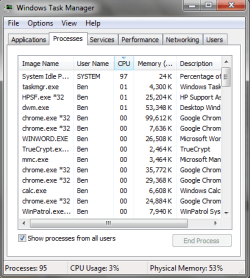
I actually already did that and it still does it. It is completely random, even when simply browsing the web. I attached a pic of when it is not doing it.
 

Attachments

  • 1234.PNG
    1234.PNG
    16.8 KB · Views: 5

My Computer

Computer type
PC/Desktop
Computer Manufacturer/Model Number
Custom (desktop), Custom (desktop), Lenovo U530 Touch
OS
Windows 7 Ultimate x64, Windows 7 Pro x64, Windows 10 Home x64
CPU
Intel i7-4790K , Intel i7-3770K, Intel i7-4510ULT
Motherboard
Asus Z87-PRO (main), Asus P8P67 Rev 3.1(secondary)
Memory
12GB Corsair Vengeance
Graphics Card(s)
EVGA GeForce GTX 660 2GB, 2X GIGABYTE 6890, Nvidia GT730M
Sound Card
Realtek Integrated, IDT (both laptops)
Monitor(s) Displays
Samsung S22C300H 21.5"
Screen Resolution
1920x1080 (Both machines)
Hard Drives
Main:
Muskin SSD 240GB
Seagate 320GB
Western Digital 1TB
Seagate 2TB

Seconday:
Toshiba 1TB
WD 1TB

Lenovo Laptop:
SAMSUNG SM843 SSD 480GB
PSU
Corsair GS700, COOLMAX CUL-850B (secondary)
Case
Thermaltake Chaser
Cooling
Corsair H60 Dual Fans, Stock Cooler
Keyboard
Logitech K360
Mouse
Logitech M310
Internet Speed
16Mbps
Antivirus
Comodo Internet Security Premium, MWB
Browser
Chrome, Firefox
Other Info
I have three systems listed in the specs area. My main desktop and my secondary desktop that was my previous build. The last one (in all the sections) is my Lenovo laptop.

Thanks for your interest in my machines! :)
Wow, 95 processes running though. does WinPatrol give a clue as to what is using the CPU? And there's nothing in startup other than security?
 

My Computer

Computer type
PC/Desktop
Computer Manufacturer/Model Number
Home Built Desktop By DataTech
OS
Windows 7 Ultimate X64 SP1
CPU
Intel i5-2550K, Differing ~4.4-4.8GHz No built in GPU
Motherboard
ASUS P8Z68-V PRO/GEN3
Memory
16GB G.Skill Sniper 1866MHz @ 2133MHz 2x8GB
Graphics Card(s)
ASUS GTX650TIB-DC2OC-2GD5, (650TI Boost)
Sound Card
Onboard Realtek 5-1
Monitor(s) Displays
Samsung P2570HD
Screen Resolution
1920x1080
Hard Drives
Samsung 840 Pro 256GB SSD for OS, 500GB Seagate Constellation (Enterprise drive) for Data
PSU
Corsair HX650W
Case
Inwin Dragon Rider
Cooling
Hyper 212 EVO w/two Noctua fans, push-pull, @1300 RPM
Keyboard
E-Z Eyes, bright yellow keys with large characters
Mouse
steelseries SENSEI Laser Pro Gaming
Internet Speed
48-51Mbs Mbs down, 11 Mbs up Xfinity Cable
Antivirus
Norton Internet Security 2013
Browser
IE 10, Opera, Pale Moon if needed
Other Info
4 case fans, LG BluRay-RE, ASUS DVD-RW, Mr. Fusion power supply, 1.21 gigawatts.
Maybe that was a bad example picture, its normally about 70 processes. I was doing a little stuff at the time I took the picture. I am not really sure where you see CPU usage on WinPatrol. I only see first detected and so on.
 

My Computer

Computer type
PC/Desktop
Computer Manufacturer/Model Number
Custom (desktop), Custom (desktop), Lenovo U530 Touch
OS
Windows 7 Ultimate x64, Windows 7 Pro x64, Windows 10 Home x64
CPU
Intel i7-4790K , Intel i7-3770K, Intel i7-4510ULT
Motherboard
Asus Z87-PRO (main), Asus P8P67 Rev 3.1(secondary)
Memory
12GB Corsair Vengeance
Graphics Card(s)
EVGA GeForce GTX 660 2GB, 2X GIGABYTE 6890, Nvidia GT730M
Sound Card
Realtek Integrated, IDT (both laptops)
Monitor(s) Displays
Samsung S22C300H 21.5"
Screen Resolution
1920x1080 (Both machines)
Hard Drives
Main:
Muskin SSD 240GB
Seagate 320GB
Western Digital 1TB
Seagate 2TB

Seconday:
Toshiba 1TB
WD 1TB

Lenovo Laptop:
SAMSUNG SM843 SSD 480GB
PSU
Corsair GS700, COOLMAX CUL-850B (secondary)
Case
Thermaltake Chaser
Cooling
Corsair H60 Dual Fans, Stock Cooler
Keyboard
Logitech K360
Mouse
Logitech M310
Internet Speed
16Mbps
Antivirus
Comodo Internet Security Premium, MWB
Browser
Chrome, Firefox
Other Info
I have three systems listed in the specs area. My main desktop and my secondary desktop that was my previous build. The last one (in all the sections) is my Lenovo laptop.

Thanks for your interest in my machines! :)
I was thinking (dangerous) WinPatrol had a list of what is running more understandable than Windows does. &0 still seem a bit high though.
In search type resmon, hit enter, CPU tab and look at the individual CPU users. You can click the column labels to sort hi-lo, etc.
 

My Computer

Computer type
PC/Desktop
Computer Manufacturer/Model Number
Home Built Desktop By DataTech
OS
Windows 7 Ultimate X64 SP1
CPU
Intel i5-2550K, Differing ~4.4-4.8GHz No built in GPU
Motherboard
ASUS P8Z68-V PRO/GEN3
Memory
16GB G.Skill Sniper 1866MHz @ 2133MHz 2x8GB
Graphics Card(s)
ASUS GTX650TIB-DC2OC-2GD5, (650TI Boost)
Sound Card
Onboard Realtek 5-1
Monitor(s) Displays
Samsung P2570HD
Screen Resolution
1920x1080
Hard Drives
Samsung 840 Pro 256GB SSD for OS, 500GB Seagate Constellation (Enterprise drive) for Data
PSU
Corsair HX650W
Case
Inwin Dragon Rider
Cooling
Hyper 212 EVO w/two Noctua fans, push-pull, @1300 RPM
Keyboard
E-Z Eyes, bright yellow keys with large characters
Mouse
steelseries SENSEI Laser Pro Gaming
Internet Speed
48-51Mbs Mbs down, 11 Mbs up Xfinity Cable
Antivirus
Norton Internet Security 2013
Browser
IE 10, Opera, Pale Moon if needed
Other Info
4 case fans, LG BluRay-RE, ASUS DVD-RW, Mr. Fusion power supply, 1.21 gigawatts.
Right now the resource monitor itself is using 30%. Chrome is using 20%. Skype 12% at idle.

Is there a part of Windows that tells programs to use a certain amount of CPU? Perhaps this is messed up and is telling many programs to use CPU all at once.
 

My Computer

Computer type
PC/Desktop
Computer Manufacturer/Model Number
Custom (desktop), Custom (desktop), Lenovo U530 Touch
OS
Windows 7 Ultimate x64, Windows 7 Pro x64, Windows 10 Home x64
CPU
Intel i7-4790K , Intel i7-3770K, Intel i7-4510ULT
Motherboard
Asus Z87-PRO (main), Asus P8P67 Rev 3.1(secondary)
Memory
12GB Corsair Vengeance
Graphics Card(s)
EVGA GeForce GTX 660 2GB, 2X GIGABYTE 6890, Nvidia GT730M
Sound Card
Realtek Integrated, IDT (both laptops)
Monitor(s) Displays
Samsung S22C300H 21.5"
Screen Resolution
1920x1080 (Both machines)
Hard Drives
Main:
Muskin SSD 240GB
Seagate 320GB
Western Digital 1TB
Seagate 2TB

Seconday:
Toshiba 1TB
WD 1TB

Lenovo Laptop:
SAMSUNG SM843 SSD 480GB
PSU
Corsair GS700, COOLMAX CUL-850B (secondary)
Case
Thermaltake Chaser
Cooling
Corsair H60 Dual Fans, Stock Cooler
Keyboard
Logitech K360
Mouse
Logitech M310
Internet Speed
16Mbps
Antivirus
Comodo Internet Security Premium, MWB
Browser
Chrome, Firefox
Other Info
I have three systems listed in the specs area. My main desktop and my secondary desktop that was my previous build. The last one (in all the sections) is my Lenovo laptop.

Thanks for your interest in my machines! :)
I think each program will use the CPU as its code is written for. Since you have had this spike on two installs it would appear that it is something you installed each time, or the CPU may be bad. Do you know whether it has over heated?
I'm requesting some others to look in too.
 

My Computer

Computer type
PC/Desktop
Computer Manufacturer/Model Number
Home Built Desktop By DataTech
OS
Windows 7 Ultimate X64 SP1
CPU
Intel i5-2550K, Differing ~4.4-4.8GHz No built in GPU
Motherboard
ASUS P8Z68-V PRO/GEN3
Memory
16GB G.Skill Sniper 1866MHz @ 2133MHz 2x8GB
Graphics Card(s)
ASUS GTX650TIB-DC2OC-2GD5, (650TI Boost)
Sound Card
Onboard Realtek 5-1
Monitor(s) Displays
Samsung P2570HD
Screen Resolution
1920x1080
Hard Drives
Samsung 840 Pro 256GB SSD for OS, 500GB Seagate Constellation (Enterprise drive) for Data
PSU
Corsair HX650W
Case
Inwin Dragon Rider
Cooling
Hyper 212 EVO w/two Noctua fans, push-pull, @1300 RPM
Keyboard
E-Z Eyes, bright yellow keys with large characters
Mouse
steelseries SENSEI Laser Pro Gaming
Internet Speed
48-51Mbs Mbs down, 11 Mbs up Xfinity Cable
Antivirus
Norton Internet Security 2013
Browser
IE 10, Opera, Pale Moon if needed
Other Info
4 case fans, LG BluRay-RE, ASUS DVD-RW, Mr. Fusion power supply, 1.21 gigawatts.
Please post a screenie of RESMON with your cpu tab maximized.
 

My Computer

Computer Manufacturer/Model Number
Home Made
OS
Windows 7 Home Premium x64
CPU
Intel 2500k @4.5ghz 66deg max P95/IBT
Motherboard
Gigabyte Z68A-D3-B3
Memory
8 Gigs Patriot Viper 2 Extreme @1600
Graphics Card(s)
EVGA GTX 580 3 GIG 35degrees idle
Sound Card
Nvidia HD audio via HDMI to 7.1 Receiver
Monitor(s) Displays
32" Olevia hdtv
Screen Resolution
1080p
Hard Drives
64gig SSD(OS/Apps)
250gig (Files and Dox)
1tb (imaging and backup)
PSU
Corsair vx550w
Case
Thermaltake V3 black
Cooling
CM 212+(push n pull) 4 case fans
Keyboard
Logitech wireless Combo, G13
Mouse
G300
Internet Speed
40mps
Other Info
Two others up and running; C2D E5200/MSI G41M-P26/Corsair XMS3 8gb/GTS 250 1gb and C2D E8200/xFx 750sli/8gb Corsair Dominator/2x EVGA 550ti
Working on; i2600 Build...
HP DV6
@Work I use a Lenovo 5536B8U + Lenovo U300s
Actually, let me clarify, open resmon. Maximize it, then drag your cpu portion so it fills the screen. Use your PC, until it starts to lag again, then go back to resmon, with it maximized, post a screen shot. It will record the minimums and maximums of running processes and show the offending processes.
 

My Computer

Computer Manufacturer/Model Number
Home Made
OS
Windows 7 Home Premium x64
CPU
Intel 2500k @4.5ghz 66deg max P95/IBT
Motherboard
Gigabyte Z68A-D3-B3
Memory
8 Gigs Patriot Viper 2 Extreme @1600
Graphics Card(s)
EVGA GTX 580 3 GIG 35degrees idle
Sound Card
Nvidia HD audio via HDMI to 7.1 Receiver
Monitor(s) Displays
32" Olevia hdtv
Screen Resolution
1080p
Hard Drives
64gig SSD(OS/Apps)
250gig (Files and Dox)
1tb (imaging and backup)
PSU
Corsair vx550w
Case
Thermaltake V3 black
Cooling
CM 212+(push n pull) 4 case fans
Keyboard
Logitech wireless Combo, G13
Mouse
G300
Internet Speed
40mps
Other Info
Two others up and running; C2D E5200/MSI G41M-P26/Corsair XMS3 8gb/GTS 250 1gb and C2D E8200/xFx 750sli/8gb Corsair Dominator/2x EVGA 550ti
Working on; i2600 Build...
HP DV6
@Work I use a Lenovo 5536B8U + Lenovo U300s
It may be useful to add the "Base Priority" column to the processes tab of Task Manager. Almost everything should be running with normal priority, with only a few like your AV, Task Manager and such running with a higher priority.
 

My Computer

OS
Windows 7 Ultimate x64
I use Symantec, Malwarebytes, and Superantispyway anyways..

There is your answer. Either update your Symantec to the very latest version or uninstall Symantec.

Uninstall Superantispyware.

Uninstall Malware Bytes and ONLY install and run if you suspect that Symantec has not detected malware and then once again, after running, immedialtely uninstall malwarebytes.

I use the best: Microsoft Security Essentials, MSE. Link in my signature.
See:
Understanding Microsoft Anti-Malware Software 2012 ~ Security Garden

Please submit:
Install CCleaner:
CCleaner - PC Optimization and Cleaning - Free Download

list of STARTUP PROGRAMS

CCleaner | Tools
icon | Startup button | Windows tab |
click on Save to text file button (bottom right side) |
accept Startup.txt as file name | SAVE button

list of SCHEDULED TASKS

CCleaner | Tools
icon | Startup button | Scheduled Tasks tab |
click on Save to text file button (bottom right side) |
enter Scheduled Tasks as File name | Save button

List of INSTALLED PROGRAMS

CCleaner | Tools
icon | Uninstall button |
click on Save to text file button (bottom right side) |
accept install.txt as File name | Save button


UPLOAD the startup.txt file
UPLOAD the Scheduled Tasks.txt file
UPLOAD the install.txt file.

HOW TO UPLOAD
Post a File or Screenshot in Seven Forums
 

My Computer

Computer Manufacturer/Model Number
Toshiba Satellite S875D-S7239 laptop
OS
MS Windows 7 Ultimate SP1 64-bit
CPU
AMD A10-4600M
Motherboard
AMD Pumori (Socket FT1)
Memory
6.00 GB Dual-Channel DDR3 @ 798MHz (11-11-12-28)
Graphics Card(s)
AMD Radeon HD 7660G
Sound Card
High Definition Audio Device
Monitor(s) Displays
Generic PnP Monitor (1600x900@60Hz)
Screen Resolution
1600x900@60Hz
Hard Drives
SSD 119GB Corsair CSSD-V128GB2 ATA Device
Keyboard
Standard PS/2 Keyboard
Mouse
HP Wireless Optical Mobile Mouse Model FHA-3410
Internet Speed
What the local pub, local coffee shop offers.
Other Info
Optical Drive:MATSHITA BD-CMB UJ160B ATA Device


Also have an Asus ha1002xp netbook with Win 7 Ultimate installed.
Back
Top