high cpu usage - unknown cause

pontifex

New member
Local time
4:16 PM
Messages
5
Hi,
I get regularly high CPU usage without any visible reason in task manager. A desktop gadget shows the CPU usage between 50 - 70 % but in the task manager there are two or three processes with 1 % each.
I see also higher power consumption. In normal idle state I have some 18 W, with the CPU usage increased it is 40 W. And of course, the notebook is pretty noisy at that time because the CPU temperature runs to 50 °C. (Usual is 15 - 20 °C.)
The notebook is HP ProBook 6540b - Intel i5, Win 7 Pro. It is new and I am quite disappointed I cannot take it to a library because of the noise.

Because I see nothing in the task manager I am not able to determine the cause of the problem.
If anybody has any ideas what to do, I would be very glad. Thx.
 

My Computer

OS
win7
Welcome!

I suggest ending all the third-party processes one at a time, next time it happens. Google the name of the process, and if it's not a part of Windows, right-click and select End Process.
 

My Computer

Computer Manufacturer/Model Number
Custom
OS
Windows 7 Professional x64
CPU
Intel i7 2600K OC'd @ 4620 MHz
Motherboard
Asus P8Z68-V Pro
Memory
16GB GSkill Sniper 2133 Mhz (4x4GB)
Graphics Card(s)
EVGA GeForce GTX 480 SuperClocked+
Sound Card
Realtek High Definition Audio
Monitor(s) Displays
2x Acer S273HLbmii 27"
Screen Resolution
2 x 1920x1080
Hard Drives
64GB Crucial M4 SSD

Storage: Hitachi 1TB 5400RPM, Samsung 1.5TB 5400RPM
PSU
Corsair HW Series 750w (modular)
Case
Cooler Master HAF 932 Advanced Blue Edition
Cooling
CM Hyper 212+ CPU cooler, 3x 230mm + 1x 140mm case fans
Keyboard
Logitech MK320 (wireless)
Mouse
Logitech MK320 (wireless)
Internet Speed
30 Mb/s : 2 Mb/s
can you post a snip of your task manager when it reach high usage . I'll appreciate it :)
 

My Computer

OS
window's 7
CPU
core 2 quad
Motherboard
gigabyte
Memory
2gb corsair
Graphics Card(s)
ati hd4850
Monitor(s) Displays
lg
Screen Resolution
1600 X 900
Case
power logic
Other Info
none of the spec above is accurate
Welcome!

Welcome to the Forum Pontifex

I suggest ending all the third-party processes one at a time, next time it happens. Google the name of the process, and if it's not a part of Windows, right-click and select End Process.

Excellent and informative post as usual. I would just like to add that pontifex may have to click on show process from all users, in the lower left of task manger, first. I make this comment because just recently, I have read 2 posts where this fact was not known.

Good luck to all.
 

My Computer

Computer type
PC/Desktop
Computer Manufacturer/Model Number
Dell XPS 420
OS
Windows 10, Home Clean Install
CPU
Intel Core2 processsor Q8200(2.33Ghz 1333FSB) Quad Core Tech
Motherboard
Dell
Memory
6 gb
Graphics Card(s)
ATI Radeon 256MB HD3650
Sound Card
Intergrated 7.1 Channel Audio
Monitor(s) Displays
Dell SP2009W 20"
Hard Drives
640 GB Serial ATA Hard drive
Cooling
Fan
Keyboard
Dell USB Keyboard
Mouse
Dell Premium Optical USB
Internet Speed
DSL 2.85
Hi,
I get regularly high CPU usage without any visible reason in task manager. A desktop gadget shows the CPU usage between 50 - 70 % but in the task manager there are two or three processes with 1 % each.
I see also higher power consumption. In normal idle state I have some 18 W, with the CPU usage increased it is 40 W. And of course, the notebook is pretty noisy at that time because the CPU temperature runs to 50 °C. (Usual is 15 - 20 °C.)
The notebook is HP ProBook 6540b - Intel i5, Win 7 Pro. It is new and I am quite disappointed I cannot take it to a library because of the noise.

Because I see nothing in the task manager I am not able to determine the cause of the problem.
If anybody has any ideas what to do, I would be very glad. Thx.
.
I suggest trying System Explorer which will enable you to see processes in much more detail then the Task Manager.

System Explorer Homepage

System Explorer is freeware, and has other great capabilities in addition to process viewing.
 

My Computer

Computer type
PC/Desktop
OS
Windows 7 x64
CPU
Intel Core2 Extreme Q6850 3.00GHz
Motherboard
EVGA 132-CK-NF79
Memory
8 GB
Graphics Card(s)
Radeon R7 260X
Sound Card
Xonar DS
Hard Drives
Hitachi Deskstar 1 tb
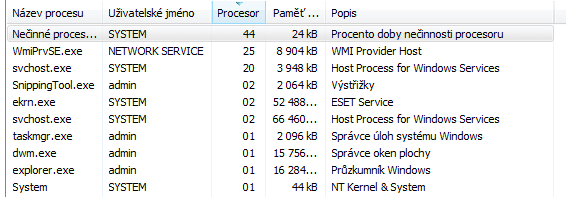
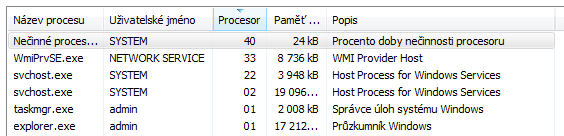
richc46 is right. I didnot switch the manager to see processes of all users. Now, I see two are responsible:
WmiPrvSE.exe user: Network service
and svchost.exe user: system
If I understand it well, the both are a part of windows. But they still seem to increase the cpu usage randomly, without any specific action from my side...
 

Attachments

  • task-manager-1.PNG
    task-manager-1.PNG
    7.9 KB · Views: 58
  • task-manager-2.PNG
    task-manager-2.PNG
    6.2 KB · Views: 35

My Computer

OS
win7
richc46 is right. I didnot switch the manager to see processes of all users. Now, I see two are responsible:
WmiPrvSE.exe user: Network service
and svchost.exe user: system
If I understand it well, the both are a part of windows. But they still seem to increase the cpu usage randomly, without any specific action from my side...
.
Have you done a scan for malware with something like MBAM or SAS? It's always good to check because malware can masquerade as system files.
 

My Computer

Computer type
PC/Desktop
OS
Windows 7 x64
CPU
Intel Core2 Extreme Q6850 3.00GHz
Motherboard
EVGA 132-CK-NF79
Memory
8 GB
Graphics Card(s)
Radeon R7 260X
Sound Card
Xonar DS
Hard Drives
Hitachi Deskstar 1 tb

My Computer

Computer type
PC/Desktop
Computer Manufacturer/Model Number
Dell XPS 420
OS
Windows 10, Home Clean Install
CPU
Intel Core2 processsor Q8200(2.33Ghz 1333FSB) Quad Core Tech
Motherboard
Dell
Memory
6 gb
Graphics Card(s)
ATI Radeon 256MB HD3650
Sound Card
Intergrated 7.1 Channel Audio
Monitor(s) Displays
Dell SP2009W 20"
Hard Drives
640 GB Serial ATA Hard drive
Cooling
Fan
Keyboard
Dell USB Keyboard
Mouse
Dell Premium Optical USB
Internet Speed
DSL 2.85
no malware

I scanned the computer for malware with MBAM. Nothing found.
 

My Computer

OS
win7

My Computer

Computer type
PC/Desktop
Computer Manufacturer/Model Number
Dell XPS 420
OS
Windows 10, Home Clean Install
CPU
Intel Core2 processsor Q8200(2.33Ghz 1333FSB) Quad Core Tech
Motherboard
Dell
Memory
6 gb
Graphics Card(s)
ATI Radeon 256MB HD3650
Sound Card
Intergrated 7.1 Channel Audio
Monitor(s) Displays
Dell SP2009W 20"
Hard Drives
640 GB Serial ATA Hard drive
Cooling
Fan
Keyboard
Dell USB Keyboard
Mouse
Dell Premium Optical USB
Internet Speed
DSL 2.85
Ok then we have to assume that the increased cpu usage is normal for the OS.
What is svchost.exe And Why Is It Running? - How-To Geek

For Vista and 7


How to Fix svchost.exe using 100% CPU / Memory Leak | Technibble

Thanks for the link. I find the article suggestive .-) I will try to catch the service that makes the svchost use more cpu time. I can also shut up some unneeded services.
Yet, it is just a half of the problem. The second halt is "WmiPrvSE.exe". Can this process be stopped?

one moment, it is back right now...

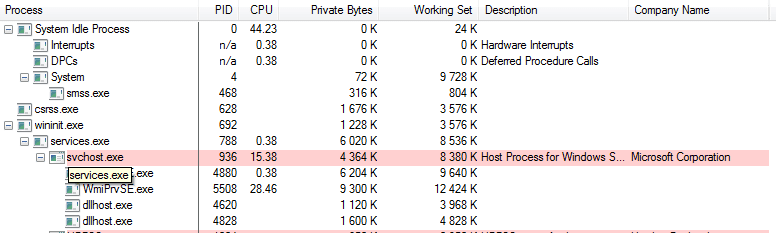
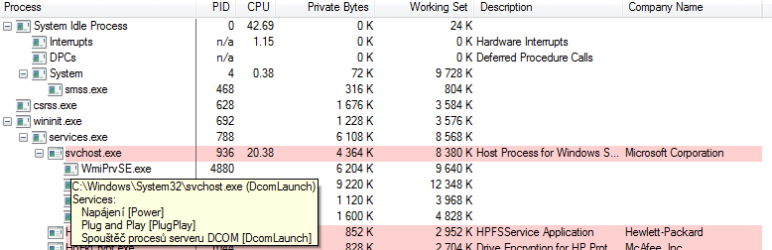
So, the services run on the svchost are: Power, Plug and Play and DCOM Launch. See pictures below.

And it is away. It lasted app. 5 minutes, this time.
 

Attachments

  • process-manager-1.PNG
    process-manager-1.PNG
    9.6 KB · Views: 24
  • process-manager.2.png
    process-manager.2.png
    12.8 KB · Views: 20

My Computer

OS
win7
Problem solved

I watched the processes in the System Explorer but I did not find the way how to stop the two services responsible for my troubles. Then, I searched in system logs (events protocols) accesible through the Action Center, I selected events occured at the time the high cpu usage appeared and, finally, found some minor problems with two Hewlett Packard utilities which are normally loaded as services at startup - HP Power Assistent and HP Wireless Assistent. So I shut them down and excluded from startup launch and... the problem never appeared again. I did some experiments to confirm this hypothesis, and it was not but hypothesis because the only link between what I have seen in the task manager and what i have found in the log was that the both somehow concern network connection, and now it is for sure.
So, the problem was HP software which, moreover, does not bring any significant improvement to basic win tools to manage wifi and power consumption. Now, the cpu is calm 20 °C and silent!
... btw. have ever noticed how noisy a harddisk can be?
 

My Computer

OS
win7
Back
Top