
Solved High CPU usage with only a program running

Tsuki

New member
Local time
1:50 PM
Messages
13
hi everyone^^

again i need your help:cry:

almost 2 weeks ago i reinstalled my windows duo to my nvidia..and i had to buy a new nvidia now on the fresh instaled windows.
i had windows 7 profesional and nvidia geforce 8400gs and now i have windows 7 ultimate and nvidia geforce 210.
it was a clean instal on windows so now i have only few programs in it..on my old windows my CPU was 1% to 15 or 30% with Opera,Photoshop,Procaster and Winamp opend..but on this my CPU is 70%-100% with only Opera and Winamp open..
i stoped the startup programs that i dind need them when windows starts but dind't helpt..
i have new versions for all my drives and all is up to date
id like to try to fix this..if anyone have any ideas plz share..please and thank you very much
 

My Computer

OS
windows 7 ultimate 32bit servicepack 1
CPU
Intel® Pentium® Dual CPU E2160 @ 1.80GHz 1.80 GHz
Motherboard
ASUS Intel Socket 775 p5vd2-vm/s
Memory
2.00 GB
Graphics Card(s)
nvidia geforce 210
Monitor(s) Displays
Hanns.G HW173
Screen Resolution
1440 X 900
Hard Drives
MAXTOR STM380215AS ATA
ST3250319AS ATA
In task manager (Ctrl-Shift-Esc) what programs/processes are using all the memory ?
 

My Computer

Computer type
PC/Desktop
Computer Manufacturer/Model Number
Pauly Special
OS
Win7 Ultimate X64
CPU
Intel i5 3570K
Motherboard
Gigabyte Z77X-DS3H
Memory
8GB DDR3 1600
Graphics Card(s)
Onboard
Sound Card
Onboard
Screen Resolution
1280x1024
Hard Drives
Samsung 840 Evo SSD (OS)
1TB Spinner (Data)
PSU
800W Arctic
Case
Cooler Master
Cooling
3x120mm Fans
Keyboard
MS Wireless
Mouse
MS Wireless
Internet Speed
20M
In task manager (Ctrl-Shift-Esc) what programs/processes are using all the memory ?


hi Pauly^^
thank you for your reply.
added a screenshot..to be honest i have no idea what those do and with i need and dont need..im not good with computers but on the old windows i never went there or to change my startup programs.
now im runing a scan with malwarebytes..
 

Attachments

  • tsm.png
    tsm.png
    44.9 KB · Views: 126

My Computer

OS
windows 7 ultimate 32bit servicepack 1
CPU
Intel® Pentium® Dual CPU E2160 @ 1.80GHz 1.80 GHz
Motherboard
ASUS Intel Socket 775 p5vd2-vm/s
Memory
2.00 GB
Graphics Card(s)
nvidia geforce 210
Monitor(s) Displays
Hanns.G HW173
Screen Resolution
1440 X 900
Hard Drives
MAXTOR STM380215AS ATA
ST3250319AS ATA
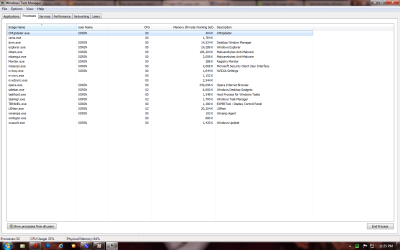
Try clicking the box that says "show processes from all users" have a look through the list and it will show you which program/process is using what

Dont forget to ignore the line that says system idle process
 

My Computer

Computer type
PC/Desktop
Computer Manufacturer/Model Number
Pauly Special
OS
Win7 Ultimate X64
CPU
Intel i5 3570K
Motherboard
Gigabyte Z77X-DS3H
Memory
8GB DDR3 1600
Graphics Card(s)
Onboard
Sound Card
Onboard
Screen Resolution
1280x1024
Hard Drives
Samsung 840 Evo SSD (OS)
1TB Spinner (Data)
PSU
800W Arctic
Case
Cooler Master
Cooling
3x120mm Fans
Keyboard
MS Wireless
Mouse
MS Wireless
Internet Speed
20M

My Computer

Computer type
PC/Desktop
Computer Manufacturer/Model Number
HP Pavilion P7-1010
OS
Windows 7 Professional x64 Service Pack 1
CPU
AMD Athlon X4 645
Motherboard
Foxxcon N-Alvorix RS880
Memory
6GB DDR3 1066
Graphics Card(s)
Sapphire Radeon HD 5670 512MB GDDR5
Sound Card
Realtek Integrated Audio
Monitor(s) Displays
HP 2011x
Screen Resolution
1600x900
Hard Drives
1. Crucial M4 128GB SSD
2. 1TB Seagate Barracuda 7200.12 RPM
3. 1TB Western Digital Caviar Green 5400RPM
PSU
Seasonic S12 II Bronze 380 Watt
Case
HP OEM
Cooling
Coolermaster Heatsink, AVC Case Fan
Keyboard
HP OEM- Made by Chicony
Mouse
HP OEM- Made by Logitech
Internet Speed
20MBit Down/4 Up
Antivirus
Microsoft Security Essentials
Browser
Internet Explorer 10
sorry for my late reply ^^

first @windude99 i had the malwarebytes scan my pc..tho he found 6 problems,that dind fix it^^

@Pauly i did that and the the MSE was using 50/75% of my cpu..it not only the MSE every program that i opend was using almost the same...i tried to end the proces of MSE and it was working but i cant stay without a antivirus so my hub changed my cpu to see if it worked..it dind't so he made my pc in pices and he changed the fan....
the fan that i had it was not the original and now is to hot to cool down my cpu so he added the original fan wich is bigger and it working in a way..well there are times when he starts to run like crazy with 70% at a program but i go to task manager,end the program and when i restart the program works fine..
now i have to figure out why one of my memory cards is not working...it stoped when the change of fan was made but well i hope it will work..

thank you very much all..
big hugs

Tsuki ^^
 

My Computer

OS
windows 7 ultimate 32bit servicepack 1
CPU
Intel® Pentium® Dual CPU E2160 @ 1.80GHz 1.80 GHz
Motherboard
ASUS Intel Socket 775 p5vd2-vm/s
Memory
2.00 GB
Graphics Card(s)
nvidia geforce 210
Monitor(s) Displays
Hanns.G HW173
Screen Resolution
1440 X 900
Hard Drives
MAXTOR STM380215AS ATA
ST3250319AS ATA
Back
Top