Home Premium Edition

NewToit

New member
VIP
Local time
10:06 PM
Messages
50
Hi!

I am running windows 7 home prem edition. I have attempted to add groups per tutorials on this forum. However, when I try to follow the basic/easy instructions a dialogue box pops up and tells me such options/features are not available through Home Prem Edition and to use the Users option through control panels.

So, I tried that

When I log onto the standard account I created I am able to use all the admin tools. I am able to turn on or turn off ability to display hidden folders. So, the standard account still has full permission somewhere - somehow.

What I want to do
My daughter and I will share this computer. She will have a separate log in(account). I have Quicken, Excel and Act database software I use for work. I also have some adult material. I want to take these files and place them into a folder only I, the admin can open.

However, I am doing something wrong? Surly this is possible? I want to make the programs in my "Work" folder/sub directories only visible to me. Or I somehow want to set permissions to her account so she is unable to turn on viewing of hidden folders.

If this is not possible is there a program out there that will do this for me?
 

My Computer

OS
Win 7
CPU
Phen 965 AMD
Motherboard
Asus m3n72-d
Memory
4gig ddr kingston
Graphics Card(s)
Nvidia 9800 something or other - good card
Sound Card
On MoBo
Monitor(s) Displays
Acer standard 19 ' / Sony Bravia 42'
Screen Resolution
I change it sometimes
Hard Drives
500gb
500gb

Western Digital
Hello,

For files you would like to keep private, I recommend the free program Truecrypt. You can create an encrypted file container, which is essentially a virtual hard drive.

Hope this helps,
~JK
 

My Computer

Computer Manufacturer/Model Number
Custom
OS
Windows 7 Professional x64
CPU
Intel i7 2600K OC'd @ 4620 MHz
Motherboard
Asus P8Z68-V Pro
Memory
16GB GSkill Sniper 2133 Mhz (4x4GB)
Graphics Card(s)
EVGA GeForce GTX 480 SuperClocked+
Sound Card
Realtek High Definition Audio
Monitor(s) Displays
2x Acer S273HLbmii 27"
Screen Resolution
2 x 1920x1080
Hard Drives
64GB Crucial M4 SSD

Storage: Hitachi 1TB 5400RPM, Samsung 1.5TB 5400RPM
PSU
Corsair HW Series 750w (modular)
Case
Cooler Master HAF 932 Advanced Blue Edition
Cooling
CM Hyper 212+ CPU cooler, 3x 230mm + 1x 140mm case fans
Keyboard
Logitech MK320 (wireless)
Mouse
Logitech MK320 (wireless)
Internet Speed
30 Mb/s : 2 Mb/s
Not Possible

So it is not possible to create groups or somehow assign permissions in the manner I was speaking with win home prem edition?

Darn! I understand. If that is correct problem solved! Thank you VERY much :D:party:

Edit:

The program you suggested looks awesome. I am reading about it now. It ought to do the trick. Thanks!
 
Last edited:

My Computer

OS
Win 7
CPU
Phen 965 AMD
Motherboard
Asus m3n72-d
Memory
4gig ddr kingston
Graphics Card(s)
Nvidia 9800 something or other - good card
Sound Card
On MoBo
Monitor(s) Displays
Acer standard 19 ' / Sony Bravia 42'
Screen Resolution
I change it sometimes
Hard Drives
500gb
500gb

Western Digital
Hi!

I am running windows 7 home prem edition. I have attempted to add groups per tutorials on this forum. However, when I try to follow the basic/easy instructions a dialogue box pops up and tells me such options/features are not available through Home Prem Edition and to use the Users option through control panels.

So, I tried that

When I log onto the standard account I created I am able to use all the admin tools. I am able to turn on or turn off ability to display hidden folders. So, the standard account still has full permission somewhere - somehow.

What I want to do
My daughter and I will share this computer. She will have a separate log in(account). I have Quicken, Excel and Act database software I use for work. I also have some adult material. I want to take these files and place them into a folder only I, the admin can open.

However, I am doing something wrong? Surly this is possible? I want to make the programs in my "Work" folder/sub directories only visible to me. Or I somehow want to set permissions to her account so she is unable to turn on viewing of hidden folders.

If this is not possible is there a program out there that will do this for me?


Sounds like you want to have two login accounts.
One for you Admin and one for your daughter which could be a guest account.
Each login will have seperate directories. Guest account would not be able to enter your directories because she will have a guest aco**** with limited access.
Your account will be able to see all directories.

Does this sound like what you are trying to achieve?
 

My Computer

Computer type
PC/Desktop
Computer Manufacturer/Model Number
Self Built
OS
Windows 10 Pro
CPU
Intel i5
Motherboard
I have a fatherboard
Memory
I'm old and lost a few chips
Graphics Card(s)
Yup
Sound Card
Yup
Monitor(s) Displays
Samsung 32" UHD
Screen Resolution
3840 x 2160
Hard Drives
Samsung 860 EVO drives
PSU
450 Watt and some fans that blow
Case
Small tower
Cooling
Yes I am cool. lol
Keyboard
Who needs a keyboard?
Mouse
Logitech Laser G7 wireless
Internet Speed
Zippy fast UP and DOWN
Antivirus
I got a shot
Browser
The new Improved EDGE 2020
Sounds like you want to have two login accounts.
One for you Admin and one for your daughter which could be a guest account.
Each login will have seperate directories. Guest account would not be able to enter your directories because she will have a guest aco**** with limited access.
Your account will be able to see all directories.

Does this sound like what you are trying to achieve?

Yes, that is absolutely correct. So, my error is attempting to setup her account as a standard user? Instead I should turn on guest accounts then assign her account as a 'guest'? Then will I need to manually install programs I want her to have access to on the guest account because, "each login will have separate directories"?
 

My Computer

OS
Win 7
CPU
Phen 965 AMD
Motherboard
Asus m3n72-d
Memory
4gig ddr kingston
Graphics Card(s)
Nvidia 9800 something or other - good card
Sound Card
On MoBo
Monitor(s) Displays
Acer standard 19 ' / Sony Bravia 42'
Screen Resolution
I change it sometimes
Hard Drives
500gb
500gb

Western Digital
Hello NewToit.

Create standard account for your daughter.
Have a look at http://www.sevenforums.com/tutorials/54360-parental-controls-setup-use.html (it may be usefull)

ok, now.
Log in with your Admin account and navigate to the folder you want block.
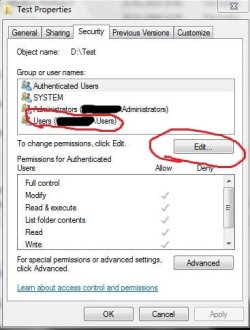
Right click it and go to the Properties
Click Security tab
Capture.JPG
Choose you daughters account and click Edit
1.JPG
In the new windows again choose your daughter account and Untick permissions you don't want to give her.
In your case it's better to untick all allow permissions.
This way you can block her read, write and explorer permissions on your Data folders.

For blocking programs, Use Parental Control (first link I gave you)

Hope it will help you. ;)
 

My Computer

OS
Windows 7 Ultimate x86 SP1
Good job JAV. I think that is what he was looking for.
Iggy
 

My Computer

Computer type
PC/Desktop
Computer Manufacturer/Model Number
Self Built
OS
Windows 10 Pro
CPU
Intel i5
Motherboard
I have a fatherboard
Memory
I'm old and lost a few chips
Graphics Card(s)
Yup
Sound Card
Yup
Monitor(s) Displays
Samsung 32" UHD
Screen Resolution
3840 x 2160
Hard Drives
Samsung 860 EVO drives
PSU
450 Watt and some fans that blow
Case
Small tower
Cooling
Yes I am cool. lol
Keyboard
Who needs a keyboard?
Mouse
Logitech Laser G7 wireless
Internet Speed
Zippy fast UP and DOWN
Antivirus
I got a shot
Browser
The new Improved EDGE 2020
Hello NewToit.

Create standard account for your daughter.
Have a look at http://www.sevenforums.com/tutorials/54360-parental-controls-setup-use.html (it may be usefull)

ok, now.
Log in with your Admin account and navigate to the folder you want block.
Right click it and go to the Properties
Click Security tab

Hope it will help you. ;)

Can I curse? Can I scream? Can I yell? I understand exactly what you have told me. I apologize for being an ignorant . . . I do not want her to have any access to the folder:"Windows23"

The PC name is: Daddy
The Admin Account I now use is: DoNotuse
The second account is: Family
==================================
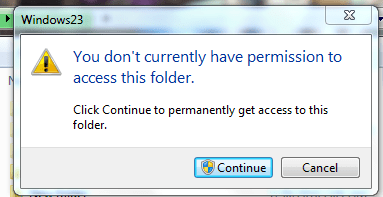
I am going to change the PCname and Admin Account name. For now they will stand. When I log onto her account(user) and unhide folders then click the folder a dialogue box pops up even if I deny her access.(**Picture of Error included). The box says, 'press of to obtain access'.

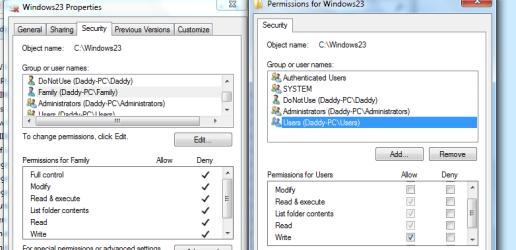
Initially when I go to set permissions her name is not in the list. I must manually add it. When I untick all permissions FC,Read,Write. . . it removes her user(name) from the list.

*If you look at the second picture you see for the family account I have everything ticked deny. Then on the right side if I remove the ticks(from allow/deny) it simply removes her user name
================================
WHAT THE HECK ARE ALL THOSE ACCOUNT NAMES? They all were not there in you picture, I do did not put them there. Her account only shows up when I 'add' it.

Current Groups/Usernames:
Authenticated Users <--- What the HECK is this
System<--- Is this a default something or other?
Donotuse(Daddy-pc\Daddy)<--- This is the username I created as ADMIN
Administrators(Daddy-Pc\Administrators) < This is the default admin?
Users(Daddy-PC\Users) <--- This is the users group? I did not create it

Ahhhhhh!:mad: Somehow, I know accounts can inherit permissions from groups or other accounts which override others? Is that what is going on? When I log onto my CPU the only two accounts are: Donotuse/Family
 

Attachments

  • Capture.PNG
    Capture.PNG
    11.7 KB · Views: 7
  • Capture4.PNG
    Capture4.PNG
    21.6 KB · Views: 8

My Computer

OS
Win 7
CPU
Phen 965 AMD
Motherboard
Asus m3n72-d
Memory
4gig ddr kingston
Graphics Card(s)
Nvidia 9800 something or other - good card
Sound Card
On MoBo
Monitor(s) Displays
Acer standard 19 ' / Sony Bravia 42'
Screen Resolution
I change it sometimes
Hard Drives
500gb
500gb

Western Digital
WHAT THE HECK ARE ALL THOSE ACCOUNT NAMES? They all were not there in you picture, I do did not put them there. Her account only shows up when I 'add' it.

Current Groups/Usernames:
Authenticated Users <--- What the HECK is this
System<--- Is this a default something or other?
Donotuse(Daddy-pc\Daddy)<--- This is the username I created as ADMIN
Administrators(Daddy-Pc\Administrators) < This is the default admin?
Users(Daddy-PC\Users) <--- This is the users group? I did not create it

System - It's just a system... Windows, It's components, some programs (usually AV programs) and things like that. Just open Task manager, go to processe, click Show from all users and you will see open process from System. (at the end, you don't need and don't want to modify it, leave it alone)
Donotuse(Daddy-pc\Daddy) - Yes, it is your Account.
Administrators(Daddy-Pc\Administrators) - In a way yes. It is user Group. It is group which may contains several other users inside it. (it's made to make sytem admistrators life easier, so they will modify groups instead of 100 users individually)
In your case this is Administrators' group, so it contains all Administrators on your PC including your own Admin account. (so in your case you and default hidden Admin (which is disabled anyway now))
Users(Daddy-PC\Users) - same as above, but for users instead of administrators.
Imagining if you had 2 daughters and separate account for each of them, you can just modify this group instead of modifying each separately.
Authenticated Users - This one is a bit complicated. It is something like group but actually not group. It's something to do with networking and null sessions. (You don't need it, Just leave it)

*If you look at the second picture you see for the family account I have everything ticked deny. Then on the right side if I remove the ticks(from allow/deny) it simply removes her user name
Ahhhhhh! Somehow, I know accounts can inherit permissions from groups or other accounts which override others? Is that what is going on? When I log onto my CPU the only two accounts are: Donotuse/Family
ahh.. My bad. :(
You are right just tick "Full control" deny instead of unticking Allow.
And about "inheriting permissions": If you tick deny as said above, deny will always work first and will have more priority then inheritated rights.

Example:
You have 2 daughters.
3 accounts: You (administrator), first daughter, second daughter (both of them standard users)

1. You will create Deny rule to Users group to some folder.
Both of them will be denied although they have allow rule on their account. (but both of them members of "users" group, so deny from this group will block their allows)
2. You will create Allow rule to Users group.
And will create deny rule for one of first daughter.
Your first daughter will be denied access (regardless the fact that she is member of Users Group which has allow rule)
Your second daughter can access because she dosen't have any deny rules.

When I log onto her account(user) and unhide folders then click the folder a dialogue box pops up even if I deny her access.(**Picture of Error included). The box says, 'press of to obtain access'.
hmm... yes I see.
But they can't do anything or obtain access unless they provide admin Password (YOUR password which they don't know)
So when they press obtain access they will promoted with UAC which will ask them for admin password. There is no chance they can break it without Admin password if they have Everthing denied.

So, you should just keep your password private.
(for example try going to: C:\Users\Your_admin account with your Family account.
You shoulnt have allow access so will be asked the same question.

So your Family members can't access user files.
"My documents", "My videos", "desktop" and stuff like these.

Hope it's all clear now.
If you have anymore questions, Please ask. ;)
 

My Computer

OS
Windows 7 Ultimate x86 SP1
Back
Top