Homegroup issues

UnitedWeFall

New member
Local time
3:03 PM
Messages
6
Hey guys, new here. I'm having a small problem with homegroup.

Basically I set up homegroup on the Windows 7 build 6xxx. There are two other Windows 7 computers on the network using this homegroup.
I since deleted the install and installed the RC1.
However for some odd reason, Windows is still detecting the old homegroup even though the computer that created it no longer exists. And I don't remember the password so I can't join it on my new Windows 7 install.
So Windows 7 is not letting me delete the homegroup, join it (because I forgot the password) or create a new one.

Really confused.. so far i'm not liking the feature.

Thanks in advance for any advice.
 

My Computer

OS
Win7
Hey guys, new here. I'm having a small problem with homegroup.

Basically I set up homegroup on the Windows 7 build 6xxx. There are two other Windows 7 computers on the network using this homegroup.
I since deleted the install and installed the RC1.
However for some odd reason, Windows is still detecting the old homegroup even though the computer that created it no longer exists. And I don't remember the password so I can't join it on my new Windows 7 install.
So Windows 7 is not letting me delete the homegroup, join it (because I forgot the password) or create a new one.

Really confused.. so far i'm not liking the feature.

Thanks in advance for any advice.
okay so you had homegroups for awhile right?
what you have to is tell the other computers to the leave the homegroup....
that should reset the homegroup configuration....

also you should be able to view the password from any computer that has originally joined the HG before...
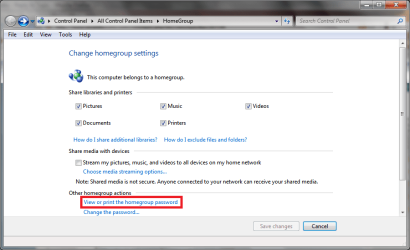
go to the control panel and click on the HomeGroups icon there you should see this
Homegroups.PNG
click on that and should see the password...;)
if you want them to leave then scroll down alittle lower and you should see the "leave the homegroup" link...
that should remove the computer from that homegroup and once that is done to all the computers then you should be able to create a new one...
 

My Computer

Computer Manufacturer/Model Number
Tx2500z Tablet Pc/Homemade Server
OS
Windows 7 Ult x64(x2), HomePrem x32(x4), Server 08 (+VM), 08 R2 (VM) , SuSe 11.2 (VM), XP 32 (VM)
CPU
Turion X2 ultra (oh well came with laptop)/P4 @3.2 (yes P4)
Motherboard
IDK HP Motherboard / Intel DG965SS
Memory
OCZ Dual Channel 4GB kit/ 1gb Dual Channel
Graphics Card(s)
HD 3200 graphics /GMA x3100 (yay for intergrated!!)
Sound Card
Realtek HD Audio(mic working, well sort of)/Siig IC-70012
Monitor(s) Displays
built-in Hp 12" laptop screen/ Acer 19"
Screen Resolution
1280x800 /1440x900
Cooling
All Air Cooled
Mouse
Logi MX Rev. /MS Wheel Optical 1.1A /Logitech Optical Mouse
Internet Speed
College baby but its still routed through vpn to 1536k...
Other Info
love my wacom pen and pressure sensitivity...
wished it worked in 7, SUSE for that matter though
Tried all that. On the other computers when I try to leave the homegroup it says "Windows could not remove computer from homegroup".

When I try to view the password, I click "view password....." or whatever it is, and nothing happens.
 

My Computer

OS
Win7
Tried all that. On the other computers when I try to leave the homegroup it says "Windows could not remove computer from homegroup".

When I try to view the password, I click "view password....." or whatever it is, and nothing happens.

can you post a screenshot of both cases?
if at all possible can you go through the Homegroup troubleshooter?
also it might be good to go and clear some files from here and restarting and see if the issue persits..;)
C:\Windows\ServiceProfiles\LocalService\AppData\Roaming\PeerNetworking
 

My Computer

Computer Manufacturer/Model Number
Tx2500z Tablet Pc/Homemade Server
OS
Windows 7 Ult x64(x2), HomePrem x32(x4), Server 08 (+VM), 08 R2 (VM) , SuSe 11.2 (VM), XP 32 (VM)
CPU
Turion X2 ultra (oh well came with laptop)/P4 @3.2 (yes P4)
Motherboard
IDK HP Motherboard / Intel DG965SS
Memory
OCZ Dual Channel 4GB kit/ 1gb Dual Channel
Graphics Card(s)
HD 3200 graphics /GMA x3100 (yay for intergrated!!)
Sound Card
Realtek HD Audio(mic working, well sort of)/Siig IC-70012
Monitor(s) Displays
built-in Hp 12" laptop screen/ Acer 19"
Screen Resolution
1280x800 /1440x900
Cooling
All Air Cooled
Mouse
Logi MX Rev. /MS Wheel Optical 1.1A /Logitech Optical Mouse
Internet Speed
College baby but its still routed through vpn to 1536k...
Other Info
love my wacom pen and pressure sensitivity...
wished it worked in 7, SUSE for that matter though

My Computer

Computer Manufacturer/Model Number
Tx2500z Tablet Pc/Homemade Server
OS
Windows 7 Ult x64(x2), HomePrem x32(x4), Server 08 (+VM), 08 R2 (VM) , SuSe 11.2 (VM), XP 32 (VM)
CPU
Turion X2 ultra (oh well came with laptop)/P4 @3.2 (yes P4)
Motherboard
IDK HP Motherboard / Intel DG965SS
Memory
OCZ Dual Channel 4GB kit/ 1gb Dual Channel
Graphics Card(s)
HD 3200 graphics /GMA x3100 (yay for intergrated!!)
Sound Card
Realtek HD Audio(mic working, well sort of)/Siig IC-70012
Monitor(s) Displays
built-in Hp 12" laptop screen/ Acer 19"
Screen Resolution
1280x800 /1440x900
Cooling
All Air Cooled
Mouse
Logi MX Rev. /MS Wheel Optical 1.1A /Logitech Optical Mouse
Internet Speed
College baby but its still routed through vpn to 1536k...
Other Info
love my wacom pen and pressure sensitivity...
wished it worked in 7, SUSE for that matter though
Hi there, old thread I found whilst googling - intentially bumped because I've got the same problem but deleting those files didn't work for me. My laptop can see that there's a homegroup set up on my PC but I don't know the password.

When I try to change the password on my PC I'm told "Windows cannot set up a homegroup on your computer".
When I try to leave the homegroup I'm told "Windows couldn't remove your computer from the homegroup".

I've also tried disabling the homegroup services to no avail and have switched them back to automatic. IPv6 is enabled on the pc and my router, which I connect to wirelessly. I've tried deleting my wireless network from my PC and reconnecting to it. I am the administrator, and I am connecting with a 'home' profile rather than a public one.

Interestingly I cannot turn on 'file and printer sharing' from the advanced sharing settings options in the network and sharing center, the option is there, I can select it and choose 'save settings' but going back into advanced sharing settings later shows it as turned off again.

Please help! It's such a shiney sexy OS I don't want to go back to XP again. I've taken ages getting this system installed with all my downloaded steam games and absolutely do not want to reinstall 7 again on the offchance reinstalling everything over the course of hours might fix the problem.
 

My Computer

OS
7
CPU
Intel q6600 G0
Memory
4gb
Graphics Card(s)
Nvidia 8800 320mb
Hard Drives
raid 0
PSU
800 watt
Cooling
6 massive fans on the side of the case
Homegroup Settings

Hi!

I have joined into this thread because I have the same issue as luttman23. I have a three computer network and had some Homegroup functionality between my laptop and media-pc but could/cannot leave the Homegroup or access the password on my desktop. I have removed the files, turned off my McAfee AV, left the Homegroups on the other two computers, but I get the same results as luttman23 on my desktop.

Interesting, my laptop and media-pc both report that my username on the laptop has already set-up Homegroup, despite the fact that the laptop reported that I had left the homegroup. The laptop will NOT reconnect or join to the Homegroup using the previous password. There is something lurking on the network/computers that needs clearing. Should the C:\Windows\ServiceProfiles\LocalService\AppData\Roaming\PeerNetworking folder and files on all computers be deleted?

Some help would be appreciated.
 

My Computer

OS
W7
same for me

same problem as you guys, impossible to create password for homegroup thus all computers run with 7 and can be seen on the network. Called hot line, no reply without paying!
 

My Computer

OS
windows 7
CPU
intel e8500
Motherboard
gigabyte
Memory
2 Go
Graphics Card(s)
9600gt
Hard Drives
200go
2x750 go
1 To
Case
antec
Cooling
air
Why can’t I access my HomeGroup?

There are several reasons why you can’t access your HomeGroup. Here are the most popular reasons for not being able to connect to your HomeGroup.
If none of these troubleshooting tips work, try restarting your computer, or leave and then re-join the HomeGroup.
 

My Computer

Computer type
PC/Desktop
Computer Manufacturer/Model Number
Home built
OS
Windows 7 Ult, Windows 8.1 Pro,
CPU
Q9650-4.275GHz, E8600 4.5GHz, E6750-3.8GHz
Motherboard
Evga 780i FTW
Memory
G.Skill PC2 9600 1200Mhz 5 5 5 15 2T
Graphics Card(s)
GTX480
Sound Card
Asus Xonar D2
Monitor(s) Displays
HannsG
Screen Resolution
1680X1050
Hard Drives
GSkill Phoenix Pro 120GB SSD
PSU
ThermalTake Toughpower 1000Watt modular
Case
ThermalTake XaserV
Cooling
Xigmatek S1283
Keyboard
Logitech G15
Mouse
Logitech G9
Internet Speed
T1
Why can’t I access my HomeGroup?

There are several reasons why you can’t access your HomeGroup. Here are the most popular reasons for not being able to connect to your HomeGroup.
If none of these troubleshooting tips work, try restarting your computer, or leave and then re-join the HomeGroup.

I have one more to add to that, everyone seems to forget it!

Make sure the time on each machine is exactly the same. Even if there's 1/2 second difference between the two, it won't connect ;)
 

My Computer

Computer Manufacturer/Model Number
HP Touchsmart IQ771.uk
OS
Windows 7 Ultimate x64
CPU
AMD Turion(tm) 64 X2 Mobile Technology TL-56
Motherboard
ASUS Pheonix
Memory
3GB Nanya PC2-6400 DDR2-SDRAM SO-DIM (400MHz)
Graphics Card(s)
NVIDIA GeForce Go 7600 256MB GDDR3 SDRAM
Sound Card
High Definition Intergrated NVIDIA MCP51
Monitor(s) Displays
46" Sony Bravia HDTV
Screen Resolution
1600x1200
Hard Drives
1.5TB Samsug
320GB Seagate ST3320820AS - SATA 3Gb/s 8MB
500GB Maxtor Basics STM305003EHD301-RK
Internet Speed
↓6.32 Mb/s ↑0.35 Mb/s ↔26ms
Other Info
BIOS - American Megatrends Inc. 5.07
Ethernet Port - NVIDIA nForce 10/100/1000 Mbps
DVD Drive - TSSTcorp DVDR/RW TS-T632L
Why can’t I access my HomeGroup?


There are several reasons why you can’t access your HomeGroup. Here are the most popular reasons for not being able to connect to your HomeGroup.
If none of these troubleshooting tips work, try restarting your computer, or leave and then re-join the HomeGroup.

I have one more to add to that, everyone seems to forget it!

Make sure the time on each machine is exactly the same. Even if there's 1/2 second difference between the two, it won't connect ;)

You are correct of course, I've seen that problem come up a few times. Sometimes the Homegroup trouble shooter will tell you if the time isn't correctly set. Windows is picky about that sorta thing.

The fix is to reset the time on all machines so they are the same, sometimes you even need to go into bios and make sure the bios time is also correct.

Windows updates will also fail if the time isn't set correctly.
 

My Computer

Computer type
PC/Desktop
Computer Manufacturer/Model Number
Home built
OS
Windows 7 Ult, Windows 8.1 Pro,
CPU
Q9650-4.275GHz, E8600 4.5GHz, E6750-3.8GHz
Motherboard
Evga 780i FTW
Memory
G.Skill PC2 9600 1200Mhz 5 5 5 15 2T
Graphics Card(s)
GTX480
Sound Card
Asus Xonar D2
Monitor(s) Displays
HannsG
Screen Resolution
1680X1050
Hard Drives
GSkill Phoenix Pro 120GB SSD
PSU
ThermalTake Toughpower 1000Watt modular
Case
ThermalTake XaserV
Cooling
Xigmatek S1283
Keyboard
Logitech G15
Mouse
Logitech G9
Internet Speed
T1

My Computer

Computer Manufacturer/Model Number
HP Touchsmart IQ771.uk
OS
Windows 7 Ultimate x64
CPU
AMD Turion(tm) 64 X2 Mobile Technology TL-56
Motherboard
ASUS Pheonix
Memory
3GB Nanya PC2-6400 DDR2-SDRAM SO-DIM (400MHz)
Graphics Card(s)
NVIDIA GeForce Go 7600 256MB GDDR3 SDRAM
Sound Card
High Definition Intergrated NVIDIA MCP51
Monitor(s) Displays
46" Sony Bravia HDTV
Screen Resolution
1600x1200
Hard Drives
1.5TB Samsug
320GB Seagate ST3320820AS - SATA 3Gb/s 8MB
500GB Maxtor Basics STM305003EHD301-RK
Internet Speed
↓6.32 Mb/s ↑0.35 Mb/s ↔26ms
Other Info
BIOS - American Megatrends Inc. 5.07
Ethernet Port - NVIDIA nForce 10/100/1000 Mbps
DVD Drive - TSSTcorp DVDR/RW TS-T632L
Make sure the time on each machine is exactly the same. Even if there's 1/2 second difference between the two, it won't connect ;)

You are correct of course, I've seen that problem come up a few times. Sometimes the Homegroup trouble shooter will tell you if the time isn't correctly set. Windows is picky about that sorta thing.

The fix is to reset the time on all machines so they are the same, sometimes you even need to go into bios and make sure the bios time is also correct.

I defy you to synchronize several computer bios times to within half a second.

I have used the windows time synchronizer to get the computer clocks as close as possible, but if this is the reason why Homegroup is so problematic for so many people, its stupid design. I just don't see average users getting that technical, and the whole point after all, is to make networking LESS technical. :(
 

My Computer

Computer type
PC/Desktop
Computer Manufacturer/Model Number
Custom
OS
7 x64 Ultimate
CPU
AMD Ryzen 5
Motherboard
Gigabyte GA-AB350-Gaming
Memory
16GB DDR4
Graphics Card(s)
Radeon R7 360
Monitor(s) Displays
2 x Dell U2518D
Screen Resolution
2560x1440 2560x1440
Hard Drives
WD 500GB x2
Samsung SSD 128MB (OS)
XPG SX8200 Pro M.2 2280 1TB
PSU
Antec 500
Cooling
Hyper 212 EVO
Keyboard
Logitech cordless K800
Mouse
Logitech M510
Antivirus
Avira
Make sure the time on each machine is exactly the same. Even if there's 1/2 second difference between the two, it won't connect ;)

You are correct of course, I've seen that problem come up a few times. Sometimes the Homegroup trouble shooter will tell you if the time isn't correctly set. Windows is picky about that sorta thing.

The fix is to reset the time on all machines so they are the same, sometimes you even need to go into bios and make sure the bios time is also correct.

I defy you to synchronize several computer bios times to within half a second.

I have used the windows time synchronizer to get the computer clocks as close as possible, but if this is the reason why Homegroup is so problematic for so many people, its stupid design. I just don't see average users getting that technical, and the whole point after all, is to make networking LESS technical. :(

Those clocks don't need to be exactly the same but if they are days off then nothing works correctly.

Did you ever get Homegroup to work for you RogerR?
 

My Computer

Computer type
PC/Desktop
Computer Manufacturer/Model Number
Home built
OS
Windows 7 Ult, Windows 8.1 Pro,
CPU
Q9650-4.275GHz, E8600 4.5GHz, E6750-3.8GHz
Motherboard
Evga 780i FTW
Memory
G.Skill PC2 9600 1200Mhz 5 5 5 15 2T
Graphics Card(s)
GTX480
Sound Card
Asus Xonar D2
Monitor(s) Displays
HannsG
Screen Resolution
1680X1050
Hard Drives
GSkill Phoenix Pro 120GB SSD
PSU
ThermalTake Toughpower 1000Watt modular
Case
ThermalTake XaserV
Cooling
Xigmatek S1283
Keyboard
Logitech G15
Mouse
Logitech G9
Internet Speed
T1
Did you ever get Homegroup to work for you RogerR?

No, sir, Mr chev. Not yet. Every now and again I look in here and chip away at it, but no success yet. There is apparently a gnat in my network somewhere ...
 

My Computer

Computer type
PC/Desktop
Computer Manufacturer/Model Number
Custom
OS
7 x64 Ultimate
CPU
AMD Ryzen 5
Motherboard
Gigabyte GA-AB350-Gaming
Memory
16GB DDR4
Graphics Card(s)
Radeon R7 360
Monitor(s) Displays
2 x Dell U2518D
Screen Resolution
2560x1440 2560x1440
Hard Drives
WD 500GB x2
Samsung SSD 128MB (OS)
XPG SX8200 Pro M.2 2280 1TB
PSU
Antec 500
Cooling
Hyper 212 EVO
Keyboard
Logitech cordless K800
Mouse
Logitech M510
Antivirus
Avira
Your not alone in that boat LOL, does workgroup or public file sharing work?
 

My Computer

Computer type
PC/Desktop
Computer Manufacturer/Model Number
Home built
OS
Windows 7 Ult, Windows 8.1 Pro,
CPU
Q9650-4.275GHz, E8600 4.5GHz, E6750-3.8GHz
Motherboard
Evga 780i FTW
Memory
G.Skill PC2 9600 1200Mhz 5 5 5 15 2T
Graphics Card(s)
GTX480
Sound Card
Asus Xonar D2
Monitor(s) Displays
HannsG
Screen Resolution
1680X1050
Hard Drives
GSkill Phoenix Pro 120GB SSD
PSU
ThermalTake Toughpower 1000Watt modular
Case
ThermalTake XaserV
Cooling
Xigmatek S1283
Keyboard
Logitech G15
Mouse
Logitech G9
Internet Speed
T1
Your not alone in that boat LOL,
No kidding - just look at the forum post totals. :sarc:

does workgroup or public file sharing work?

They work fine.

Just synched all my clocks, and currently the wireless machine says there are no homegroups to join.
:doh:
 

My Computer

Computer type
PC/Desktop
Computer Manufacturer/Model Number
Custom
OS
7 x64 Ultimate
CPU
AMD Ryzen 5
Motherboard
Gigabyte GA-AB350-Gaming
Memory
16GB DDR4
Graphics Card(s)
Radeon R7 360
Monitor(s) Displays
2 x Dell U2518D
Screen Resolution
2560x1440 2560x1440
Hard Drives
WD 500GB x2
Samsung SSD 128MB (OS)
XPG SX8200 Pro M.2 2280 1TB
PSU
Antec 500
Cooling
Hyper 212 EVO
Keyboard
Logitech cordless K800
Mouse
Logitech M510
Antivirus
Avira
Maybe trying all this stuff will help or possibly it's a problem with the Router's security settings.

Why can’t I access my HomeGroup?


There are several reasons why you can’t access your HomeGroup. Here are the most popular reasons for not being able to connect to your HomeGroup.
If none of these troubleshooting tips work, try restarting your computer, or leave and then re-join the HomeGroup.
Giving up is not an Option! :geek:
 

My Computer

Computer type
PC/Desktop
Computer Manufacturer/Model Number
Home built
OS
Windows 7 Ult, Windows 8.1 Pro,
CPU
Q9650-4.275GHz, E8600 4.5GHz, E6750-3.8GHz
Motherboard
Evga 780i FTW
Memory
G.Skill PC2 9600 1200Mhz 5 5 5 15 2T
Graphics Card(s)
GTX480
Sound Card
Asus Xonar D2
Monitor(s) Displays
HannsG
Screen Resolution
1680X1050
Hard Drives
GSkill Phoenix Pro 120GB SSD
PSU
ThermalTake Toughpower 1000Watt modular
Case
ThermalTake XaserV
Cooling
Xigmatek S1283
Keyboard
Logitech G15
Mouse
Logitech G9
Internet Speed
T1
All that is OK. Can see other computers on the network and access the public shares from both Win7 computers. I have previously dumped the homegroup on my main machine and started all over, and I think at this point I've been through all the troubleshooters and toggled all the toggles. If I had to guess, I would guess its an IPv6 issue (yes, my router is compliant and up to date).
 

My Computer

Computer type
PC/Desktop
Computer Manufacturer/Model Number
Custom
OS
7 x64 Ultimate
CPU
AMD Ryzen 5
Motherboard
Gigabyte GA-AB350-Gaming
Memory
16GB DDR4
Graphics Card(s)
Radeon R7 360
Monitor(s) Displays
2 x Dell U2518D
Screen Resolution
2560x1440 2560x1440
Hard Drives
WD 500GB x2
Samsung SSD 128MB (OS)
XPG SX8200 Pro M.2 2280 1TB
PSU
Antec 500
Cooling
Hyper 212 EVO
Keyboard
Logitech cordless K800
Mouse
Logitech M510
Antivirus
Avira
Back
Top