Homegroup & Mac OS 10

pleveque

New member
Local time
6:10 AM
Messages
7
I have a new Windows 7 laptop and am trying to access my iMac on the homegroup wireless network. I can see the Mac, but when asked for credentials they are rejected. Am I correct in assuming that a homegroup will only accept Windows 7 devices, and I should have some other network setup? If that is the case, how do I get rid of the homegroup and set up the correct configuration?

I have been searching for a solution on the internet and am just getting increasingly confused. Frankly, I am beginnig to think I am just stupid. I did not have this much hassle in setting up the network on my old XP laptop.

Help!
 

My Computer My Computer

At a glance

Windows 7 64-bit4GB
Computer Manufacturer/Model Number
Dell Inspiton 1545
OS
Windows 7 64-bit
Memory
4GB

My Computer My Computer

At a glance

Windows 7 Ult, Windows 8.1 Pro,Q9650-4.275GHz, E8600 4.5GHz, E6750-3.8GHzG.Skill PC2 9600 1200Mhz 5 5 5 15 2TGTX480
Computer type
PC/Desktop
Computer Manufacturer/Model Number
Home built
OS
Windows 7 Ult, Windows 8.1 Pro,
CPU
Q9650-4.275GHz, E8600 4.5GHz, E6750-3.8GHz
Motherboard
Evga 780i FTW
Memory
G.Skill PC2 9600 1200Mhz 5 5 5 15 2T
Graphics Card(s)
GTX480
Sound Card
Asus Xonar D2
Monitor(s) Displays
HannsG
Screen Resolution
1680X1050
Hard Drives
GSkill Phoenix Pro 120GB SSD
PSU
ThermalTake Toughpower 1000Watt modular
Case
ThermalTake XaserV
Cooling
Xigmatek S1283
Keyboard
Logitech G15
Mouse
Logitech G9
Internet Speed
T1
You do not need to leave the Homegroup, both Workgroup and Homegroup can be active at the same time. Open Network and Sharing Center > Sidebar on the left > Advance Sharing Settings > Scroll down to Homegroup Connections and select "Use user accounts and passwords..."
 

My Computer My Computer

At a glance

Windows 10 Pro (x64)Intel Core i7-3930K (3.2GHz - 4.5GHz)4x Samsung 4GB PC3-12800 DDR3 (16GB 1600MHz)Nvidia Geforce GTX 690
Computer type
PC/Desktop
Computer Manufacturer/Model Number
Alienware Aurora ALX R4
OS
Windows 10 Pro (x64)
CPU
Intel Core i7-3930K (3.2GHz - 4.5GHz)
Motherboard
Alienware Aurora-R4 x79
Memory
4x Samsung 4GB PC3-12800 DDR3 (16GB 1600MHz)
Graphics Card(s)
Nvidia Geforce GTX 690
Sound Card
SteelSeries Siberia Elite
Monitor(s) Displays
Dell UltraSharp U3011
Screen Resolution
2560x1600
Hard Drives
Samsung 850 Pro 256 GB, Seagate 1TB Desktop Hybrid HDD, 2x Western Digital 4TB Green HDD
PSU
875W Some Dell PSU <.<
Case
Alienware Aurora ALX
Cooling
Custom Liquid Cooling (EK CPU & GPU blocks) dual EK 480RAD
Keyboard
Logitech G710+ Mechanical
Mouse
Logitech G700s
Internet Speed
Verizon Fios (50 mbps average)
Other Info
Server: Intel NUC D54250WYK: i5-4250U, 16GB, 256 GB mSATA, Windows Server 2012 R2
Okay. I have left the homegroup and set up a public network. I have turned off password protected sharing. When I select the Mac on the network it is still asking for login and password and then network password. I do not have the Mac password protected. So, I'm still dead in the water.

Sheesh, this is frustrating. Anything else I might be missing?
 

My Computer My Computer

At a glance

Windows 7 64-bit4GB
Computer Manufacturer/Model Number
Dell Inspiton 1545
OS
Windows 7 64-bit
Memory
4GB
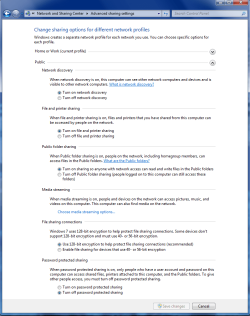
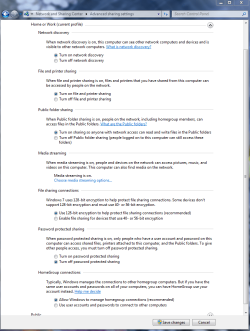
Check here under Advanced Sharing settings and make sure that password protected sharing is turned off. There are two windows here Work-Home and Public, you need to check them both.
 

Attachments

  • public sharing enabled all.PNG
    public sharing enabled all.PNG
    39.7 KB · Views: 910
  • Home or work homegroup enable.PNG
    Home or work homegroup enable.PNG
    45 KB · Views: 626

My Computer My Computer

At a glance

Windows 7 Ult, Windows 8.1 Pro,Q9650-4.275GHz, E8600 4.5GHz, E6750-3.8GHzG.Skill PC2 9600 1200Mhz 5 5 5 15 2TGTX480
Computer type
PC/Desktop
Computer Manufacturer/Model Number
Home built
OS
Windows 7 Ult, Windows 8.1 Pro,
CPU
Q9650-4.275GHz, E8600 4.5GHz, E6750-3.8GHz
Motherboard
Evga 780i FTW
Memory
G.Skill PC2 9600 1200Mhz 5 5 5 15 2T
Graphics Card(s)
GTX480
Sound Card
Asus Xonar D2
Monitor(s) Displays
HannsG
Screen Resolution
1680X1050
Hard Drives
GSkill Phoenix Pro 120GB SSD
PSU
ThermalTake Toughpower 1000Watt modular
Case
ThermalTake XaserV
Cooling
Xigmatek S1283
Keyboard
Logitech G15
Mouse
Logitech G9
Internet Speed
T1
Thanks. I made sure both were checked...did a restart. It still wants login/passwords.
 

My Computer My Computer

At a glance

Windows 7 64-bit4GB
Computer Manufacturer/Model Number
Dell Inspiton 1545
OS
Windows 7 64-bit
Memory
4GB
Ok for the Mac to work with Windows 7 file sharing system you need to modify some settings. Try this. I assume that you already have changed the Workgroup name on the Macbook to the same as the Windows 7 machine?

Accessing Mac OS X Windows Sharing from Windows 7
Windows 7 will not work with Mac OS X Windows file sharing support by default. If you attempt to access a folder shared from Mac OS X, W7 will display a logon error repeatedly.
The problem is that W7, by default, will only use NTLMv2 for authentication, which is not supported by Mac OS X's Windows Sharing service.
The other problem is the Minimum Session Security for NTVLM SSP based Clients.
To get around this:

1. In W7, open the Control Panel
3. Double-click Administration Tools
4. Double-click Local Security Policy
5. Expand "Local Policies" and select "Security Options"
6. Locate "Network Security: LAN Manager Authentication Level" in the list and double-click it.
7. Change the setting from "Send NTMLv2 response only" to "Send LM & NTLM - use NTLMv2 session if negotiated"
8. Network Security: Minimum session security for NTLM SSP Based (including secure RPC) Clients
9. Change the setting from "require 128 bit" to unchecked (No Minimum)
10. Click OK

This is all I can find on this subject so I hope it works.
 

My Computer My Computer

At a glance

Windows 7 Ult, Windows 8.1 Pro,Q9650-4.275GHz, E8600 4.5GHz, E6750-3.8GHzG.Skill PC2 9600 1200Mhz 5 5 5 15 2TGTX480
Computer type
PC/Desktop
Computer Manufacturer/Model Number
Home built
OS
Windows 7 Ult, Windows 8.1 Pro,
CPU
Q9650-4.275GHz, E8600 4.5GHz, E6750-3.8GHz
Motherboard
Evga 780i FTW
Memory
G.Skill PC2 9600 1200Mhz 5 5 5 15 2T
Graphics Card(s)
GTX480
Sound Card
Asus Xonar D2
Monitor(s) Displays
HannsG
Screen Resolution
1680X1050
Hard Drives
GSkill Phoenix Pro 120GB SSD
PSU
ThermalTake Toughpower 1000Watt modular
Case
ThermalTake XaserV
Cooling
Xigmatek S1283
Keyboard
Logitech G15
Mouse
Logitech G9
Internet Speed
T1
When I open Administrative Tools there is no selection for Local SecurityPolicy.
 

My Computer My Computer

At a glance

Windows 7 64-bit4GB
Computer Manufacturer/Model Number
Dell Inspiton 1545
OS
Windows 7 64-bit
Memory
4GB
The Local Group Policy Editor will only be available in the Windows 7 Professional, Ultimate, and Enterpise editions.

Apparently that is the only way to make the macbooks network correctly with Windows 7.
 

My Computer My Computer

At a glance

Windows 7 Ult, Windows 8.1 Pro,Q9650-4.275GHz, E8600 4.5GHz, E6750-3.8GHzG.Skill PC2 9600 1200Mhz 5 5 5 15 2TGTX480
Computer type
PC/Desktop
Computer Manufacturer/Model Number
Home built
OS
Windows 7 Ult, Windows 8.1 Pro,
CPU
Q9650-4.275GHz, E8600 4.5GHz, E6750-3.8GHz
Motherboard
Evga 780i FTW
Memory
G.Skill PC2 9600 1200Mhz 5 5 5 15 2T
Graphics Card(s)
GTX480
Sound Card
Asus Xonar D2
Monitor(s) Displays
HannsG
Screen Resolution
1680X1050
Hard Drives
GSkill Phoenix Pro 120GB SSD
PSU
ThermalTake Toughpower 1000Watt modular
Case
ThermalTake XaserV
Cooling
Xigmatek S1283
Keyboard
Logitech G15
Mouse
Logitech G9
Internet Speed
T1
Thanks for trying...I couldn't find the Local Security Policy selection under Administrative Tools...or anywhere else. I cannot understand why in Windows 7 this is such an issue. Certainly not very user friendly.

I am also having trouble using Bonjour to connect to the printer attached to the Mac. I suspect these issues may be linked.

I hate to give up.
 

My Computer My Computer

At a glance

Windows 7 64-bit4GB
Computer Manufacturer/Model Number
Dell Inspiton 1545
OS
Windows 7 64-bit
Memory
4GB
Thanks for trying...I couldn't find the Local Security Policy selection under Administrative Tools...or anywhere else. I cannot understand why in Windows 7 this is such an issue. Certainly not very user friendly.

I am also having trouble using Bonjour to connect to the printer attached to the Mac. I suspect these issues may be linked.

I hate to give up.

Check out this thread, as you scroll down it talks about specific settings on the Mac that might help. I wouldn't give up either until all possible work arounds have been tried.
Networking with a mac

It may work if you just type in "Guest" with no password. There are a few things that work but apparently not too well.
Other suggestions here. http://forums.macrumors.com/showthread.php?t=644480

Works fine for me.
When you connect manually(smb://iphere) and it asks for password, just select Guest.
 

My Computer My Computer

At a glance

Windows 7 Ult, Windows 8.1 Pro,Q9650-4.275GHz, E8600 4.5GHz, E6750-3.8GHzG.Skill PC2 9600 1200Mhz 5 5 5 15 2TGTX480
Computer type
PC/Desktop
Computer Manufacturer/Model Number
Home built
OS
Windows 7 Ult, Windows 8.1 Pro,
CPU
Q9650-4.275GHz, E8600 4.5GHz, E6750-3.8GHz
Motherboard
Evga 780i FTW
Memory
G.Skill PC2 9600 1200Mhz 5 5 5 15 2T
Graphics Card(s)
GTX480
Sound Card
Asus Xonar D2
Monitor(s) Displays
HannsG
Screen Resolution
1680X1050
Hard Drives
GSkill Phoenix Pro 120GB SSD
PSU
ThermalTake Toughpower 1000Watt modular
Case
ThermalTake XaserV
Cooling
Xigmatek S1283
Keyboard
Logitech G15
Mouse
Logitech G9
Internet Speed
T1
Back
Top