HoN Desktop Icon: UAC shield

Dampkring

New member
Member
Local time
10:17 PM
Messages
29
Location
France/Germany
Hi everyone, just wanted to know if it is possible to get rid of the UAC shield without disabling UAC, still want to run the application as admin, would creating Elevated Program Shortcut be the solution?
I have this issue only with the Heroes of Newerth icon, I can run all my other programs as admin without having the shield on my icon. Any ideas? Thanks :geek:
 

My Computer

OS
Windows 7 Home Premium 64 bits
CPU
AMD Phenom II X6 1090T
Motherboard
Asus M4A89GTD PRO/USB3
Memory
6GB Corsair Dominator
Graphics Card(s)
ATI Radeon HD 5970 2GB
Monitor(s) Displays
LG W2286L
Screen Resolution
1680x1050
Hard Drives
WD Caviar Black 640GB SATA II
Iomega Professional 2.0TB
PSU
Corsair HX850W
Case
Antec P180
Keyboard
Logitech G11
Mouse
Logitech G5
Internet Speed
18MB
Other Info
Roland TD-20KX V-Drums V-Pro Series,
Roland RH-300,
DW 9002 Double Bass Pedals,
DW 9303 Snare Stand,
DW 9500TB Hi-Hat Pedal
Hi everyone, just wanted to know if it is possible to get rid of the UAC shield without disabling UAC, still want to run the application as admin, would creating Elevated Program Shortcut be the solution?
I have this issue only with the Heroes of Newerth icon, I can run all my other programs as admin without having the shield on my icon. Any ideas? Thanks :geek:


UAC shield? could you explain?
 

My Computer

Computer Manufacturer/Model Number
HP Pavillion dv-7 1005 Tx
OS
Win 8 Release candidate 8400
CPU
[email protected]
Memory
4 gigs
Graphics Card(s)
Nvidia 9600M
Sound Card
HD built-in
Monitor(s) Displays
17" Wxga
Screen Resolution
1440x900
Cooling
none
Internet Speed
45Mb down 5Mb up
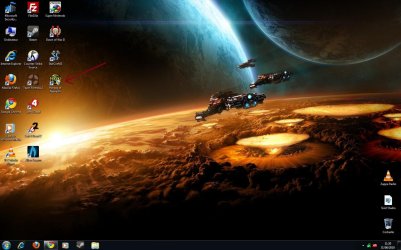
The blue/yellow shield on the icon:

desktop.jpg
 

My Computer

OS
Windows 7 Home Premium 64 bits
CPU
AMD Phenom II X6 1090T
Motherboard
Asus M4A89GTD PRO/USB3
Memory
6GB Corsair Dominator
Graphics Card(s)
ATI Radeon HD 5970 2GB
Monitor(s) Displays
LG W2286L
Screen Resolution
1680x1050
Hard Drives
WD Caviar Black 640GB SATA II
Iomega Professional 2.0TB
PSU
Corsair HX850W
Case
Antec P180
Keyboard
Logitech G11
Mouse
Logitech G5
Internet Speed
18MB
Other Info
Roland TD-20KX V-Drums V-Pro Series,
Roland RH-300,
DW 9002 Double Bass Pedals,
DW 9303 Snare Stand,
DW 9500TB Hi-Hat Pedal
Hi Dampkring,
I was interested by your question, so I took about one hour for reading the internet ... Many people have the same desire, but there seems to be no real good solution, it's connected to the UAC. The most probable solution is to change the icon of the shield (make it transparent) via an "imageres.dll". I did not tested this solution by myself... Good luck with this one:
First locate "imageres.dll" in Win 7 System32 folder (C:\Windows\System32\imageres.dll)
Copy it on your desktop.
Download Resource Hacker or PE Explorer.
Open the imageres.dll file in ResHacker or PE Explorer.
Go to the IMAGE folder (image 838 to 856).
replace the image for your current resolution.
Save and copy this file to Win 7 System32 folder after backing up the original imageres.dll file

Maybe this works?
Kind reg,
 

My Computer

Computer Manufacturer/Model Number
HP xw4400 Workstation
OS
Windows 7 Ultimate x64, Windows 7 Starter x86
CPU
Intel Core 2 Duo E6400 @ 2.13GHz Conroe 65nm Technology
Motherboard
Hewlett-Packard 0A68h (XU1 PROCESSOR)
Memory
Type: DDR2 Size: 8192 MBytes
Graphics Card(s)
L1942 @ 1280x1024 128MB ATI FireGL V3300
Sound Card
High Definition Audio Device
Monitor(s) Displays
Flatron L1942P
Screen Resolution
1280x1024 pixels
Hard Drives
488GB Seagate ST3500418AS ATA Device
78GB Seagate ST3808110AS ATA Device
Keyboard
Standard PS/2 Keyboard AZERTY
Internet Speed
LAN
I think the shield means that you're running the program as an (the) Administrator.
 

My Computer

Computer type
PC/Desktop
Computer Manufacturer/Model Number
Bruce ... somewhere in his 40's
OS
Windows 7 Ultimate 32bit SP1
CPU
Intel(R) Core(TM)2 Quad CPU @ 2.40GHz, 2400 MHz
Motherboard
INTEL/D975XBX2
Memory
4 GB
Graphics Card(s)
ATI Radeon HD 2600 Pro
Monitor(s) Displays
Samsung SyncMaster 914v
Screen Resolution
1280 x 1024
Hard Drives
2/500GB each ... ST3500630AS ATA Device.
One is not connected
PSU
Rocketfish 700 W
Case
G.Skill Gigabyte Chassis
Keyboard
Standard PS/2 Keyboard
Mouse
Microsoft PS/2 Mouse
Internet Speed
DSL
Antivirus
Avira Internet Security
Browser
IE 11
Other Info
ATI HDMI Audio
Hi Dampkring,
I was interested by your question, so I took about one hour for reading the internet ... Many people have the same desire, but there seems to be no real good solution, it's connected to the UAC. The most probable solution is to change the icon of the shield (make it transparent) via an "imageres.dll". I did not tested this solution by myself... Good luck with this one:
First locate "imageres.dll" in Win 7 System32 folder (C:\Windows\System32\imageres.dll)
Copy it on your desktop.
Download Resource Hacker or PE Explorer.
Open the imageres.dll file in ResHacker or PE Explorer.
Go to the IMAGE folder (image 838 to 856).
replace the image for your current resolution.
Save and copy this file to Win 7 System32 folder after backing up the original imageres.dll file

Maybe this works?
Kind reg,


well thanx for your post, seems a little bit abused for such a little detail though ^^
 

My Computer

OS
Windows 7 Home Premium 64 bits
CPU
AMD Phenom II X6 1090T
Motherboard
Asus M4A89GTD PRO/USB3
Memory
6GB Corsair Dominator
Graphics Card(s)
ATI Radeon HD 5970 2GB
Monitor(s) Displays
LG W2286L
Screen Resolution
1680x1050
Hard Drives
WD Caviar Black 640GB SATA II
Iomega Professional 2.0TB
PSU
Corsair HX850W
Case
Antec P180
Keyboard
Logitech G11
Mouse
Logitech G5
Internet Speed
18MB
Other Info
Roland TD-20KX V-Drums V-Pro Series,
Roland RH-300,
DW 9002 Double Bass Pedals,
DW 9303 Snare Stand,
DW 9500TB Hi-Hat Pedal
The UAC shield means that the program (or some portion of it) requires elevation to run.
 

My Computer

Computer Manufacturer/Model Number
Custom
OS
Windows 7 Ultimate RTM (Technet)
CPU
3.00 gigahertz Intel Core2 Duo E8400
Motherboard
ASUSTeK Computer INC. P5K/EPU Rev 1.xx
Memory
4GB
Graphics Card(s)
ATI Radeon X1950 Pro
Sound Card
Built in HD Audio
Monitor(s) Displays
22" Gateway LCD
Screen Resolution
1920 x 1200
Hard Drives
ST3160023A [Hard drive] (160.04 GB) -- drive 0, rev 8.01, ST3500630AS [Hard drive] (500.11 GB) -- drive 2, rev 3.AAK
ST3500630AS [Hard drive] (500.11 GB) -- drive 1, rev 3.AAK
Keyboard
Logitech G11
Mouse
Microsoft Wireless Laser Mouse 5000
Internet Speed
13.44 Mbps
Yaaay, I've managed to do it...
I know this thread is old, but if someone comes here through googling and is really interested in this, I will explain it for him/her.
 

My Computer

Computer type
PC/Desktop
Computer Manufacturer/Model Number
Custom Built PC
OS
Windows 7 Ultimate 64 bit SP1
CPU
Intel(R) Core(TM) i5-2500K
Motherboard
Gigabyte Technology Co., Ltd. Z68X-UD3-B3
Memory
12GB Kingston Hyperx 1600MHz
Graphics Card(s)
Asus GTS 450
PSU
500W Coolink
Other Info
Genius G-Pen F610 (PenPad)
Well yea, I don't play HoN anymore but could be interesting ;)
 

My Computer

OS
Windows 7 Home Premium 64 bits
CPU
AMD Phenom II X6 1090T
Motherboard
Asus M4A89GTD PRO/USB3
Memory
6GB Corsair Dominator
Graphics Card(s)
ATI Radeon HD 5970 2GB
Monitor(s) Displays
LG W2286L
Screen Resolution
1680x1050
Hard Drives
WD Caviar Black 640GB SATA II
Iomega Professional 2.0TB
PSU
Corsair HX850W
Case
Antec P180
Keyboard
Logitech G11
Mouse
Logitech G5
Internet Speed
18MB
Other Info
Roland TD-20KX V-Drums V-Pro Series,
Roland RH-300,
DW 9002 Double Bass Pedals,
DW 9303 Snare Stand,
DW 9500TB Hi-Hat Pedal
Please, it can help others. :)
 

My Computer

Computer type
PC/Desktop
Computer Manufacturer/Model Number
Home Built Desktop By DataTech
OS
Windows 7 Ultimate X64 SP1
CPU
Intel i5-2550K, Differing ~4.4-4.8GHz No built in GPU
Motherboard
ASUS P8Z68-V PRO/GEN3
Memory
16GB G.Skill Sniper 1866MHz @ 2133MHz 2x8GB
Graphics Card(s)
ASUS GTX650TIB-DC2OC-2GD5, (650TI Boost)
Sound Card
Onboard Realtek 5-1
Monitor(s) Displays
Samsung P2570HD
Screen Resolution
1920x1080
Hard Drives
Samsung 840 Pro 256GB SSD for OS, 500GB Seagate Constellation (Enterprise drive) for Data
PSU
Corsair HX650W
Case
Inwin Dragon Rider
Cooling
Hyper 212 EVO w/two Noctua fans, push-pull, @1300 RPM
Keyboard
E-Z Eyes, bright yellow keys with large characters
Mouse
steelseries SENSEI Laser Pro Gaming
Internet Speed
48-51Mbs Mbs down, 11 Mbs up Xfinity Cable
Antivirus
Norton Internet Security 2013
Browser
IE 10, Opera, Pale Moon if needed
Other Info
4 case fans, LG BluRay-RE, ASUS DVD-RW, Mr. Fusion power supply, 1.21 gigawatts.
Turn off user account control. You may have to reinstall the program.
 

My Computer

Computer Manufacturer/Model Number
Myself
OS
Windows 7 Ultimate 64Bit
CPU
C2D E8200
Motherboard
XFX 750i
Memory
8GB PNY PC2-6400
Graphics Card(s)
BFG 9600GT x 2
Sound Card
Stock XFX Optical
Monitor(s) Displays
Gateway 22" HD Display
Hard Drives
C: 1 TB G: 500 GB H: 500 GB
PSU
Ultra LSP 550 Pro Lifetime Series
Case
Xion2
Cooling
ThermalTake
Yaaay, I've managed to do it...
I know this thread is old, but if someone comes here through googling and is really interested in this, I will explain it for him/her.

Please tell how you did it.

I've tried to do this for the entire time I've had Win 7. The fact that I want to keep UAC enabled makes it difficult. If I turn off UAC and then change the icon as soon as I reenable UAC the shield comes back. I have the shield on so many programs, MBAM, SpywareBlaster, Speccy where it seems like it shouldn't even be there to start with. I haven't tried to reinstall the programs without UAC enabled but I think once it is enabled something won't be right.
 

Attachments

  • mwb.JPG
    mwb.JPG
    8.6 KB · Views: 803

My Computer

Computer Manufacturer/Model Number
HP p6608f
OS
Win 7 Home Premium x64
CPU
Intel Core i3-540 3.07 GHz
Motherboard
MS-7613 (Iona-GL8E)
Memory
4 GB (2 X 2) Dual-Channel PC-10600 DDR3 @ 665MHz (9-9-9-24)
Graphics Card(s)
Integrated Intel H57
Sound Card
Integrated Realtek ALC888S Audio
Monitor(s) Displays
17" SDM-HS73 (a vestige from my old computer)
Screen Resolution
1280 X 1024
Hard Drives
750GB SATA 7200 RPM
PSU
250W
Keyboard
HP USB keyboard
Mouse
HP USB optical mouse
Internet Speed
15Mbps/1Mbps
*Warning*
Follow this tutorial at your own risk. I will help you with everything if you leave a reply. Read the text carefully.


Update(2011/Aug): no need for second OS!

You wil need:

- to download my patched imageres.dll file
- to download Windows file replacer

Step 1: Preparing & BackUp
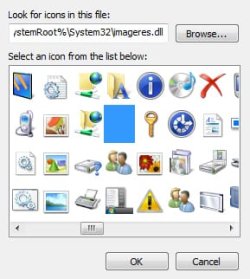
Alright here's the deal, the rest of the system icons are stored in 1 file (System32\imageres.dll). You want to replace the uac (blue/yellow shield) icon. As you can see, mine is already replaced with a blank icon:
7 forums - imagers icons 2.jpg


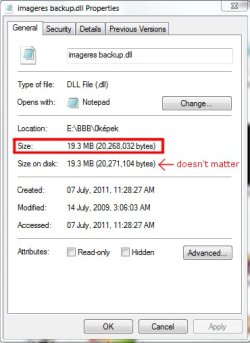
I found that both of my systems (win 7 enterprise 32 and 64 bit) has the same imageres.dll file, other editions' file may vary so before you continue check these details of Your file, if these details do not match stop here:

props03.jpg props04.jpg

If everything is like above, go to
Windows\System32\imageres.dll and copy imageres.dll by pressing Ctrl+C, and Ctrl+V then rename your new file to imageres_dll.backup
OR navigate to a folder where you want to back it up, and paste it with Ctrl+V.


When you're done, you can download my modified DLL file Here.


Step 2:
Replacing imageres.dll

Download
Windows Se7en File Replacer, unzip and run the software.
Click on "Manual" this will allow you to locate the new and then the old imageres.dll (C:\Windows\System32\imageres.dll)
It will actomatically create a backup file at the same place where imageres.dll was originally located, when it's done it will promt to you to reboot.


Viola! if you have done these steps right you will see that your uac icons are now gone.
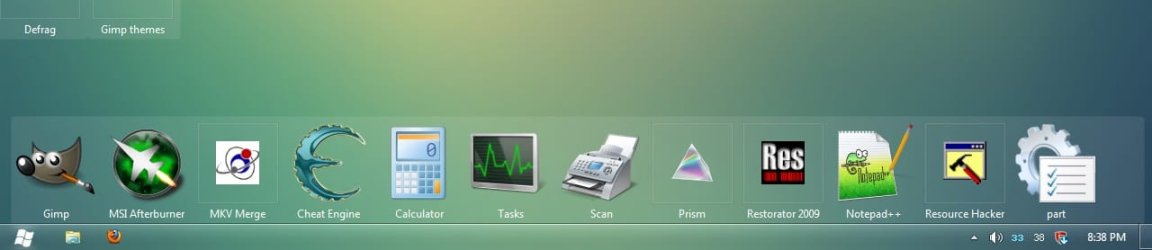
Here you can find out how to remove the shortcut arrows, to get a tidier look!
showing_off01.jpg

Any feedback is greatly appreciated.
SG
 
Last edited:

My Computer

Computer type
PC/Desktop
Computer Manufacturer/Model Number
Custom Built PC
OS
Windows 7 Ultimate 64 bit SP1
CPU
Intel(R) Core(TM) i5-2500K
Motherboard
Gigabyte Technology Co., Ltd. Z68X-UD3-B3
Memory
12GB Kingston Hyperx 1600MHz
Graphics Card(s)
Asus GTS 450
PSU
500W Coolink
Other Info
Genius G-Pen F610 (PenPad)
*Warning*
Follow this tutorial at your own risk. I will help you with everything if you leave a reply. Read the text carefully.

Update(2011/Aug): no need for second OS!

You wil need:

- to download my patched imageres.dll file
- to download Windows file replacer

Step 1: Preparing & BackUp
Alright here's the deal, the rest of the system icons are stored in 1 file (System32\imageres.dll). You want to replace the uac (blue/yellow shield) icon. As you can see, mine is already replaced with a blank icon:
View attachment 165364


It works. I downloaded Se7en_File_Replacer in other place, because the link not works. Thanks.
 

My Computer

OS
Windows 7 Ultimate x64
Another Method

As per this tutorial:

UAC Shield icon overlay doesn't disappear even that UAC is - Microsoft Community

Method:

1. Open the Search box from Charms bar( if you're using a mouse, pointing to the upper-right corner of the screen, moving the mouse pointer down, and then clicking Search).

2. Type cmd in the search box.

3. Open command prompt and type

taskkill/im explorer.exe /f - Press Enter
cd /d %userprofile%\appdata\local - Press Enter
del iconcache.db /a - Press Enter

4. And restart your computer.
 

My Computer

Computer Manufacturer/Model Number
Acer Aspire 5742G-7200
OS
Windows 7 Home Premium 64 Bit
CPU
2.53 GHz
Memory
4 GB
Graphics Card(s)
Nvidia Geforce GT 555M Cuda 2GB
I DO NOT recommend doing the above written.

This clears icon cache, but not necessarily removes the overlay. Also, you have to restart explorer.exe afterwards to be able to shut down the computer conveniently.

BTW W7 file replacer that I've linked above is able to do this with a single click.
 

My Computer

Computer type
PC/Desktop
Computer Manufacturer/Model Number
Custom Built PC
OS
Windows 7 Ultimate 64 bit SP1
CPU
Intel(R) Core(TM) i5-2500K
Motherboard
Gigabyte Technology Co., Ltd. Z68X-UD3-B3
Memory
12GB Kingston Hyperx 1600MHz
Graphics Card(s)
Asus GTS 450
PSU
500W Coolink
Other Info
Genius G-Pen F610 (PenPad)
I DO NOT recommend doing the above written.

This clears icon cache, but not necessarily removes the overlay. Also, you have to restart explorer.exe afterwards to be able to shut down the computer conveniently.

BTW W7 file replacer that I've linked above is able to do this with a single click.

No it works. I wouldn't have posted a method that didn't work for me & just say it does. I did it under an Administrator account with UAC turned off already. Not sure what happens in other scenarios. & you don't have to restart explorer.exe. Alternatively, you can just press the power button once & wait for it to shut down. Or press Ctrl+Alt+Del & choose restart from the power options. Why do you say you do NOT reccommend this procedure? The Microsoft site info was provided by an avid user there. I can't say I've noticed any undesired behavior whatsoever.
 

My Computer

Computer Manufacturer/Model Number
Acer Aspire 5742G-7200
OS
Windows 7 Home Premium 64 Bit
CPU
2.53 GHz
Memory
4 GB
Graphics Card(s)
Nvidia Geforce GT 555M Cuda 2GB
I DO NOT recommend doing the above written.

This clears icon cache, but not necessarily removes the overlay. Also, you have to restart explorer.exe afterwards to be able to shut down the computer conveniently.

BTW W7 file replacer that I've linked above is able to do this with a single click.

Sorry if I seem abrasive or condescending but, I'm curious as to why you put not in all caps. Have you noticed any hiccups after applying this method?
 

My Computer

Computer Manufacturer/Model Number
Acer Aspire 5742G-7200
OS
Windows 7 Home Premium 64 Bit
CPU
2.53 GHz
Memory
4 GB
Graphics Card(s)
Nvidia Geforce GT 555M Cuda 2GB
Sorry, I said that because most people are not creative enough to turn off their computer without a tray, I know that for a fact.
 

My Computer

Computer type
PC/Desktop
Computer Manufacturer/Model Number
Custom Built PC
OS
Windows 7 Ultimate 64 bit SP1
CPU
Intel(R) Core(TM) i5-2500K
Motherboard
Gigabyte Technology Co., Ltd. Z68X-UD3-B3
Memory
12GB Kingston Hyperx 1600MHz
Graphics Card(s)
Asus GTS 450
PSU
500W Coolink
Other Info
Genius G-Pen F610 (PenPad)
Sorry, I said that because most people are not creative enough to turn off their computer without a tray, I know that for a fact.

Oh. Good point lol.
 

My Computer

Computer Manufacturer/Model Number
Acer Aspire 5742G-7200
OS
Windows 7 Home Premium 64 Bit
CPU
2.53 GHz
Memory
4 GB
Graphics Card(s)
Nvidia Geforce GT 555M Cuda 2GB
Back
Top