How can i disable automatic Bluetooth driver installation ?

BOSS21

New member
Hi guys,
i have got a problem, i do not know how can i disable automatic Bluetooth driver installation ?

I have already uninstalled Bluetooth driver, but after i do the restart, Bluetooth driver is installed again.
I want to unistall Bluetooth driver (i do not need it) and disable automatic installation after restart.
Please, can anybody help me to solve this problem ?
Sorry for bad english
 

My Computer

OS
Windows 7 Ultimate x64
Hi guys,
i have got a problem, i do not know how can i disable automatic Bluetooth driver installation ?

I have already uninstalled Bluetooth driver, but after i do the restart, Bluetooth driver is installed again.
I want to unistall Bluetooth driver (i do not need it) and disable automatic installation after restart.
Please, can anybody help me to solve this problem ?
Sorry for bad english

Go into device manager>find the Bluetooch tab>un-install the driver>diable the device.

You wont be able to use bluetooth if you do, nor any thing else that is dependent on it.
 

My Computer

Computer Manufacturer/Model Number
HP Pavillion dv-7 1005 Tx
OS
Win 8 Release candidate 8400
CPU
[email protected]
Memory
4 gigs
Graphics Card(s)
Nvidia 9600M
Sound Card
HD built-in
Monitor(s) Displays
17" Wxga
Screen Resolution
1440x900
Cooling
none
Internet Speed
45Mb down 5Mb up
I did it.
Next i restarted notebook.
After restart there was a table of device driver installation > and it installed Bluetooth again....
 

My Computer

OS
Windows 7 Ultimate x64
I did it.
Next i restarted notebook.
After restart there was a table of device driver installation > and it installed Bluetooth again....


With it disabled in device manager? Did you disable all the bluetooth devices?
 

My Computer

Computer Manufacturer/Model Number
HP Pavillion dv-7 1005 Tx
OS
Win 8 Release candidate 8400
CPU
[email protected]
Memory
4 gigs
Graphics Card(s)
Nvidia 9600M
Sound Card
HD built-in
Monitor(s) Displays
17" Wxga
Screen Resolution
1440x900
Cooling
none
Internet Speed
45Mb down 5Mb up
Boss, You can also disable it in services. Type services in start menu and click it. Then look for bluetooth, right click it, and click disable
 

My Computer

Computer type
PC/Desktop
Computer Manufacturer/Model Number
Custom Asus Build
OS
Microsoft Windows 8.1 Pro 64-bit
CPU
Intel(R) Core(TM) i3-4130 CPU @ 3.40GHz
Motherboard
B85M-E
Memory
8.00 GB
Graphics Card(s)
None
Sound Card
Realtek High Definition Audio
Monitor(s) Displays
Asus 23.6" Monitor
Screen Resolution
1920 x 1080 x 32 bits (4294967296 colors) @ 60 Hz
Hard Drives
INTEL SSDSC2BW180A4
Samsung SSD 840 PRO Series
PSU
Seasonic S12II-380Bronze
Case
Lian Li
Cooling
Fan, Passive
Keyboard
Logitech K120
Mouse
Microsoft Touch Mouse
Internet Speed
4ms Ping, 19.0 Mbps Download, 19.0 Mbps Upload
Antivirus
Eset Endpoint
Browser
Internet Explorer, Chrome
You need to be careful when disabling it in services.msc. First that is global so it affects all users on a machine.

Second it affects dependencies.
 

My Computer

Computer Manufacturer/Model Number
HP Pavillion dv-7 1005 Tx
OS
Win 8 Release candidate 8400
CPU
[email protected]
Memory
4 gigs
Graphics Card(s)
Nvidia 9600M
Sound Card
HD built-in
Monitor(s) Displays
17" Wxga
Screen Resolution
1440x900
Cooling
none
Internet Speed
45Mb down 5Mb up
You need to be careful when disabling it in services.msc. First that is global so it affects all users on a machine.

Second it affects dependencies.
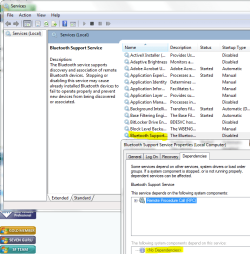
Very true. My friend here and I were joking earlier about messing with the services. Don't go willy nilly, but you can disable Bluetooth support, as it has no dependencies:
Capture.PNG
 

My Computer

Computer type
PC/Desktop
Computer Manufacturer/Model Number
Custom Asus Build
OS
Microsoft Windows 8.1 Pro 64-bit
CPU
Intel(R) Core(TM) i3-4130 CPU @ 3.40GHz
Motherboard
B85M-E
Memory
8.00 GB
Graphics Card(s)
None
Sound Card
Realtek High Definition Audio
Monitor(s) Displays
Asus 23.6" Monitor
Screen Resolution
1920 x 1080 x 32 bits (4294967296 colors) @ 60 Hz
Hard Drives
INTEL SSDSC2BW180A4
Samsung SSD 840 PRO Series
PSU
Seasonic S12II-380Bronze
Case
Lian Li
Cooling
Fan, Passive
Keyboard
Logitech K120
Mouse
Microsoft Touch Mouse
Internet Speed
4ms Ping, 19.0 Mbps Download, 19.0 Mbps Upload
Antivirus
Eset Endpoint
Browser
Internet Explorer, Chrome
how to disable automatic bluetooth startup

I have the same problem with last version 10/11 first version Windows.
I have disabled every bluetooth service; disabled in device manager; disabled in another place or two in registry after checking to be sure the services are 4 (disabled); bluetooth is not in startup.

It is another one of the Microsoft 10/11 annoyances and inconveniences that happens automatically no matter what one tries to configure.

I have NOT tried to use any of the available configuring software (apps). Any advice of successful experiences with the same is welcome. Although perhaps I should ask a new question, because this one is from several years back.
 
Last edited:

My Computer

Computer type
PC/Desktop
OS
Windows 7 Home Premium 64 bit
things have definately moved on since the last post

WiFi/Bluetooth drivers tend to be co-joined now
so the question becomes --- how do you connect
if its ethernet not a problem dissable wifi/bluetooth drivers. Or in Bios turn off wifi function


using WiFi
what card do you have.... might be able to dissable via the Advanced Driver tab settings
 

My Computer

Computer type
PC/Desktop
Computer Manufacturer/Model Number
medionl/Aspire 6930G/acer x55a
OS
W7 home premium 32bit/W7HP 64bit/w10 tp insider ring
CPU
E5300 dual core
Motherboard
medion MS7366
Memory
3gb
Graphics Card(s)
Nvidia Geforce 7100 Nforce 630i
Monitor(s) Displays
avixc
Internet Speed
n (isp resticted to 72)
Antivirus
mse/pands
Browser
palemoon
Other Info
Belkin Fd7050 n USB using Railink RT2870 drivers, more upto date
Thanks for replying Torchwood.

I have wifi disabled in the modem and services. I do not use wifi, only ethernet.
However, I have two additional devices attached by ethernet, to the modem, NOT networked to the computer.

Smart t.v. ethernet connection and voip phone ethernet connection (which is not via my isp CenturyLink connection).
They are both wifi capable. And of course neither has a user interface that allows turning off the wifi, although I think it is possible to access the voip box which I read long ago, so I suppose finding the info again would be a good idea.(sigh)

When my very unstable CenturyLink connection cuts out, which some days it does relentlessly, they probably try to connect with wifi.
However, I unplug the t.v. so the wifi should not activate (hopefully). Sometime I unplug the phone too, which does not seem to make a difference.
Thing is I turn bluetooth off each time I put the computer on (even though I have wireless and bluetooth disabled in bios, hardware, settings, and registry.

When it comes on, later, it creates terrible audio interference. So I turn it off again.
I suspect my house is being "assaulted" in a search for any type of wireless connection, even though I do my best to keep it out.
(Microsoft OS always misbehaves. We are lead to believe we can configure, however, Microsoft repeatedly changes what is configured.
Have not had as many problems since there are no longer updates to the computer. However, the long arm of Microsoft does not stop reaching and disrupting.)

I have a tablet (android), with bluetooth and wifi turned off (actually connect via ethernet sometimes).
(I have connected it via wifi in the past, by turning the modem wifi on but no longer used it.)

Wondering if websites try to use wifi, and scan to try to use anything they find. Don't know if they can send a wifi signal that turns bluetooth on.

I have no idea the wifi model/card in the in the tablet, t.v., or voip phone box. I have bluetooth disabled and uninstalled in hardware manager, and it never shows reinstalled, when I find it reinstalled in the control panel "devices and printers" where I disconnect it.

 

My Computer

Computer type
PC/Desktop
OS
Windows 7 Home Premium 64 bit
now thats interesting IF its turned off in Bios, its not Hardware enabled.
So something is "pushing" a signal to install/enable wifi/Bluetooth

can you run MSinfo32, copy/paste the output

BEFORE tuning bluetooth off
 

My Computer

Computer type
PC/Desktop
Computer Manufacturer/Model Number
medionl/Aspire 6930G/acer x55a
OS
W7 home premium 32bit/W7HP 64bit/w10 tp insider ring
CPU
E5300 dual core
Motherboard
medion MS7366
Memory
3gb
Graphics Card(s)
Nvidia Geforce 7100 Nforce 630i
Monitor(s) Displays
avixc
Internet Speed
n (isp resticted to 72)
Antivirus
mse/pands
Browser
palemoon
Other Info
Belkin Fd7050 n USB using Railink RT2870 drivers, more upto date
Be happy to, however it is currently off without disconnect problems, and no reconnection - yet - need to used it while its accessible.
Will run MSinfo32 when/if it turns back on, today - otherwise tomorrow when I first put the computer on (at least 16 hours from now).
Thanks for being willing to consider the problem!

- - - Updated - - -

With bluetooth off: the list of "problem devices" (I have intentionally disabled/and uninstalled all of them) (bluetooth is "radio device")

AMD SMBus PCI\VEN_1022&DEV_790B&SUBSYS_790B1022&REV_51\3&11583659&0&A0 This device is disabled.
Microsoft Hyper-V Virtualization Infrastructure Driver ROOT\VID\0000 This device is disabled.
Microsoft Radio Device Enumeration Bus SWD\RADIO\{3DB5895D-CC28-44B3-AD3D-6F01A782B8D2}
This device is disabled. Realtek 8852BE Wireless LAN WiFi 6 PCI-E NIC PCI\VEN_10EC&DEV_B852&SUBSYS_B85210EC&REV_00\00E04CFFFE88520100 This device is disabled.
 

My Computer

Computer type
PC/Desktop
OS
Windows 7 Home Premium 64 bit
note

that last driver is usually found in minicards for a laptop
however there are a couple of external aerial type recivers
google the id - select images
Realtek 8852BE Wireless LAN WiFi 6 PCI-E NIC
 

My Computer

Computer type
PC/Desktop
Computer Manufacturer/Model Number
medionl/Aspire 6930G/acer x55a
OS
W7 home premium 32bit/W7HP 64bit/w10 tp insider ring
CPU
E5300 dual core
Motherboard
medion MS7366
Memory
3gb
Graphics Card(s)
Nvidia Geforce 7100 Nforce 630i
Monitor(s) Displays
avixc
Internet Speed
n (isp resticted to 72)
Antivirus
mse/pands
Browser
palemoon
Other Info
Belkin Fd7050 n USB using Railink RT2870 drivers, more upto date
Back
Top