how can i make my other partition bootable?

maifs

maifs
Member
VIP
Local time
9:31 AM
Messages
133
Location
Lahore
how can i make my other partition bootable using easybcd?
 

My Computer My Computer

At a glance

windows7mobile AMD Athlon(tm) XP-M 2600+, 1514 Mhz, 1...768 MB
Computer Manufacturer/Model Number
Gericom/755CI
OS
windows7
CPU
mobile AMD Athlon(tm) XP-M 2600+, 1514 Mhz, 1 Core(s), 1 Log
Motherboard
Gericom 755CI 1.0,BIOS: American Megatrends Inc. 1.04G 07/09
Memory
768 MB
Monitor(s) Displays
15 inches TFT(XGA 1024x786)
Screen Resolution
1024x786
Hard Drives
40GB
Keyboard
compaq
Mouse
IBM
Internet Speed
512KB
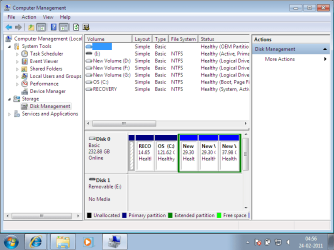
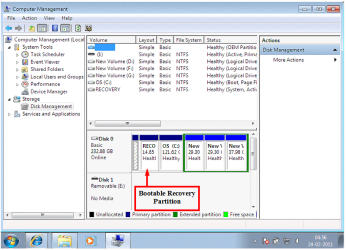
Before we make any specific recommendations will you please post a snip/screen-shot of the entire disk management drive map with a full description as to which drive/partition is which, so we can see what you have going on as there may be a fairly simple way to resolve the situation.

In the Windows start menu right click computer and click manage, in the left pane of the "Computer Management" window that opens click disk management and post a snip of that.


How to Upload and Post a Screenshot and File in Seven Forums
 

My Computer My Computer

At a glance

W 7 64-bit UltimateIntel Q9550 Yorkfield8GB Dominator 8500C5DATI : XFX 5870
Computer Manufacturer/Model Number
* BFK Customs *
OS
W 7 64-bit Ultimate
CPU
Intel Q9550 Yorkfield
Motherboard
ASUS P5Q Pro
Memory
8GB Dominator 8500C5D
Graphics Card(s)
ATI : XFX 5870
Sound Card
Realtek HD Audio 7-1
Monitor(s) Displays
1x 47" LCD HDMI & 3x 26" LCD HDMI
Screen Resolution
1920x1080P & 1920x1200
Hard Drives
1x 80GB Intel X25-M G2 SSD : 1x 500GB & 1x 640GB WD Caviar Black(s)
PSU
Corsair 620HX
Case
Cooler Master RC-690
Cooling
Tuniq Tower 120, 2x 140mm and 3x 120mm case fans
Keyboard
Microsoft 500
Mouse
Razer Diamondback 3G
Internet Speed
14 Mb/s
Other Info
1x Koutech 3Gb/s SATA HDD Hot Swap Rack
What is it you are trying to do?
 

My Computer My Computer

At a glance

Windows 10 Pro x64, Windows 8.1 Pro x64, Wind...INTEL i9-7920X LGA 206664 GB (4 X 16 GB) G-Skill V Series DDR4 3200 ...EVGA GTX 1060 SC 3 GB
Computer type
PC/Desktop
Computer Manufacturer/Model Number
Custom Built
OS
Windows 10 Pro x64, Windows 8.1 Pro x64, Windows 7 Ultimate x64 SP1,
CPU
INTEL i9-7920X LGA 2066
Motherboard
Gigabyte X299-WU8 F3
Memory
64 GB (4 X 16 GB) G-Skill V Series DDR4 3200 Quad Channel
Graphics Card(s)
EVGA GTX 1060 SC 3 GB
Sound Card
Realtek Onboard ALC1220
Monitor(s) Displays
2 x Samsung S27E310
Screen Resolution
1920x1080
Hard Drives
Samsung 2 x 970 EVO Plus 500 GB NVMe
1 x 6TB WD 6003FZBX SATA
1 x 6TB WD 60EFRX SATA
12 x 3TB WD 30EFRX SATA
PSU
Seasonic X-1050
Case
Thermaltake Armor+
Cooling
Corsair H80i V2 Liquid AOI Cooler
Keyboard
Logitech G510s
Mouse
Logitech MX Master 2S
Internet Speed
200 Mb/s
Antivirus
ESET NOD32 13.1
Browser
EDGE (Dev, Canary, Beta), Chrome
Other Info
ASUS RT-AC68U router
Malwarebytes 4.0.4
1.png

i am trying to make hd's F: drive bootable.
 

My Computer My Computer

At a glance

windows7mobile AMD Athlon(tm) XP-M 2600+, 1514 Mhz, 1...768 MB
Computer Manufacturer/Model Number
Gericom/755CI
OS
windows7
CPU
mobile AMD Athlon(tm) XP-M 2600+, 1514 Mhz, 1 Core(s), 1 Log
Motherboard
Gericom 755CI 1.0,BIOS: American Megatrends Inc. 1.04G 07/09
Memory
768 MB
Monitor(s) Displays
15 inches TFT(XGA 1024x786)
Screen Resolution
1024x786
Hard Drives
40GB
Keyboard
compaq
Mouse
IBM
Internet Speed
512KB
Have you already installed another OS to F which you need to add to a Dual Boot menu?

Why else would you want to make it bootable? You need to be more explicit.
 
hello gregrocker.

basically, i have two machines right now.

one machine support usb bootable device and

other doesnt support usb bootable devices nor support bootable dvd.

I have once copied the win7 ISO from my friend's machine through his dvd rom into my usb.

After than i copied it into my both machines.

One is for making usb bootable and other machine doesn't have any support with usb botting nor dvd booting.

So that's why i am trying to make my HD's F: drive bottable for the 2nd machine.

Please ask for more details . I am here.
 

My Computer My Computer

At a glance

windows7mobile AMD Athlon(tm) XP-M 2600+, 1514 Mhz, 1...768 MB
Computer Manufacturer/Model Number
Gericom/755CI
OS
windows7
CPU
mobile AMD Athlon(tm) XP-M 2600+, 1514 Mhz, 1 Core(s), 1 Log
Motherboard
Gericom 755CI 1.0,BIOS: American Megatrends Inc. 1.04G 07/09
Memory
768 MB
Monitor(s) Displays
15 inches TFT(XGA 1024x786)
Screen Resolution
1024x786
Hard Drives
40GB
Keyboard
compaq
Mouse
IBM
Internet Speed
512KB
For what purpose do you want to make it bootable? You can run the Setup file from the existing OS to in-place Upgrade or Clean Install Win7 to that machine without having to boot it.

A Logical partition cannot be made bootable, but you really don't need to make it bootable to contain the install files and run them from the existing OS to install Win7 over itself or to another partition.

What is your exact goal?

I have also never heard of a machine that has neither support to boot a DVD or to boot a USB flash stick. What is the exact problem with these functions?
 
my machine doesnt support booting/startup from win7 bootable dvd not usb.

We have tried alot on it but it doesnt support.

I had been making bootable HD's drive through BCDEDIT.

CANT I use easybcd? I dont have too much space in my HDs. there is no other option except it.

please read my below post.

http://www.sevenforums.com/installation-setup/21632-boot-drives-format.html
 

My Computer My Computer

At a glance

windows7mobile AMD Athlon(tm) XP-M 2600+, 1514 Mhz, 1...768 MB
Computer Manufacturer/Model Number
Gericom/755CI
OS
windows7
CPU
mobile AMD Athlon(tm) XP-M 2600+, 1514 Mhz, 1 Core(s), 1 Log
Motherboard
Gericom 755CI 1.0,BIOS: American Megatrends Inc. 1.04G 07/09
Memory
768 MB
Monitor(s) Displays
15 inches TFT(XGA 1024x786)
Screen Resolution
1024x786
Hard Drives
40GB
Keyboard
compaq
Mouse
IBM
Internet Speed
512KB
The answer is the same as before:

Copy your Win7 DVD files to another partition besides C.

From the Desktop, rightlclick on Setup file to Run as Adminstrator.

Select Custom Intsall, install to C and it will overwrite the current OS.

Be sure to back up your files first.

If you want to format C or repartition your HD, you'll need to make the flash stick bootable.

What is your exact problem with doing these things? Please explain.
 
i have no space in C: drive and there is no option to overwrite. it show a message you dont have a succifient space in this drive.

Now my this machine doesn't support booting win7 through usb nor dvd except of bootable drives.
 

My Computer My Computer

At a glance

windows7mobile AMD Athlon(tm) XP-M 2600+, 1514 Mhz, 1...768 MB
Computer Manufacturer/Model Number
Gericom/755CI
OS
windows7
CPU
mobile AMD Athlon(tm) XP-M 2600+, 1514 Mhz, 1 Core(s), 1 Log
Motherboard
Gericom 755CI 1.0,BIOS: American Megatrends Inc. 1.04G 07/09
Memory
768 MB
Monitor(s) Displays
15 inches TFT(XGA 1024x786)
Screen Resolution
1024x786
Hard Drives
40GB
Keyboard
compaq
Mouse
IBM
Internet Speed
512KB
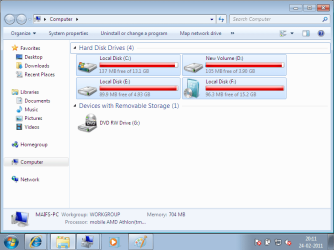
Is this wont you are trying to make?

Capture2.PNG
 

My Computer My Computer

At a glance

ME/XP/Vista/Win7
OS
ME/XP/Vista/Win7
Dear gregrocker, I had been continuously talking about my two machines. which differs from each other.

I have been completely understood whatever you said.

please see my below.

3.png

Yesterday i was displaying snips of my 2nd machine.

i think that was the root problem of mis understanding. Now please suggest.

IF my F: drive is not primary then how can i convert it into primary disrk dirve without lossing my data on F: drive?

my data is critical on F: drive.

Please ask if it still have some confusions.
 

My Computer My Computer

At a glance

windows7mobile AMD Athlon(tm) XP-M 2600+, 1514 Mhz, 1...768 MB
Computer Manufacturer/Model Number
Gericom/755CI
OS
windows7
CPU
mobile AMD Athlon(tm) XP-M 2600+, 1514 Mhz, 1 Core(s), 1 Log
Motherboard
Gericom 755CI 1.0,BIOS: American Megatrends Inc. 1.04G 07/09
Memory
768 MB
Monitor(s) Displays
15 inches TFT(XGA 1024x786)
Screen Resolution
1024x786
Hard Drives
40GB
Keyboard
compaq
Mouse
IBM
Internet Speed
512KB
As you are using a 40gb HD with 4 partition, backup all data, & replace HD with a 100gb Hd or more
 

My Computer My Computer

At a glance

ME/XP/Vista/Win7
OS
ME/XP/Vista/Win7
Please see the detail below :

Question.1) If you understand what you have been told repeatedly for almost two years that you can run the files from F to install Windows 7 to C, then why can't you do that or even explain to us what is the difficulty? It is not correct that you cannot overwrite C while running the Setup files from F!

Reply:
[Start]
Yeah Gregrocker, You are saying everything right. I want to refresh my OS, i dont have any option to boot windows7 from any media whether it would be a Flash disk or a DVD. I just have the option to overwrite the boot configuration data file in C (partition/Volumne/drive) while running setup files from F: (Drive/Volumne/Partition).
Windows7 souce is resided in F: dirve.
In simple words, I just want to run/execute win7 setup file (resided in F: drive) from boot menu (cold booting/warm booting) but want to clean/fresh install in my C: drive.
[End]

Question.2) Have you tried running a Repair Install? Why exactly do you need to clean reinstall Windows 7 to C?

Reply:
[start]
Yes but couldnt be successful. Basically, I dont have any space in my C drive. i am to enlarge mt C: drive by combining it with my D drive.
I can't install softwares which i really need them. Their size is huge.
As Visual Studio, SQL Server, Expression Tools, MS Office, My Scanner Driver, My external Wireless LAN,MODEM,GSM Driver and many more. SO how can i limit all of them in 13 GB space (C: drive is 13GB).
IF you have any other solution then it would be a super favour for me.
I have two machine . One having 40 GB HD and other 220GB.
i cant shift this huge data from first machine to second machine. It will took too much time which i dont have.
Please suggest now.
[start]

 

My Computer My Computer

At a glance

windows7mobile AMD Athlon(tm) XP-M 2600+, 1514 Mhz, 1...768 MB
Computer Manufacturer/Model Number
Gericom/755CI
OS
windows7
CPU
mobile AMD Athlon(tm) XP-M 2600+, 1514 Mhz, 1 Core(s), 1 Log
Motherboard
Gericom 755CI 1.0,BIOS: American Megatrends Inc. 1.04G 07/09
Memory
768 MB
Monitor(s) Displays
15 inches TFT(XGA 1024x786)
Screen Resolution
1024x786
Hard Drives
40GB
Keyboard
compaq
Mouse
IBM
Internet Speed
512KB
If your goal is to refresh your OS then a Repair Install should be what you try first. Be aware that there is a small risk of the Install failing so as with any install you should back up your files.

Move some files from C to other partitions, to an external, DVD or another network computer.

From your flashstick installer or the extracted files on F, rightclick Setup to Run as Administrator a Repair Install on C.

Click Install Now


Click Go Online to get Latest Updates


Next accept License Agreement, then select Upgrade Install:


If it returns any error messages report back the exact wording.

While it runs the Repair, read over this tutorial fully to understand the few things which will be set back to Default including Activation: http://www.sevenforums.com/tutorials/3413-repair-install.html?ltr=R
 
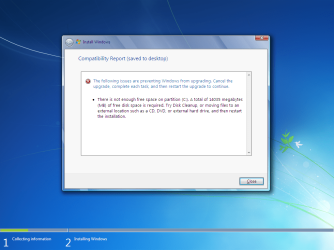
I have faced the error.
Please see below.
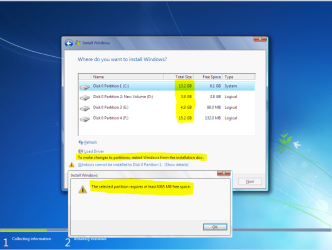
it requires 14035Megabytes means 13.71GB. But unfortunately my whole space is 13.1 GB. Besides of this, I have been successfuuly moved or deleted 4 GB files from C drive.

Untitled.png
 

My Computer My Computer

At a glance

windows7mobile AMD Athlon(tm) XP-M 2600+, 1514 Mhz, 1...768 MB
Computer Manufacturer/Model Number
Gericom/755CI
OS
windows7
CPU
mobile AMD Athlon(tm) XP-M 2600+, 1514 Mhz, 1 Core(s), 1 Log
Motherboard
Gericom 755CI 1.0,BIOS: American Megatrends Inc. 1.04G 07/09
Memory
768 MB
Monitor(s) Displays
15 inches TFT(XGA 1024x786)
Screen Resolution
1024x786
Hard Drives
40GB
Keyboard
compaq
Mouse
IBM
Internet Speed
512KB
Since you now have the bootable flash stick, how about moving 2.34 gb to F to replace the Win7 install files. Then run the Repair from flash stick.

I believe you have another computer. Can you send the files you want to save over the network to the other computer so that you can Repair Install or even boot the flash stick to http://www.sevenforums.com/installation-setup/125874-re-install-windows-7-a.html#post1086729.

You would get a better install if you boot the installer, wipe the HD and clean reinstall - unless you want to save your Recovery partition in which case you can delete all other partitions.

You can create an ad-hoc network between two computer using an ethernet cable - I do it all the time. You need to click on the Public icon in Network center to change to Home network, in Advanced settings turn on network discovery, file sharing and disable password, then share the files you want to copy between computers.
 
yes i have a maintained network over wifi adhoc connectivity.

Flash dish is now bootable but that works on my 220GB HD's machine not work on 40 GB HD's machine.

bootable Flash disk and dvd doesn't work on my 40GB machine.

I didnt understand now.
please explain the below lines:

Since you now have the bootable flash stick, how about moving 2.34 gb to F to replace the Windows 7 install files. Then run the Repair from flash stick.

Are you saying that i can divide by win7 iso extracted files into two portions? one will be copied in F: drive and other will be still remain in flash disk?
MOving from C: drive or F: or Flash disk drive?

if you are saying about C: drive then i have deleted/moved all unneccessory files . Now after this , i am still not able to do so.

can it be possible that i increase the size of C drive without booting? it require 13.71 GB in C drive but it consist on 13.1.
even i cant make a partition to C drive nor couldnt enlarge c drive?
 

My Computer My Computer

At a glance

windows7mobile AMD Athlon(tm) XP-M 2600+, 1514 Mhz, 1...768 MB
Computer Manufacturer/Model Number
Gericom/755CI
OS
windows7
CPU
mobile AMD Athlon(tm) XP-M 2600+, 1514 Mhz, 1 Core(s), 1 Log
Motherboard
Gericom 755CI 1.0,BIOS: American Megatrends Inc. 1.04G 07/09
Memory
768 MB
Monitor(s) Displays
15 inches TFT(XGA 1024x786)
Screen Resolution
1024x786
Hard Drives
40GB
Keyboard
compaq
Mouse
IBM
Internet Speed
512KB
Hi Maifs,

I think you want to put the windows installation files on a partition - boot from that partition and do a clean install.

Do you have enough space on any of your partitions to do that?

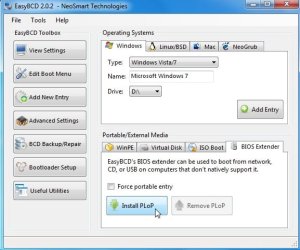
First, you could try installing PLOP from Easybcd - then select plop boot menu on restart - that may allow you to boot from usb stick.

PLOPjpg.jpg
 

My Computers My Computers

  • At a glance

    7 X64i5 84002x8gb 3200mhz
    Computer type
    PC/Desktop
    OS
    7 X64
    CPU
    i5 8400
    Motherboard
    gigabyte b365m ds3h
    Memory
    2x8gb 3200mhz
    Hard Drives
    various
    PSU
    pure power 11 400w cm
    Case
    Coolermaster
    Cooling
    cryorig m9i
  • At a glance

    7x64g54008gb ddr4 2400
    Computer type
    PC/Desktop
    OS
    7x64
    CPU
    g5400
    Motherboard
    ga b365m ds3h
    Memory
    8gb ddr4 2400
    PSU
    xfx pro 450w
I have been moved file all unecessory file from C: Drive. Now C drive just has the windows7 installation file.
Please see the result below.

Capture.PNG
 

My Computer My Computer

At a glance

windows7mobile AMD Athlon(tm) XP-M 2600+, 1514 Mhz, 1...768 MB
Computer Manufacturer/Model Number
Gericom/755CI
OS
windows7
CPU
mobile AMD Athlon(tm) XP-M 2600+, 1514 Mhz, 1 Core(s), 1 Log
Motherboard
Gericom 755CI 1.0,BIOS: American Megatrends Inc. 1.04G 07/09
Memory
768 MB
Monitor(s) Displays
15 inches TFT(XGA 1024x786)
Screen Resolution
1024x786
Hard Drives
40GB
Keyboard
compaq
Mouse
IBM
Internet Speed
512KB
Back
Top