how can i make my other partition bootable?

SIW i am trying to use EASYBCD2.1. but i am still unsuccessfull because of that i dont have enough space nor even F: drive is my primary drive.
it is not letting allow me to write BCD or MBR because of logical disk.

moreover i am trying to transfer my Drive data on my other machine but it will take some extra time.
 

My Computer My Computer

At a glance

windows7mobile AMD Athlon(tm) XP-M 2600+, 1514 Mhz, 1...768 MB
Computer Manufacturer/Model Number
Gericom/755CI
OS
windows7
CPU
mobile AMD Athlon(tm) XP-M 2600+, 1514 Mhz, 1 Core(s), 1 Log
Motherboard
Gericom 755CI 1.0,BIOS: American Megatrends Inc. 1.04G 07/09
Memory
768 MB
Monitor(s) Displays
15 inches TFT(XGA 1024x786)
Screen Resolution
1024x786
Hard Drives
40GB
Keyboard
compaq
Mouse
IBM
Internet Speed
512KB
Since you are trying to overwrite C anyway, delete the files you left there which you don't want to save to another partition or externally.

You'll need to move the data off of one or more of the Logical drives before Partition Wizard will convert F to Primary partition needed to boot with PLoP. Use EasyBCD 2.02 from here: http://neosmart.net/blog/2010/welcome-to-easybcd-2/

Do you wish to save the Recovery partition? Have you made the disks? It contains the System MBR but Win7 may not write them there in a clean reinstall, it will lose its link to the OS and may not run Factory Recovery at boot - same with the OEM partition which will lose its functionality. And what is "I" partition which is marked Active - cannot see it on the map:
 
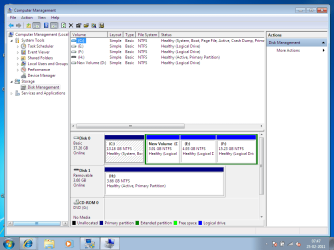
greg please see below snip. this is the correct one. yes i wish to.

greg can i ask something beyound the thread?

40gb.png
 

My Computer My Computer

At a glance

windows7mobile AMD Athlon(tm) XP-M 2600+, 1514 Mhz, 1...768 MB
Computer Manufacturer/Model Number
Gericom/755CI
OS
windows7
CPU
mobile AMD Athlon(tm) XP-M 2600+, 1514 Mhz, 1 Core(s), 1 Log
Motherboard
Gericom 755CI 1.0,BIOS: American Megatrends Inc. 1.04G 07/09
Memory
768 MB
Monitor(s) Displays
15 inches TFT(XGA 1024x786)
Screen Resolution
1024x786
Hard Drives
40GB
Keyboard
compaq
Mouse
IBM
Internet Speed
512KB
thanks Greg.

No i didnt switched computers. The snapshot was mistakenly from my 2nd machine.

Awesome EasyBCD made my life too much easy. Now flash disk is enabed for booting. I have been run a clean install successfully.

but now i dont know what happened with my 3rd drive. I just deleted the VOlumne and then created its volume but it is displaying an error mesage.

what should i do now? i couldnt delete it during installation through booting.

please see.

new_error_of_notenough_space.png


One thing more, when i tried to create a new voulme according to provided web reference then that drive became logical not primary.

why is it so?

How can i increase the size of my C drive now?
 
Last edited:

My Computer My Computer

At a glance

windows7mobile AMD Athlon(tm) XP-M 2600+, 1514 Mhz, 1...768 MB
Computer Manufacturer/Model Number
Gericom/755CI
OS
windows7
CPU
mobile AMD Athlon(tm) XP-M 2600+, 1514 Mhz, 1 Core(s), 1 Log
Motherboard
Gericom 755CI 1.0,BIOS: American Megatrends Inc. 1.04G 07/09
Memory
768 MB
Monitor(s) Displays
15 inches TFT(XGA 1024x786)
Screen Resolution
1024x786
Hard Drives
40GB
Keyboard
compaq
Mouse
IBM
Internet Speed
512KB
It wiped my all drive except of C .
Now i ll have to use some recovery tools.

Can i do something for restoring my partitions?
 

My Computer My Computer

At a glance

windows7mobile AMD Athlon(tm) XP-M 2600+, 1514 Mhz, 1...768 MB
Computer Manufacturer/Model Number
Gericom/755CI
OS
windows7
CPU
mobile AMD Athlon(tm) XP-M 2600+, 1514 Mhz, 1 Core(s), 1 Log
Motherboard
Gericom 755CI 1.0,BIOS: American Megatrends Inc. 1.04G 07/09
Memory
768 MB
Monitor(s) Displays
15 inches TFT(XGA 1024x786)
Screen Resolution
1024x786
Hard Drives
40GB
Keyboard
compaq
Mouse
IBM
Internet Speed
512KB
What wiped all of your HD except C?

If you are saying that while trying to extend C into the adjacent Logical Free Space using Partition Wizard, it deleted all but your C partition then that is quite impossible. You were only touching your C partition.

Which partition has been deleted, and have you backed up the data?
 
no no. i am not saying this.

I have been made a mistake myself, i wiped partition on unallocated space. so that 's why it made it.
 

My Computer My Computer

At a glance

windows7mobile AMD Athlon(tm) XP-M 2600+, 1514 Mhz, 1...768 MB
Computer Manufacturer/Model Number
Gericom/755CI
OS
windows7
CPU
mobile AMD Athlon(tm) XP-M 2600+, 1514 Mhz, 1 Core(s), 1 Log
Motherboard
Gericom 755CI 1.0,BIOS: American Megatrends Inc. 1.04G 07/09
Memory
768 MB
Monitor(s) Displays
15 inches TFT(XGA 1024x786)
Screen Resolution
1024x786
Hard Drives
40GB
Keyboard
compaq
Mouse
IBM
Internet Speed
512KB
Did you back up the data on the partition? Do you want to Resize C into it?

If not, run the Partition Recovery Wizard on the Wizard tab at top of PW.
 
greg my computer was re-booted after that operation.
I am assuming that it would commited and will not recover now.
 

My Computer My Computer

At a glance

windows7mobile AMD Athlon(tm) XP-M 2600+, 1514 Mhz, 1...768 MB
Computer Manufacturer/Model Number
Gericom/755CI
OS
windows7
CPU
mobile AMD Athlon(tm) XP-M 2600+, 1514 Mhz, 1 Core(s), 1 Log
Motherboard
Gericom 755CI 1.0,BIOS: American Megatrends Inc. 1.04G 07/09
Memory
768 MB
Monitor(s) Displays
15 inches TFT(XGA 1024x786)
Screen Resolution
1024x786
Hard Drives
40GB
Keyboard
compaq
Mouse
IBM
Internet Speed
512KB
Will Win7 start up now? If not, boot the Partition Wizard CD to confirm Win7 100mb SysReserved partition is still marked Active, if not rightclick>Modify>Set to Active, OK.

Then from Disk tab click Rebuild MBR, OK, Apply. Report back.

If it will boot, what are the results from running PW Partition Recovery Wizard?

Exactly what operation were you running when it rebooted, and what has changed now?
 
Windows 7 was started up before 30 hour?

See the current recovery partition status.

recovery status.png

I didnt completely understand your above post.
 

My Computer My Computer

At a glance

windows7mobile AMD Athlon(tm) XP-M 2600+, 1514 Mhz, 1...768 MB
Computer Manufacturer/Model Number
Gericom/755CI
OS
windows7
CPU
mobile AMD Athlon(tm) XP-M 2600+, 1514 Mhz, 1 Core(s), 1 Log
Motherboard
Gericom 755CI 1.0,BIOS: American Megatrends Inc. 1.04G 07/09
Memory
768 MB
Monitor(s) Displays
15 inches TFT(XGA 1024x786)
Screen Resolution
1024x786
Hard Drives
40GB
Keyboard
compaq
Mouse
IBM
Internet Speed
512KB
I do not understand "Windows 7 was started up before 30 hour?"

I asked if Win7 will start up. But it looks like you are working from Win7, even though the PW Home Edition drive map shows the entire HD is Unallocated space.

What partitions were missing when Win7 restarted?
 
it was an half hour not 30 hour.

Yes Windows 7 start up. Yes i am working from Windows 7 because it is almost 3:00 A.M in my country,Shops have been closed.

PW Home Edition drive map shows the entire HD is Unallocated space. :> Yes this is also right

What partitions were missing when Windows 7 restarted? :> partition E: was missing


Should i use MiniTool Power Data Recovery Free Edition tool for data recovery now?
 

My Computer My Computer

At a glance

windows7mobile AMD Athlon(tm) XP-M 2600+, 1514 Mhz, 1...768 MB
Computer Manufacturer/Model Number
Gericom/755CI
OS
windows7
CPU
mobile AMD Athlon(tm) XP-M 2600+, 1514 Mhz, 1 Core(s), 1 Log
Motherboard
Gericom 755CI 1.0,BIOS: American Megatrends Inc. 1.04G 07/09
Memory
768 MB
Monitor(s) Displays
15 inches TFT(XGA 1024x786)
Screen Resolution
1024x786
Hard Drives
40GB
Keyboard
compaq
Mouse
IBM
Internet Speed
512KB
See if the Partition Recovery Wizard can restore the missing partition.

Select it from the drives found, then try to recover it.

Please post another screenshot of Disk Management, but this time maximize the window so all of the listings and sizes are shown.
 
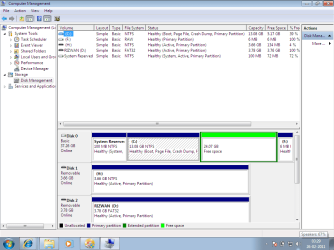
It is showing just one C drive.

see snip.

just one drive.png


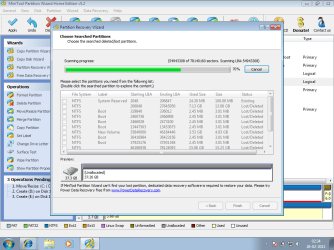
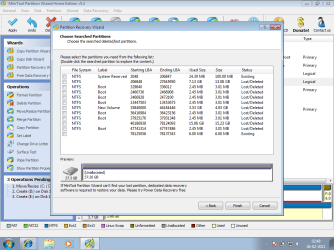
It has been completed and lost partitions.

see snip.

lost partition.png
 

My Computer My Computer

At a glance

windows7mobile AMD Athlon(tm) XP-M 2600+, 1514 Mhz, 1...768 MB
Computer Manufacturer/Model Number
Gericom/755CI
OS
windows7
CPU
mobile AMD Athlon(tm) XP-M 2600+, 1514 Mhz, 1 Core(s), 1 Log
Motherboard
Gericom 755CI 1.0,BIOS: American Megatrends Inc. 1.04G 07/09
Memory
768 MB
Monitor(s) Displays
15 inches TFT(XGA 1024x786)
Screen Resolution
1024x786
Hard Drives
40GB
Keyboard
compaq
Mouse
IBM
Internet Speed
512KB
Doubleclick on the partitions it found to see which have the data you need recovered, then check the box for those partitions.

Judging by the sizes it appears that you need everything except the first, second and last choices found, but confirm that by double clicking and seeing what's in each one.
 
it couldnt recove partition successfully.

I have used its recovery solution and took backup my all required data .
 

My Computer My Computer

At a glance

windows7mobile AMD Athlon(tm) XP-M 2600+, 1514 Mhz, 1...768 MB
Computer Manufacturer/Model Number
Gericom/755CI
OS
windows7
CPU
mobile AMD Athlon(tm) XP-M 2600+, 1514 Mhz, 1 Core(s), 1 Log
Motherboard
Gericom 755CI 1.0,BIOS: American Megatrends Inc. 1.04G 07/09
Memory
768 MB
Monitor(s) Displays
15 inches TFT(XGA 1024x786)
Screen Resolution
1024x786
Hard Drives
40GB
Keyboard
compaq
Mouse
IBM
Internet Speed
512KB
Thanks greg. my problems have been resolved. you supported me alot and very nicely.
I learnt alot of things from you.

but i didnt understand the lines below:
Your Line 1:
boot the Partition Wizard CD to confirm Windows 7 100mb SysReserved partition is still marked Active, if not rightclick>Modify>Set to Active, OK.

my Question:
SysReserved partition was active that time. How could i get my partitions from it?

Your Line 2:
Then from Disk tab click Rebuild MBR, OK, Apply. Report back.

my Question:

What would MBR do?

Request:
Please must comment on me where you can comment either on this post or message on this forum or through email ([email protected]). Please dont hesitate, i want to get comments/ opinioun about me.
 

My Computer My Computer

At a glance

windows7mobile AMD Athlon(tm) XP-M 2600+, 1514 Mhz, 1...768 MB
Computer Manufacturer/Model Number
Gericom/755CI
OS
windows7
CPU
mobile AMD Athlon(tm) XP-M 2600+, 1514 Mhz, 1 Core(s), 1 Log
Motherboard
Gericom 755CI 1.0,BIOS: American Megatrends Inc. 1.04G 07/09
Memory
768 MB
Monitor(s) Displays
15 inches TFT(XGA 1024x786)
Screen Resolution
1024x786
Hard Drives
40GB
Keyboard
compaq
Mouse
IBM
Internet Speed
512KB
Back
Top