How do I disable annoying performance color scheme popup

flashist

New member
Member
Local time
12:42 AM
Messages
54
When I play some slightly demanding fullscreen games I get an annoying popup from windows. It says
Windows has detected your computer's performance is slow. This could be because there are not enough resources to run the Windows Aero color scheme. To improve performance, try changing the color scheme to windows 7 basic. Any change you make will be in effect until the next time you log on to windows.

Now first of all, at this point my computer is running just fine. it seems like it reacts simply because one of the cpu cores are running high, because the ram isn't even at 40% and the other cores are running with ease. I don't notice any problems in the game itself and no problems with normal tasks while it runs in the background.

With this popup I get three options:

- Change the color scheme to windows 7 basic
- Keep the current color scheme, but ask me again if my computer continues to perform slowly
- Keep the current color scheme, and don't show this message again.

I've pressed the latter atleast four times now, but still next time around it pops up again, tossing me out of fullscreen mode and annoying the crap out of me.

how can I make it stop?
 

My Computer My Computer

At a glance

Windows 7 / VistaIntel Core Quad Processor i7-860Kingston DDR3 HyperX T1 2000MHz 6GBEVGA GeForce 9800GTX 512MB
OS
Windows 7 / Vista
CPU
Intel Core Quad Processor i7-860
Motherboard
Gigabyte GA-P55-UD4 Socket-1156
Memory
Kingston DDR3 HyperX T1 2000MHz 6GB
Graphics Card(s)
EVGA GeForce 9800GTX 512MB
Sound Card
Creative Sound Blaster X-Fi Platinum Fatal1ty
Monitor(s) Displays
Sony 21" + BENQ 24" LCD
Screen Resolution
1600x1200 + 1920x1080
Hard Drives
Corsair SSD P64 2,5" 64GB
Samsung SpinPoint T166 500GB
PSU
Thermaltake Toughpower 1200W
Case
Antec Nine Hundred
Cooling
Fans
Keyboard
Logitec G15
Mouse
Logitech G9
Internet Speed
20Mb/s
As per my experience (though I almost never play games, so its really little. I experienced it while editing videos using adobe premier), when a program demanding high utilization of resources, it wants to turn aero off, just to provide more resources to the demanding program. As the program is turned off, it automitacilly returns to aero.

Primarily I didn't pay heed to the message, and my system crashed! In the next time, I choosed basic, the desired operation worked nicely, and after that, I easily got aero back.

By the way, your configuration is really just nice!! so it is not to fear at all.
 

My Computer My Computer

At a glance

Microsoft Windows 10 Pro Insider Preview 64-bitIntel(R) Core(TM) i3-4130 CPU @ 3.40GHzCorsair Vengence 4GB x2 (8.00GB Dual-Channel ...2047MB GeForce GTS 450 (ZOTAC International)
Computer type
PC/Desktop
Computer Manufacturer/Model Number
Self Assembled
OS
Microsoft Windows 10 Pro Insider Preview 64-bit
CPU
Intel(R) Core(TM) i3-4130 CPU @ 3.40GHz
Motherboard
Gigabyte Technology Co., Ltd. B85M-D3H
Memory
Corsair Vengence 4GB x2 (8.00GB Dual-Channel DDR3 @ 798MHz)
Graphics Card(s)
2047MB GeForce GTS 450 (ZOTAC International)
Sound Card
Onboard (Realtek High Definition Audio)
Monitor(s) Displays
LG Flatron E2040T
Screen Resolution
1600x900
Hard Drives
Western Digital 1 TB
Seagate 500 GB
PSU
Corsair VS550
Case
Cooler Master K380
Cooling
Cooler Master Seidon 120V Plus
Keyboard
Logitech MK260r
Mouse
Logitech MK260r
Internet Speed
PMPL Broadband
Antivirus
Windows Defender + MBAM
Browser
Firefox
Other Info
Dell Studio 15" Laptop
Hehe, thanks. Well ignoring it has worked well so far, but the problem with this message is that when it pops up during fullscreen play I get tossed back into windows and then return back into the game, which is somewhat annoying. that's why I wanted it to just stop nagging about the performance :P
 

My Computer My Computer

At a glance

Windows 7 / VistaIntel Core Quad Processor i7-860Kingston DDR3 HyperX T1 2000MHz 6GBEVGA GeForce 9800GTX 512MB
OS
Windows 7 / Vista
CPU
Intel Core Quad Processor i7-860
Motherboard
Gigabyte GA-P55-UD4 Socket-1156
Memory
Kingston DDR3 HyperX T1 2000MHz 6GB
Graphics Card(s)
EVGA GeForce 9800GTX 512MB
Sound Card
Creative Sound Blaster X-Fi Platinum Fatal1ty
Monitor(s) Displays
Sony 21" + BENQ 24" LCD
Screen Resolution
1600x1200 + 1920x1080
Hard Drives
Corsair SSD P64 2,5" 64GB
Samsung SpinPoint T166 500GB
PSU
Thermaltake Toughpower 1200W
Case
Antec Nine Hundred
Cooling
Fans
Keyboard
Logitec G15
Mouse
Logitech G9
Internet Speed
20Mb/s
Really ! During an interesting game if a message pops up :sa: .
Next time, before starting the game, set the windows basic color scheme, it will not appear ;)
As it being played in full screen, who looks whether it is aero or basic ?
 

My Computer My Computer

At a glance

Microsoft Windows 10 Pro Insider Preview 64-bitIntel(R) Core(TM) i3-4130 CPU @ 3.40GHzCorsair Vengence 4GB x2 (8.00GB Dual-Channel ...2047MB GeForce GTS 450 (ZOTAC International)
Computer type
PC/Desktop
Computer Manufacturer/Model Number
Self Assembled
OS
Microsoft Windows 10 Pro Insider Preview 64-bit
CPU
Intel(R) Core(TM) i3-4130 CPU @ 3.40GHz
Motherboard
Gigabyte Technology Co., Ltd. B85M-D3H
Memory
Corsair Vengence 4GB x2 (8.00GB Dual-Channel DDR3 @ 798MHz)
Graphics Card(s)
2047MB GeForce GTS 450 (ZOTAC International)
Sound Card
Onboard (Realtek High Definition Audio)
Monitor(s) Displays
LG Flatron E2040T
Screen Resolution
1600x900
Hard Drives
Western Digital 1 TB
Seagate 500 GB
PSU
Corsair VS550
Case
Cooler Master K380
Cooling
Cooler Master Seidon 120V Plus
Keyboard
Logitech MK260r
Mouse
Logitech MK260r
Internet Speed
PMPL Broadband
Antivirus
Windows Defender + MBAM
Browser
Firefox
Other Info
Dell Studio 15" Laptop
that would be a backup solution, but I would prefer not having to change back and forth between aero and basic everytime I launch a fullscreen game :P
 

My Computer My Computer

At a glance

Windows 7 / VistaIntel Core Quad Processor i7-860Kingston DDR3 HyperX T1 2000MHz 6GBEVGA GeForce 9800GTX 512MB
OS
Windows 7 / Vista
CPU
Intel Core Quad Processor i7-860
Motherboard
Gigabyte GA-P55-UD4 Socket-1156
Memory
Kingston DDR3 HyperX T1 2000MHz 6GB
Graphics Card(s)
EVGA GeForce 9800GTX 512MB
Sound Card
Creative Sound Blaster X-Fi Platinum Fatal1ty
Monitor(s) Displays
Sony 21" + BENQ 24" LCD
Screen Resolution
1600x1200 + 1920x1080
Hard Drives
Corsair SSD P64 2,5" 64GB
Samsung SpinPoint T166 500GB
PSU
Thermaltake Toughpower 1200W
Case
Antec Nine Hundred
Cooling
Fans
Keyboard
Logitec G15
Mouse
Logitech G9
Internet Speed
20Mb/s
Need Assistance because it is so aggravating.

I am having the same problem. I really don't think it is that hardware dependent because I am using a oc'd i7 920 at 3.83 with sli evga gtx 260's 216 and I get the popups. If it really just a core load problem then why does it not pop up in linx of p95.

I believe it is reading your graphics card utilization. In full screen 1920x1080 of BBC2 and crysis (on all high/max) are the only games that do it to me.
 

My Computer My Computer

At a glance

Windows 7 x64 ProIntel i7 -920 OC'd to 3.83OCZ GOLD 1600MHZ at 1470mhz2x SLI EVGA GTX 260
Computer Manufacturer/Model Number
Custom
OS
Windows 7 x64 Pro
CPU
Intel i7 -920 OC'd to 3.83
Motherboard
EVGA TRI Sli x58 -a1
Memory
OCZ GOLD 1600MHZ at 1470mhz
Graphics Card(s)
2x SLI EVGA GTX 260
Sound Card
7.1 on board
Monitor(s) Displays
3x dell 24'' 1920x1080
Screen Resolution
5760x1080
Hard Drives
1 intel x-25m 80gb main
2 segate 1tbs 7200.12 in raid 0
2 segate 1.5tbs 7200.11 in raid 1
PSU
1kw corsair hx
Case
HAF 922
Cooling
2skythe fans 1h50 2 230mm 1 intake 1 outtake
Keyboard
Microsft Wireless 5000 keyboard
Mouse
Microsfot Natural Comfort Wireless Mouse
Internet Speed
27mbps
same problem
i7 920/ 6GB ram / HD 5870 / win7 x64

Yet every session this bloody message comes up. And it would not believe that I don't care, I just want it to shut up for good.

I've o/c-ed the cpu to 4GHz, the message still came.

There's certainly no resource shortage...bfbc2 runs on full detail on my 24" monitor 1920x1200 nice and smooth.

Stupid windows.
 

My Computer My Computer

At a glance

win7 x64
OS
win7 x64
I think you can disable these popups through Windows 7 Manager, look for that app on google.. It allows you to customize a lot of stuff in windows 7..
 

My Computer My Computer

At a glance

Windows 7 Ultimate x64AMD Phenom II x4 B502x4 G.skill DDR3 CL9 @1600Powercolor HD 6950 2G GDDR5
Computer Manufacturer/Model Number
Custom
OS
Windows 7 Ultimate x64
CPU
AMD Phenom II x4 B50
Motherboard
GA-MA770T-UD3P
Memory
2x4 G.skill DDR3 CL9 @1600
Graphics Card(s)
Powercolor HD 6950 2G GDDR5
Sound Card
Built in + Creative T6200 5.1 sub system
Monitor(s) Displays
LG FLATRON W1934S
Screen Resolution
1440x900
Hard Drives
2 1T WD Blacks (No Raid), 1 2T WD Green
PSU
NZXT HALE90 1000W 80Gold+
Case
HAF 932
Cooling
5 Fans
Keyboard
Upgrading~
Mouse
Upgrading~
Internet Speed
ADSL 2mb
widden, welcome to the forums.

More like stupid Dice. Not the first time a game of theirs has managed to mess up Windows settings. They managed with a couple of the BF2 patches (including the last 1.5 patch) that after running the game, for those that use a screen saver (or not, and just go to a blank screen) it wouldn't work anymore. There was a couple of other minor bugs in that last patch (Alt+Tab among others) that they fixed with a small update (and later included in the full download) that also fixed the screen saver bug.

With BFBC2 it is most likely the same sort of thing. For me I don't get the error message that you are. I am running dual monitors and what happens to me is that anything running on my second monitor freezes as if the computer was frozen, and stays that way until I quit the game. Not too good when that is also where I have my system monitoring program running as as well. Only way around I have found until they fix it (if they do) is to go into the games install folder, find the games exe, right click and select Properties and on the Compatibility tab select the "Disable Desktop Composition" option. Once I did that everything on the second monitor worked as it should while the game was running.
 

My Computer My Computer

At a glance

Win 7 Ultimate x64FX-8350 @ 4.6 GHz so farADATA XPG V1 Series Black 8GB DDR3 1600Sapphire R9 270x Dual-X
Computer type
PC/Desktop
Computer Manufacturer/Model Number
Me
OS
Win 7 Ultimate x64
CPU
FX-8350 @ 4.6 GHz so far
Motherboard
Asus M5A97 EVO
Memory
ADATA XPG V1 Series Black 8GB DDR3 1600
Graphics Card(s)
Sapphire R9 270x Dual-X
Sound Card
Xonar DGX w/ Corsair Vengence 1300
Monitor(s) Displays
Acer S232HL Abid
Screen Resolution
1920x1080
Hard Drives
120 GB OCZ Vertex 3
500 GB Seagate 7200.12
PSU
Antec Earthwatts 650W Green
Case
Antec Three Hundred
Cooling
Cooler Master 212 EVO
Keyboard
Logitech G510
Mouse
Logitech G500s
Internet Speed
35000/3000
As per my experience (though I almost never play games, so its really little. I experienced it while editing videos using adobe premier), when a program demanding high utilization of resources, it wants to turn aero off, just to provide more resources to the demanding program. As the program is turned off, it automitacilly returns to aero.

Primarily I didn't pay heed to the message, and my system crashed! In the next time, I choosed basic, the desired operation worked nicely, and after that, I easily got aero back.

By the way, your configuration is really just nice!! so it is not to fear at all.

I agree with Archie, using aero themes will consume high resources from your computer.
So I suggest to change to basic scheme, when running high demanding resources.
 

My Computer My Computer

At a glance

win7
OS
win7
Go to your control panel and type "notification area icon" in the search box. You'll get a page where you can set your preferences. Go to Desktop Window Manager and select "hide notification and icon".
If a demanding program is being run windows will still change scheme and reset afterwards but it won't interrupt you anymore.
 

My Computer My Computer

At a glance

Windows 7 - 64bit Home Premium
OS
Windows 7 - 64bit Home Premium
I was hoping a more desired answer to this problem can be found other then disabling notifications. I receive this pop up all the time playing many different games and some I would notice the pop up with my GC being at a 20% load on some undemanding titles. I would think with my system I wouldn't be strained for resources as I have plenty of avail ram w/e this notification pops up and shouldn't have to turn aero off. Does anyone have any other solutions to this problem?
 

My Computer My Computer

At a glance

Windows 7 64bitIntel I7 4770k @4.516GB corsair VengenceEVGA GTX 980 TI SC acx2.0
Computer type
PC/Desktop
Computer Manufacturer/Model Number
Custom
OS
Windows 7 64bit
CPU
Intel I7 4770k @4.5
Motherboard
Asus z87-pro
Memory
16GB corsair Vengence
Graphics Card(s)
EVGA GTX 980 TI SC acx2.0
Sound Card
XFI fatality gamer
Monitor(s) Displays
Samsung
Screen Resolution
1920 x 1080
Hard Drives
OCZ ssd Baracuda 1tb x2
PSU
Corsair 1200 watt
Case
NZXT Noctis 450
Cooling
Kraken X61
Keyboard
Logitech G510
Mouse
Razer naga
Internet Speed
100 down 25 up
Other Info
Nzxt Hue +
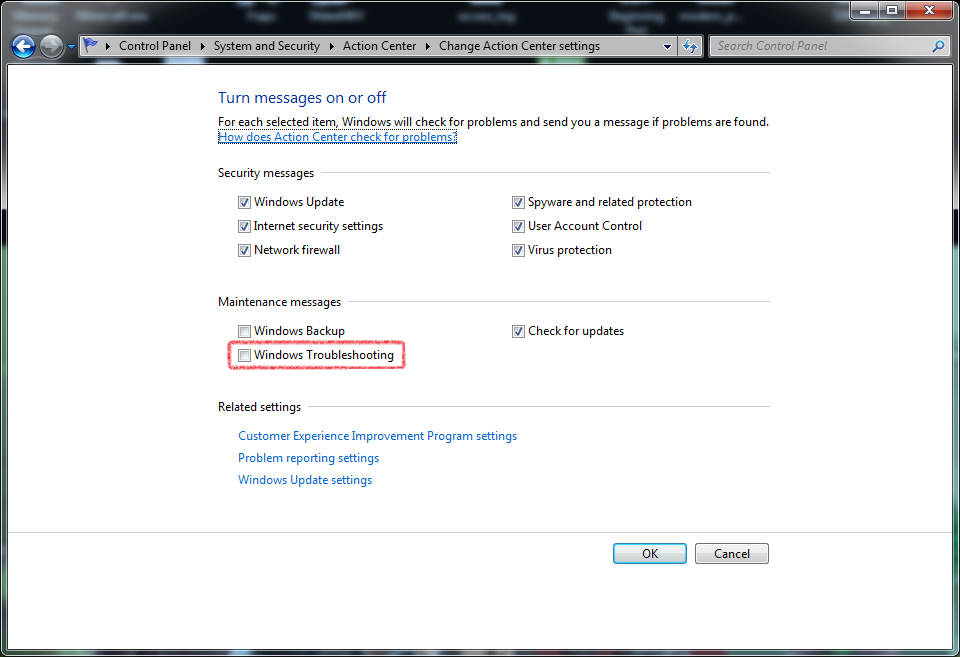
Okay, I'm going to reply to this because it showed up as the #1 answer in my google search, and the answers posed so far are rather useless. I found the following instructions here. Be warned. you will also disable some other "troubleshooting" things that Windows automatically does, so I recommend this only to an advanced user.

windows 7 - Disable "Do you want to change the color scheme to improve performance?" warning - Super User

1. Go to the Start Menu and type Action Center on the Search box
2. Start it (it should be the top entry, under the "Control Panel" group)
3. On the left sidebar, click Change Action Center settings
4. Untick the Windows Troubleshooting checkbox, under "Maintenance Messages".
5. Click the Ok button and you are done.

VRCKB.png
 

My Computer My Computer

At a glance

win7 x64 pro
OS
win7 x64 pro
It still pops up after trying that fix in the action centre :(
 

My Computer My Computer

At a glance

Windows 7 Ultimate x64
OS
Windows 7 Ultimate x64
Heya ppl, I've noticed in several games AND while browsing on Google! example while scrolling down my monitor seems to be skipping frames when running basic with my graphics performance. in GAMES after changing to basic, it makes a such stutter or screen tearing when running in windowd mode, example World of Warcraft and Diablo3, several FPS games too even though you have got fullscreen. so for those that change full time to basic make sure to try it out so you do not get stuck on the same area as I was!

Towards the topic I still got this issue with BBC2 and several more games, don't seem to use too much of the CPU either, Can easily run 2 Games with full performance in both different games at the same time if I so wish, and as the computer performing worse with basic it annoys me. Isn't there anyone out there who've experienced such and got a solution?

I still wonder why the message still showing after unchecking Windows Troubleshooting under "Maintenance Messages"
 

My Computer My Computer

At a glance

Win 7 pro, x64i7 2600kCorsair 1600Mhz CL9, 8GBNvidia GeForce GTX 590
Computer type
PC/Desktop
Computer Manufacturer/Model Number
Custom Build
OS
Win 7 pro, x64
CPU
i7 2600k
Motherboard
Asus p8z68-v pro
Memory
Corsair 1600Mhz CL9, 8GB
Graphics Card(s)
Nvidia GeForce GTX 590
Screen Resolution
1920 x 1080
Hard Drives
OCZ 120gb SSD
PSU
Corsair 1200W
Case
NZXT Phantom
Cooling
Corsair H80
Browser
Mozilla Firefox
This may help you. It is a change to the registry I found while on the internet. It seems to have fixed the issue on my computer as I have not had the message since. As normal with changes to the registry, back it up and use at your own risk.

The answer on this link is the one by Havoc (who appears to have answered his own question) with the tick next to it.

windows 7 - Permanent fix for.

It goes

Since Windows doesn't understand how resources work, you need to keep it from checking them:

In regedit go to:

HKEY_CURRENT_USER\Software\Microsoft\Windows\DWM (create if not already existent)

Set a new DWORD UseMachineCheck with a value of 0.

This will keep Windows from checking if your computer "performs slowly" and thus attempting to disable Aero.
 
Last edited:

My Computer My Computer

At a glance

Microsoft Windows 7 Ultimate 64-bit SP1Intel Core i7 3930K16.0GB Corsair Dominator DDR3-1866MSI GTX 1070 X
Computer type
PC/Desktop
Computer Manufacturer/Model Number
Home Build
OS
Microsoft Windows 7 Ultimate 64-bit SP1
CPU
Intel Core i7 3930K
Motherboard
Gigabyte X79s
Memory
16.0GB Corsair Dominator DDR3-1866
Graphics Card(s)
MSI GTX 1070 X
Hard Drives
3 x SSD Boot Drive Samsung 850Pro 256GB
Mix of 2, 4 and 6 TB Hard Drives
Antivirus
Avast Free
Browser
Firefox
Thanks mate, will try out asap and see if it giving any results!

BRG enneb.
 

My Computer My Computer

At a glance

Win 7 pro, x64i7 2600kCorsair 1600Mhz CL9, 8GBNvidia GeForce GTX 590
Computer type
PC/Desktop
Computer Manufacturer/Model Number
Custom Build
OS
Win 7 pro, x64
CPU
i7 2600k
Motherboard
Asus p8z68-v pro
Memory
Corsair 1600Mhz CL9, 8GB
Graphics Card(s)
Nvidia GeForce GTX 590
Screen Resolution
1920 x 1080
Hard Drives
OCZ 120gb SSD
PSU
Corsair 1200W
Case
NZXT Phantom
Cooling
Corsair H80
Browser
Mozilla Firefox
This may help you. It is a change to the registry I found while on the internet. It seems to have fixed the issue on my computer as I have not had the message since. As normal with changes to the registry, back it up and use at your own risk.

The answer on this link is the one by Havoc (who appears to have answered his own question) with the tick next to it.

windows 7 - Permanent fix for.

It goes

Since Windows doesn't understand how resources work, you need to keep it from checking them:

In regedit go to:

HKEY_CURRENT_USER\Software\Microsoft\Windows\DWM (create if not already existent)

Set a new DWORD UseMachineCheck with a value of 0.

This will keep Windows from checking if your computer "performs slowly" and thus attempting to disable Aero.

This doesn't actually disable the check every time, it just ignores your input so some games will just snap into basic instead.
 

My Computer My Computer

At a glance

Windows 7 x64
Computer type
PC/Desktop
OS
Windows 7 x64
Apologies for the thread necro, but this is really pissing me off. EVERY website under the sun lists that "Turn off trouble shooting in Action Center" is the solution but it's not. I'm running Windows 7 64 with 32GB of Ram and a Geforce GTX 780 with the latest drivers installed. You can't tell me that my system doesn't have enough resources to run ANY game. It doesn't matter what game I launch, they all minimize and give me this warning. I don't want to disable desktop composition and I don't want to have to run a script file that does it every time I run a game. I've had a previous install of windows where this issue doesn't exist so it's something that only started being a problem recently (just re-installed win 7 on a new HD). I swear MS put out a windows update to force this message to display all the time cause they're trying to get people to upgrade to win 10.
 

My Computer My Computer

At a glance

Windows 7 64bit
OS
Windows 7 64bit
Back
Top