I've tried a search for this and couldn't find anything, but please re-direct me if this has been discussed elsewhere.
Sometimes, while working on my PC, my display goes like this:
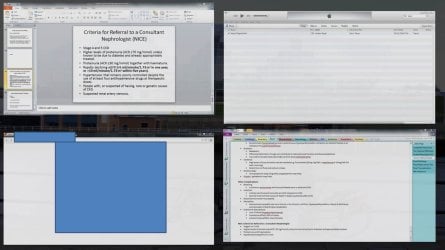
(Ignore the content of the windows...)
I don't know how or why it happens. It seems to happen after a minor mouse movement but otherwise I'm clueless. However, its a very useful feature and any of those open windows can be clicked on. Does anyone know how to (intentionally) make this happen?
Thanks
Sometimes, while working on my PC, my display goes like this:
(Ignore the content of the windows...)
I don't know how or why it happens. It seems to happen after a minor mouse movement but otherwise I'm clueless. However, its a very useful feature and any of those open windows can be clicked on. Does anyone know how to (intentionally) make this happen?
Thanks
Last edited by a moderator:
My Computer
- Computer type
- Laptop
- OS
- Windows 7 x64