
How do I fix my Windows Firewall?

DoeZ

New member
Local time
8:49 PM
Messages
308
The other day I had installed a VPN service that I had...but I decided that I didn't like that one so I followed the links to uninstall it and after that I just figured why not clean up my PC too it had been a few weeks since I really cleaned it...ccleaner and disc cleanup and defrag etc...after all that I also ran some of the items I have just to keep it all up to date and my PC clean as well...like my MS Essentials and Malwarebytes etc...while all that was doing what it does I went about my own business and when everything was all done and my PC was nice and clean again I went to get on it and I get the "Flag" with the red x in the circle telling me to "Turn on my Windows Firewall"...when I clicked the open the action center (I think it was) there's a box with a RED STRIPE going down the left side under SECURITY...and in that box it says...Network firewall (important) Windows Firewall is turned off or set up incorrectly. I tried to click the tab that says "Turn on now" with the shield for admin permission I guess which I am...and nothing happens...I really don't know what to do here...Can anyone help me out please?

Thanks
DoeZ
 

My Computer

Computer type
PC/Desktop
Computer Manufacturer/Model Number
Toshiba HP
OS
Windows7 Home Premium 32-bit SP-1
CPU
Intel(R) Celeron(R) CPU 900 @ 2.20GHz
Motherboard
TOSHIBA NBWAA
Memory
2.00 GB USABLE 1.87 GB
Graphics Card(s)
(1) Mobile Intel(R) 4 Series Express Chipset Family (2) Mo
Sound Card
Realtek High Definition Audio
Hard Drives
TOSHIBA MK2555GSX
Antivirus
Panda Free Antivirus
Browser
I'm a new FireFox Browser user~
Other Info
Do Not Mess With Your Computer~
Unless You Know What You're Doing~
Unlike Me~I Had No Clue At All~I Thought I Did~
Do Not Mess With Your Computer~

My Computer

Computer type
Laptop
Computer Manufacturer/Model Number
HP Elitebook 8540p
OS
Windows 7 Pro 32
CPU
Intel(R) Core(TM) i5 CPU M 540 @ 2.53GHz
Motherboard
Hewlett-Packard 1521
Memory
4,00 GB (Usable 2,98)
Graphics Card(s)
NVIDIA NVS 5100M
Sound Card
NVIDIA High Definition Audio
Screen Resolution
1600x900
Hard Drives
INTEL SSDSA2CW120G3
Antivirus
F-Secure Internet Security
Browser
IE, Firefox, Opera
Other Info
Sandboxie,
SRP (Software Restriction Policy),
EMET (Enhanced Mitigation Experience Toolkit),
WFC (Windows Firewall Control by BiniSoft),
Malwarebytes Premium
Ok Thanks I'll give that a try and let ya know how it goes.
 

My Computer

Computer type
PC/Desktop
Computer Manufacturer/Model Number
Toshiba HP
OS
Windows7 Home Premium 32-bit SP-1
CPU
Intel(R) Celeron(R) CPU 900 @ 2.20GHz
Motherboard
TOSHIBA NBWAA
Memory
2.00 GB USABLE 1.87 GB
Graphics Card(s)
(1) Mobile Intel(R) 4 Series Express Chipset Family (2) Mo
Sound Card
Realtek High Definition Audio
Hard Drives
TOSHIBA MK2555GSX
Antivirus
Panda Free Antivirus
Browser
I'm a new FireFox Browser user~
Other Info
Do Not Mess With Your Computer~
Unless You Know What You're Doing~
Unlike Me~I Had No Clue At All~I Thought I Did~
Do Not Mess With Your Computer~
This is what I got from that link...


Sorry, the page you requested is not available.


The page you were looking for is currently not available. The address may not be correct, or there may be a temporary problem with this site. Please try one of the following options:
  • Check the address for typing errors.
  • Click the Back button and try a different option from the navigation menu.
  • Try this page again later.
For additional assistance, try one of the pages below:
  • Home
    Go to the Microsoft Help and Support site
  • Product Support Center (FAQs and Highlights)
    Review common support questions, issues, and new information for Microsoft products.
  • TechNet
    Search the online support site that provides detailed "how-to" information for IT professionals concerning Microsoft products.
  • MSDN
    Search the online support site that provides detailed information for development professionals concerning Microsoft products.
 

My Computer

Computer type
PC/Desktop
Computer Manufacturer/Model Number
Toshiba HP
OS
Windows7 Home Premium 32-bit SP-1
CPU
Intel(R) Celeron(R) CPU 900 @ 2.20GHz
Motherboard
TOSHIBA NBWAA
Memory
2.00 GB USABLE 1.87 GB
Graphics Card(s)
(1) Mobile Intel(R) 4 Series Express Chipset Family (2) Mo
Sound Card
Realtek High Definition Audio
Hard Drives
TOSHIBA MK2555GSX
Antivirus
Panda Free Antivirus
Browser
I'm a new FireFox Browser user~
Other Info
Do Not Mess With Your Computer~
Unless You Know What You're Doing~
Unlike Me~I Had No Clue At All~I Thought I Did~
Do Not Mess With Your Computer~
Strange, I tested both links now again and no problems! Maybe it's a temporary issue with these servers
 

My Computer

Computer type
Laptop
Computer Manufacturer/Model Number
HP Elitebook 8540p
OS
Windows 7 Pro 32
CPU
Intel(R) Core(TM) i5 CPU M 540 @ 2.53GHz
Motherboard
Hewlett-Packard 1521
Memory
4,00 GB (Usable 2,98)
Graphics Card(s)
NVIDIA NVS 5100M
Sound Card
NVIDIA High Definition Audio
Screen Resolution
1600x900
Hard Drives
INTEL SSDSA2CW120G3
Antivirus
F-Secure Internet Security
Browser
IE, Firefox, Opera
Other Info
Sandboxie,
SRP (Software Restriction Policy),
EMET (Enhanced Mitigation Experience Toolkit),
WFC (Windows Firewall Control by BiniSoft),
Malwarebytes Premium
Strange, I tested both links now again and no problems! Maybe it's a temporary issue with these servers

I clicked it right from your posting too:confused:

I just clicked it again from your posting and it's working now...how strange :/
 

My Computer

Computer type
PC/Desktop
Computer Manufacturer/Model Number
Toshiba HP
OS
Windows7 Home Premium 32-bit SP-1
CPU
Intel(R) Celeron(R) CPU 900 @ 2.20GHz
Motherboard
TOSHIBA NBWAA
Memory
2.00 GB USABLE 1.87 GB
Graphics Card(s)
(1) Mobile Intel(R) 4 Series Express Chipset Family (2) Mo
Sound Card
Realtek High Definition Audio
Hard Drives
TOSHIBA MK2555GSX
Antivirus
Panda Free Antivirus
Browser
I'm a new FireFox Browser user~
Other Info
Do Not Mess With Your Computer~
Unless You Know What You're Doing~
Unlike Me~I Had No Clue At All~I Thought I Did~
Do Not Mess With Your Computer~
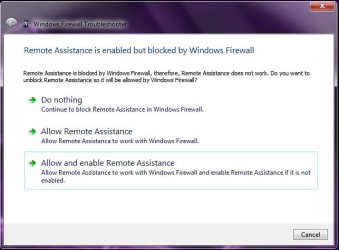
Not sure what I should do here? It's telling me that Remote Assistance is enabled but blocked by Windows Firewall...and then gives me 3 options...one to leave it as is 2 to allow it to work with Windows Firewall and 3 to allow and enable it to work with Windows Firewall...
 

My Computer

Computer type
PC/Desktop
Computer Manufacturer/Model Number
Toshiba HP
OS
Windows7 Home Premium 32-bit SP-1
CPU
Intel(R) Celeron(R) CPU 900 @ 2.20GHz
Motherboard
TOSHIBA NBWAA
Memory
2.00 GB USABLE 1.87 GB
Graphics Card(s)
(1) Mobile Intel(R) 4 Series Express Chipset Family (2) Mo
Sound Card
Realtek High Definition Audio
Hard Drives
TOSHIBA MK2555GSX
Antivirus
Panda Free Antivirus
Browser
I'm a new FireFox Browser user~
Other Info
Do Not Mess With Your Computer~
Unless You Know What You're Doing~
Unlike Me~I Had No Clue At All~I Thought I Did~
Do Not Mess With Your Computer~
If you're unsure then leave it as is. I can't find any documentation about this Fix It, so I can't help further.
 

My Computer

Computer type
Laptop
Computer Manufacturer/Model Number
HP Elitebook 8540p
OS
Windows 7 Pro 32
CPU
Intel(R) Core(TM) i5 CPU M 540 @ 2.53GHz
Motherboard
Hewlett-Packard 1521
Memory
4,00 GB (Usable 2,98)
Graphics Card(s)
NVIDIA NVS 5100M
Sound Card
NVIDIA High Definition Audio
Screen Resolution
1600x900
Hard Drives
INTEL SSDSA2CW120G3
Antivirus
F-Secure Internet Security
Browser
IE, Firefox, Opera
Other Info
Sandboxie,
SRP (Software Restriction Policy),
EMET (Enhanced Mitigation Experience Toolkit),
WFC (Windows Firewall Control by BiniSoft),
Malwarebytes Premium
You stated that you set up all those scans and went about your business.

Did you run all your scans separately or more than one scan at a time?
 

My Computer

Computer type
PC/Desktop
Computer Manufacturer/Model Number
Home made Desktop
OS
Windows 10 Pro. 64/ version 1709 Windows 7 Pro/64
CPU
Intel i7-6800K @ 4.3
Motherboard
ASUS X-99 Deluxe II
Memory
Corsair Platinum 16 gig @2400
Graphics Card(s)
EVGA GTX 1070 OC
Monitor(s) Displays
Asus 27" LED LCD/VE278Q
Screen Resolution
1920-1080 or 1280-720 HDMI
Hard Drives
INTEL SSD 730-240 Gb Sata 3.0/
PSU
EVGA Platium 1200W
Case
Phanteks Luxe Tempered Glass 8 fans/ one radiator
Cooling
XSPC/ Water Cooled CPU
Keyboard
Das 4 Professional
Mouse
Logitech M705/MX Anywhere 2-S
Internet Speed
100 mbits
Antivirus
Microsoft Security Essentials/ Malwarebytes Premium 3.0/ SAS
Browser
I.E. 11 default/Firefox/ ISP Time Warner Cable/Spectrum
Other Info
LG BluRay Burner/
Sound system-KLipsch-THX/
Icy Dock ssd Hot Swap bays.
No No No 1 scan at a time. I never ever run multiple things like that at the same time.
 

My Computer

Computer type
PC/Desktop
Computer Manufacturer/Model Number
Toshiba HP
OS
Windows7 Home Premium 32-bit SP-1
CPU
Intel(R) Celeron(R) CPU 900 @ 2.20GHz
Motherboard
TOSHIBA NBWAA
Memory
2.00 GB USABLE 1.87 GB
Graphics Card(s)
(1) Mobile Intel(R) 4 Series Express Chipset Family (2) Mo
Sound Card
Realtek High Definition Audio
Hard Drives
TOSHIBA MK2555GSX
Antivirus
Panda Free Antivirus
Browser
I'm a new FireFox Browser user~
Other Info
Do Not Mess With Your Computer~
Unless You Know What You're Doing~
Unlike Me~I Had No Clue At All~I Thought I Did~
Do Not Mess With Your Computer~

My Computer

Computer type
PC/Desktop
Computer Manufacturer/Model Number
Home made Desktop
OS
Windows 10 Pro. 64/ version 1709 Windows 7 Pro/64
CPU
Intel i7-6800K @ 4.3
Motherboard
ASUS X-99 Deluxe II
Memory
Corsair Platinum 16 gig @2400
Graphics Card(s)
EVGA GTX 1070 OC
Monitor(s) Displays
Asus 27" LED LCD/VE278Q
Screen Resolution
1920-1080 or 1280-720 HDMI
Hard Drives
INTEL SSD 730-240 Gb Sata 3.0/
PSU
EVGA Platium 1200W
Case
Phanteks Luxe Tempered Glass 8 fans/ one radiator
Cooling
XSPC/ Water Cooled CPU
Keyboard
Das 4 Professional
Mouse
Logitech M705/MX Anywhere 2-S
Internet Speed
100 mbits
Antivirus
Microsoft Security Essentials/ Malwarebytes Premium 3.0/ SAS
Browser
I.E. 11 default/Firefox/ ISP Time Warner Cable/Spectrum
Other Info
LG BluRay Burner/
Sound system-KLipsch-THX/
Icy Dock ssd Hot Swap bays.
Ok Thanks I'll take a look...but Bears I was in the middle of that link that Tookeri posted and it was fixing it I'm guessing but I got stuck when it asked me what I wanted to do with Remote Assistance and Windows Firewall.
 

Attachments

  • Windows Firewall.jpg
    Windows Firewall.jpg
    34.9 KB · Views: 32

My Computer

Computer type
PC/Desktop
Computer Manufacturer/Model Number
Toshiba HP
OS
Windows7 Home Premium 32-bit SP-1
CPU
Intel(R) Celeron(R) CPU 900 @ 2.20GHz
Motherboard
TOSHIBA NBWAA
Memory
2.00 GB USABLE 1.87 GB
Graphics Card(s)
(1) Mobile Intel(R) 4 Series Express Chipset Family (2) Mo
Sound Card
Realtek High Definition Audio
Hard Drives
TOSHIBA MK2555GSX
Antivirus
Panda Free Antivirus
Browser
I'm a new FireFox Browser user~
Other Info
Do Not Mess With Your Computer~
Unless You Know What You're Doing~
Unlike Me~I Had No Clue At All~I Thought I Did~
Do Not Mess With Your Computer~
I followed that link Bears and went thru everything and my WF is set up the same way but when I ran that fix it scan it's telling me that it's not started etc. and again when I went in there it says that it's on but something is wrong here. I need help please. Eating dinner and I'll be right back.

Thanks
Doez
 

My Computer

Computer type
PC/Desktop
Computer Manufacturer/Model Number
Toshiba HP
OS
Windows7 Home Premium 32-bit SP-1
CPU
Intel(R) Celeron(R) CPU 900 @ 2.20GHz
Motherboard
TOSHIBA NBWAA
Memory
2.00 GB USABLE 1.87 GB
Graphics Card(s)
(1) Mobile Intel(R) 4 Series Express Chipset Family (2) Mo
Sound Card
Realtek High Definition Audio
Hard Drives
TOSHIBA MK2555GSX
Antivirus
Panda Free Antivirus
Browser
I'm a new FireFox Browser user~
Other Info
Do Not Mess With Your Computer~
Unless You Know What You're Doing~
Unlike Me~I Had No Clue At All~I Thought I Did~
Do Not Mess With Your Computer~
This is very important that you read what I am about to say.

Download windows repair all in one from here:

Windows Repair (All In One)

Run it/install it. Then check to fix only windows firewall. Do not check anything else.

Follow the instructions. I suspect you are infected, which we then can proceed to malware removal assistance.


Please read this entirely before we begin malware removal:


Before we start with malware assistance, I want to inform you of a few things:

1.) I am not a recognized malware removal expert. I do not have a certification from a malware removal school. Having said that, I have removed a lot of malware with PCs and have years of experience.
But just like no antivirus program is 100% effective, neither am I. My goal is to simply clean up your PC from any malware, and assist you in any way possible to help you secure your PC.

2.) Sevenforums (This forum)and I will NOT be held responsible for anything that might go wrong with your pc.

3.) You agree to follow all directions given, until I advise that your pc is clean and you are free of threats. You will not abandon the thread.


The most important rule of all:

4.) YOU WILL NOT INSTALL/change/modify OR ADD ANYTHING TO YOUR SYSTEM UNTIL MALWARE REMOVAL IS COMPLETE. No files or programs or anything of the sort.

Do you agree to these terms?

If yes, reply with a Yes. If not, please state so and I will flag an official malware remover, or I will recommend another place for malware removal assistance.
 

My Computer

Computer type
PC/Desktop
Computer Manufacturer/Model Number
Custom Built
OS
Windows 10 Pro
CPU
AMD Ryzen 5 2400G Processor with Radeon RX Vega 11 Graphics
Motherboard
ASRock X470 Master SLI/AC AM4 AMD Promontory X470 SATA 6Gb/s
Memory
G.SKILL Ripjaws V Series 16GB (2 x 8GB) 288-Pin DDR4 SDRAM D
Graphics Card(s)
2047MB NVIDIA GeForce GTX 1060 6GB (EVGA)
Sound Card
Motherboard Built in
Monitor(s) Displays
Acer R240HY bidx 23.8-Inch IPS HDMI DVI VGA (1920 x 1080) Wi
Screen Resolution
1920 x 1080
Hard Drives
1TB Sandisk SSD PLUS (Main drive)
500 GB Seagate 7200 RPM (Games)
500 GB Western Digital 7200 RPM (Virtual Machines)
PSU
CORSAIR TX Series TX650M 650W 80+ Gold Modular Power Supply
Case
CORSAIR CARBIDE SPEC-02 Mid-Tower Gaming Case, Red LED Fan
Cooling
220mm, two 120mm, and four 60mm fans
Keyboard
Wired Dell keyboard
Mouse
Wireless Logitech mouse
Internet Speed
250mb down, 30mb up
Antivirus
Panda Cloud Antivirus
Browser
Chrome-ish x64
Other Info
Your awesome for reading this.
DoeZ could you list all:

1. Security programs you have installed

2. Tuneup/Speedup/Registry cleaners/Fixit programs ect.

3. Do you have anything by IObit. If you do please list them.

**Andrew is heading in a good direction. Something on your computer is turning off Windows 7 firewall and it's not Windows 7.**
 

My Computer

Computer type
PC/Desktop
Computer Manufacturer/Model Number
Home made Desktop
OS
Windows 10 Pro. 64/ version 1709 Windows 7 Pro/64
CPU
Intel i7-6800K @ 4.3
Motherboard
ASUS X-99 Deluxe II
Memory
Corsair Platinum 16 gig @2400
Graphics Card(s)
EVGA GTX 1070 OC
Monitor(s) Displays
Asus 27" LED LCD/VE278Q
Screen Resolution
1920-1080 or 1280-720 HDMI
Hard Drives
INTEL SSD 730-240 Gb Sata 3.0/
PSU
EVGA Platium 1200W
Case
Phanteks Luxe Tempered Glass 8 fans/ one radiator
Cooling
XSPC/ Water Cooled CPU
Keyboard
Das 4 Professional
Mouse
Logitech M705/MX Anywhere 2-S
Internet Speed
100 mbits
Antivirus
Microsoft Security Essentials/ Malwarebytes Premium 3.0/ SAS
Browser
I.E. 11 default/Firefox/ ISP Time Warner Cable/Spectrum
Other Info
LG BluRay Burner/
Sound system-KLipsch-THX/
Icy Dock ssd Hot Swap bays.
DoeZ could you list all:

1. Security programs you have installed

2. Tuneup/Speedup/Registry cleaners/Fixit programs ect.

3. Do you have anything by IObit. If you do please list them.

**Andrew is heading in a good direction. Something on your computer is turning off Windows 7 firewall and it's not Windows 7.**

I agree...something keeps turning it off and I have no clue. After I had followed that one link with Mr. Fix It and tried to follow along and fix what was wrong on the list I ended up clicking on a lot more of the Mr. Fix It's links and each time there were more things wrong that I tried to fix...but every time I read those details it always tells me that I have a network problem and I just have no clue what that means.

I'm just gonna list everything I have to make it easier...

Microsoft Security Essentials
Malwarebytes Anti-Malware
Malwarebytes Anti-Exploit Premium
CCleaner
PrivaZer
Shellbag AnalyZer & Cleaner
Puran Defragger
Secunia PSI

As for the IObit...if I'm not mistaken that's SuperAntiSpyware correct? No I don't but when this laptop got renewed sotospeak...I had removed everything that I needed off of here so Greg could install my Windows7 for me again and it was like having a brand new laptop with everything and he did put that on here but after so long I really didn't like it so I removed it. Whether there are remnants of it I'm not really sure.

So there you have it...Now what? Am I following what Andrew has in store for me? Or what?

Thanks again
DoeZ
 

My Computer

Computer type
PC/Desktop
Computer Manufacturer/Model Number
Toshiba HP
OS
Windows7 Home Premium 32-bit SP-1
CPU
Intel(R) Celeron(R) CPU 900 @ 2.20GHz
Motherboard
TOSHIBA NBWAA
Memory
2.00 GB USABLE 1.87 GB
Graphics Card(s)
(1) Mobile Intel(R) 4 Series Express Chipset Family (2) Mo
Sound Card
Realtek High Definition Audio
Hard Drives
TOSHIBA MK2555GSX
Antivirus
Panda Free Antivirus
Browser
I'm a new FireFox Browser user~
Other Info
Do Not Mess With Your Computer~
Unless You Know What You're Doing~
Unlike Me~I Had No Clue At All~I Thought I Did~
Do Not Mess With Your Computer~
No SAS is not a IObit product. Something like Advanced System Care is what I was looking for.


Just okay that you understand the conditions in Andrews post # 14 and I'm sure he will be glad to guide you through making sure your computer is clean of infections.

Infections have been known to turn off security programs.
Cleanup tools used wrong can do the same thing.

I know nothing of these two programs. Never used them. I have found that using
PrivaZer if not used correctly can cause some serious damage.

Please read this.

http://www.sevenforums.com/software/316912-privazer-pc-cleaner.html
 

My Computer

Computer type
PC/Desktop
Computer Manufacturer/Model Number
Home made Desktop
OS
Windows 10 Pro. 64/ version 1709 Windows 7 Pro/64
CPU
Intel i7-6800K @ 4.3
Motherboard
ASUS X-99 Deluxe II
Memory
Corsair Platinum 16 gig @2400
Graphics Card(s)
EVGA GTX 1070 OC
Monitor(s) Displays
Asus 27" LED LCD/VE278Q
Screen Resolution
1920-1080 or 1280-720 HDMI
Hard Drives
INTEL SSD 730-240 Gb Sata 3.0/
PSU
EVGA Platium 1200W
Case
Phanteks Luxe Tempered Glass 8 fans/ one radiator
Cooling
XSPC/ Water Cooled CPU
Keyboard
Das 4 Professional
Mouse
Logitech M705/MX Anywhere 2-S
Internet Speed
100 mbits
Antivirus
Microsoft Security Essentials/ Malwarebytes Premium 3.0/ SAS
Browser
I.E. 11 default/Firefox/ ISP Time Warner Cable/Spectrum
Other Info
LG BluRay Burner/
Sound system-KLipsch-THX/
Icy Dock ssd Hot Swap bays.
Ok..read all that and I'll be back after dinner around 6 to start this cleanup I guess. Hopefully someone will be here then too.

Thanks
DoeZ
 

My Computer

Computer type
PC/Desktop
Computer Manufacturer/Model Number
Toshiba HP
OS
Windows7 Home Premium 32-bit SP-1
CPU
Intel(R) Celeron(R) CPU 900 @ 2.20GHz
Motherboard
TOSHIBA NBWAA
Memory
2.00 GB USABLE 1.87 GB
Graphics Card(s)
(1) Mobile Intel(R) 4 Series Express Chipset Family (2) Mo
Sound Card
Realtek High Definition Audio
Hard Drives
TOSHIBA MK2555GSX
Antivirus
Panda Free Antivirus
Browser
I'm a new FireFox Browser user~
Other Info
Do Not Mess With Your Computer~
Unless You Know What You're Doing~
Unlike Me~I Had No Clue At All~I Thought I Did~
Do Not Mess With Your Computer~
I'm here and not sure if I should just go ahead and click the link from Andrew or wait.

Bear I don't see a #14 from Andrew...
 

My Computer

Computer type
PC/Desktop
Computer Manufacturer/Model Number
Toshiba HP
OS
Windows7 Home Premium 32-bit SP-1
CPU
Intel(R) Celeron(R) CPU 900 @ 2.20GHz
Motherboard
TOSHIBA NBWAA
Memory
2.00 GB USABLE 1.87 GB
Graphics Card(s)
(1) Mobile Intel(R) 4 Series Express Chipset Family (2) Mo
Sound Card
Realtek High Definition Audio
Hard Drives
TOSHIBA MK2555GSX
Antivirus
Panda Free Antivirus
Browser
I'm a new FireFox Browser user~
Other Info
Do Not Mess With Your Computer~
Unless You Know What You're Doing~
Unlike Me~I Had No Clue At All~I Thought I Did~
Do Not Mess With Your Computer~
You are kidding right.
Post # 14 in this thread. Just scroll up and you will find it.


Windows 7 Professional x64 Sp1
3,508 posts
Local Time: 06:57 PM
USA.gif


user_online.gif


This is very important that you read what I am about to say.

Download windows repair all in one from here:

Windows Repair (All In One)

Run it/install it. Then check to fix only windows firewall. Do not check anything else.

Follow the instructions. I suspect you are infected, which we then can proceed to malware removal assistance.


Please read this entirely before we begin malware removal:
 

My Computer

Computer type
PC/Desktop
Computer Manufacturer/Model Number
Home made Desktop
OS
Windows 10 Pro. 64/ version 1709 Windows 7 Pro/64
CPU
Intel i7-6800K @ 4.3
Motherboard
ASUS X-99 Deluxe II
Memory
Corsair Platinum 16 gig @2400
Graphics Card(s)
EVGA GTX 1070 OC
Monitor(s) Displays
Asus 27" LED LCD/VE278Q
Screen Resolution
1920-1080 or 1280-720 HDMI
Hard Drives
INTEL SSD 730-240 Gb Sata 3.0/
PSU
EVGA Platium 1200W
Case
Phanteks Luxe Tempered Glass 8 fans/ one radiator
Cooling
XSPC/ Water Cooled CPU
Keyboard
Das 4 Professional
Mouse
Logitech M705/MX Anywhere 2-S
Internet Speed
100 mbits
Antivirus
Microsoft Security Essentials/ Malwarebytes Premium 3.0/ SAS
Browser
I.E. 11 default/Firefox/ ISP Time Warner Cable/Spectrum
Other Info
LG BluRay Burner/
Sound system-KLipsch-THX/
Icy Dock ssd Hot Swap bays.
Back
Top