
how do i format my hard drive

I have two oft-repeated suggestions. Try these.

1. Download the HP USB Disk Storage Format Tool, http://download.cnet.com/HP-USB-Disk-Storage-Format-Tool/3000-2094_4-10974082.html run it as an administrator and format your external HDD.

2. If the above suggestion fails, download the HDD Low Level Format Tool - only the Windows Executable that does not require installation - HDDGURU: HDD LLF Low Level Format Tool, click on the .exe file and run it to reinitialize your HDD to the factory state. If successful, you will be required to do a regular format.

( It will take quite sometime to write zeroes to each and every sector. So be patient. On my 8 GB pendrive it took almost 20 minutes on my PC at the rate of around 6MB/sec.)
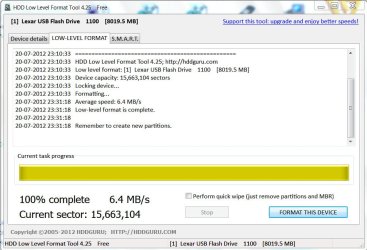
5LLF complete.jpg
 
Last edited:

My Computer My Computer

OS
Windows 7 Home Premium 32 bit
  • Like
Reactions: Arc
nah i cant take the case off

the first one didnt work cause media is write protected
and i m running the second on now and it keeps comming up with format error media is write protected it like 30% done atm
 

My Computer My Computer

OS
Windows 7 Professional 32bit
If you have a Seven CD, boot from the CD and then while you install format. You must boot from the CD and not the installed OS.
If you have, or can borrow (but must have your Product Key Number) you can install, if you boot from the CD and format, too. You must have an installation CD and not the CD that comes with the computer, when Seven is preinstalled.


As Rich suggested, as long as you have a valid Product Key (should be located on a sticker on your computer) you can download an installation DVD in ISO format. It must be the same Windows 7 version that is currently on your computer. Save it to a convenient location (like your desktop) and then burn the image to DVD.

Official Windows 7 SP1 ISO from Digital River « My Digital Life
 

My Computer My Computer

Computer type
Laptop
Computer Manufacturer/Model Number
Sony Vaio VPCEB47GM Laptop
OS
Win 7 Pro 64-bit
CPU
Intel i5 2.4 Ghz
Memory
8GB DDR3
Graphics Card(s)
Intel HD 3000
Sound Card
IDT High Definition
Monitor(s) Displays
15.6 WGXA Anti-Glare LED
Screen Resolution
1280x800
Hard Drives
640Gb 7200rpm
Antivirus
MSE
Browser
Opera (primary) with IE9 backup
I think I'm not understanding the purpose of this thread. Are you trying to format the disk for an OS install? I was thinking it was an external you just wanted to wipe out and start over with it...

nah i dont have the CD

when i type in detail disk it comes up that diskpart has stopped working
i m still tryna figure out the program u sent me the link too

Doesn't sound good if diskpart stops working; especially if all you're doing is a detail of the disk. Try this: http://www.sevenforums.com/tutorials/1538-sfc-scannow-command-system-file-checker.html (unless you're trying to do an OS install).
 

My Computer My Computer

OS
Windows 7 Ultimate x64
I think the OP is trying to get the unknown mark removed from an external HDD, so that he can use the data stored in it.
 

My Computer My Computer

Computer type
PC/Desktop
Computer Manufacturer/Model Number
Self Assembled
OS
Microsoft Windows 10 Pro Insider Preview 64-bit
CPU
Intel(R) Core(TM) i3-4130 CPU @ 3.40GHz
Motherboard
Gigabyte Technology Co., Ltd. B85M-D3H
Memory
Corsair Vengence 4GB x2 (8.00GB Dual-Channel DDR3 @ 798MHz)
Graphics Card(s)
2047MB GeForce GTS 450 (ZOTAC International)
Sound Card
Onboard (Realtek High Definition Audio)
Monitor(s) Displays
LG Flatron E2040T
Screen Resolution
1600x900
Hard Drives
Western Digital 1 TB
Seagate 500 GB
PSU
Corsair VS550
Case
Cooler Master K380
Cooling
Cooler Master Seidon 120V Plus
Keyboard
Logitech MK260r
Mouse
Logitech MK260r
Internet Speed
PMPL Broadband
Antivirus
Windows Defender + MBAM
Browser
Firefox
Other Info
Dell Studio 15" Laptop
the purpose of the thread is to try an use a portable hard the wont come up in my computer and when i tried to format it it came up media is write protected. i just wanna clear it all and be able to use my hardrive
 

My Computer My Computer

OS
Windows 7 Professional 32bit
Okay, I just started getting confused when I saw posts about OS install. Try that sfc I mentioned in post #24. You shouldn't have the issue of diskpart stopping when simply trying to detail a disk.
 

My Computer My Computer

OS
Windows 7 Ultimate x64
Hi JH17,

I regret to say that your external drive had reached its end of life.

All the reserved space for replacing the bad sectors have been taken up. No vacancy now. So the drive controller puts a blanket ban - no more writing. Write protected. Come to think of it even formatting or zero filling involves writing to the disk.

If the HP USB Disk Storage Format Tool and the HDD LLF Tool get the same write-protected error, I would consider your disk as beyond redemption. The write protected error comes up with pendrives too at the end of their life.

You may still try the HDD manufacturer's Hard disk Drive Diagnostic/Repair Utility as a last resort.

( I would be happy if I am proved to be wrong.:))
 

My Computer My Computer

OS
Windows 7 Home Premium 32 bit
jumanji, you may very well be correct.

JH17, does Diskpart work without error when you try and detail your other disks/volumes?
 

My Computer My Computer

OS
Windows 7 Ultimate x64
you can just try a 3rd party freeware to do this task. like partition manager or partition wizard. they can help format your hard drive easily and quickly.
 

My Computer My Computer

OS
Windows 7 Home Premium 32bit
yeah i think ur rite ay

partition wizard doesnt work

i dont have a boot CD or anything ay so i think ill just get rid of it ay
thx to everyone for ur imput :)
 

My Computer My Computer

OS
Windows 7 Professional 32bit
Sorry to hear, but you gave it a good try. At least you didn't have any data on there that you needed!
 

My Computer My Computer

OS
Windows 7 Ultimate x64
You will need a blank recordable CD-R or a DVD-R. and then in the address box type "http://www.dban.org/ Best of luck.
 
Last edited:

My Computer My Computer

Computer type
Laptop
Computer Manufacturer/Model Number
Toshiba Satellite Pro C870-1E2
OS
Windows 7 Professional 64 Bit
Here are the steps I use when I encounter issues similar to the one the op has.
1. try it with another computer.
2. If it does the same thing I'll remove it from the enclosure and put it into a pc.
3. If the pc fails to work with the drive internally, I'll rma it or destroy it. Note, opening up the enclosure may void the warranty.

If the drive does work in the pc, then I'd suspect an issue with the enclosure, which is not uncommon.
 

My Computer My Computer

Computer Manufacturer/Model Number
HAL-9000
OS
Windows 7 Ultimate 64bit
CPU
Intel i7 3770K
Motherboard
Asus Sabertooth Z77
Memory
16GB DDR3 1333 Corsair XMS3
Graphics Card(s)
XFX HD6950 2GB EyeFinity
Sound Card
Logitech G35 & Sennheiser PC135 & VIA HD
Monitor(s) Displays
23" HP 2310e, 23" Samsung B2230, 21.5" Viewsonic
Screen Resolution
5760x1080
Hard Drives
16TB of Storage
128GB & 256GB Crucial M4 SSD's, 2X 1TB WD Black, 3x 2TB WD, 3x 2TB Samsung F4, 1.5TB Seagate, WD 500GB,
PSU
Antec True Power New 650watt
Case
Cooler Master HAF-932
Cooling
Corsair H60 Hydro Cooler, 3x 230mm Fans, 2x120mm Fan
Keyboard
Logitech G15 and G13
Mouse
Logitech G700 Gaming Mouse
Internet Speed
50/10 Mbit
Other Info
Speakers : Alesis M1 Active Mk2 Studio Monitors , APC RS 1200 UPS, HP 4500DN Color Laser, HP P1006 mono Laser, Kodak 8500 Dye-Sub, Epson 1280 inkjet, Epson Worforce 610 MFC
Back
Top