
You are using an out of date browser. It may not display this or other websites correctly.
You should upgrade or use an alternative browser.
You should upgrade or use an alternative browser.
Solved How do i get back windows 7 when i updated to windows 8
- Thread starter pokomo123
- Start date

- Local time
- 5:07 AM
- Messages
- 50,634
I will monitor this thread for the next few hours so have a go at Recovery now.
If Recovery will not run and you do not have disks, then we'll use the WIn7 installer you made to boot and Clean Reinstall Windows 7 Factory OEM - which is a better install anyway without all of the bloatware.
You want to keep the help in the thread because others may have better ideas and know more on certain issues, and I am not always around.
Factory Recovery for Vaio is most often run from boot like this:
If Recovery will not run and you do not have disks, then we'll use the WIn7 installer you made to boot and Clean Reinstall Windows 7 Factory OEM - which is a better install anyway without all of the bloatware.
You want to keep the help in the thread because others may have better ideas and know more on certain issues, and I am not always around.
Factory Recovery for Vaio is most often run from boot like this:
Sony Vaio Laptop Factory Reset Instructions:
================================
1. Turn on or reboot/restart the computer.
2. When the VAIO logo appears on the computer's screen, briefly press the F10 key on the computer keyboard. The VAIO Recovery Wizard appears. Note that depending on the model of Sony Vaio, you may have to press either the F11, F12 or the ESC key to enter this restore mode. This must be done before your operating system begins to load. If you see the Windows logo appear on screen, you'll have to restart and try again.
3. Choose the option on screen that is most appropriate to your needs. You will be presented with three options: you can either create a set of recovery discs, attempt to repair your operating system's installation, or restore your operating system. Repairing your operating system will attempt to fix your computer without deleting any of your personal files. Restoring your operating system will delete everything on your hard drive and return your computer to its original factory settings.
4. Wait for the restore process to complete. Depending on the type of restore you've tried, you may have to wait as little as a few minutes and as much as an hour or more. When the process is finished, the computer will automatically restart itself.
when i restart my computer and click on F10,F11,F12 or ESC it just shows the win8 fish and says preparing automatic repair and then Diagnosing your pc and then Repairing disk errors.This might take over an hour to complete
My Computer
At a glance
Windows 7
- OS
- Windows 7
- Local time
- 5:07 AM
- Messages
- 50,634
And you've already confirmed last night that F8 Advanced Boot Options does not have a Repair My Computer choice, correct?
Are you ready to boot Win7 installer to Clean Reinstall Windows 7 Factory OEM?
Following the steps in the blue link above, when you get to the Drive selection screen, use the Drive Options (Advanced) shown in the red box below to Delete each partition, then just click Next and Win7 will create and format your install partition for you.
 click to enlarge
Are you ready to boot Win7 installer to Clean Reinstall Windows 7 Factory OEM?
Following the steps in the blue link above, when you get to the Drive selection screen, use the Drive Options (Advanced) shown in the red box below to Delete each partition, then just click Next and Win7 will create and format your install partition for you.
 click to enlarge
yes there is no repair my computer. When i get to the part where i click on install now and its like setup is starting and then A required CD/DVD drive device driver is missing. If you have a driver floppy disk, CD, DVD, or USB flash drive, please insert it now.
My Computer
At a glance
Windows 7
- OS
- Windows 7
- Local time
- 5:07 AM
- Messages
- 50,634
This almost always means a bad installer.
Where did you get the WIn7 installer? Did you burn the DVD yourself?
I thought you created a new installer after I linked you to the latest official ISO download, since you reported this error in your very first post and I explained it is a bad installer then.
Have you since used this same disk to copy out your files?
Where did you get the WIn7 installer? Did you burn the DVD yourself?
I thought you created a new installer after I linked you to the latest official ISO download, since you reported this error in your very first post and I explained it is a bad installer then.
Have you since used this same disk to copy out your files?
i used the Official Windows 7 SP1 ISO from Digital River « My Digital Life and universal usb installer
My Computer
At a glance
Windows 7
- OS
- Windows 7
- Local time
- 5:07 AM
- Messages
- 50,634
Can you confirm the USB stick by trying to boot and cue up install on another computer to see if it generates the same error?
Are you sure the ISO file completed download?
Can you try burning the ISO to DVD using ImgBurn at 4x speed? ImgBurn - Free software downloads and software reviews - CNET Download.com
Are you sure the ISO file completed download?
Can you try burning the ISO to DVD using ImgBurn at 4x speed? ImgBurn - Free software downloads and software reviews - CNET Download.com
- Local time
- 5:07 AM
- Messages
- 50,634
Yes, I understand. We need to confirm it is the installer which is bad so please boot it on another computer and cue up the Install as you just did to see if it repeats the same error.
If so, download another ISO and write to flash stick using Windows 7 USB-DVD Download Tool.
THen if that doesn't fix it burn a DVD to see what happens.
If so, download another ISO and write to flash stick using Windows 7 USB-DVD Download Tool.
THen if that doesn't fix it burn a DVD to see what happens.
- Local time
- 5:07 AM
- Messages
- 50,634
I'm guessing that points to your USB stick as being dodgy.
Do you have a DVD drive? You can get DVD's on the wall rack 24 hours at Walgreens for a few bucks.
Do you have a DVD drive? You can get DVD's on the wall rack 24 hours at Walgreens for a few bucks.
- Local time
- 5:07 AM
- Messages
- 50,634
Were you able to get your files for your project out of Win8?
Do you have another computer to work on the project?
You'd better concentrate on that now and we can continue this some other time. It will take some troubleshooting.
Later I'd next try burning a DVD with Download Tool or ImgBurn, or look for another flash stick since that one was not even seen by Win7 Download Tool and the error has always been the installer.
Do you have another computer to work on the project?
You'd better concentrate on that now and we can continue this some other time. It will take some troubleshooting.
Later I'd next try burning a DVD with Download Tool or ImgBurn, or look for another flash stick since that one was not even seen by Win7 Download Tool and the error has always been the installer.
- Local time
- 5:07 AM
- Messages
- 50,634
I was waiting to bring it up until you finished reinstalling but I've heard from some experts I asked here that you should try playing it with VLC which has all its codecs: VideoLAN - Download official VLC media player for Windows
If it plays then it would mean you need the codec package here: Shark007's FREE Codec solutions - Windows 7 codecs
If it plays then it would mean you need the codec package here: Shark007's FREE Codec solutions - Windows 7 codecs
- Local time
- 5:07 AM
- Messages
- 50,634
Burn at 4x speed, after loading the ISO using the little file tab at top.

Select Write Speed: 4X.
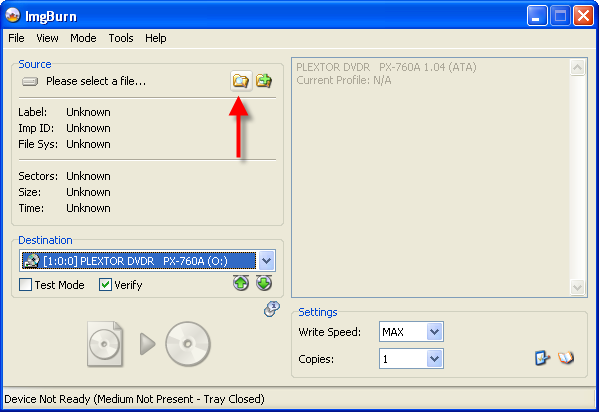
Click the big 'Write' button.
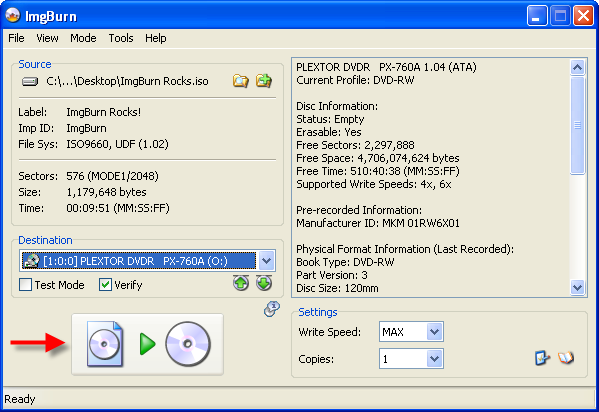
Select Write Speed: 4X.
Click the big 'Write' button.
Similar threads
- Replies
- 2
- Views
- 2K

- Replies
- 3
- Views
- 1K

- Replies
- 4
- Views
- 2K

- Replies
- 19
- Views
- 42K
