
How do i get frequent list in jumplist?

rezelute

New member
Member
Local time
8:14 PM
Messages
78
Hi,
I have just installed Windows 7 home and i noticed that i dont get a frequent list when i right click on Windows Explorer in taskbar but i get a recent list only. Is there a way to exchange the recent by frequent list?
 

My Computer My Computer

At a glance

Windows 7 64-bitCore 2 Duo OC 4GHZ4MB DDR2GTX 460
OS
Windows 7 64-bit
CPU
Core 2 Duo OC 4GHZ
Motherboard
Asus P5Q SE Plus
Memory
4MB DDR2
Graphics Card(s)
GTX 460
Sound Card
Xonar D1
Monitor(s) Displays
LG 42 inch
Screen Resolution
1980x1020
I believe the frequent list will appear after it finds some locations you "frequent".

You just installed Windows, so I doubt you have many frequent locations yet.
 

My Computer My Computer

At a glance

Windows 7 Professional x64Intel i7 2600K OC'd @ 4620 MHz16GB GSkill Sniper 2133 Mhz (4x4GB)EVGA GeForce GTX 480 SuperClocked+
Computer Manufacturer/Model Number
Custom
OS
Windows 7 Professional x64
CPU
Intel i7 2600K OC'd @ 4620 MHz
Motherboard
Asus P8Z68-V Pro
Memory
16GB GSkill Sniper 2133 Mhz (4x4GB)
Graphics Card(s)
EVGA GeForce GTX 480 SuperClocked+
Sound Card
Realtek High Definition Audio
Monitor(s) Displays
2x Acer S273HLbmii 27"
Screen Resolution
2 x 1920x1080
Hard Drives
64GB Crucial M4 SSD

Storage: Hitachi 1TB 5400RPM, Samsung 1.5TB 5400RPM
PSU
Corsair HW Series 750w (modular)
Case
Cooler Master HAF 932 Advanced Blue Edition
Cooling
CM Hyper 212+ CPU cooler, 3x 230mm + 1x 140mm case fans
Keyboard
Logitech MK320 (wireless)
Mouse
Logitech MK320 (wireless)
Internet Speed
30 Mb/s : 2 Mb/s
What you can also do is prevent a "Recent" item from being removed from the list as newer recent items are added.
  1. Right-click the Explorer icon on the task bar to open the jump list.
  2. Move the mouse over the item you want to "pin". You'll notice a pin icon to the right of a recent item
  3. Click the pin icon to "pin" the item to the jump list.
 

My Computer My Computer

At a glance

Windows 7 Professional 32-bit SP1AMD A4/A63.00GB EDOVMware SVGA 3D
Computer type
PC/Desktop
Computer Manufacturer/Model Number
Virtual Machine
OS
Windows 7 Professional 32-bit SP1
CPU
AMD A4/A6
Motherboard
Intel Corporation 440BX Desktop Reference Platform
Memory
3.00GB EDO
Graphics Card(s)
VMware SVGA 3D
Sound Card
High Definition Audio Device
Monitor(s) Displays
Generic Non-PnP Monitor on VMware SVGA 3D
Screen Resolution
1440x900
Hard Drives
1 x 60GB VMware Virtual SATA Hard Drive ATA Device
Antivirus
Kaspersky Total Security
Thank you both for the answers. I will wait abit longer to see if Windows will show the frequent list with time. Dzomlija cheers thats what im currently using at the minute i just thought that there should be a frequent list too.
 

My Computer My Computer

At a glance

Windows 7 64-bitCore 2 Duo OC 4GHZ4MB DDR2GTX 460
OS
Windows 7 64-bit
CPU
Core 2 Duo OC 4GHZ
Motherboard
Asus P5Q SE Plus
Memory
4MB DDR2
Graphics Card(s)
GTX 460
Sound Card
Xonar D1
Monitor(s) Displays
LG 42 inch
Screen Resolution
1980x1020
Thank you both for the answers. I will wait abit longer to see if Windows will show the frequent list with time. Dzomlija cheers thats what im currently using at the minute i just thought that there should be a frequent list too.

Let's hope that we have some of the Microsoft Engineers working on Windows 7 SP1 are reading these forums, specifically this post, because a "Frequently Viewed Folders" list in the Explorer Jump List would be a cool idea, and would most defintely be more productive than the "Pinned Folders" (I sometime forget to pin a folder there).

Oh well, we work with what we have, don't we?
 

My Computer My Computer

At a glance

Windows 7 Professional 32-bit SP1AMD A4/A63.00GB EDOVMware SVGA 3D
Computer type
PC/Desktop
Computer Manufacturer/Model Number
Virtual Machine
OS
Windows 7 Professional 32-bit SP1
CPU
AMD A4/A6
Motherboard
Intel Corporation 440BX Desktop Reference Platform
Memory
3.00GB EDO
Graphics Card(s)
VMware SVGA 3D
Sound Card
High Definition Audio Device
Monitor(s) Displays
Generic Non-PnP Monitor on VMware SVGA 3D
Screen Resolution
1440x900
Hard Drives
1 x 60GB VMware Virtual SATA Hard Drive ATA Device
Antivirus
Kaspersky Total Security
Actually that is exactly what im after yes :), what is quite annoying is the fact that i have to access a file in a folder for the actual folder to show up in the recent list too. Ideally i would like to have a frequent folder as you described.
 

My Computer My Computer

At a glance

Windows 7 64-bitCore 2 Duo OC 4GHZ4MB DDR2GTX 460
OS
Windows 7 64-bit
CPU
Core 2 Duo OC 4GHZ
Motherboard
Asus P5Q SE Plus
Memory
4MB DDR2
Graphics Card(s)
GTX 460
Sound Card
Xonar D1
Monitor(s) Displays
LG 42 inch
Screen Resolution
1980x1020
Thank you both for the answers. I will wait abit longer to see if Windows will show the frequent list with time. Dzomlija cheers thats what im currently using at the minute i just thought that there should be a frequent list too.

Let's hope that we have some of the Microsoft Engineers working on Windows 7 SP1 are reading these forums, specifically this post, because a "Frequently Viewed Folders" list in the Explorer Jump List would be a cool idea, and would most defintely be more productive than the "Pinned Folders" (I sometime forget to pin a folder there).

Oh well, we work with what we have, don't we?

Hi Dzomlija,
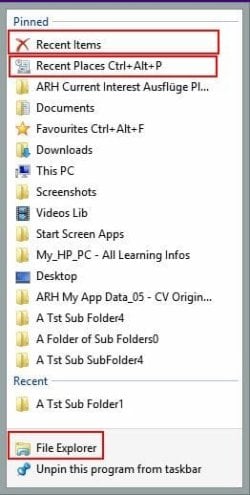
Speaking for my Windows 8.1 system, I have been able to add both the "recent items" and the "recent places" (this is your "frequently viewed folders") to my File Explorer's jump list as a "pinned", not just "recent" item.
See attachement for proof.
How?
Drag-and-drop from anywhere (Desktop, addressbar in File Explorer, Favourites items in Navigation pane of File Explorer) onto the already Taskbar pinned File Explorer icon, and Bob's your Uncle! :)
 

Attachments

  • 2014-02-04 11-44-09 File Explorer Jump List.jpg
    2014-02-04 11-44-09 File Explorer Jump List.jpg
    23.5 KB · Views: 10

My Computer My Computer

At a glance

Windows 8 and Windows 8.1 64bit
Computer type
PC/Desktop
Computer Manufacturer/Model Number
HP
OS
Windows 8 and Windows 8.1 64bit
Back
Top