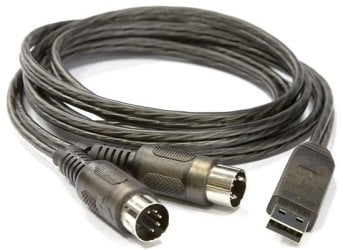
How do I get my Viewcon MIDI to USB cable to work?

TSquad

New member
Local time
7:55 PM
Messages
4
Like a lot of people I bought a cheap generic brand MIDI interface on Amazon so I could connect my Yamaha PSR-275 Keyboard to my Windows 7 64bit Laptop. I tried many things including downloading xmidi, rimio, and Yamaha drivers, but bone worked. With the romio driver output on my pc works on my keyboard but when i play my keyboard nothing shows on my pc. Also when notes come from my PC to my Keyboard there is an annoying ringing sound that gets really loud! What do I do???!!!
 

My Computer My Computer

At a glance

Windows 7 Home Premium 64bit.Itel Core i3-350M8GBIntel HD Graphics
Computer Manufacturer/Model Number
Acer Aspire 7741-5209
OS
Windows 7 Home Premium 64bit.
CPU
Itel Core i3-350M
Memory
8GB
Graphics Card(s)
Intel HD Graphics
Hard Drives
320 GB

My Computer My Computer

At a glance

Windows 7 Pro-x64i7-2600 3.4GHz - 3.8GHz Turbo8Gb - 2x4GB, Muskin 991770 PC3-1333Integrated Intel HD 2000
Computer type
PC/Desktop
Computer Manufacturer/Model Number
Built 2/11/2011
OS
Windows 7 Pro-x64
CPU
i7-2600 3.4GHz - 3.8GHz Turbo
Motherboard
Intel DH67BL-B3
Memory
8Gb - 2x4GB, Muskin 991770 PC3-1333
Graphics Card(s)
Integrated Intel HD 2000
Sound Card
Integrated Intel 10.1 HD, RealTek ALC892
Monitor(s) Displays
Asus LCD VH222H, Haier HL24XSL2a
Screen Resolution
1920x1080, 1920x1080
Hard Drives
Crucial SSD C300-128Gb,
Western Digital WD5002AALX - 500Gb,
Western Digital WD7501AALS - 750Gb
PSU
Seasonic 650W 80+ Gold Modular
Case
Rosewill Defender
Cooling
Stock CPU, Four 120mm case fans, PCH fan added
Keyboard
Logitech EX100 Y-RBH94 Wireless
Mouse
Logitech EX100 M-RCE95 Wireless
Internet Speed
3.0/1.5 Mbs
Antivirus
Microsoft Security Essentials
Browser
Microsoft Internet Explorer 11
Other Info
Antec Veris Premier-Multimedia IR Station,
Cyber Accoustics-3602 Speakers,
AFT XM-5U Card Reader,
Hauppauge TV-HVR-2250,
Sony LX300 USB Turntable
Ok Great

I rebooted and used the Romio driver and now input into mykeyboard works great, but when i hit the keys on my keyboard they don't do anything on my pc. I've Googled it for like 10 hours yesterday and I still can't find anything. I'll keep trying though. Any more suggesstions? I would appreciate them!
 

My Computer My Computer

At a glance

Windows 7 Home Premium 64bit.Itel Core i3-350M8GBIntel HD Graphics
Computer Manufacturer/Model Number
Acer Aspire 7741-5209
OS
Windows 7 Home Premium 64bit.
CPU
Itel Core i3-350M
Memory
8GB
Graphics Card(s)
Intel HD Graphics
Hard Drives
320 GB
Does the keyboard show up in your Sound Panel under Recording Devices? You might have to enable it.

Added: Are you using Sterio Mix? What do you want the keyboard to do on your PC? Play through the speakers or record?
 

My Computer My Computer

At a glance

Windows 7 Pro-x64i7-2600 3.4GHz - 3.8GHz Turbo8Gb - 2x4GB, Muskin 991770 PC3-1333Integrated Intel HD 2000
Computer type
PC/Desktop
Computer Manufacturer/Model Number
Built 2/11/2011
OS
Windows 7 Pro-x64
CPU
i7-2600 3.4GHz - 3.8GHz Turbo
Motherboard
Intel DH67BL-B3
Memory
8Gb - 2x4GB, Muskin 991770 PC3-1333
Graphics Card(s)
Integrated Intel HD 2000
Sound Card
Integrated Intel 10.1 HD, RealTek ALC892
Monitor(s) Displays
Asus LCD VH222H, Haier HL24XSL2a
Screen Resolution
1920x1080, 1920x1080
Hard Drives
Crucial SSD C300-128Gb,
Western Digital WD5002AALX - 500Gb,
Western Digital WD7501AALS - 750Gb
PSU
Seasonic 650W 80+ Gold Modular
Case
Rosewill Defender
Cooling
Stock CPU, Four 120mm case fans, PCH fan added
Keyboard
Logitech EX100 Y-RBH94 Wireless
Mouse
Logitech EX100 M-RCE95 Wireless
Internet Speed
3.0/1.5 Mbs
Antivirus
Microsoft Security Essentials
Browser
Microsoft Internet Explorer 11
Other Info
Antec Veris Premier-Multimedia IR Station,
Cyber Accoustics-3602 Speakers,
AFT XM-5U Card Reader,
Hauppauge TV-HVR-2250,
Sony LX300 USB Turntable
Still won't work.

I tried looking under recording devices but it did not show up. I am trying to get my keyboard to work with two programs, Synthesia a MIDI keyboard learning game, and also, eMedia Piano and Keyboard Method. So far in Synthesia, I have gotten the program to play notes and it registers on my keyboard, but it won't work when playing keys on my keyboard and registering on my PC.
 

My Computer My Computer

At a glance

Windows 7 Home Premium 64bit.Itel Core i3-350M8GBIntel HD Graphics
Computer Manufacturer/Model Number
Acer Aspire 7741-5209
OS
Windows 7 Home Premium 64bit.
CPU
Itel Core i3-350M
Memory
8GB
Graphics Card(s)
Intel HD Graphics
Hard Drives
320 GB
More Info

I don't care if it plays over speakers because the keyboard speakers work great! All I want it for my PC to know and register when I press a key on my Keyboard.
 

My Computer My Computer

At a glance

Windows 7 Home Premium 64bit.Itel Core i3-350M8GBIntel HD Graphics
Computer Manufacturer/Model Number
Acer Aspire 7741-5209
OS
Windows 7 Home Premium 64bit.
CPU
Itel Core i3-350M
Memory
8GB
Graphics Card(s)
Intel HD Graphics
Hard Drives
320 GB
Hello, and I hope I'm not breaking any of your forum rules by bumping this thread, I just was searching google and found this, and hoped I could get some technical assistance quickly. I bought a generic USB Midi device off of Amazon, and while a majority of the reviews favor a working plug and play driver setup, my computer simply does not register this one's drivers, and it seems as if it just doesn't want anything to do with it, and I want to get this device working ASAP. In the long run I want to purchase a new one, but I'd like to approach this issue as if there was no probability of buying a new one.

I followed the link you posted that led me to the Creative Worldwide website, and to the driver, however every time I try to install the driver it gives me an error:

6d16abbf5765d4001c0f8f587803d9ea

I've tried looking through my drivers, none seem incompatible, and I uninstalled the original drivers for this one that I'd tried to install a while ago when I first got the device, but to no avail. This is very irritating, especially since everyone else seems to be getting pretty good results from such a cheap item. Any help, and quickly, would be very appreciated!
 

My Computer My Computer

At a glance

Windows 7 Home Premium 64bitAMD Athlon II X2 220 Processor 2.80 GHz4.00 GB
Computer Manufacturer/Model Number
Hewlett-Packard Company
OS
Windows 7 Home Premium 64bit
CPU
AMD Athlon II X2 220 Processor 2.80 GHz
Memory
4.00 GB
I bought a generic USB Midi cable and thought it was faulty, as the drivers did not fully install and returned a malfunction message. I had first tested driver installation on a laptop with Windows XP which failed, then on another laptop with windows 7 Home premium 32bit which also failed. I tested the cable on my works computer - windows 7 Professional 32bit and it installed fine. I then tested it on my works laptop XP and it failed.

I discovered that the driver installed correctly to my XP laptop if it was link via a usb hub. When again the hub was removed and the usb midi cable was plugged directly into the computer, the driver failed. I tried another USB hub of a different make and design and found that the midi cable driver loaded again when linked through the hub.

It looks like the chances are increased that the midi cable driver will work through a USB hub, but utimately this is not a solution for all, as my home xp laptop still refuses to load the driver through the same hub. For me it's hit and miss according to what computer I connect to.

The vendor for my USB cable was listed as "Bitboys OY" in software.
 
Last edited:

My Computer My Computer

At a glance

Windows 7 32bit
OS
Windows 7 32bit
I've seen a similar issue to TSquad with another person who got a cheap midi cable shortly after I did. He was using Mac OS Lion and Synthesia. Synthesia has a keyboard setup option which shows the midi driver when installed.

The computer successfully sent a signal test signal to the keyboard so that the keyboard would play music through the midi cable. However, it didn't work the other way around in that the keyboard wouldn't play a signal into the computer.

When I exchanged my cheap midi cable with his, my cable driver didn't show up at all. Swapped it back, and his driver showed up, but still refused to accept a signal from the keyboard to the computer.
 

My Computer My Computer

At a glance

Windows 7 32bit
OS
Windows 7 32bit
Apologies in advance for insulting anyone's intelligence, but if the usb cable looks like this picture, the DIN marked out connects to the keyboard socket marked in and vice versa. I have seen people connect in-in and out-out, which does not work.

usb-midi-cable.jpg
 

My Computer My Computer

At a glance

Windows 7 pro x64 SP1Intel i7-2600k o/c to 4.6GHz8GB Mushkin 1866MHzNvidia GTX 750 Ti 2GB
Computer type
PC/Desktop
Computer Manufacturer/Model Number
self build
OS
Windows 7 pro x64 SP1
CPU
Intel i7-2600k o/c to 4.6GHz
Motherboard
MSI Z68-GD80
Memory
8GB Mushkin 1866MHz
Graphics Card(s)
Nvidia GTX 750 Ti 2GB
Sound Card
integrated
Monitor(s) Displays
Liyama ProLite 27"
Screen Resolution
1920*1080 px
Hard Drives
Seagate 2TB
PSU
Coolermaster GX 750W
Case
Antec 300 case + 5 fans
Cooling
Dark Rock Pro
Internet Speed
62Mbit down 18Mbit up
Antivirus
MSE
Browser
Firefox
Other Info
Blackgold BGT3650 Quad HD TV card. Also have various 3770 + 4770K render boxes.
Back
Top