How do I get Windows Live Mail 2012 export to work?

Galane

New member
Member
Local time
3:08 AM
Messages
53
I'm working on a laptop with Windows 7 and Windows Live Mail 2012 is not exporting email properly.

There are 4,008 messages in the Inbox folder but the export function will only copy out ONE message. A web search finds that this function of WLM 2012 is very badly broken and apparently Microsoft is not going to fix it. No difference in its dysfunction if it's set to work offline.

Exporting from Outlook then into WLM worked fine, but WLM can only (not) export to WLM and Exchange, which requires being on a network with an Exchange server.
 

My Computer My Computer

Computer type
Laptop
Computer Manufacturer/Model Number
Dell Inspiron E1505
OS
Win7 Ultimate 64bit
CPU
T5600
Memory
4gig
Hard Drives
500 gig
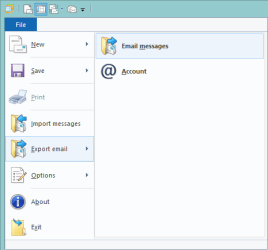
Open the blue File menu
Select Export email > Email messages
wlmexp-b.png

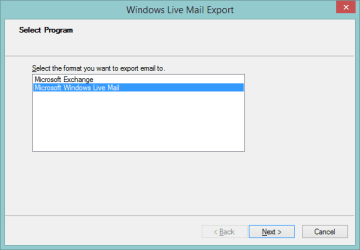
Select Microsoft Windows Live Mail
wlmexp-0.png

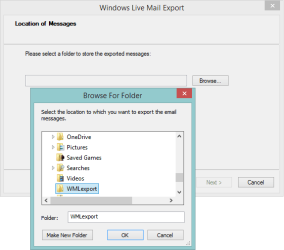
Chose the export destination folder, [Make New Folder] is a bit tricky, the Folder: field doesn't always automatically get updated, I just click on the folder above it, then click on the folder I created. As long as both the highlighted folder and the name of the folder in the Folder: filed match, you're good to go.
Press [OK]
wlmexp-1.png

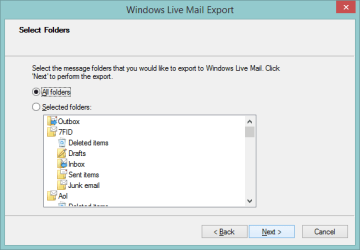
Make sure the radio button
picture.php
All folders is the active selection.
Press [Next]
wlmexp-2.png

The export should begin and every eMail message should be in the destination folder you chose.
 

My Computer My Computer

Computer type
Laptop
Computer Manufacturer/Model Number
HP Pavilion dv6-6c10us
OS
x64 (6.3.9600) Win8.1 Pro & soon dual boot x64 (6.1.7601) Win7_SP1 HomePrem
CPU
AMD A6-3420M APU with Radeon(tm) HD Graphics
Motherboard
Hewlett-Packard 1805
Memory
6.00 GB
Graphics Card(s)
AMD Radeon(TM) HD 6520G
Sound Card
(1) AMD High Definition Audio Device (2) IDT High Definiti
Monitor(s) Displays
HP W2072a 20" LCD (1600 x 900) @ 60 Hz
Screen Resolution
1366 x 768 x 32 bits (4294967296 colors) @ 60 Hz
Hard Drives
ST640LM0 00 HM641JI SATA Disk Device
Keyboard
Logitech k520 wireless KB
Mouse
Logitech m320 wireless mouse (bundled with KB)
Internet Speed
15/5 | 54 MB Wireless 'n'
Antivirus
Realtime: Defender or Avast | On-demand: Malwarebytes, ESET
Browser
IE 11 on Win8, IE 10 on win 7
Other Info
Media: [Gimp, Audacity, VLC] || Comm: [WEmail 2012, Skype] || Productivity: [OpenOffice,| Textpad] || Utils: [Sysinternals, cCleaner, Speccy, Defraggler]
That's exactly what I did and it would only export ONE of 4008 messages.
 

My Computer My Computer

Computer type
Laptop
Computer Manufacturer/Model Number
Dell Inspiron E1505
OS
Win7 Ultimate 64bit
CPU
T5600
Memory
4gig
Hard Drives
500 gig
What version are you running, I know it's 2012, but the specific version.

blue file menu -> about
Version 2012 (Build 16.4.3528.0331)


also what other Essential apps are installed, just mail or (photo, movie maker, etc?)

Let me know and try to repair all Essential apps not just mail
WinKey+R
type wlarp in the Run box

Please let me know why you're trying to export mail - backup?
 

My Computer My Computer

Computer type
Laptop
Computer Manufacturer/Model Number
HP Pavilion dv6-6c10us
OS
x64 (6.3.9600) Win8.1 Pro & soon dual boot x64 (6.1.7601) Win7_SP1 HomePrem
CPU
AMD A6-3420M APU with Radeon(tm) HD Graphics
Motherboard
Hewlett-Packard 1805
Memory
6.00 GB
Graphics Card(s)
AMD Radeon(TM) HD 6520G
Sound Card
(1) AMD High Definition Audio Device (2) IDT High Definiti
Monitor(s) Displays
HP W2072a 20" LCD (1600 x 900) @ 60 Hz
Screen Resolution
1366 x 768 x 32 bits (4294967296 colors) @ 60 Hz
Hard Drives
ST640LM0 00 HM641JI SATA Disk Device
Keyboard
Logitech k520 wireless KB
Mouse
Logitech m320 wireless mouse (bundled with KB)
Internet Speed
15/5 | 54 MB Wireless 'n'
Antivirus
Realtime: Defender or Avast | On-demand: Malwarebytes, ESET
Browser
IE 11 on Win8, IE 10 on win 7
Other Info
Media: [Gimp, Audacity, VLC] || Comm: [WEmail 2012, Skype] || Productivity: [OpenOffice,| Textpad] || Utils: [Sysinternals, cCleaner, Speccy, Defraggler]
Just mail installed. Version is whatever is the latest version available to download. I copied the whole mail store folder to a usb stick. Had to get the laptop ready for its new owner and delete the old user account and files.
 

My Computer My Computer

Computer type
Laptop
Computer Manufacturer/Model Number
Dell Inspiron E1505
OS
Win7 Ultimate 64bit
CPU
T5600
Memory
4gig
Hard Drives
500 gig
That's what was going to be the next step, but you beat me to it.

You'll want both folders below, the 1st has your contacts, the 2nd has your message store
%LOCALAPPDATA%\Microsoft\Windows Live
%LOCALAPPDATA%\Microsoft\Windows Live Mail

If you use rules, they're stored in the registry
HKEY_CURRENT_USER\Software\Microsoft\Windows Live Mail\Rules

You can export just that key and import it as part of a restore

If you just want to look, launch Command Prompt and enter
reg query "HKCU\Software\Microsoft\Windows Live Mail\Rules" /s > WLMRules.txt

Then open %USERPROFILE%\WLMRules.txt
This will not be a backup, just a reference to build a new rule set.

Bill
.
 

My Computer My Computer

Computer type
Laptop
Computer Manufacturer/Model Number
HP Pavilion dv6-6c10us
OS
x64 (6.3.9600) Win8.1 Pro & soon dual boot x64 (6.1.7601) Win7_SP1 HomePrem
CPU
AMD A6-3420M APU with Radeon(tm) HD Graphics
Motherboard
Hewlett-Packard 1805
Memory
6.00 GB
Graphics Card(s)
AMD Radeon(TM) HD 6520G
Sound Card
(1) AMD High Definition Audio Device (2) IDT High Definiti
Monitor(s) Displays
HP W2072a 20" LCD (1600 x 900) @ 60 Hz
Screen Resolution
1366 x 768 x 32 bits (4294967296 colors) @ 60 Hz
Hard Drives
ST640LM0 00 HM641JI SATA Disk Device
Keyboard
Logitech k520 wireless KB
Mouse
Logitech m320 wireless mouse (bundled with KB)
Internet Speed
15/5 | 54 MB Wireless 'n'
Antivirus
Realtime: Defender or Avast | On-demand: Malwarebytes, ESET
Browser
IE 11 on Win8, IE 10 on win 7
Other Info
Media: [Gimp, Audacity, VLC] || Comm: [WEmail 2012, Skype] || Productivity: [OpenOffice,| Textpad] || Utils: [Sysinternals, cCleaner, Speccy, Defraggler]
Back
Top