How do I investigate WHEA-Logger?

grits

New member
Power User
VIP
Local time
9:18 PM
Messages
582
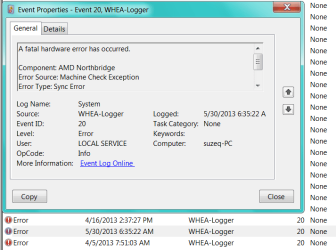
Found this just after turning on PC this morning. I tried searching on my own but was way over my head & a good share of results talked of BSOD but I've not had them. I'm wondering what, if any, special scan might reveal something?
Thank you.
 

Attachments

  • 2013-05-30_105002 _ 3 of these WHEA-Logger.png
    2013-05-30_105002 _ 3 of these WHEA-Logger.png
    45.7 KB · Views: 6
  • WHEA-Logger.txt
    WHEA-Logger.txt
    3.3 KB · Views: 2

My Computer

Computer type
PC/Desktop
Computer Manufacturer/Model Number
emachines
OS
Microsoft Windows 7 Home Premium 64-bit 7601 Multiprocessor Free Service Pack 1
CPU
AMD Athlon(tm) II X2 220 Processor
Motherboard
eMachines EL1358G
Memory
3.00 GB
Graphics Card(s)
NVIDIA GeForce 6150SE nForce 430
Sound Card
Realtek High Definition Audio
Screen Resolution
1280 x 1024 x 32 bits (4294967296 colors) @ 60 Hz
Hard Drives
(1) WDC WD10 EADX-22TDHB0 SCSI Disk Device (2) Generic- Multi-Card USB Device
Keyboard
came with PC
Mouse
came with PC
Antivirus
Avast
Browser
IE 9
Other Info
don't know how to get info for the other 5 areas
I assume you are talking about the computer listed in your system specs. I do not know what emachines allow you to adjust in BIOS. But, I would first go to bios and look at your ram and sata controller. Then set optimized defaults, set your ram frequency, timings and voltage to manufacturers specs, and set the sata controller to what it is now then set the current boot order, save and exit. Once booted into Windows open an elevated command prompt (click the start button, tupe cmd, right click the cmd entry and select run as administrator) When the window opens copy/paste this command in the Window sfc /scannow That will check for and attempt to repair any missing or corrupted system files.
See option Two of this tutorial http://www.sevenforums.com/tutorials/1538-sfc-scannow-command-system-file-checker.html. There are several tests that can be run, but start out with those.
Other tests are http://www.sevenforums.com/tutorials/105647-ram-test-memtest86.html
http://www.sevenforums.com/tutorials/100352-hardware-stress-test-prime95.html which I don't know would be a good idea with an emachines as it creates excessive heat.
 

My Computers

System One System Two

  • Computer type
    PC/Desktop
    Computer Manufacturer/Model Number
    ALWAYS UNDER CONSTRUCTION
    OS
    Windows 11 Pro
    CPU
    Ryzen 9 5900X
    Motherboard
    Asus X570 Crosshair Viii Hero
    Memory
    32GB G Skill DDR4-3600
    Graphics Card(s)
    EVGA RTX 3080 FTW 3 Ultra
    Sound Card
    On Board/Sennheiser PC37X Headset
    Monitor(s) Displays
    3 X Asus 27"
    Screen Resolution
    2560x1440
    Hard Drives
    2 X 1 TB NVME drives
    PSU
    EVGA 850
    Case
    Phanteks Eclipse P400A
    Cooling
    EVGA 280 AIO
    Keyboard
    Logitech G510s/ Logitech G13
    Mouse
    Logitech G502
    Internet Speed
    24/1
    Antivirus
    ESET/MBAM Pro/SAS Pro
    Browser
    Chrome/ Firefox/ Edge
  • Computer type
    Laptop
    System Manufacturer/Model Number
    Dell 16 Plus
    OS
    Windows 11 Pro
    CPU
    Intel Ultra 9 288V
    Memory
    32 GB LPDDR5X 8533
    Monitor(s) Displays
    16" Mini-LED HDR600 Touch 90 Hz
    Screen Resolution
    2560X1600
    Hard Drives
    1 TB NVME
Sorry essenbe, I should have noted that I don't know diddly squat about computers. The only thing I vaguely understand in your reply is the sfc scan which I did do once but I think I may have just done the 'verify' scan because I'm "chicken" & didn't really understand what the other options meant or would do.
 

My Computer

Computer type
PC/Desktop
Computer Manufacturer/Model Number
emachines
OS
Microsoft Windows 7 Home Premium 64-bit 7601 Multiprocessor Free Service Pack 1
CPU
AMD Athlon(tm) II X2 220 Processor
Motherboard
eMachines EL1358G
Memory
3.00 GB
Graphics Card(s)
NVIDIA GeForce 6150SE nForce 430
Sound Card
Realtek High Definition Audio
Screen Resolution
1280 x 1024 x 32 bits (4294967296 colors) @ 60 Hz
Hard Drives
(1) WDC WD10 EADX-22TDHB0 SCSI Disk Device (2) Generic- Multi-Card USB Device
Keyboard
came with PC
Mouse
came with PC
Antivirus
Avast
Browser
IE 9
Other Info
don't know how to get info for the other 5 areas
That's OK grits, ask any questions you need to. I'll be happy to try to answer them. Have you been getting any computer freeze ups or Blue Screens? A WHEA error is Windows Hardware error reporting architcture. It tells there was an error and attempts to recover from it. While I'm no expert on them, it is usually a generic error. I do know that they can be caused by improper settings in bios for your hardware. If you have not had 'blue screen of death' AKA BSODs, then the errors are recoverable, meaning the operating systen was able to recover from the WHEA error. The sfc /scannow is very simple and normally takes only a few minutes to run. It checks system files integrity and will attempt to fix them If you get a message that Windows found errors but could not fix them, reboot and run it again. Do this about 4 times until it says Windows found no integrity problems. If after running 3 or 4 times, it still can't fix them, then we will have to look at another route.
 

My Computers

System One System Two

  • Computer type
    PC/Desktop
    Computer Manufacturer/Model Number
    ALWAYS UNDER CONSTRUCTION
    OS
    Windows 11 Pro
    CPU
    Ryzen 9 5900X
    Motherboard
    Asus X570 Crosshair Viii Hero
    Memory
    32GB G Skill DDR4-3600
    Graphics Card(s)
    EVGA RTX 3080 FTW 3 Ultra
    Sound Card
    On Board/Sennheiser PC37X Headset
    Monitor(s) Displays
    3 X Asus 27"
    Screen Resolution
    2560x1440
    Hard Drives
    2 X 1 TB NVME drives
    PSU
    EVGA 850
    Case
    Phanteks Eclipse P400A
    Cooling
    EVGA 280 AIO
    Keyboard
    Logitech G510s/ Logitech G13
    Mouse
    Logitech G502
    Internet Speed
    24/1
    Antivirus
    ESET/MBAM Pro/SAS Pro
    Browser
    Chrome/ Firefox/ Edge
  • Computer type
    Laptop
    System Manufacturer/Model Number
    Dell 16 Plus
    OS
    Windows 11 Pro
    CPU
    Intel Ultra 9 288V
    Memory
    32 GB LPDDR5X 8533
    Monitor(s) Displays
    16" Mini-LED HDR600 Touch 90 Hz
    Screen Resolution
    2560X1600
    Hard Drives
    1 TB NVME
Thank you for your patience essenbe. So I gather that the scan produces a report each of 3 or 4 times (if needed) & the report shows what the problems were?
No, I've not had any BSOD or even what I'd say were 'freezes', but it just seems quite slow in 'some' areas, like going from page to page here at the forum.
I did go to the tut page for sfc to read a bit & looked at my services for the Windows Module & mine is set at Manual but the Status column is 'blank', not 'Started'. Is that ok, or should I 'Start' it?
 

My Computer

Computer type
PC/Desktop
Computer Manufacturer/Model Number
emachines
OS
Microsoft Windows 7 Home Premium 64-bit 7601 Multiprocessor Free Service Pack 1
CPU
AMD Athlon(tm) II X2 220 Processor
Motherboard
eMachines EL1358G
Memory
3.00 GB
Graphics Card(s)
NVIDIA GeForce 6150SE nForce 430
Sound Card
Realtek High Definition Audio
Screen Resolution
1280 x 1024 x 32 bits (4294967296 colors) @ 60 Hz
Hard Drives
(1) WDC WD10 EADX-22TDHB0 SCSI Disk Device (2) Generic- Multi-Card USB Device
Keyboard
came with PC
Mouse
came with PC
Antivirus
Avast
Browser
IE 9
Other Info
don't know how to get info for the other 5 areas
Back
Top