How do I move music files from Download to Media Player ?

sushiman

New member
Member
Local time
8:30 PM
Messages
65
First off , allow me to say I am a computer dummy . :D

Also , I am using a Japanese computer , and new to it , an HP Touchsmart .

Media Player 11 installed .

I downloaded music files that went directly into " downloads " .

I want to burn these files to CDR .

How do I go about moving them into the LIBRARY ? Or is there another way to burn the files w/o putting them in the library .

Any help appreciated .
 

My Computer My Computer

At a glance

Windows 7 Premium
OS
Windows 7 Premium
You should just be able to select all the files, right-click, hit cut. Then, go to the Music Library, right click and hit paste. Then Windows Media Player should pick them up when you open it, and you can burn them to CD from there.
 

My Computer My Computer

At a glance

Windows 10 Tech Preview 9926 x64AMD FX-835016GB DDR3 1333Asus R9 290 DirectCU II OC, Gigabyte Windforc...
Computer type
PC/Desktop
Computer Manufacturer/Model Number
SuperBeast
OS
Windows 10 Tech Preview 9926 x64
CPU
AMD FX-8350
Motherboard
Gigabyte GA-990FXA-UD3
Memory
16GB DDR3 1333
Graphics Card(s)
Asus R9 290 DirectCU II OC, Gigabyte Windforce R9 290 OC
Sound Card
Integrated w/ Creative A250 2.1 speakers
Monitor(s) Displays
Main: Asus VN289H 28" Secondary: Acer G246HL 24"
Screen Resolution
1920x1080
Hard Drives
128 GB SanDisk Ultra Plus (Windows drive)

240 GB Crucial M500 SSD (Games drive)

1 TB WDC WD10EACS 7200RPM HDD (Data drive)

2 TB Seagate Expansion Desktop external HDD (Backup drive)
PSU
900w Antec HCG-900
Case
Raidmax Agusta Full ATX
Cooling
Corsair H80
Keyboard
Cooler Master Devastator MB24
Mouse
Cooler Master Devastator MS2K 1000/1600/2000 DPI
Internet Speed
100Mbps cable
Antivirus
Avast!
Browser
Chrome
Thanks for the quick reply ! Not sure I follow you , but I'll have a go at it !
 

My Computer My Computer

At a glance

Windows 7 Premium
OS
Windows 7 Premium
If you need more in-depth help, let me know, and I'll throw up some screenshots for ya.
 

My Computer My Computer

At a glance

Windows 10 Tech Preview 9926 x64AMD FX-835016GB DDR3 1333Asus R9 290 DirectCU II OC, Gigabyte Windforc...
Computer type
PC/Desktop
Computer Manufacturer/Model Number
SuperBeast
OS
Windows 10 Tech Preview 9926 x64
CPU
AMD FX-8350
Motherboard
Gigabyte GA-990FXA-UD3
Memory
16GB DDR3 1333
Graphics Card(s)
Asus R9 290 DirectCU II OC, Gigabyte Windforce R9 290 OC
Sound Card
Integrated w/ Creative A250 2.1 speakers
Monitor(s) Displays
Main: Asus VN289H 28" Secondary: Acer G246HL 24"
Screen Resolution
1920x1080
Hard Drives
128 GB SanDisk Ultra Plus (Windows drive)

240 GB Crucial M500 SSD (Games drive)

1 TB WDC WD10EACS 7200RPM HDD (Data drive)

2 TB Seagate Expansion Desktop external HDD (Backup drive)
PSU
900w Antec HCG-900
Case
Raidmax Agusta Full ATX
Cooling
Corsair H80
Keyboard
Cooler Master Devastator MB24
Mouse
Cooler Master Devastator MS2K 1000/1600/2000 DPI
Internet Speed
100Mbps cable
Antivirus
Avast!
Browser
Chrome
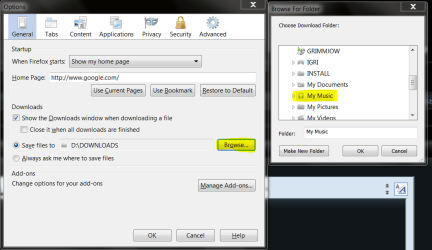
You can change the download location:
Capture1.PNG
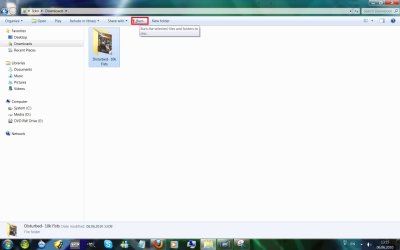
If you want to move the files just for burning them, you don't have to:
Untitled.jpg
or depends of your burning software, just point to the files. What are you using for burning files?
 

My Computer My Computer

At a glance

Windows 7 Ultimate x32DualCore Intel Pentium E2200, 2218 MHz (11 x ...2 GB DDR2-800 DDR2 SDRAMnVIDIA GeForce 9500GT 1GB
Computer Manufacturer/Model Number
Micro-Star International/MS-7529
OS
Windows 7 Ultimate x32
CPU
DualCore Intel Pentium E2200, 2218 MHz (11 x 202)
Motherboard
MSI G31M3 V2 (MS-7529) (2 PCI, 1 PCI-E x16,2 DDR2 DIMM)
Memory
2 GB DDR2-800 DDR2 SDRAM
Graphics Card(s)
nVIDIA GeForce 9500GT 1GB
Sound Card
Realtek ALC888/1200 @ Intel 82801GB ICH7
Monitor(s) Displays
Samsung SyncMaster 2253BW (Digital) 22'' LCD
Screen Resolution
1680x1050
Hard Drives
SAMSUNG HD322IJ ATA Device (298 GB , IDE)
Windows Media Player 11 .

The files are still in download folder .
 

My Computer My Computer

At a glance

Windows 7 Premium
OS
Windows 7 Premium
Click the file you want to burn, and click burn, as shown on the pic:
Untitled1.jpg
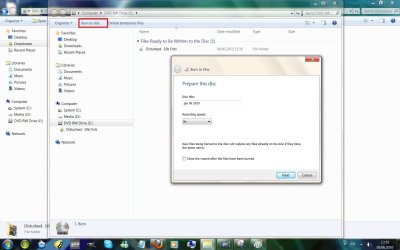
Click burn to disc, pop window will appear, choose your burning speed, also, if you aren't burning files anymore, you can check "close the wizard after the files have been burned"
click "next" and wait for the files to be burned
Untitled3.jpg
hope this helps,
cheers
 

My Computer My Computer

At a glance

Windows 7 Ultimate x32DualCore Intel Pentium E2200, 2218 MHz (11 x ...2 GB DDR2-800 DDR2 SDRAMnVIDIA GeForce 9500GT 1GB
Computer Manufacturer/Model Number
Micro-Star International/MS-7529
OS
Windows 7 Ultimate x32
CPU
DualCore Intel Pentium E2200, 2218 MHz (11 x 202)
Motherboard
MSI G31M3 V2 (MS-7529) (2 PCI, 1 PCI-E x16,2 DDR2 DIMM)
Memory
2 GB DDR2-800 DDR2 SDRAM
Graphics Card(s)
nVIDIA GeForce 9500GT 1GB
Sound Card
Realtek ALC888/1200 @ Intel 82801GB ICH7
Monitor(s) Displays
Samsung SyncMaster 2253BW (Digital) 22'' LCD
Screen Resolution
1680x1050
Hard Drives
SAMSUNG HD322IJ ATA Device (298 GB , IDE)
Back
Top