How do I remove custom icons?

Noztra

New member
Local time
9:36 AM
Messages
14
Hello SevenForums,

I have had some custom icons installed within a theme.
I now got tired of the theme and the icons, and wanted to delete it. I managed to delete the theme, but how do I get rid of the custom icons?
Thanks.
 

My Computer

OS
Windows 7 64bit

My Computer

Computer Manufacturer/Model Number
Hewlett packard/p6512uk
OS
Microsoft Windows 7 Home Premium 64-bit 7600
CPU
IIx4 amd athelon 635 processor
Motherboard
FOXCONN 2AA9
Memory
2x2gb
Graphics Card(s)
ati radeon HD 5450
Sound Card
(1) Realtek High Definition Audio (2) AMD High Definition
Monitor(s) Displays
samsung lcd tv 32"
Screen Resolution
1360x 768
Hard Drives
(1) WDC WD10 01FAES-60Z2A0 SATA Disk Device (2) Maxtor OneTouch USB Device (3) ST310003 33AS USB Device (4) WD My Book 1111 USB Device
PSU
?
Cooling
air!
Keyboard
wireless hp
Mouse
wireless Hp,optical
Internet Speed
1.10mb/s
Antivirus
MSE
Browser
Firefox
Okay, so I just type "sfc /scannow" & when it's done, everything is back to normal?
 

My Computer

OS
Windows 7 64bit

My Computer

Computer Manufacturer/Model Number
Assembled
OS
Windows 7 Ultimate 64-bit SP1
CPU
AMD Athlon II X2 260 @ 3.2 Ghz
Motherboard
Gigabyte Technology Co., Ltd. M68MT-S2 (Socket M2)
Memory
Kingston 8.0GB Dual-Channel DDR3 @ 669MHz (9-9-9-24)
Graphics Card(s)
ASUS EAH 5450 - 1 GB
Sound Card
Realtek HD Audio
Monitor(s) Displays
23 Inch - DELL SP2309W
Screen Resolution
2048 x 1152
Hard Drives
488GB Seagate ST3500418AS ATA Device (SATA)
PSU
450W
Case
Iball - Standard Form - i8190
Cooling
Stock Cooling
Keyboard
Logitech
Mouse
Logitech
Internet Speed
1 MB/Sec
Other Info
Creative Inspire 2.1 Speakers, LITEON 24x DVD Writer
Hi noztra . Your system specs says your OS is windows 7 64 bit. IS the SP1 installed there or not ?
 

My Computer

Computer type
PC/Desktop
Computer Manufacturer/Model Number
Self Assembled
OS
Microsoft Windows 10 Pro Insider Preview 64-bit
CPU
Intel(R) Core(TM) i3-4130 CPU @ 3.40GHz
Motherboard
Gigabyte Technology Co., Ltd. B85M-D3H
Memory
Corsair Vengence 4GB x2 (8.00GB Dual-Channel DDR3 @ 798MHz)
Graphics Card(s)
2047MB GeForce GTS 450 (ZOTAC International)
Sound Card
Onboard (Realtek High Definition Audio)
Monitor(s) Displays
LG Flatron E2040T
Screen Resolution
1600x900
Hard Drives
Western Digital 1 TB
Seagate 500 GB
PSU
Corsair VS550
Case
Cooler Master K380
Cooling
Cooler Master Seidon 120V Plus
Keyboard
Logitech MK260r
Mouse
Logitech MK260r
Internet Speed
PMPL Broadband
Antivirus
Windows Defender + MBAM
Browser
Firefox
Other Info
Dell Studio 15" Laptop
Service pack 1 for Xp & Vista are installed. I will reboot in a minute. The scan is done.
 

My Computer

OS
Windows 7 64bit
UPDATE: It only removed some icons, there a still a few that looks the same!
 

My Computer

OS
Windows 7 64bit
Service pack 1 for Xp & Vista are installed. I will reboot in a minute. The scan is done.

UPDATE: It only removed some icons, there a still a few that looks the same!
If you answer me correctly, if your windows 7 system is Service Pack 1 installed or not, we could guide you further steps to get all the icons back to default.

This one is the most important information in this case.
 

My Computer

Computer type
PC/Desktop
Computer Manufacturer/Model Number
Self Assembled
OS
Microsoft Windows 10 Pro Insider Preview 64-bit
CPU
Intel(R) Core(TM) i3-4130 CPU @ 3.40GHz
Motherboard
Gigabyte Technology Co., Ltd. B85M-D3H
Memory
Corsair Vengence 4GB x2 (8.00GB Dual-Channel DDR3 @ 798MHz)
Graphics Card(s)
2047MB GeForce GTS 450 (ZOTAC International)
Sound Card
Onboard (Realtek High Definition Audio)
Monitor(s) Displays
LG Flatron E2040T
Screen Resolution
1600x900
Hard Drives
Western Digital 1 TB
Seagate 500 GB
PSU
Corsair VS550
Case
Cooler Master K380
Cooling
Cooler Master Seidon 120V Plus
Keyboard
Logitech MK260r
Mouse
Logitech MK260r
Internet Speed
PMPL Broadband
Antivirus
Windows Defender + MBAM
Browser
Firefox
Other Info
Dell Studio 15" Laptop
Service pack 1 for Xp & Vista are installed. I will reboot in a minute. The scan is done.

UPDATE: It only removed some icons, there a still a few that looks the same!
If you answer me correctly, if your windows 7 system is Service Pack 1 installed or not, we could guide you further steps to get all the icons back to default.

This one is the most important information in this case.

I just installed Service pack 1 for Windows 7, what now?
 

My Computer

OS
Windows 7 64bit
I just installed Service pack 1 for Windows 7, what now?
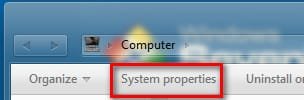
If your system is Service pack installed (to be sure, click on the "system properties button in explorer window ....
1.jpg

This button ... it will give you the required info )

If it is really service pack 1 , download and install Windows 7 default icons installer . Every icon will be back to default.

But if it is not Service pack 1, this one will not work, and you will need something else.

So, the info is very important.
 

My Computer

Computer type
PC/Desktop
Computer Manufacturer/Model Number
Self Assembled
OS
Microsoft Windows 10 Pro Insider Preview 64-bit
CPU
Intel(R) Core(TM) i3-4130 CPU @ 3.40GHz
Motherboard
Gigabyte Technology Co., Ltd. B85M-D3H
Memory
Corsair Vengence 4GB x2 (8.00GB Dual-Channel DDR3 @ 798MHz)
Graphics Card(s)
2047MB GeForce GTS 450 (ZOTAC International)
Sound Card
Onboard (Realtek High Definition Audio)
Monitor(s) Displays
LG Flatron E2040T
Screen Resolution
1600x900
Hard Drives
Western Digital 1 TB
Seagate 500 GB
PSU
Corsair VS550
Case
Cooler Master K380
Cooling
Cooler Master Seidon 120V Plus
Keyboard
Logitech MK260r
Mouse
Logitech MK260r
Internet Speed
PMPL Broadband
Antivirus
Windows Defender + MBAM
Browser
Firefox
Other Info
Dell Studio 15" Laptop
Okay, I will keep you updated if this will work.
 

My Computer

OS
Windows 7 64bit
I just installed Service pack 1 for Windows 7, what now?
If your system is Service pack installed (to be sure, click on the "system properties button in explorer window ....
View attachment 221477

This button ... it will give you the required info )

If it is really service pack 1 , download and install Windows 7 default icons installer . Every icon will be back to default.

But if it is not Service pack 1, this one will not work, and you will need something else.

So, the info is very important.

excellent link to the icon installer arc, cant rep you atm, :(
 

My Computer

Computer Manufacturer/Model Number
Hewlett packard/p6512uk
OS
Microsoft Windows 7 Home Premium 64-bit 7600
CPU
IIx4 amd athelon 635 processor
Motherboard
FOXCONN 2AA9
Memory
2x2gb
Graphics Card(s)
ati radeon HD 5450
Sound Card
(1) Realtek High Definition Audio (2) AMD High Definition
Monitor(s) Displays
samsung lcd tv 32"
Screen Resolution
1360x 768
Hard Drives
(1) WDC WD10 01FAES-60Z2A0 SATA Disk Device (2) Maxtor OneTouch USB Device (3) ST310003 33AS USB Device (4) WD My Book 1111 USB Device
PSU
?
Cooling
air!
Keyboard
wireless hp
Mouse
wireless Hp,optical
Internet Speed
1.10mb/s
Antivirus
MSE
Browser
Firefox
excellent link to the icon installer arc, cant rep you atm, :(
Thanks for the appreciation, my friend :)

Waiting for the response from Noztra ! If his system is not SP1, it will not work, and will need different fix.
 

My Computer

Computer type
PC/Desktop
Computer Manufacturer/Model Number
Self Assembled
OS
Microsoft Windows 10 Pro Insider Preview 64-bit
CPU
Intel(R) Core(TM) i3-4130 CPU @ 3.40GHz
Motherboard
Gigabyte Technology Co., Ltd. B85M-D3H
Memory
Corsair Vengence 4GB x2 (8.00GB Dual-Channel DDR3 @ 798MHz)
Graphics Card(s)
2047MB GeForce GTS 450 (ZOTAC International)
Sound Card
Onboard (Realtek High Definition Audio)
Monitor(s) Displays
LG Flatron E2040T
Screen Resolution
1600x900
Hard Drives
Western Digital 1 TB
Seagate 500 GB
PSU
Corsair VS550
Case
Cooler Master K380
Cooling
Cooler Master Seidon 120V Plus
Keyboard
Logitech MK260r
Mouse
Logitech MK260r
Internet Speed
PMPL Broadband
Antivirus
Windows Defender + MBAM
Browser
Firefox
Other Info
Dell Studio 15" Laptop
Back
Top