How do i remove Microsoft Visuals 2005 C++?

JSHuiting

New member
As the title says, i can't delete Microsoft Visuals 2005 C++
Whenever i try it says that it cannot find the specified path where it should have been installed.

Also a update for Microsft Visuals is popping up all the time, i don't really know if it's relevant. But the exact update is :
Beveiligingsupdate voor herdistribueerbaar pakket Microsoft Visual C++ 2005 Service Pack 1 (KB2538242)

Any help would be much apreciated.
 

My Computer

Computer Manufacturer/Model Number
Acer Aspire 5742G
OS
Windows 7 Home Premium x64
CPU
Intel Core i5-460M
Motherboard
Aspire 5742G
Memory
4,00 GB
Graphics Card(s)
Nvidia GeForce GT 420M
Since KB2538242 pertains to the VS 2005 /redistributable/ package then definitely do NOT try to uninstall it. It is the "runtime" libraries that are needed for other programs installed on your computer to work properly. Uninstalling it may break some unknown number of other programs. DO do the update if suggested by windows update, and if that succeeds, leave it alone at that point.
 

My Computer

Computer Manufacturer/Model Number
Scratch built
OS
Windows 7 x64 Ultimate
CPU
i7 960
Motherboard
Asus P6X58D
Memory
12 Gig Corsair Dominator
Graphics Card(s)
Nvidia 480
Sound Card
Maudio Delta 44 + breakout box
Monitor(s) Displays
Dell UltraSharp U2410 24in and Samsung 21 dual monitors
Screen Resolution
1920x1200 and 1280x1024
Hard Drives
Primary: Intel X-25M G2 160G SSD
Secondary: Segate baracuda 1.0 TB
HDs in AHCI mode.
PSU
Corasair TX850
Case
Cooler Master HAF
Cooling
Corsair H50
Keyboard
Logitech G15 + N52 game pad
Mouse
Logitech MX518
Internet Speed
15kbs down 4.5kbps up
Other Info
WEI 7.6
CPU & RAM 7.6
Graphics 7.9
Hard disk 7.7
Since KB2538242 pertains to the VS 2005 /redistributable/ package then definitely do NOT try to uninstall it. It is the "runtime" libraries that are needed for other programs installed on your computer to work properly. Uninstalling it may break some unknown number of other programs. DO do the update if suggested by windows update, and if that succeeds, leave it alone at that point.

Yeah about that, after installing the new update, it want's so install again, and again, and again...

Also the problem started with this new update, because Seculauncher wouldn't work anymore. So what i wanted to do was re-install the 2005 C++ packs and see if the problem percists. Also it apears that more had this issue with the latest update re-apearing. But besides that.

How to fix?
 

My Computer

Computer Manufacturer/Model Number
Acer Aspire 5742G
OS
Windows 7 Home Premium x64
CPU
Intel Core i5-460M
Motherboard
Aspire 5742G
Memory
4,00 GB
Graphics Card(s)
Nvidia GeForce GT 420M
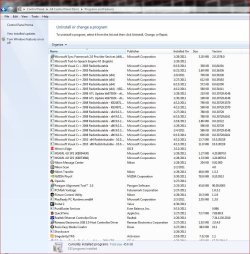
Your C++ can/should be uninstalled through the Programs and features panel. Why you'd want to do that, well..... :confused:

Capture.JPG

And you definitely shouldn't just "Delete" them as you can definitely break things as fseal said. The correct procedures is through the Programs and features panel.

Good luck
 

My Computer

Computer type
PC/Desktop
Computer Manufacturer/Model Number
Custom built by me.
OS
Windows 10 Pro
CPU
Intel Core i7-4770K (3.5Ghz)
Motherboard
Gigabyte G1 Sniper 5 (F10 Bios)
Memory
32 gig Corsair Dominator Platinum (4x8Gig)
Graphics Card(s)
Sapphire Tri-X R9 Fury
Sound Card
Soundblaster ZXR
Monitor(s) Displays
NEC PA242W 24" LCD Monitor
Screen Resolution
1920 x 1200
Hard Drives
Primary - Samsung 850 Pro (512gig), Samsung 840 Pro (256gig), 2TB WD Caviar Black.
PSU
EVGA Supernova 1000 G2
Case
Cooler Master HAF X
Cooling
Corsair H100i with Corsair Air Series SP120 Quiet Fans
Keyboard
Logitech Wireless Wave
Mouse
Logitech Performance MX
Internet Speed
High Speed Cable
Antivirus
Norton Security
Browser
IE11
Other Info
Memory Timings - 1866MHz @ 9-9-9-27-1T @ 1.5 volts
Yeah i tried uninnstalling them there but whenever i try it says that it's the incorrect path. And i can only sellect two, or direct the unninstaller to the correct path. But i don't really know where it is installed...

Anyway i saw some good programs that should fix my issue, MicrosoftFixIt and Microsoft Software Cleanup, but both don't seem to work on Windows 7, isn't there any program that could reset my Microsoft Visuals 2005 C++? And maybe something to fix the update?

Also both of you guys are suggesting things that are irrelevant, or things i should've known before... which't aren't really helpfull right now. But thanks for the effort. :)
 

My Computer

Computer Manufacturer/Model Number
Acer Aspire 5742G
OS
Windows 7 Home Premium x64
CPU
Intel Core i5-460M
Motherboard
Aspire 5742G
Memory
4,00 GB
Graphics Card(s)
Nvidia GeForce GT 420M
Well if there in the Programs and features they should be removalable, howeve since you "deleted" some files I'm sure that's what's causing the uninstall issues through the Programs & features now.

Anyway i saw some good programs that should fix my issue, MicrosoftFixIt and Microsoft Software Cleanup, but both don't seem to work on Windows 7, isn't there any program that could reset my Microsoft Visuals 2005 C++? And maybe something to fix the update?

Most definitely works under Windows 7 - Fix it Center Help - Introducing Fix it Center

Anyway you can try a.....

http://www.sevenforums.com/tutorials/3413-repair-install.html?ltr=R

Or.....

http://www.sevenforums.com/tutorials/700-system-restore.html
 

My Computer

Computer type
PC/Desktop
Computer Manufacturer/Model Number
Custom built by me.
OS
Windows 10 Pro
CPU
Intel Core i7-4770K (3.5Ghz)
Motherboard
Gigabyte G1 Sniper 5 (F10 Bios)
Memory
32 gig Corsair Dominator Platinum (4x8Gig)
Graphics Card(s)
Sapphire Tri-X R9 Fury
Sound Card
Soundblaster ZXR
Monitor(s) Displays
NEC PA242W 24" LCD Monitor
Screen Resolution
1920 x 1200
Hard Drives
Primary - Samsung 850 Pro (512gig), Samsung 840 Pro (256gig), 2TB WD Caviar Black.
PSU
EVGA Supernova 1000 G2
Case
Cooler Master HAF X
Cooling
Corsair H100i with Corsair Air Series SP120 Quiet Fans
Keyboard
Logitech Wireless Wave
Mouse
Logitech Performance MX
Internet Speed
High Speed Cable
Antivirus
Norton Security
Browser
IE11
Other Info
Memory Timings - 1866MHz @ 9-9-9-27-1T @ 1.5 volts
Yeah i tried uninnstalling them there but whenever i try it says that it's the incorrect path. And i can only sellect two, or direct the unninstaller to the correct path. But i don't really know where it is installed...

Anyway i saw some good programs that should fix my issue, MicrosoftFixIt and Microsoft Software Cleanup, but both don't seem to work on Windows 7, isn't there any program that could reset my Microsoft Visuals 2005 C++? And maybe something to fix the update?

Also both of you guys are suggesting things that are irrelevant, or things i should've known before... which't aren't really helpfull right now. But thanks for the effort. :)

There is always more to the story than the first post, but since no one can read minds, all we can do is start out with the most common issue. And the number of people that want to randomly uninstall the redistributable packages for no reason is pretty large. So that answer ususaly does the trick.

So am I reading right that you have tried reinstalling the 2005 redistributrable package from the MS site iteslf but that didn't work? You should try installing that and the service pack 1 one.

Also, to look for an answer to the problem we may have to find out when/why it happened. You said that a program just suddenly sopped working? It sounds like the installed package got damaged somehow. Was that before or after trying to install the update?

If before, this is frequently caused by registry or disk cleaners, but might also be a hard drive error. Can you think of anything else that happened between last time the program worked and when it didn't? The solution may depends on exactly how it started.

If after, did something happen during the update that you can remember?
 

My Computer

Computer Manufacturer/Model Number
Scratch built
OS
Windows 7 x64 Ultimate
CPU
i7 960
Motherboard
Asus P6X58D
Memory
12 Gig Corsair Dominator
Graphics Card(s)
Nvidia 480
Sound Card
Maudio Delta 44 + breakout box
Monitor(s) Displays
Dell UltraSharp U2410 24in and Samsung 21 dual monitors
Screen Resolution
1920x1200 and 1280x1024
Hard Drives
Primary: Intel X-25M G2 160G SSD
Secondary: Segate baracuda 1.0 TB
HDs in AHCI mode.
PSU
Corasair TX850
Case
Cooler Master HAF
Cooling
Corsair H50
Keyboard
Logitech G15 + N52 game pad
Mouse
Logitech MX518
Internet Speed
15kbs down 4.5kbps up
Other Info
WEI 7.6
CPU & RAM 7.6
Graphics 7.9
Hard disk 7.7
Well as far as i remember, i somehow got the Bluescreen once a while ago, and after that the update started coming and never gone away ever since.
Also Seculauncher worked fine before all of this happenend.
I also do use a registry cleaner between now and then, Auslogic Boostspeed.

Also to sygnus, i tried to download MicrosoftFixIt, but i need a Beta tester account?

Anyway when all of this wont work and i cant figure a way out of this i might just install a clean fresh install of Windows 7. But for now lets try some stuff, i even spotted a update for Windows Update in my update list. Maybe that will fix it.
 

My Computer

Computer Manufacturer/Model Number
Acer Aspire 5742G
OS
Windows 7 Home Premium x64
CPU
Intel Core i5-460M
Motherboard
Aspire 5742G
Memory
4,00 GB
Graphics Card(s)
Nvidia GeForce GT 420M

My Computer

Computer type
PC/Desktop
Computer Manufacturer/Model Number
Custom built by me.
OS
Windows 10 Pro
CPU
Intel Core i7-4770K (3.5Ghz)
Motherboard
Gigabyte G1 Sniper 5 (F10 Bios)
Memory
32 gig Corsair Dominator Platinum (4x8Gig)
Graphics Card(s)
Sapphire Tri-X R9 Fury
Sound Card
Soundblaster ZXR
Monitor(s) Displays
NEC PA242W 24" LCD Monitor
Screen Resolution
1920 x 1200
Hard Drives
Primary - Samsung 850 Pro (512gig), Samsung 840 Pro (256gig), 2TB WD Caviar Black.
PSU
EVGA Supernova 1000 G2
Case
Cooler Master HAF X
Cooling
Corsair H100i with Corsair Air Series SP120 Quiet Fans
Keyboard
Logitech Wireless Wave
Mouse
Logitech Performance MX
Internet Speed
High Speed Cable
Antivirus
Norton Security
Browser
IE11
Other Info
Memory Timings - 1866MHz @ 9-9-9-27-1T @ 1.5 volts

My Computer

Computer Manufacturer/Model Number
Acer Aspire 5742G
OS
Windows 7 Home Premium x64
CPU
Intel Core i5-460M
Motherboard
Aspire 5742G
Memory
4,00 GB
Graphics Card(s)
Nvidia GeForce GT 420M
Also to sygnus, i tried to download MicrosoftFixIt, but i need a Beta tester account?

You have a link for that? :confused:

Thanks

Just try to download it.
http://fixitcenter.support.microsoft.com/Portal/Device
"The beta test is now closed"
And i cant seem to find another download.
OK I see it here.... Microsoft Fix it Center Online

Well than I suggest you look at the other options I posted.

Good luck.
 

My Computer

Computer type
PC/Desktop
Computer Manufacturer/Model Number
Custom built by me.
OS
Windows 10 Pro
CPU
Intel Core i7-4770K (3.5Ghz)
Motherboard
Gigabyte G1 Sniper 5 (F10 Bios)
Memory
32 gig Corsair Dominator Platinum (4x8Gig)
Graphics Card(s)
Sapphire Tri-X R9 Fury
Sound Card
Soundblaster ZXR
Monitor(s) Displays
NEC PA242W 24" LCD Monitor
Screen Resolution
1920 x 1200
Hard Drives
Primary - Samsung 850 Pro (512gig), Samsung 840 Pro (256gig), 2TB WD Caviar Black.
PSU
EVGA Supernova 1000 G2
Case
Cooler Master HAF X
Cooling
Corsair H100i with Corsair Air Series SP120 Quiet Fans
Keyboard
Logitech Wireless Wave
Mouse
Logitech Performance MX
Internet Speed
High Speed Cable
Antivirus
Norton Security
Browser
IE11
Other Info
Memory Timings - 1866MHz @ 9-9-9-27-1T @ 1.5 volts
Well guys i fixed my problems with a new, fresh install. Have to reinstall everything again though, servers, etc. But i knew that.
Also thanks for all the help guys! If i ever have a problem again i come to this forum again. You get way more answers then on the official MS forums. ;)
 

My Computer

Computer Manufacturer/Model Number
Acer Aspire 5742G
OS
Windows 7 Home Premium x64
CPU
Intel Core i5-460M
Motherboard
Aspire 5742G
Memory
4,00 GB
Graphics Card(s)
Nvidia GeForce GT 420M
Well guys i fixed my problems with a new, fresh install. Have to reinstall everything again though, servers, etc. But i knew that.
Also thanks for all the help guys! If i ever have a problem again i come to this forum again. You get way more answers then on the official MS forums. ;)

You didn't read my post with these links.....


http://www.sevenforums.com/software/171239-how-do-i-remove-microsoft-visuals-2005-c.html#post1461218

Otherwise you would have seen that you didn't have to resinstall everything again. A repair install allows windows to be repaired without having to reinstalling stuff - it just repairs/reinstalls missing/corrupt files/folders.

Anyway you got it fixed.

Peace :cool:
 

My Computer

Computer type
PC/Desktop
Computer Manufacturer/Model Number
Custom built by me.
OS
Windows 10 Pro
CPU
Intel Core i7-4770K (3.5Ghz)
Motherboard
Gigabyte G1 Sniper 5 (F10 Bios)
Memory
32 gig Corsair Dominator Platinum (4x8Gig)
Graphics Card(s)
Sapphire Tri-X R9 Fury
Sound Card
Soundblaster ZXR
Monitor(s) Displays
NEC PA242W 24" LCD Monitor
Screen Resolution
1920 x 1200
Hard Drives
Primary - Samsung 850 Pro (512gig), Samsung 840 Pro (256gig), 2TB WD Caviar Black.
PSU
EVGA Supernova 1000 G2
Case
Cooler Master HAF X
Cooling
Corsair H100i with Corsair Air Series SP120 Quiet Fans
Keyboard
Logitech Wireless Wave
Mouse
Logitech Performance MX
Internet Speed
High Speed Cable
Antivirus
Norton Security
Browser
IE11
Other Info
Memory Timings - 1866MHz @ 9-9-9-27-1T @ 1.5 volts
Well guys i fixed my problems with a new, fresh install. Have to reinstall everything again though, servers, etc. But i knew that.
Also thanks for all the help guys! If i ever have a problem again i come to this forum again. You get way more answers then on the official MS forums. ;)

You didn't read my post with these links.....


http://www.sevenforums.com/software/171239-how-do-i-remove-microsoft-visuals-2005-c.html#post1461218

Otherwise you would have seen that you didn't have to resinstall everything again. A repair install allows windows to be repaired without having to reinstalling stuff - it just repairs/reinstalls missing/corrupt files/folders.

Anyway you got it fixed.

Peace :cool:

True, but i have re-installed windows 7 several times, so i'm kinda used to it.

Also with a fresh and clean restart i fixed more then just the C++ problems because i probably messed up more files in my attempt to fix my PC. i used several fixes/programs including registry cleaners and such.

Edit : i also did read your post, but i didn't have a Windows 7 dvd, only a recovery DVD which i made after i got the laptop. And the windows files like repair installer didn't seem to work correctly somehow.

Anyway thanks for all your help. :)
 

My Computer

Computer Manufacturer/Model Number
Acer Aspire 5742G
OS
Windows 7 Home Premium x64
CPU
Intel Core i5-460M
Motherboard
Aspire 5742G
Memory
4,00 GB
Graphics Card(s)
Nvidia GeForce GT 420M
Back
Top