How do I remove Unused Partition in Windows 7

LuckyJosh

New member
Member
Local time
7:25 PM
Messages
39
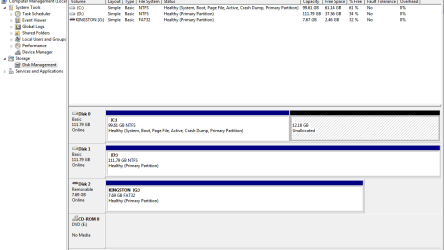
I have a HP Notebook and it has a 12 gb unused partition that I tried to delete that was used for "HP System Recovery" (Press F10) which reinstalled XP each time from the original installation . Now that is not needed because I am using Acronis Home 2010 Disk Imaging and can restore my computer with the recovery CD I have made as part of this program. I can see in my computer management/ disk management console that this is still there.

It says 12.18 gb "unallocated" I wish to free this up and use it as part of my C:\ drive

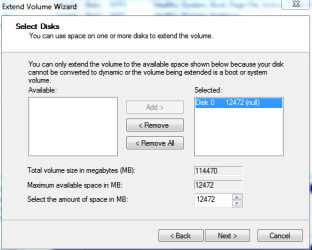
Can I use the "Extend Volume" Wizard to increase the size of my disk space and remove this unallocated space?
 

Attachments
  • Capture1.PNG
    Capture1.PNG
    12.6 KB · Views: 91
  • Capture.PNG
    Capture.PNG
    19.1 KB · Views: 116

My Computer My Computer

At a glance

Windows 7 7600 x65 Ultimate Signature Edition
Computer Manufacturer/Model Number
GENERIC
OS
Windows 7 7600 x65 Ultimate Signature Edition
Screen Resolution
1920 * 1200
Can I use the "Extend Volume" Wizard to increase the size of my disk space and remove this unallocated space?

Yes that's exactly what it's for.
 

My Computer My Computer

At a glance

XP, Seven, 2008R2AMD, Intel, VIACorsair, Kingston, etc.ATI, NVIDIA
Computer Manufacturer/Model Number
Too many to list.
OS
XP, Seven, 2008R2
CPU
AMD, Intel, VIA
Motherboard
Various
Memory
Corsair, Kingston, etc.
Graphics Card(s)
ATI, NVIDIA
Monitor(s) Displays
Samsung
Hard Drives
Maxtor, Western Digital
Keyboard
qwerty
Internet Speed
22 Mb/s @ home, 1 Gb/s @ server
Other Info
All of my systems still run fastest on XP 32-bit for the most part. Win7 is fun to play with, but I still prefer XP for raw speed, security, and functionality.
Can I use the "Extend Volume" Wizard to increase the size of my disk space and remove this unallocated space?

Yes that's exactly what it's for.

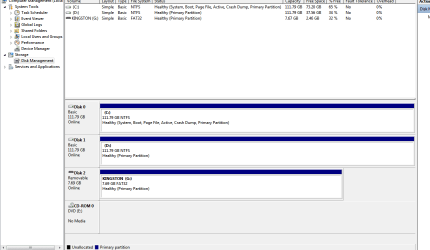
OK thanks for that advice, I went ahead and extended my partition and I am still here (breathes sigh of relief)
 

Attachments

  • Capture.PNG
    Capture.PNG
    20.3 KB · Views: 104
Last edited:

My Computer My Computer

At a glance

Windows 7 7600 x65 Ultimate Signature Edition
Computer Manufacturer/Model Number
GENERIC
OS
Windows 7 7600 x65 Ultimate Signature Edition
Screen Resolution
1920 * 1200
You're welcome. Good job ;)
 

My Computer My Computer

At a glance

XP, Seven, 2008R2AMD, Intel, VIACorsair, Kingston, etc.ATI, NVIDIA
Computer Manufacturer/Model Number
Too many to list.
OS
XP, Seven, 2008R2
CPU
AMD, Intel, VIA
Motherboard
Various
Memory
Corsair, Kingston, etc.
Graphics Card(s)
ATI, NVIDIA
Monitor(s) Displays
Samsung
Hard Drives
Maxtor, Western Digital
Keyboard
qwerty
Internet Speed
22 Mb/s @ home, 1 Gb/s @ server
Other Info
All of my systems still run fastest on XP 32-bit for the most part. Win7 is fun to play with, but I still prefer XP for raw speed, security, and functionality.
Back
Top