How do i delete the system reserved partition carefully?

D3N

Banned
Local time
9:26 AM
Messages
1
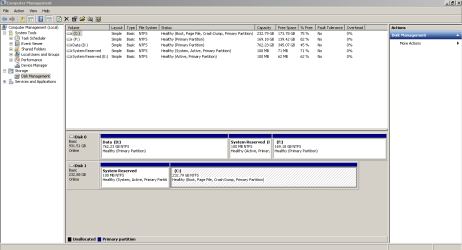
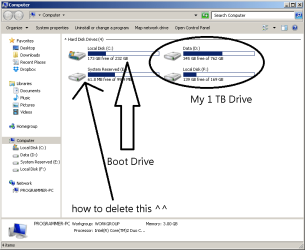
Hi everyone, ive got a system running windows 7 Ultimate x64 (dual boot) having a couple of drive.
A 250Gb & 1TB. My 250 Gb is where i installed windows and my 1Tb has 2 different partition. Drive D: where is save all my data and drive F: is my other windows installation drive. Long time ago i tried to delete my system reserved drive then my computer doesnt boot up at all. Is there any work around to delete without messing up my system? Thanks
 

Attachments
  • Untitled.png
    Untitled.png
    18.7 KB · Views: 0
  • Capture.PNG
    Capture.PNG
    18.2 KB · Views: 4

My Computer My Computer

Computer type
PC/Desktop
OS
Windows 7 Ultimate x64
I think you know the answer. The system reserved partition contains the bootmgr and if you delete is, the system cannot boot.

What you can do is to copy the bootmgr to the C partition. Then the system reserved is no more needed.

http://www.sevenforums.com/tutorials/209885-bootmgr-move-c-easybcd.html

However, I question the wisdom of removing this tiny partition. The amount of space you can gain is extremely minimal and it is not that easy to make use of it.
 

My Computer My Computer

Computer Manufacturer/Model Number
HP, Dell, Gateway, Toshiba - 4 laptops and 2 desktops
OS
Vista, Windows7, Mint Mate, Zorin, Windows 8
CPU
from 1.6GHz Duo to i7
Monitor(s) Displays
2x HP w2207
Hard Drives
5x HDD, 7x SSD, 12x Externals
Keyboard
with trackball - no mices
Mouse
Trackball mice
Internet Speed
DSL 6000
Can you boot into the other OS on DISK0 so we can see if it flags the System Reserved partition on that drive with System flag signifying which partition is booting the OS you're presently booted into?

If not, and you installed the OS on DISk0 with both hard drives plugged in, and you have a Windows Dual Boot menu and are not choosing which OS to boot via the BIOS Boot Menu key, then its possible both OS's are being booted by the System Reserved partition on Disk1.

To further test this unplug DISK1 to see if the OS on DISK0 will boot itself.

Please report back the results of both these tests so we can advise you correctly whether the E: System Reserved can be deleted because it is unused. We can also show you how to make DISK0 independently bootable via the BIOS if it isn't already so that either HD can come and go.
 
Back
Top