How do you "unlink" my documents from a folder?

ProsperousOne

New member
Local time
1:29 PM
Messages
8
I had a directory D:\Poker

I then had the bright idea to move "My Documents" to this folder, since that how the library always wanted to open default to.

Now, I"m having problems with after postgresql after reinstalling it, it can't find the data directory in D:\Poker, as I assume it's now seeing D:\My Documents.

How do I "unlink" My Documents from D:\Poker?

I tried restoring the My Documents default location via http://www.sevenforums.com/tutorials/18583-user-folders-restore-default-location-10.html

but that didn't do anything.

FYI, I currently have:

D:\My Document (Location D:\which points to D:\Poker, but in this My Documents Property, Location shows up as "D:\")

I also have a My Documents under C:\Documents and Settings\Steve.

This is driving me nuts....

thx in advance for any help.
 

My Computer

OS
Windows 7 Professional x64
CPU
AMC Phenom II X4 955 Quad 3.2GHz
Motherboard
Gigabyte AM3
Memory
8GB
Graphics Card(s)
BFG Tech GeForce 9400 512MB
Monitor(s) Displays
Hannspree 25" & HP 1730 17"
Hard Drives
OS & Programs: CRUCIAL 64GB SDD 250/150MB/S
Data: 2 x 1TB WD Caviar Black 7200RPM in RAID 0 Config.
Case
Covered in Magic Marker from my 2 year old
I had a directory D:\Poker

I then had the bright idea to move "My Documents" to this folder, since that how the library always wanted to open default to.

Now, I"m having problems with after postgresql after reinstalling it, it can't find the data directory in D:\Poker, as I assume it's now seeing D:\My Documents.

How do I "unlink" My Documents from D:\Poker?

I tried restoring the My Documents default location via http://www.sevenforums.com/tutorials/18583-user-folders-restore-default-location-10.html

but that didn't do anything.

FYI, I currently have:

D:\My Document (Location D:\which points to D:\Poker, but in this My Documents Property, Location shows up as "D:\")

I also have a My Documents under C:\Documents and Settings\Steve.

This is driving me nuts....

thx in advance for any help.

First of all, your "My Documents" folder should not be pointing to the drive root rolder ("D:\" in your case), but there are no laws that says it can't do that.

Secondly, you change "My Documents" to "D:\Poker". The name of the folder does not change. "My Documents" is only a display name. And then when you tried to restore default locations, you moved whatever was inside "D:\Poker" to that default location, which is usually "C:\Users\YOUUSERNAME\Documents", that's why your program can no longer find the D:\Poker data file. You're going to have to either re-install the poker program, or manually copy the data files back to where they should be.
 

My Computer

Computer type
PC/Desktop
Computer Manufacturer/Model Number
Virtual Machine
OS
Windows 7 Professional 32-bit SP1
CPU
AMD A4/A6
Motherboard
Intel Corporation 440BX Desktop Reference Platform
Memory
3.00GB EDO
Graphics Card(s)
VMware SVGA 3D
Sound Card
High Definition Audio Device
Monitor(s) Displays
Generic Non-PnP Monitor on VMware SVGA 3D
Screen Resolution
1440x900
Hard Drives
1 x 60GB VMware Virtual SATA Hard Drive ATA Device
Antivirus
Kaspersky Total Security
D:\Poker (aka My Documents) still has all the data, ie it wasn't moved to C:\Users\YOUUSERNAME\Documents.

But how to I removed the "My Documents" display name from "D:\Poker"?

In explorer, "D:\Poker" is showing up as "My Documents."

There isn't a "location" tab or option in this My Documents properties.

thx
 

My Computer

OS
Windows 7 Professional x64
CPU
AMC Phenom II X4 955 Quad 3.2GHz
Motherboard
Gigabyte AM3
Memory
8GB
Graphics Card(s)
BFG Tech GeForce 9400 512MB
Monitor(s) Displays
Hannspree 25" & HP 1730 17"
Hard Drives
OS & Programs: CRUCIAL 64GB SDD 250/150MB/S
Data: 2 x 1TB WD Caviar Black 7200RPM in RAID 0 Config.
Case
Covered in Magic Marker from my 2 year old

My Computer

Computer type
PC/Desktop
Computer Manufacturer/Model Number
Self built custom
OS
64-bit Windows 11 Pro for Workstations
CPU
Intel i7-8700K OC'd to 5 GHz
Motherboard
ASUS ROG Maximus XI Formula Z390
Memory
64 GB (4x16GB) G.SKILL TridentZ RGB DDR4 3600 MHz
Graphics Card(s)
ASUS ROG-STRIX-GTX1080TI-O11G-GAMING
Sound Card
Integrated
Monitor(s) Displays
2 x Samsung Odyssey G7 27"
Screen Resolution
2560x1440
Hard Drives
1TB Samsung 990 PRO M.2,
4TB Samsung 990 PRO PRO M.2,
TerraMaster F8 SSD Plus NAS
PSU
Seasonic Prime Titanium 850W
Case
Thermaltake Core P3
Cooling
Corsair Hydro H115i
Keyboard
Logitech wireless K800
Mouse
Logitech MX Master 4
Internet Speed
2 Gb/s Download and 100 Mb/s Upload
Antivirus
Malwarebyte Anti-Malware Premium
Browser
Google Chrome
Other Info
Logitech Z625 speaker system,
Logitech BRIO 4K Pro webcam,
HP Color LaserJet Pro MFP M477fdn,
APC SMART-UPS RT 1000 XL - SURT1000XLI,
Galaxy S23 Plus phone
D:\Poker (aka My Documents) still has all the data, ie it wasn't moved to C:\Users\YOUUSERNAME\Documents.

But how to I removed the "My Documents" display name from "D:\Poker"?

In explorer, "D:\Poker" is showing up as "My Documents."

There isn't a "location" tab or option in this My Documents properties.

thx

Correct me if I'm wrong, but you want to have "My Documents" point to "D:\Poker", but when you browse to D:, you want it to show as "Poker" and not "My Documents"?

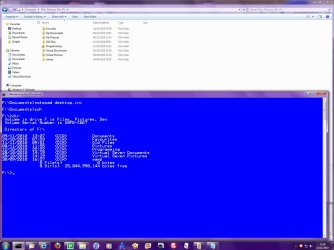
Checkout this screenshot:
Image1.jpg

In the Explorer view, you can clearly see "My Documents", "My Pictures", "Virtual Documents" and "Virtual Pictures". But in the command-line view, you see the folw names "Documents", "Pictures", "Virtual Seven Documents" and "Virtual Seven Pictures". (Thos last two I use in a Windows 7 Virtual PC to solve a compatibility problem with Windows Live Essentials 2011 and the Mede8er Media Player on my network, but that is a different topic".

Basically, I have the "My Documents" folder of 2 Windows installations on the same hard disk. One, pointing to "F:\Documents", is my normal folder, and the other, pointing to "F:\Virtual Seven Documents", belongs to the virtual Windows 7 installation. Under normal circumstances, BOTH with show up in either installation as "My Documents", which can understandably cause confusion. I changed the virtual "My Documents" to show as "Virtual Documents" by following this procedure:
  1. Open a command prompt
  2. Type "F:" (without quotes) and press <ENTER>. (Change "F:" to whatever drive letter your documents folder is on, in your case "D:")
  3. Type "CD Documents" (without quotes) to change to the Documents folder, and press <ENTER>. (In your case, you will change to "Poker"
  4. type "attrib -r -h -s -a desktop.ini" (all without quotes) and press <ENTER>
  5. type "notepad desktop.ini" (without quotes) and press <ENTER>
  6. Change the value of the "LocalizedResourceName=" key to whatever you want. I changed it to "Virtual Documents". If you completely remove the "LocalizedResourceName=" entry, the folder name will show up, which is I think what you want.
  7. Close notepad, and allow changes to be saved.
  8. Go back to the command line, and type "attrib +r +h +s +a desktop.ini" (without quotes) and press <ENTER>
  9. type "exit" (without quotes) and press <ENTER> to close the command line
  10. Close all explorer windows
  11. Reopen Explorer, and browse to "D:". You "My Documents" folder will show up with whatever name you entered into desktop.ini, or if you completely removed the "LocalizedResourceName=" entry, then it will display in Explorer with its actual name.
 

My Computer

Computer type
PC/Desktop
Computer Manufacturer/Model Number
Virtual Machine
OS
Windows 7 Professional 32-bit SP1
CPU
AMD A4/A6
Motherboard
Intel Corporation 440BX Desktop Reference Platform
Memory
3.00GB EDO
Graphics Card(s)
VMware SVGA 3D
Sound Card
High Definition Audio Device
Monitor(s) Displays
Generic Non-PnP Monitor on VMware SVGA 3D
Screen Resolution
1440x900
Hard Drives
1 x 60GB VMware Virtual SATA Hard Drive ATA Device
Antivirus
Kaspersky Total Security
Back
Top