How to add Windows 7 to boot manager?

seraphryu

New member
Local time
4:00 AM
Messages
11
i've had an interesting time with my computer lately and really could use some help to put myself at ease.

first of all i already have both XP(32) and Win7(64) installed but yesterday XP crapped out on me with a corrupted DLL file that didn't let me boot up into XP again.

i ran windows repair but because of a weird combination of unofficial sound drivers and the part of the installation process where all my devices(mouse, keyboard etc.) were seemingly cut off i couldn't proceed since i was prompted a choice i couldn't do anything with.

also, apparently the XP repair/installation process removes your old boot settings so i couldn't get into 7 either so i thought i was locked out from both of my drives though luckily i managed to solve it by doing a new XP install on top of the old one and could at least back up all my files before more things screwed up.

so basically i've got a new XP install and an old Win7 install but have no idea how to access win7 on my other drive since the boot option was removed.

i was going to just install win7 again but on top of all this when i boot up my win7 CD, it comes to a blue screen with a mouse cursor and apparently just hangs with nothing happening.

so basically:

-is it possible to add win7 to your boot manager from XP and if so, how?

-if that fails, how do you get past the blank/blue screen after booting up the win7 CD? there were no problems when i first installed win7.

thx alot.
 
Last edited:

My Computer My Computer

OS
windows 7 64 bit, windows XP 32 bit

My Computer My Computer

Computer type
PC/Desktop
Computer Manufacturer/Model Number
Custom Build
OS
Windows 10 Pro x64, Arch Linux
CPU
Intel Core 2 Quad Q8200 OC'd 3.08GHz
Motherboard
Asus Rampage formula LGA775
Memory
8GB DDR2 900Mhz
Graphics Card(s)
MSI GT730 2GB GDDR5 (Kepler)
Sound Card
Supreme FX2
Monitor(s) Displays
Samsung LS22F350 LED
Screen Resolution
1080P
Hard Drives
Kingston SSDNow UV400 120GB, 500GB Hitachi, 2TB Samsung, 500GB Seagate FreeAgent, 640GB Samsung, 160GB Toshiba (Arch)
PSU
AeroCool 500W Bronze
Cooling
Cooler Master V6 + 3X fans
Keyboard
Prolink keyboard
Mouse
Logitech M705
Internet Speed
1MiB/s
Browser
Chrome Beta
okay after installing it, it shows my old boot list instead of the new one with the fresh XP install(remember i installed a new XP on top without formatting/removing the old one because i didn't want to lose my files)

old list:
earlier version of windows(XP)
win7
win7

the new boot list that doesn't show in easyBCD:
windows home premium(fresh install)
windows home premium(from my botched repair of the old windows which i can't boot into anyway)

what can i do from here to make it recognize the new list and add win7 to that?
 

My Computer My Computer

OS
windows 7 64 bit, windows XP 32 bit
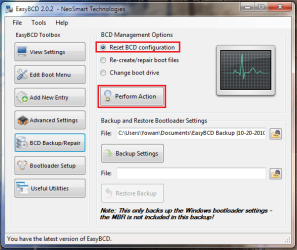
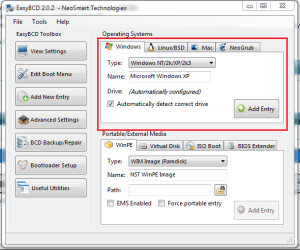
Reset the Boot configuration then add the missing entries
 

Attachments

  • Capture.PNG
    Capture.PNG
    30.3 KB · Views: 86
  • 2.PNG
    2.PNG
    23.8 KB · Views: 57

My Computer My Computer

Computer type
PC/Desktop
Computer Manufacturer/Model Number
Custom Build
OS
Windows 10 Pro x64, Arch Linux
CPU
Intel Core 2 Quad Q8200 OC'd 3.08GHz
Motherboard
Asus Rampage formula LGA775
Memory
8GB DDR2 900Mhz
Graphics Card(s)
MSI GT730 2GB GDDR5 (Kepler)
Sound Card
Supreme FX2
Monitor(s) Displays
Samsung LS22F350 LED
Screen Resolution
1080P
Hard Drives
Kingston SSDNow UV400 120GB, 500GB Hitachi, 2TB Samsung, 500GB Seagate FreeAgent, 640GB Samsung, 160GB Toshiba (Arch)
PSU
AeroCool 500W Bronze
Cooling
Cooler Master V6 + 3X fans
Keyboard
Prolink keyboard
Mouse
Logitech M705
Internet Speed
1MiB/s
Browser
Chrome Beta
okay good news first:
after resetting and applying the new entries i managed to get into win7 again.

the bad news is that using the automatic drive selection for detecting XP it boots me into the botched version of XP instead of the new one i installed.

i tried renaming the working XP folder to default windows(my fault for not just overwriting the damn thing but put it in a new folder "Windows1" instead) and it boots up but doesn't go past the blue welcome screen.

got any more suggestions?

this is probably the weirdest issue i've had to deal with on my computer so far.
 

My Computer My Computer

OS
windows 7 64 bit, windows XP 32 bit
it boots up but doesn't go past the blue welcome screen
Your XP installation might be corrupt
 

My Computer My Computer

Computer type
PC/Desktop
Computer Manufacturer/Model Number
Custom Build
OS
Windows 10 Pro x64, Arch Linux
CPU
Intel Core 2 Quad Q8200 OC'd 3.08GHz
Motherboard
Asus Rampage formula LGA775
Memory
8GB DDR2 900Mhz
Graphics Card(s)
MSI GT730 2GB GDDR5 (Kepler)
Sound Card
Supreme FX2
Monitor(s) Displays
Samsung LS22F350 LED
Screen Resolution
1080P
Hard Drives
Kingston SSDNow UV400 120GB, 500GB Hitachi, 2TB Samsung, 500GB Seagate FreeAgent, 640GB Samsung, 160GB Toshiba (Arch)
PSU
AeroCool 500W Bronze
Cooling
Cooler Master V6 + 3X fans
Keyboard
Prolink keyboard
Mouse
Logitech M705
Internet Speed
1MiB/s
Browser
Chrome Beta
okay good news first:
after resetting and applying the new entries i managed to get into win7 again.

the bad news is that using the automatic drive selection for detecting XP it boots me into the botched version of XP instead of the new one i installed.

i tried renaming the working XP folder to default windows(my fault for not just overwriting the damn thing but put it in a new folder "Windows1" instead) and it boots up but doesn't go past the blue welcome screen.

got any more suggestions?

this is probably the weirdest issue i've had to deal with on my computer so far.
Did you run easy bcd from within the windows 7 install?:cool:
 

My Computer My Computer

Computer Manufacturer/Model Number
Gateway GT5692
OS
Windows 7 Ulti. x64
CPU
AMD Phenom 8450 triple-core 2.10 ghz
Memory
4GB
Graphics Card(s)
ATI Radion HD 3200
Monitor(s) Displays
Gateway FPD1775W
Screen Resolution
1280x720
Hard Drives
465.6613 Gibibytes
Well i just said screw it and went for another install of XP but this time deleting the previous install occupying the default windows XP folder... gonna install easy BCD again and then use the same method as before and see if automatic detection for XP enables me to boot into it now as well as 7(since 7 worked before i'm assuming it shouldn't give me any problems).
 

My Computer My Computer

OS
windows 7 64 bit, windows XP 32 bit
Again, did you try adding XP using EasyBCD from Win7? It works better.
 
no... i was already done reinstalling XP when the suggestion came.

anyways the method worked and i've got access to both 7 and XP now.

thx for every suggestion.
 

My Computer My Computer

OS
windows 7 64 bit, windows XP 32 bit
Back
Top