How to bypass logon screen?

RiddleMeThis

New member
Local time
7:46 AM
Messages
2
Hi guys, i hope this is in the right section, wasn't sure where to put it so sorry if it isn't.
I'm new to Windows 7, never used it before yesterday and came straight from XP so I'm not completely sure as to the configuration yet.

My problem is that I don't have a Windows password, but Windows won't boot straight up, instead i always get presented with the logon screen and I have to click my username to log in.
This is quite irritating as I just want to turn the PC on, go get a drink or something, come back and it's ready, but I cant!
I'm not sure what I've installed that's made it do this but is there a simple way around it? I only have one user account (which has admin rights) and no password on it.
Thanks in advance
 

My Computer

OS
Windows 7 x64
CPU
Athlon II x4 630
Motherboard
Asus M4A78LT-M LE
Memory
4GB OCR 1033MHz
Graphics Card(s)
Integrated ATI Radeon HD 3000 (max shared 1GB)
Sound Card
VIA VT1708S
Monitor(s) Displays
Hanns-G 22" HG216D & Samsung Syncmaster 15" 151s
Screen Resolution
1680x1050 and 1024x768
Hard Drives
Western Digital Green 800GB with 64MB cache
PSU
Arctic Cooling 600w

My Computer

Computer type
Laptop
Computer Manufacturer/Model Number
HP ENVY 17-1150eg
OS
Windows 10 Pro x64 EN-GB
CPU
1.6 GHz Intel Core i7-720QM Processor
Memory
6 GB
Graphics Card(s)
ATI Mobility Radeon HD 5850 Graphics
Sound Card
Beats sound system with integrated subwoofer
Monitor(s) Displays
17" laptop display, 22" LED and 32" Full HD TV through HDMI
Screen Resolution
1600*900 (1), 1920*1080 (2&3)
Hard Drives
Internal: 2 x 500 GB SATA Hard Disk Drive 7200 rpm
External: 2TB for backups, 3TB USB3 network drive for media
Cooling
As Envy runs a bit warm, I have it on a Cooler Master pad
Keyboard
Logitech diNovo Media Desktop Laser (bluetooth)
Mouse
Logitech Performance Mouse MX
Internet Speed
50/10 Mbps VDSL
Antivirus
Windows Defender 4.3.9431.0
Browser
Maxthon 3.5.2., IE11
Hi guys, i hope this is in the right section, wasn't sure where to put it so sorry if it isn't.
I'm new to Windows 7, never used it before yesterday and came straight from XP so I'm not completely sure as to the configuration yet.

My problem is that I don't have a Windows password, but Windows won't boot straight up, instead i always get presented with the logon screen and I have to click my username to log in.
This is quite irritating as I just want to turn the PC on, go get a drink or something, come back and it's ready, but I cant!
I'm not sure what I've installed that's made it do this but is there a simple way around it? I only have one user account (which has admin rights) and no password on it.
Thanks in advance
.
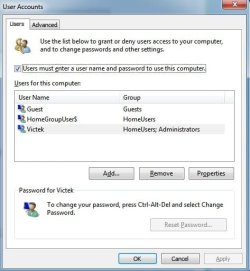
From an elevated command prompt (search on "command" and then right-click and select "run as administrator") type "control userpasswords2" and push enter. You should see the screenshot below. Remove the check from the box:

"users must enter a user name and password to use this computer"

You will be asked to confirm your password, so just leave the boxes blank. That should do it. Reboot to confirm. :geek:
 

Attachments

  • ScreenShot00013.jpg
    ScreenShot00013.jpg
    34.1 KB · Views: 112

My Computer

Computer type
PC/Desktop
OS
Windows 7 x64
CPU
Intel Core2 Extreme Q6850 3.00GHz
Motherboard
EVGA 132-CK-NF79
Memory
8 GB
Graphics Card(s)
Radeon R7 260X
Sound Card
Xonar DS
Hard Drives
Hitachi Deskstar 1 tb
Sweet! Thanks guys it worked a treat, much better :D
 

My Computer

OS
Windows 7 x64
CPU
Athlon II x4 630
Motherboard
Asus M4A78LT-M LE
Memory
4GB OCR 1033MHz
Graphics Card(s)
Integrated ATI Radeon HD 3000 (max shared 1GB)
Sound Card
VIA VT1708S
Monitor(s) Displays
Hanns-G 22" HG216D & Samsung Syncmaster 15" 151s
Screen Resolution
1680x1050 and 1024x768
Hard Drives
Western Digital Green 800GB with 64MB cache
PSU
Arctic Cooling 600w
Back
Top