
Solved How to clean my Mouse?

OneDarkLord

New member
Member
Local time
6:39 PM
Messages
43
Location
Israel
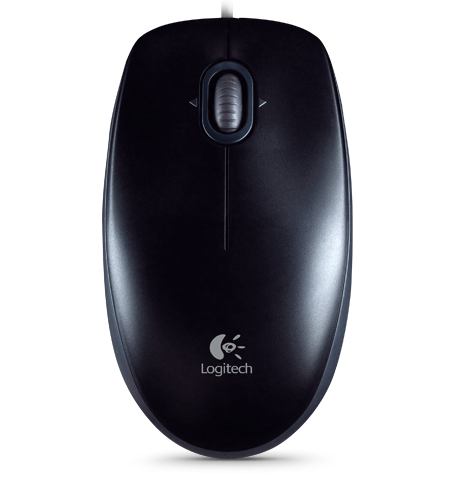
i have Logitech B110 Optical USB Mouse,i need to open it to clean dirt inside it,now the mouse have only 1 bolt from the outside,and something from the inside keeps half of the mouse attached,but there are no bolts.
20248.png
910-001246_45_1600x1600.jpg


that's my mouse,you can see only 1 bolt at the bottom,i even removed those black sticky things but no bolts under them,can't completely open it.
 

My Computer My Computer

OS
MS Windows 7 Ultimate 32-bit SP1
CPU
Intel Pentium E5400 @ 2.70GHz Wolfdale 45nm Technology
Motherboard
MSI G41M4 (MS-7592) (CPU 1)
Memory
4.00 GB Dual-Channel DDR2 @ 400MHz (6-6-6-18)
Graphics Card(s)
ATI Radeon HD 4600 Series
Sound Card
Speakers (Realtek High Definition Audio)
Monitor(s) Displays
BenQ G2020HDA
Screen Resolution
1600x900
Hard Drives
313GB SAMSUNG SAMSUNG HD322HJ ATA Device (SATA)
Keyboard
Chicony Multimedia Keyboard KB-0512
Mouse
Logitech B110 Optical USB Mouse
Internet Speed
100.0 Mbps
I'm not familiar with that particular Logitech mouse but with other models it's possible to slide the bottom half either up or down and then lift it away from the top half. Don't have any idea if this will work.

I went to the Logitech website and found this for your mouse:

B110 Optical USB Mouse

No support documentation, no product documentation, no replacement parts. Not very helpful. But I was able to find a customer support email link (right column.) Perhaps they can give you specific instructions for disassembling the mouse.

Support + Downloads
 

My Computer My Computer

Computer type
Laptop
Computer Manufacturer/Model Number
Sony Vaio VPCEB47GM Laptop
OS
Win 7 Pro 64-bit
CPU
Intel i5 2.4 Ghz
Memory
8GB DDR3
Graphics Card(s)
Intel HD 3000
Sound Card
IDT High Definition
Monitor(s) Displays
15.6 WGXA Anti-Glare LED
Screen Resolution
1280x800
Hard Drives
640Gb 7200rpm
Antivirus
MSE
Browser
Opera (primary) with IE9 backup
I'd simply blow compressed air on it.

If you really want to take it apart, then I recommend contacting Logitech via their web site.

Does the mouse work?
 

My Computer My Computer

Computer Manufacturer/Model Number
Toshiba Satellite S875D-S7239 laptop
OS
MS Windows 7 Ultimate SP1 64-bit
CPU
AMD A10-4600M
Motherboard
AMD Pumori (Socket FT1)
Memory
6.00 GB Dual-Channel DDR3 @ 798MHz (11-11-12-28)
Graphics Card(s)
AMD Radeon HD 7660G
Sound Card
High Definition Audio Device
Monitor(s) Displays
Generic PnP Monitor (1600x900@60Hz)
Screen Resolution
1600x900@60Hz
Hard Drives
SSD 119GB Corsair CSSD-V128GB2 ATA Device
Keyboard
Standard PS/2 Keyboard
Mouse
HP Wireless Optical Mobile Mouse Model FHA-3410
Internet Speed
What the local pub, local coffee shop offers.
Other Info
Optical Drive:MATSHITA BD-CMB UJ160B ATA Device


Also have an Asus ha1002xp netbook with Win 7 Ultimate installed.
i managed to open it like marsmimar said and cleaned it,looks like new mouse now :D
 

My Computer My Computer

OS
MS Windows 7 Ultimate 32-bit SP1
CPU
Intel Pentium E5400 @ 2.70GHz Wolfdale 45nm Technology
Motherboard
MSI G41M4 (MS-7592) (CPU 1)
Memory
4.00 GB Dual-Channel DDR2 @ 400MHz (6-6-6-18)
Graphics Card(s)
ATI Radeon HD 4600 Series
Sound Card
Speakers (Realtek High Definition Audio)
Monitor(s) Displays
BenQ G2020HDA
Screen Resolution
1600x900
Hard Drives
313GB SAMSUNG SAMSUNG HD322HJ ATA Device (SATA)
Keyboard
Chicony Multimedia Keyboard KB-0512
Mouse
Logitech B110 Optical USB Mouse
Internet Speed
100.0 Mbps
That's very good news. Thanks for posting back. :thumbsup:
 

My Computer My Computer

Computer type
Laptop
Computer Manufacturer/Model Number
Sony Vaio VPCEB47GM Laptop
OS
Win 7 Pro 64-bit
CPU
Intel i5 2.4 Ghz
Memory
8GB DDR3
Graphics Card(s)
Intel HD 3000
Sound Card
IDT High Definition
Monitor(s) Displays
15.6 WGXA Anti-Glare LED
Screen Resolution
1280x800
Hard Drives
640Gb 7200rpm
Antivirus
MSE
Browser
Opera (primary) with IE9 backup
Back
Top