
Solved How to combine two primary partitions into one.

Raul

New member
Local time
12:53 PM
Messages
44
Hi.

First I'd like to say that this is my first post on this site, if I've posted on the wrong forum do let me know. I picked general discussion because it seemed to be the most correct one to post this kind of issue.

I have an Acer Aspire 5920G from way back which originally came with Vista, but I upgraded to Windows 7 a while ago as I like it more and it is compatible according to windows 7 upgrade advisor.

I want to know if can put all the stuff I need to keep the laptop up and going into one of the drives(C drive), and format the other drive(D drive) for personal use.

I want to do this because at the moment they both have used space but I don't know for what. I'd like to use the C drive for all the stuff the laptop needs, and empty the D drive and only put stuff in there of my own choice. Like my private files, pictures, university documents etc, and I have 100GB+ of those. I have been mingling around with the laptop recently myself as well, like removing the windows.old folder and some minor changes here and there(dont know if that is of importance or not).

Under computer-manage-disk management it says that both drives are primary partitions.

Here is a picture of the disk management; pic.png
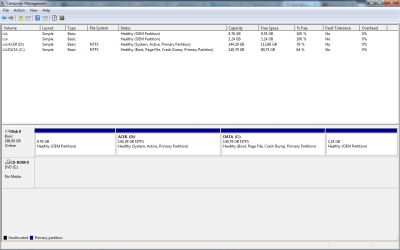
You can see the C and D drive, but I have no idea what the two empty ones above them are.

Please keep in mind that I'm IT illiterate. If there is any information regarding the laptop that I can give to aid the question, ask away.
 
Last edited:

My Computer My Computer

At a glance

Windows 7 Ultimate 32bitInter(r) core(tm) 2 duo CPU t5550 @1.83ghz 1....4,00 GB (3,00 GB usable)?
Computer type
PC/Desktop
Computer Manufacturer/Model Number
Acer
OS
Windows 7 Ultimate 32bit
CPU
Inter(r) core(tm) 2 duo CPU t5550 @1.83ghz 1.83 ghz
Motherboard
?
Memory
4,00 GB (3,00 GB usable)
Graphics Card(s)
?
Hard Drives
?
Antivirus
Bitdefender total security
Browser
Opera

My Computer My Computer

At a glance

Windows 10 Pro x64Intel Core i7 6700KGSkill TridentZ RGB 16GB 3600 16-16-16-36EVGA GTX 980 Ti SC x2
Computer type
PC/Desktop
Computer Manufacturer/Model Number
Skylake Special #666
OS
Windows 10 Pro x64
CPU
Intel Core i7 6700K
Motherboard
Asus Sabertooth Z170 Mark 1
Memory
GSkill TridentZ RGB 16GB 3600 16-16-16-36
Graphics Card(s)
EVGA GTX 980 Ti SC x2
Sound Card
Realtek High Definition
Monitor(s) Displays
AOC G2460PG
Screen Resolution
1920 x 1080 144Hz
Hard Drives
Samsung 860 Pro 256GB, Seagate Barracuda 4TB x2
PSU
EVGA 1000 P2, EVGA White Custom Braided Cables
Case
Corsair Vengeance C70 Gunmetal Black
Cooling
Corsair H100i v2, Corsair ML120 x2, Thermal Grizzly Kryonaut
Keyboard
Logitech G910 Orion Spectrum
Mouse
Logitech G700s
Internet Speed
Verizon Fios Quantum Gateway 75/75
Antivirus
Windows Defender, Malwarebytes Free 3.8.3
Browser
Chrome
Other Info
Corsair SP120 x4, LG Blu-ray Drive, Durabrand HT-395 100 Watt Dolby Digital Amp, Corsair H2100 Wireless 7.1 Headset
@AddRAM My bad regarding the picture, I edited it now. How do I know if I have two hard drives or just two partitions on one hard drive
 

My Computer My Computer

At a glance

Windows 7 Ultimate 32bitInter(r) core(tm) 2 duo CPU t5550 @1.83ghz 1....4,00 GB (3,00 GB usable)?
Computer type
PC/Desktop
Computer Manufacturer/Model Number
Acer
OS
Windows 7 Ultimate 32bit
CPU
Inter(r) core(tm) 2 duo CPU t5550 @1.83ghz 1.83 ghz
Motherboard
?
Memory
4,00 GB (3,00 GB usable)
Graphics Card(s)
?
Hard Drives
?
Antivirus
Bitdefender total security
Browser
Opera
Still no pic.

In Disk Management, you should see individual discs labeled Disk 0, Disk 1, Disk 2, etc.

Partitions typically have letters like C, D, E.

But we need the pic.
 

My Computer My Computer

At a glance

Windows 7 Home Premium SP1, 64-bitIntel Skylake i5-6600K, not overclocked8 GB HyperX DDR4-2666 (2 x 4 GB)none; graphics are integrated on CPU
Computer type
PC/Desktop
Computer Manufacturer/Model Number
Ignatz Special; 4 speed manual gearbox; factory air conditioning; one of one
OS
Windows 7 Home Premium SP1, 64-bit
CPU
Intel Skylake i5-6600K, not overclocked
Motherboard
AsRock Z170M Extreme 4, micro ATX
Memory
8 GB HyperX DDR4-2666 (2 x 4 GB)
Graphics Card(s)
none; graphics are integrated on CPU
Sound Card
onboard: Realtek ALC1150; external: USB Behringer UF0-202
Monitor(s) Displays
Dell S2340M 23 inch IPS
Screen Resolution
1600 x 900
Hard Drives
System: Crucial MX100 series SSD, 128 GB;
Data: Samsung Spinpoint 103SJ, 1 TB;
Backup: WD Caviar Green WD30EZRX-00D8PB0, 3 TB
PSU
Rosewill SilentNight 500 watt fanless, semi-modular
Case
Antec Solo II
Cooling
Noctua NH-U12S; Noctua F12 intake, Noctua S12A exhaust
Keyboard
Microsoft 200 6JH-00001 USB
Mouse
Dell or Microsoft optical wired; USB
Antivirus
Microsoft Security Essentials and Malwarebytes Premium
Browser
Pale Moon
Other Info
All fans PWM; speeds at idle: CPU circa 500 rpm; intake circa 600 rpm; exhaust circa 600 rpm; CPU temps 27 idle and 47 C load in a warm room (27 C/81 F) when running Intel Extreme Tuning Utility stress test.
Really still no pic? I followed the steps on the link AddRam provided. This is how it looks on my part; Here is a picture of the disk management; Attachment 311289(In light blue colour and i press it and it takes me to the picture)

Looking at disk management I think I have one hard drive then. Let me try to fix the issue with the picture one more time.
 

My Computer My Computer

At a glance

Windows 7 Ultimate 32bitInter(r) core(tm) 2 duo CPU t5550 @1.83ghz 1....4,00 GB (3,00 GB usable)?
Computer type
PC/Desktop
Computer Manufacturer/Model Number
Acer
OS
Windows 7 Ultimate 32bit
CPU
Inter(r) core(tm) 2 duo CPU t5550 @1.83ghz 1.83 ghz
Motherboard
?
Memory
4,00 GB (3,00 GB usable)
Graphics Card(s)
?
Hard Drives
?
Antivirus
Bitdefender total security
Browser
Opera
For the pic, you have to use "go advanced" at the bottom of the posting window and then look for "manage attachment".

When I poke your link, I get an "invalid" error.
 

My Computer My Computer

At a glance

Windows 7 Home Premium SP1, 64-bitIntel Skylake i5-6600K, not overclocked8 GB HyperX DDR4-2666 (2 x 4 GB)none; graphics are integrated on CPU
Computer type
PC/Desktop
Computer Manufacturer/Model Number
Ignatz Special; 4 speed manual gearbox; factory air conditioning; one of one
OS
Windows 7 Home Premium SP1, 64-bit
CPU
Intel Skylake i5-6600K, not overclocked
Motherboard
AsRock Z170M Extreme 4, micro ATX
Memory
8 GB HyperX DDR4-2666 (2 x 4 GB)
Graphics Card(s)
none; graphics are integrated on CPU
Sound Card
onboard: Realtek ALC1150; external: USB Behringer UF0-202
Monitor(s) Displays
Dell S2340M 23 inch IPS
Screen Resolution
1600 x 900
Hard Drives
System: Crucial MX100 series SSD, 128 GB;
Data: Samsung Spinpoint 103SJ, 1 TB;
Backup: WD Caviar Green WD30EZRX-00D8PB0, 3 TB
PSU
Rosewill SilentNight 500 watt fanless, semi-modular
Case
Antec Solo II
Cooling
Noctua NH-U12S; Noctua F12 intake, Noctua S12A exhaust
Keyboard
Microsoft 200 6JH-00001 USB
Mouse
Dell or Microsoft optical wired; USB
Antivirus
Microsoft Security Essentials and Malwarebytes Premium
Browser
Pale Moon
Other Info
All fans PWM; speeds at idle: CPU circa 500 rpm; intake circa 600 rpm; exhaust circa 600 rpm; CPU temps 27 idle and 47 C load in a warm room (27 C/81 F) when running Intel Extreme Tuning Utility stress test.
I think it should be ok now?
 

My Computer My Computer

At a glance

Windows 7 Ultimate 32bitInter(r) core(tm) 2 duo CPU t5550 @1.83ghz 1....4,00 GB (3,00 GB usable)?
Computer type
PC/Desktop
Computer Manufacturer/Model Number
Acer
OS
Windows 7 Ultimate 32bit
CPU
Inter(r) core(tm) 2 duo CPU t5550 @1.83ghz 1.83 ghz
Motherboard
?
Memory
4,00 GB (3,00 GB usable)
Graphics Card(s)
?
Hard Drives
?
Antivirus
Bitdefender total security
Browser
Opera
That's quite a mess.

4 partitions, 2 of them OEM partitions from Acer. That's OK.

It looks like Windows is on what is now called the D partition and your boot files are on what is now called the C partition.

Normally, you'd expect to see the C partition carrying the tags of system, boot, and active.

If the boot files were copied to the D partition, I suspect that partition would be renamed from D to C.

You can copy boot files with third party tools--such as Easy BCD I think.

In your opinion, where are your personal files right now--on C or on D, referring to that picture?

Wait for more comments before changing anything.

Is the PC performing fine?
 

My Computer My Computer

At a glance

Windows 7 Home Premium SP1, 64-bitIntel Skylake i5-6600K, not overclocked8 GB HyperX DDR4-2666 (2 x 4 GB)none; graphics are integrated on CPU
Computer type
PC/Desktop
Computer Manufacturer/Model Number
Ignatz Special; 4 speed manual gearbox; factory air conditioning; one of one
OS
Windows 7 Home Premium SP1, 64-bit
CPU
Intel Skylake i5-6600K, not overclocked
Motherboard
AsRock Z170M Extreme 4, micro ATX
Memory
8 GB HyperX DDR4-2666 (2 x 4 GB)
Graphics Card(s)
none; graphics are integrated on CPU
Sound Card
onboard: Realtek ALC1150; external: USB Behringer UF0-202
Monitor(s) Displays
Dell S2340M 23 inch IPS
Screen Resolution
1600 x 900
Hard Drives
System: Crucial MX100 series SSD, 128 GB;
Data: Samsung Spinpoint 103SJ, 1 TB;
Backup: WD Caviar Green WD30EZRX-00D8PB0, 3 TB
PSU
Rosewill SilentNight 500 watt fanless, semi-modular
Case
Antec Solo II
Cooling
Noctua NH-U12S; Noctua F12 intake, Noctua S12A exhaust
Keyboard
Microsoft 200 6JH-00001 USB
Mouse
Dell or Microsoft optical wired; USB
Antivirus
Microsoft Security Essentials and Malwarebytes Premium
Browser
Pale Moon
Other Info
All fans PWM; speeds at idle: CPU circa 500 rpm; intake circa 600 rpm; exhaust circa 600 rpm; CPU temps 27 idle and 47 C load in a warm room (27 C/81 F) when running Intel Extreme Tuning Utility stress test.
The D partition is your active partition - that is it contains the bootmgr. The first thing you have to do is copy the bottmgr to C - Like this:

http://www.sevenforums.com/tutorials/209885-bootmgr-move-c-easybcd.html

Then you have to check what else is on the D partition and possibly back that up. After that you can delete the D partition. Best is to use the bootable CD of Partition Wizard. The iso is in the last box of the webpage. And here is how:

Delete Partition - Partition Wizard Help Video

Once you have unallocated space in lieu of D, you can either create a new partition or add it to C. For that you also have to use the CD. Here is how:

How to extend partition easily with partition magic ? Partition Wizard video help.

Make sure you make an image of C before you do that operation. Here is how:

http://www.sevenforums.com/tutorials/73828-imaging-free-macrium.html?ltr=I

If you have questions, post back.
 

My Computer My Computer

At a glance

Vista, Windows7, Mint Mate, Zorin, Windows 8from 1.6GHz Duo to i7
Computer Manufacturer/Model Number
HP, Dell, Gateway, Toshiba - 4 laptops and 2 desktops
OS
Vista, Windows7, Mint Mate, Zorin, Windows 8
CPU
from 1.6GHz Duo to i7
Monitor(s) Displays
2x HP w2207
Hard Drives
5x HDD, 7x SSD, 12x Externals
Keyboard
with trackball - no mices
Mouse
Trackball mice
Internet Speed
DSL 6000
@ignatzatsonic To be honest I've done plenty of mingling with the laptop. As I mentioned it came with Vista at first, and I've gone back and forth several times between Vista and Windows( several version). This could be the cause of why it's so messy looking at the disk management.

It had plenty of issues and I meant to just format and clean the laptop back to factory settings, but it did not work out I think, and it's gone through a lot of change in the last year.

I only started using it a year ago, before that it was unused for a year or two because it was just a mess because of what I'd done on it.

I would say it's on C drive, but I'm not so sure if I have anything of significance on it as I saved all my personal files(100gb+) on another laptop for the moment until I can get this issue fixed.

I use dropbox and I have 50gb on it(about 5% is used), there I keep all my personal files which I access through this laptop.

Ideally, I'd like to wipe the laptop and fix this issue but keep all the programs i have installed. Bitdefender, Office 2013 etc. Or just wipe the laptop and reinstall the programs can work, although it's a hassle.
 

My Computer My Computer

At a glance

Windows 7 Ultimate 32bitInter(r) core(tm) 2 duo CPU t5550 @1.83ghz 1....4,00 GB (3,00 GB usable)?
Computer type
PC/Desktop
Computer Manufacturer/Model Number
Acer
OS
Windows 7 Ultimate 32bit
CPU
Inter(r) core(tm) 2 duo CPU t5550 @1.83ghz 1.83 ghz
Motherboard
?
Memory
4,00 GB (3,00 GB usable)
Graphics Card(s)
?
Hard Drives
?
Antivirus
Bitdefender total security
Browser
Opera
Just follow my instructions and you'll be OK.
 

My Computer My Computer

At a glance

Vista, Windows7, Mint Mate, Zorin, Windows 8from 1.6GHz Duo to i7
Computer Manufacturer/Model Number
HP, Dell, Gateway, Toshiba - 4 laptops and 2 desktops
OS
Vista, Windows7, Mint Mate, Zorin, Windows 8
CPU
from 1.6GHz Duo to i7
Monitor(s) Displays
2x HP w2207
Hard Drives
5x HDD, 7x SSD, 12x Externals
Keyboard
with trackball - no mices
Mouse
Trackball mice
Internet Speed
DSL 6000
You can't "wipe" the laptop and keep all programs.

First thing I'd do is confirm to a 100% certainty that all of my personal files, including bookmarks and email, are backed up to some location other than any of those partitions shown.

Would that be to dropbox only or do you have an external drive or something like that you could back up to?

50 GB now on dropbox. If that isn't ALL of your stuff, get the rest of it to dropbox.

Personally, I wouldn't trust dropbox as my one and only backup, but that's your call.
 

My Computer My Computer

At a glance

Windows 7 Home Premium SP1, 64-bitIntel Skylake i5-6600K, not overclocked8 GB HyperX DDR4-2666 (2 x 4 GB)none; graphics are integrated on CPU
Computer type
PC/Desktop
Computer Manufacturer/Model Number
Ignatz Special; 4 speed manual gearbox; factory air conditioning; one of one
OS
Windows 7 Home Premium SP1, 64-bit
CPU
Intel Skylake i5-6600K, not overclocked
Motherboard
AsRock Z170M Extreme 4, micro ATX
Memory
8 GB HyperX DDR4-2666 (2 x 4 GB)
Graphics Card(s)
none; graphics are integrated on CPU
Sound Card
onboard: Realtek ALC1150; external: USB Behringer UF0-202
Monitor(s) Displays
Dell S2340M 23 inch IPS
Screen Resolution
1600 x 900
Hard Drives
System: Crucial MX100 series SSD, 128 GB;
Data: Samsung Spinpoint 103SJ, 1 TB;
Backup: WD Caviar Green WD30EZRX-00D8PB0, 3 TB
PSU
Rosewill SilentNight 500 watt fanless, semi-modular
Case
Antec Solo II
Cooling
Noctua NH-U12S; Noctua F12 intake, Noctua S12A exhaust
Keyboard
Microsoft 200 6JH-00001 USB
Mouse
Dell or Microsoft optical wired; USB
Antivirus
Microsoft Security Essentials and Malwarebytes Premium
Browser
Pale Moon
Other Info
All fans PWM; speeds at idle: CPU circa 500 rpm; intake circa 600 rpm; exhaust circa 600 rpm; CPU temps 27 idle and 47 C load in a warm room (27 C/81 F) when running Intel Extreme Tuning Utility stress test.
@ignatzatsonic All of my personal files including those you mentioned and so forth are all backed up on another laptop so they are safe, fortunately. Those on dropbox are also backed up on another laptop, but I mentioned dropbox only because I use it regularly for my most used university documents on this laptop. I would not mind wiping the laptop as long as it fixed this issue with the paritions, I could always re-install the programs that will not be problem.

@whs Wow! All of that looks scary!

The first part looks understandable enough. I think I can manage that.

When you say to check for what else is on the D partition. Do you mean what else, as in personal files? Or what else as in files or folders that windows needs to run and which I will need to move to C?

When I've done this, if I make a new partition will it be just like the D one I have now? But it will empty and I can use it for personal stuff? Btw, if I fill up the new partition close to the max will that affect system performance? Can I choose how much space i'd like on the partition or is that automatically chosen?

What does it mean to make an image of C?
 

My Computer My Computer

At a glance

Windows 7 Ultimate 32bitInter(r) core(tm) 2 duo CPU t5550 @1.83ghz 1....4,00 GB (3,00 GB usable)?
Computer type
PC/Desktop
Computer Manufacturer/Model Number
Acer
OS
Windows 7 Ultimate 32bit
CPU
Inter(r) core(tm) 2 duo CPU t5550 @1.83ghz 1.83 ghz
Motherboard
?
Memory
4,00 GB (3,00 GB usable)
Graphics Card(s)
?
Hard Drives
?
Antivirus
Bitdefender total security
Browser
Opera
You have to take one of two forks in the road first:

1: Do a clean install and then reinstall all programs. You'd end up without those OEM partitions. You'd have Windows and presumably all applications on C. Data could also be on C or you could make a D and put it there.

2: Do what WHS is suggesting: get everything of value on D copied elsewhere, delete D, which leaves you with a bunch of "unallocated space" and then add that unallocated space to C.

Which will it be?

Do you have any interest in being able to restore to the way it was when you bought it---I guess with Vista?

Is this laptop out of warranty?

Making an image means to make a molecule for molecule copy of one or more partitions--usually for the purpose of recovering from a disaster or bad state. It's a backup of sorts. The "image" is a single large file that can later be "restored" to bring you back to the state those partitions were in at the time you made the image file. If the partition that is imaged is fouled up, it will be fouled up when restored because it's an exact replica.
 

My Computer My Computer

At a glance

Windows 7 Home Premium SP1, 64-bitIntel Skylake i5-6600K, not overclocked8 GB HyperX DDR4-2666 (2 x 4 GB)none; graphics are integrated on CPU
Computer type
PC/Desktop
Computer Manufacturer/Model Number
Ignatz Special; 4 speed manual gearbox; factory air conditioning; one of one
OS
Windows 7 Home Premium SP1, 64-bit
CPU
Intel Skylake i5-6600K, not overclocked
Motherboard
AsRock Z170M Extreme 4, micro ATX
Memory
8 GB HyperX DDR4-2666 (2 x 4 GB)
Graphics Card(s)
none; graphics are integrated on CPU
Sound Card
onboard: Realtek ALC1150; external: USB Behringer UF0-202
Monitor(s) Displays
Dell S2340M 23 inch IPS
Screen Resolution
1600 x 900
Hard Drives
System: Crucial MX100 series SSD, 128 GB;
Data: Samsung Spinpoint 103SJ, 1 TB;
Backup: WD Caviar Green WD30EZRX-00D8PB0, 3 TB
PSU
Rosewill SilentNight 500 watt fanless, semi-modular
Case
Antec Solo II
Cooling
Noctua NH-U12S; Noctua F12 intake, Noctua S12A exhaust
Keyboard
Microsoft 200 6JH-00001 USB
Mouse
Dell or Microsoft optical wired; USB
Antivirus
Microsoft Security Essentials and Malwarebytes Premium
Browser
Pale Moon
Other Info
All fans PWM; speeds at idle: CPU circa 500 rpm; intake circa 600 rpm; exhaust circa 600 rpm; CPU temps 27 idle and 47 C load in a warm room (27 C/81 F) when running Intel Extreme Tuning Utility stress test.
When you say to check for what else is on the D partition. Do you mean what else, as in personal files? Or what else as in files or folders that windows needs to run and which I will need to move to C?
I don't think there are any other files than the bootmgr files for the OS. And those you can ignore once the bootmgr was copied to C. But there is a lot more data in the partition. That must be your stuff.

When I've done this, if I make a new partition will it be just like the D one I have now? But it will empty and I can use it for personal stuff? Btw, if I fill up the new partition close to the max will that affect system performance? Can I choose how much space i'd like on the partition or is that automatically chosen?
That is 3 questions:

1. Yes, the new partition will be just like D. It may even get the D letter by default unless you chose another letter. You can use it for anything you like.

2. Whether the partition is full or empty has no bearing on performance. The purist would argue that there can be a small delay because of the location of the data on the platter, but that will be quasi unnoticeable.

3. Yes you can chose the size of the partition. But if you don't take all the unallocated space, what are you going to do with the remainder of the unallocated space. And you have to be careful with partition creation. You can only have a max. of 3 primary partition and 1 extended partition. After that it is only logical partitions.

What does it mean to make an image of C?
An image is an exact copy of your partition that you can easily restore in case something went wrong and the partition got destroyed or corrupted. It is a safety measure. I have lost partitions during operations like that because I made a tiny mistake. That's why I am always careful.
 

My Computer My Computer

At a glance

Vista, Windows7, Mint Mate, Zorin, Windows 8from 1.6GHz Duo to i7
Computer Manufacturer/Model Number
HP, Dell, Gateway, Toshiba - 4 laptops and 2 desktops
OS
Vista, Windows7, Mint Mate, Zorin, Windows 8
CPU
from 1.6GHz Duo to i7
Monitor(s) Displays
2x HP w2207
Hard Drives
5x HDD, 7x SSD, 12x Externals
Keyboard
with trackball - no mices
Mouse
Trackball mice
Internet Speed
DSL 6000
@ ignatzatsonic Hmm I see. Yes restoring back to the way it was, i.e back to Vista, is ok by me, would that fix this issue[faster]? How many partitions will I be with then?

After restoring back to Vista and how it was when I first bought it, if I upgraded back to W7 would I have these issue again? And how many partitions will I be with then? Thank you all for responding all these questions.
 

My Computer My Computer

At a glance

Windows 7 Ultimate 32bitInter(r) core(tm) 2 duo CPU t5550 @1.83ghz 1....4,00 GB (3,00 GB usable)?
Computer type
PC/Desktop
Computer Manufacturer/Model Number
Acer
OS
Windows 7 Ultimate 32bit
CPU
Inter(r) core(tm) 2 duo CPU t5550 @1.83ghz 1.83 ghz
Motherboard
?
Memory
4,00 GB (3,00 GB usable)
Graphics Card(s)
?
Hard Drives
?
Antivirus
Bitdefender total security
Browser
Opera
@ ignatzatsonic Hmm I see. Yes restoring back to the way it was, i.e back to Vista, is ok by me, would that fix this issue[faster]? How many partitions will I be with then?

After restoring back to Vista and how it was when I first bought it, if I upgraded back to W7 would I have these issue again? And how many partitions will I be with then? Thank you all for responding all these questions.

In my previous post, when I said "clean install", I meant Win 7, not Vista.

One or more of those OEM partitions should supposedly get you back to factory state--with Vista, as it was the day you got it. None of your personal data. None of the programs you've installed since, etc. You would have EXACTLY the same number of partitions as you had when you bought it--in the same exact configuration. I assume that is 4 partitions. They'd be the same size, etc.

But--why go back to Vista when Windows 7 is available?

Do you in fact have a 25 character Product Key for your Windows 7? The Vista key won't do. The Vista key is probably on a sticker on the laptop somewhere. I assume you have an original legit Win 7 install disc and that should have come with a Product Key.

If you want to stay with Win 7, there's no reason to go back to Vista first.

If you want to go back to Vista and stay with Vista, consider restoring with that OEM partition--but it isn't what I'd do.

You could go back to Vista and then move forward to Win 7, but you'd end up with the same problems IF you don't pay attention to what you are doing. That's why you have boot files on the wrong partition now.

So, I'd get Vista out of my head UNLESS I had an over-riding reason to go with it. If you want nothing to do with Vista, those 2 OEM partitions are likely useless to you. They are Vista-related.
 

My Computer My Computer

At a glance

Windows 7 Home Premium SP1, 64-bitIntel Skylake i5-6600K, not overclocked8 GB HyperX DDR4-2666 (2 x 4 GB)none; graphics are integrated on CPU
Computer type
PC/Desktop
Computer Manufacturer/Model Number
Ignatz Special; 4 speed manual gearbox; factory air conditioning; one of one
OS
Windows 7 Home Premium SP1, 64-bit
CPU
Intel Skylake i5-6600K, not overclocked
Motherboard
AsRock Z170M Extreme 4, micro ATX
Memory
8 GB HyperX DDR4-2666 (2 x 4 GB)
Graphics Card(s)
none; graphics are integrated on CPU
Sound Card
onboard: Realtek ALC1150; external: USB Behringer UF0-202
Monitor(s) Displays
Dell S2340M 23 inch IPS
Screen Resolution
1600 x 900
Hard Drives
System: Crucial MX100 series SSD, 128 GB;
Data: Samsung Spinpoint 103SJ, 1 TB;
Backup: WD Caviar Green WD30EZRX-00D8PB0, 3 TB
PSU
Rosewill SilentNight 500 watt fanless, semi-modular
Case
Antec Solo II
Cooling
Noctua NH-U12S; Noctua F12 intake, Noctua S12A exhaust
Keyboard
Microsoft 200 6JH-00001 USB
Mouse
Dell or Microsoft optical wired; USB
Antivirus
Microsoft Security Essentials and Malwarebytes Premium
Browser
Pale Moon
Other Info
All fans PWM; speeds at idle: CPU circa 500 rpm; intake circa 600 rpm; exhaust circa 600 rpm; CPU temps 27 idle and 47 C load in a warm room (27 C/81 F) when running Intel Extreme Tuning Utility stress test.
I only wanted to go back to Vista then back to W7 because I though it would be the fastest and "easiest" way to fix the issue.

But it's now 3.30am and I think i'll be going to sleep. I will have to check these options out either tomorrow or another day. Thanks for the help, i'll be back with questions or just maybe an update.
 

My Computer My Computer

At a glance

Windows 7 Ultimate 32bitInter(r) core(tm) 2 duo CPU t5550 @1.83ghz 1....4,00 GB (3,00 GB usable)?
Computer type
PC/Desktop
Computer Manufacturer/Model Number
Acer
OS
Windows 7 Ultimate 32bit
CPU
Inter(r) core(tm) 2 duo CPU t5550 @1.83ghz 1.83 ghz
Motherboard
?
Memory
4,00 GB (3,00 GB usable)
Graphics Card(s)
?
Hard Drives
?
Antivirus
Bitdefender total security
Browser
Opera

My Computer My Computer

At a glance

Windows 10 Pro x64Intel Core i7 6700KGSkill TridentZ RGB 16GB 3600 16-16-16-36EVGA GTX 980 Ti SC x2
Computer type
PC/Desktop
Computer Manufacturer/Model Number
Skylake Special #666
OS
Windows 10 Pro x64
CPU
Intel Core i7 6700K
Motherboard
Asus Sabertooth Z170 Mark 1
Memory
GSkill TridentZ RGB 16GB 3600 16-16-16-36
Graphics Card(s)
EVGA GTX 980 Ti SC x2
Sound Card
Realtek High Definition
Monitor(s) Displays
AOC G2460PG
Screen Resolution
1920 x 1080 144Hz
Hard Drives
Samsung 860 Pro 256GB, Seagate Barracuda 4TB x2
PSU
EVGA 1000 P2, EVGA White Custom Braided Cables
Case
Corsair Vengeance C70 Gunmetal Black
Cooling
Corsair H100i v2, Corsair ML120 x2, Thermal Grizzly Kryonaut
Keyboard
Logitech G910 Orion Spectrum
Mouse
Logitech G700s
Internet Speed
Verizon Fios Quantum Gateway 75/75
Antivirus
Windows Defender, Malwarebytes Free 3.8.3
Browser
Chrome
Other Info
Corsair SP120 x4, LG Blu-ray Drive, Durabrand HT-395 100 Watt Dolby Digital Amp, Corsair H2100 Wireless 7.1 Headset

My Computer My Computer

At a glance

Vista, Windows7, Mint Mate, Zorin, Windows 8from 1.6GHz Duo to i7
Computer Manufacturer/Model Number
HP, Dell, Gateway, Toshiba - 4 laptops and 2 desktops
OS
Vista, Windows7, Mint Mate, Zorin, Windows 8
CPU
from 1.6GHz Duo to i7
Monitor(s) Displays
2x HP w2207
Hard Drives
5x HDD, 7x SSD, 12x Externals
Keyboard
with trackball - no mices
Mouse
Trackball mice
Internet Speed
DSL 6000
Back
Top