Solved How to combine two primary partitions into one.

I think this is enough IT for me, for today at least :).

But I forgot to mention that my cd/dvd reader does not work, It does not open at all. When I manually try to open it it just makes the sound(once) the cd reader usually makes just as it's to open, but then it stops and it does not open.

When I press eject by going to my computer it makes the sound 6 times then I get an error and it still does not open. Error; An error occurred while ejecting 'BD-ROM DRIVE (E):'. Can I fix this?

I was thinking about just to install with a bootable usb instead.
- http://www.sevenforums.com/tutorials/31541-windows-7-usb-dvd-download-tool.html?filter[2]=General%20Tips
That should work yes? And then http://www.sevenforums.com/tutorials/1649-clean-install-windows-7-a.html ofc.

If this is faster/easier and will do a clean install on my laptop. Will I be with just 1 or 2 partitions? Or perhaps you meant delete the partitions then do a clean install?

If not, I will just go with the "boring" and detailed instructions provided by whs lol.
 

My Computer My Computer

At a glance

Windows 7 Ultimate 32bitInter(r) core(tm) 2 duo CPU t5550 @1.83ghz 1....4,00 GB (3,00 GB usable)?
Computer type
PC/Desktop
Computer Manufacturer/Model Number
Acer
OS
Windows 7 Ultimate 32bit
CPU
Inter(r) core(tm) 2 duo CPU t5550 @1.83ghz 1.83 ghz
Motherboard
?
Memory
4,00 GB (3,00 GB usable)
Graphics Card(s)
?
Hard Drives
?
Antivirus
Bitdefender total security
Browser
Opera
But I forgot to mention that my cd/dvd reader does not work, It does not open at all. When I manually try to open it it just makes the sound(once) the cd reader usually makes just as it's to open, but then it stops and it does not open.
There is a tiny little pinhole next to it. Stick a paperclip into that and it will open. But if it does not work, you can do everything with a USB stick that you can do with a CD/DVD.

If not, I will just go with the "boring" and detailed instructions provided by whs lol
.
I beg your pardon - this is exciting stuff and you might learn something.
 

My Computer My Computer

At a glance

Vista, Windows7, Mint Mate, Zorin, Windows 8from 1.6GHz Duo to i7
Computer Manufacturer/Model Number
HP, Dell, Gateway, Toshiba - 4 laptops and 2 desktops
OS
Vista, Windows7, Mint Mate, Zorin, Windows 8
CPU
from 1.6GHz Duo to i7
Monitor(s) Displays
2x HP w2207
Hard Drives
5x HDD, 7x SSD, 12x Externals
Keyboard
with trackball - no mices
Mouse
Trackball mice
Internet Speed
DSL 6000
My apologies, I meant no disrespect.

I think i'll start with making the bootable usb first.
 

My Computer My Computer

At a glance

Windows 7 Ultimate 32bitInter(r) core(tm) 2 duo CPU t5550 @1.83ghz 1....4,00 GB (3,00 GB usable)?
Computer type
PC/Desktop
Computer Manufacturer/Model Number
Acer
OS
Windows 7 Ultimate 32bit
CPU
Inter(r) core(tm) 2 duo CPU t5550 @1.83ghz 1.83 ghz
Motherboard
?
Memory
4,00 GB (3,00 GB usable)
Graphics Card(s)
?
Hard Drives
?
Antivirus
Bitdefender total security
Browser
Opera
I suggest you follow closely the detailed steps given so you don't make another blunder like installing Win7 on the data partition when you intended to upgrade Vista.

To do this follow Wolfgang's link to move the boot files to C: Bootmgr - Move to C:\ with EasyBCD. This can be easily done from within the OS, then reboot to check results.

Once the C partition is labeled System, Active, Boot in Disk Mgmt you have succeeded with this step. Now back up your files from C and D externally. All files should always be backed up externally since the hard drive could die at any time. Anything less is reckless if you value your files at all.

Download Partition Wizard CD ISO, write to flash stick with YUMI - Multiboot USB Creator (Windows) | USB Pen Drive Linux. While you are at it I would add the Win7 installation media bootable installer from Windows 7 Direct Download Links so you have repair media and also the option to do a perfect Clean Reinstall - Factory OEM Windows 7 if after looking over the steps you see that you made other mistakes you'd like to correct.

Boot the Partition Wizard flash stick by tapping the Acer F12 one-time BIOS Boot menu key at boot, select stick under USB, REmovable or HD's. YOu may need to expand a listing to see it. Once stick boots, browse through its menu choices to find the PW listing.

Then delete D and the small 9gb Recovery partition at the beginning of the drive which will no longer boot after D (Vista) is gone. Delete Partition - Partition Wizard Help Video

Next grab the left border of C with your mouse and drag it to the left border of hard drive, click OK, Apply both steps. Partition Wizard Resize Partition - Video Help.

At reboot if Win7 won't start, reboot into your Win7 installation media to run Startup Repair which is sometimes required when you resize on the boot sector.
 
My apologies, I meant no disrespect.

I think i'll start with making the bootable usb first.
No problem. I was just kidding.
To do this follow Wolfgang's link to move the boot files to C: Bootmgr - Move to C:\ with EasyBCD. This can be easily done from within the OS, then reboot to check results.
Greg is right - if you want to complicate your life. LOL
 

My Computer My Computer

At a glance

Vista, Windows7, Mint Mate, Zorin, Windows 8from 1.6GHz Duo to i7
Computer Manufacturer/Model Number
HP, Dell, Gateway, Toshiba - 4 laptops and 2 desktops
OS
Vista, Windows7, Mint Mate, Zorin, Windows 8
CPU
from 1.6GHz Duo to i7
Monitor(s) Displays
2x HP w2207
Hard Drives
5x HDD, 7x SSD, 12x Externals
Keyboard
with trackball - no mices
Mouse
Trackball mice
Internet Speed
DSL 6000
Hehe reading between the lines is not always easy when you're online.

Just want to make sure. I'm about to start the process.

Do I go with the detailed steps provided by whs and gregrocker, or just do the clean install with the bootable usb?

I must inform that I will have to add the product key after the installation is done since my cd reader is broken. A friend of mine is more IT literate than me and he will find the product key on my registry( something like this i think he said How To Find Your Windows 7 Product Key ) or just by using the cd on another laptop. I'm not sure how, but he said he will get me my product key. Again, I will have to activate the w7 after full installation, in case this is helpful information.
 

My Computer My Computer

At a glance

Windows 7 Ultimate 32bitInter(r) core(tm) 2 duo CPU t5550 @1.83ghz 1....4,00 GB (3,00 GB usable)?
Computer type
PC/Desktop
Computer Manufacturer/Model Number
Acer
OS
Windows 7 Ultimate 32bit
CPU
Inter(r) core(tm) 2 duo CPU t5550 @1.83ghz 1.83 ghz
Motherboard
?
Memory
4,00 GB (3,00 GB usable)
Graphics Card(s)
?
Hard Drives
?
Antivirus
Bitdefender total security
Browser
Opera
I'd like to give a step by step update, just in case.

Here is a picture of the Disk mgmt. I followed the first step, was it successful?

disk mgmt.png
 

My Computer My Computer

At a glance

Windows 7 Ultimate 32bitInter(r) core(tm) 2 duo CPU t5550 @1.83ghz 1....4,00 GB (3,00 GB usable)?
Computer type
PC/Desktop
Computer Manufacturer/Model Number
Acer
OS
Windows 7 Ultimate 32bit
CPU
Inter(r) core(tm) 2 duo CPU t5550 @1.83ghz 1.83 ghz
Motherboard
?
Memory
4,00 GB (3,00 GB usable)
Graphics Card(s)
?
Hard Drives
?
Antivirus
Bitdefender total security
Browser
Opera
Looking at your Disk management I am not really sure anymore why you want to change anything. Looks normal to me.

For the product key, run this program. It will give you all your product keys and a LOT of other useful info. Make sure you save the output file - preferably on a stick or so. It takes a few minutes to collect all the info.
 

My Computer My Computer

At a glance

Vista, Windows7, Mint Mate, Zorin, Windows 8from 1.6GHz Duo to i7
Computer Manufacturer/Model Number
HP, Dell, Gateway, Toshiba - 4 laptops and 2 desktops
OS
Vista, Windows7, Mint Mate, Zorin, Windows 8
CPU
from 1.6GHz Duo to i7
Monitor(s) Displays
2x HP w2207
Hard Drives
5x HDD, 7x SSD, 12x Externals
Keyboard
with trackball - no mices
Mouse
Trackball mice
Internet Speed
DSL 6000
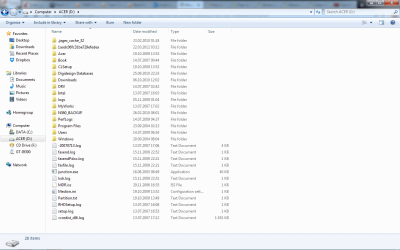
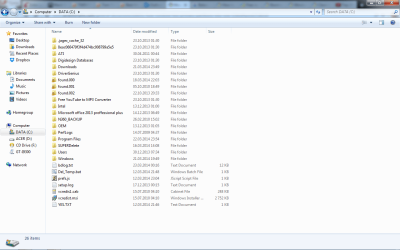
Well it could be me doing something wrong. But my D partition/drive on my other laptops do not look like this one. They are only filed with my personal files, i.e they don't contain any of these folders on the one on this laptop (see picture below).
Is it supposed to be like this because of all the mingling I've done? It's almost identical to the C;

D; D.png

C; c.png
 

My Computer My Computer

At a glance

Windows 7 Ultimate 32bitInter(r) core(tm) 2 duo CPU t5550 @1.83ghz 1....4,00 GB (3,00 GB usable)?
Computer type
PC/Desktop
Computer Manufacturer/Model Number
Acer
OS
Windows 7 Ultimate 32bit
CPU
Inter(r) core(tm) 2 duo CPU t5550 @1.83ghz 1.83 ghz
Motherboard
?
Memory
4,00 GB (3,00 GB usable)
Graphics Card(s)
?
Hard Drives
?
Antivirus
Bitdefender total security
Browser
Opera
D looks like a copy of C.

Suggestion: Make an image of D and then delete all that stuff. If the system is coughing, you can always restore the image. Use free Macrium for imaging.
 

My Computer My Computer

At a glance

Vista, Windows7, Mint Mate, Zorin, Windows 8from 1.6GHz Duo to i7
Computer Manufacturer/Model Number
HP, Dell, Gateway, Toshiba - 4 laptops and 2 desktops
OS
Vista, Windows7, Mint Mate, Zorin, Windows 8
CPU
from 1.6GHz Duo to i7
Monitor(s) Displays
2x HP w2207
Hard Drives
5x HDD, 7x SSD, 12x Externals
Keyboard
with trackball - no mices
Mouse
Trackball mice
Internet Speed
DSL 6000
After i've made the Image. Do you mean delete manually? Just mark everything and delete?
 

My Computer My Computer

At a glance

Windows 7 Ultimate 32bitInter(r) core(tm) 2 duo CPU t5550 @1.83ghz 1....4,00 GB (3,00 GB usable)?
Computer type
PC/Desktop
Computer Manufacturer/Model Number
Acer
OS
Windows 7 Ultimate 32bit
CPU
Inter(r) core(tm) 2 duo CPU t5550 @1.83ghz 1.83 ghz
Motherboard
?
Memory
4,00 GB (3,00 GB usable)
Graphics Card(s)
?
Hard Drives
?
Antivirus
Bitdefender total security
Browser
Opera
Making an image requires a cd or dvd, yes? My cd reader doesn't work...
 

My Computer My Computer

At a glance

Windows 7 Ultimate 32bitInter(r) core(tm) 2 duo CPU t5550 @1.83ghz 1....4,00 GB (3,00 GB usable)?
Computer type
PC/Desktop
Computer Manufacturer/Model Number
Acer
OS
Windows 7 Ultimate 32bit
CPU
Inter(r) core(tm) 2 duo CPU t5550 @1.83ghz 1.83 ghz
Motherboard
?
Memory
4,00 GB (3,00 GB usable)
Graphics Card(s)
?
Hard Drives
?
Antivirus
Bitdefender total security
Browser
Opera
Well, for the recovery you need a CD OR a USB stick. You can download the Macrium rescue .iso from my Skydrive. Store that somewhere on your system and then get Rufus with which you can make a bootable USB stick. You need only a small stick because the file is only 155MBs.

Once you have the recovery stick and made the image to an external drive, try to reformat the whole partition with disk management. If that does not work, post back and we'll move in heavier artillery.

PS: I forgot - check first whether your PC can boot from USB. Put a stick into a port and restart the PC tapping F12 (ESC if it is a HP or Asus). That will bring up the boot menu. See whether the USB is mentioned. Do nothing, just hit Enter.
 

My Computer My Computer

At a glance

Vista, Windows7, Mint Mate, Zorin, Windows 8from 1.6GHz Duo to i7
Computer Manufacturer/Model Number
HP, Dell, Gateway, Toshiba - 4 laptops and 2 desktops
OS
Vista, Windows7, Mint Mate, Zorin, Windows 8
CPU
from 1.6GHz Duo to i7
Monitor(s) Displays
2x HP w2207
Hard Drives
5x HDD, 7x SSD, 12x Externals
Keyboard
with trackball - no mices
Mouse
Trackball mice
Internet Speed
DSL 6000
You want me to add macrium rescue to the usb right? I have a usb ready, it's 16gb and i formated it today as I planned to use it for this.
 

My Computer My Computer

At a glance

Windows 7 Ultimate 32bitInter(r) core(tm) 2 duo CPU t5550 @1.83ghz 1....4,00 GB (3,00 GB usable)?
Computer type
PC/Desktop
Computer Manufacturer/Model Number
Acer
OS
Windows 7 Ultimate 32bit
CPU
Inter(r) core(tm) 2 duo CPU t5550 @1.83ghz 1.83 ghz
Motherboard
?
Memory
4,00 GB (3,00 GB usable)
Graphics Card(s)
?
Hard Drives
?
Antivirus
Bitdefender total security
Browser
Opera
Right, the stick can be used to recover from an image, but you can also use it to make the image if you don't want to install Macrium.
 

My Computer My Computer

At a glance

Vista, Windows7, Mint Mate, Zorin, Windows 8from 1.6GHz Duo to i7
Computer Manufacturer/Model Number
HP, Dell, Gateway, Toshiba - 4 laptops and 2 desktops
OS
Vista, Windows7, Mint Mate, Zorin, Windows 8
CPU
from 1.6GHz Duo to i7
Monitor(s) Displays
2x HP w2207
Hard Drives
5x HDD, 7x SSD, 12x Externals
Keyboard
with trackball - no mices
Mouse
Trackball mice
Internet Speed
DSL 6000
Ok, i'll restart and look.
 

My Computer My Computer

At a glance

Windows 7 Ultimate 32bitInter(r) core(tm) 2 duo CPU t5550 @1.83ghz 1....4,00 GB (3,00 GB usable)?
Computer type
PC/Desktop
Computer Manufacturer/Model Number
Acer
OS
Windows 7 Ultimate 32bit
CPU
Inter(r) core(tm) 2 duo CPU t5550 @1.83ghz 1.83 ghz
Motherboard
?
Memory
4,00 GB (3,00 GB usable)
Graphics Card(s)
?
Hard Drives
?
Antivirus
Bitdefender total security
Browser
Opera
Had to wait for the files to download first before I could restart. I did and yes it works, I saw my usb as an option. Go ahead with adding the file to the usb?
 

My Computer My Computer

At a glance

Windows 7 Ultimate 32bitInter(r) core(tm) 2 duo CPU t5550 @1.83ghz 1....4,00 GB (3,00 GB usable)?
Computer type
PC/Desktop
Computer Manufacturer/Model Number
Acer
OS
Windows 7 Ultimate 32bit
CPU
Inter(r) core(tm) 2 duo CPU t5550 @1.83ghz 1.83 ghz
Motherboard
?
Memory
4,00 GB (3,00 GB usable)
Graphics Card(s)
?
Hard Drives
?
Antivirus
Bitdefender total security
Browser
Opera
Also I noticed it says it's x64 when I open the macrium iso, I have a 32 bit. Does that matter?
 

My Computer My Computer

At a glance

Windows 7 Ultimate 32bitInter(r) core(tm) 2 duo CPU t5550 @1.83ghz 1....4,00 GB (3,00 GB usable)?
Computer type
PC/Desktop
Computer Manufacturer/Model Number
Acer
OS
Windows 7 Ultimate 32bit
CPU
Inter(r) core(tm) 2 duo CPU t5550 @1.83ghz 1.83 ghz
Motherboard
?
Memory
4,00 GB (3,00 GB usable)
Graphics Card(s)
?
Hard Drives
?
Antivirus
Bitdefender total security
Browser
Opera
I am sure your PC can work with 64bit. This is completely independent of your OS - works all by itself.
 

My Computer My Computer

At a glance

Vista, Windows7, Mint Mate, Zorin, Windows 8from 1.6GHz Duo to i7
Computer Manufacturer/Model Number
HP, Dell, Gateway, Toshiba - 4 laptops and 2 desktops
OS
Vista, Windows7, Mint Mate, Zorin, Windows 8
CPU
from 1.6GHz Duo to i7
Monitor(s) Displays
2x HP w2207
Hard Drives
5x HDD, 7x SSD, 12x Externals
Keyboard
with trackball - no mices
Mouse
Trackball mice
Internet Speed
DSL 6000
Do you want me to change the settings when I run rufus to the exact ones on the picture on the rufus site? Mine says 8192 bytes(default) at cluster size. Do you want me to change to 16 bites? And chose the option iso image?
 

My Computer My Computer

At a glance

Windows 7 Ultimate 32bitInter(r) core(tm) 2 duo CPU t5550 @1.83ghz 1....4,00 GB (3,00 GB usable)?
Computer type
PC/Desktop
Computer Manufacturer/Model Number
Acer
OS
Windows 7 Ultimate 32bit
CPU
Inter(r) core(tm) 2 duo CPU t5550 @1.83ghz 1.83 ghz
Motherboard
?
Memory
4,00 GB (3,00 GB usable)
Graphics Card(s)
?
Hard Drives
?
Antivirus
Bitdefender total security
Browser
Opera
Back
Top